How Teams Use AI Headshots for Corporate Directories and Websites
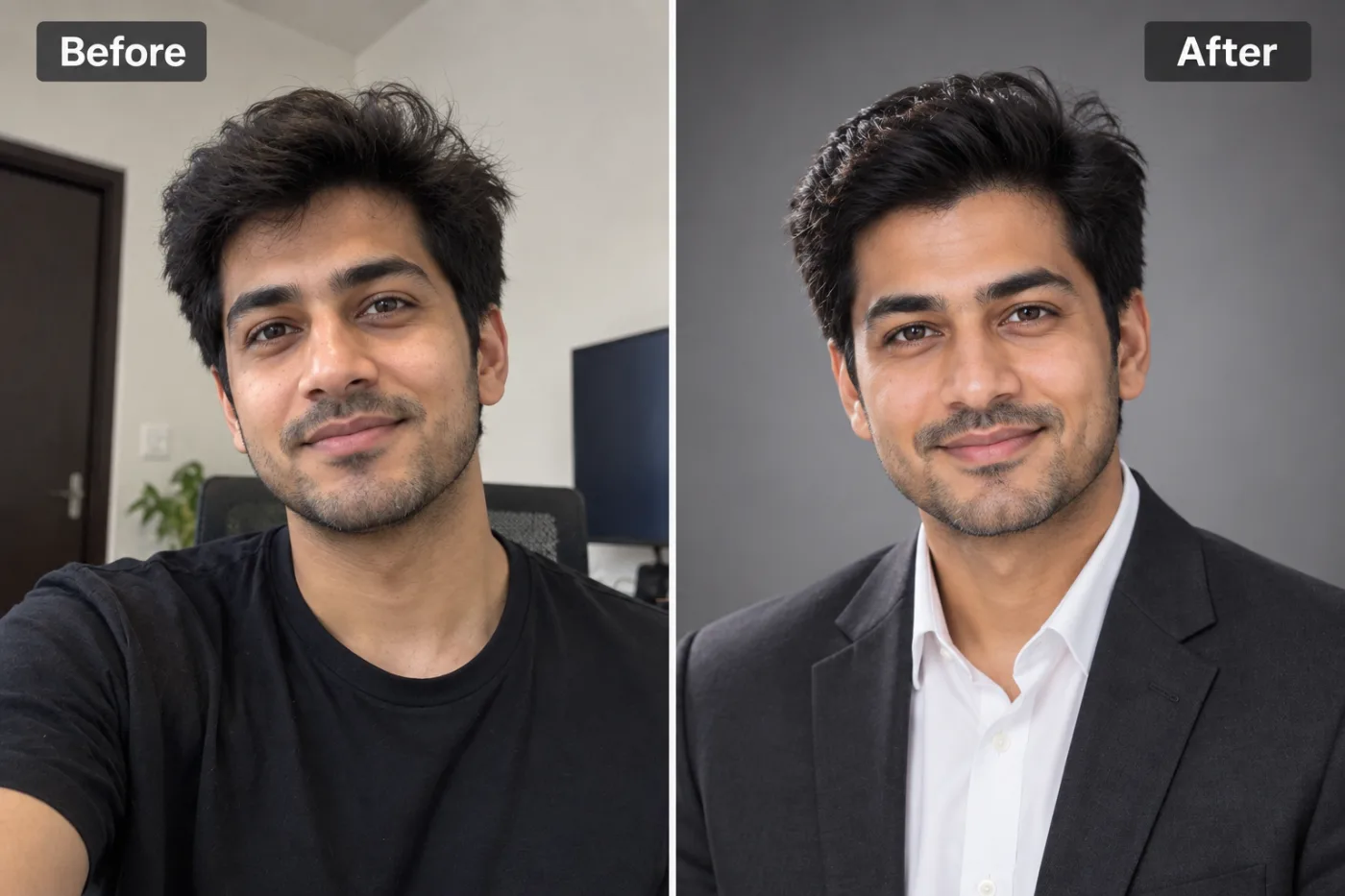
Getting consistent professional headshots for an entire team is expensive and time-consuming. AI headshot tools solve this, and here is how companies are using them.
For any company building a corporate directory, an About Us page, or a staff wall, AI headshots for teams have quietly become the practical alternative to the traditional group photo shoot. Coordinating a professional photographer to capture every employee — matching schedules, booking a space, dealing with remote workers, and re-shooting whenever someone joins — is expensive, slow, and logistically painful. A corporate team headshot generated with AI sidesteps all of that: each person submits a photo from wherever they are, and the whole team ends up with consistent, professional, on-brand headshots.
The result is a directory or website where everyone looks cohesive, even though the source photos were taken in different cities, rooms, and lighting conditions. That consistency is what makes a team page look intentional and credible rather than like a patchwork of mismatched selfies. In this guide, we'll cover how teams actually use AI headshots at scale — the workflow, how to keep the whole set consistent, cost and logistics compared to a traditional shoot, and how Pixel Shine's pay-as-you-go platform makes it accessible for teams of any size and budget.
The Problem with Traditional Team Photo Shoots
To appreciate why AI headshots have caught on for teams, it helps to see the pain points they solve.
Scheduling is a nightmare. Getting an entire team in one place at one time — around meetings, travel, and time off — is genuinely hard. For companies with any remote or hybrid staff, it's often impossible without significant coordination.
It's expensive. A photographer for a full team runs from hundreds to thousands of dollars depending on team size and location, plus the hidden cost of everyone's time away from work during the shoot.
Remote and distributed teams are left out. When your people are spread across cities or countries, flying in a photographer or flying in employees isn't viable. Distributed teams have historically struggled to get consistent professional imagery at all.
Onboarding creates constant re-shoots. Every new hire means either an awkward mismatched photo or booking the photographer again. Over a year of hiring, this adds up.
Consistency is hard even with a pro. Different sittings, changing lighting, and varied poses can make even professionally-shot photos look uneven across a large team.
AI headshots address each of these: no scheduling, dramatically lower cost, native support for distributed teams, painless onboarding of new hires, and — done right — strong visual consistency. That combination is why more companies are adopting the approach for directories and websites.
How to Keep a Whole Team's Headshots Consistent
The single biggest factor in a professional-looking team page is consistency, and with AI you control it deliberately.
Standardize the style across everyone. Choose one style profile — the same background, similar attire tone, and consistent framing — and apply it to every team member's generated headshot. This is what makes 40 people photographed in 40 different rooms look like they were shot in the same studio.
Set clear source-photo guidelines. Give employees simple instructions: face a window for soft light, shoot at eye level, plain background, head-and-shoulders framing, neutral expression. Consistent input leads to more consistent output. (Sharing a short guide on taking a good source photo pays off here.)
Use a uniform background. Decide on one background — clean white, a brand color, or a consistent neutral — and apply it to the whole team. This is often the strongest unifying element, and Pixel Shine's background remover lets you place everyone on the identical backdrop.
Match framing and crop. Crop every headshot to the same proportions and head size so the directory grid looks even and orderly.
Keep attire in a consistent register. You don't need identical outfits, but guiding everyone toward the same level of formality (e.g., business or business-casual) keeps the set cohesive.
Do a final review as a set, not one at a time. Lay all the headshots out together and check they read as a unified group. Adjust any outliers. Reviewing them as a grid, the way visitors will see them, is the best quality check.
Step-by-Step: Generate Headshots for a Team
Here's a practical workflow for producing consistent headshots across an entire team with Pixel Shine.
Step 1: Define your standard. Decide on the background, framing, and attire level for the whole team before you start. Document it in a short one-page brief.
Step 2: Collect source photos from everyone. Send employees your source-photo guidelines and have each person submit a few clear, well-lit, front-facing photos. Consistent guidelines here save work later.
Step 3: Go to Pixel Shine and open the AI Headshot Generator.
Step 4: Generate each person's headshot in the agreed style. Upload each employee's source photos and apply the same style settings across the board for consistency.
Step 5: Standardize the background. Use Pixel Shine's background remover to place every headshot on the identical backdrop — white, a brand color, or a consistent neutral.
Step 6: Crop uniformly. Apply the same crop dimensions and head-size proportion to every image so the directory grid is even.
Step 7: Upscale for print and web. Run the final headshots through the upscaler so they're crisp on the website, in print materials, and at large sizes.
Step 8: Review as a complete set. Lay all headshots out in a grid, check for consistency, and fix any outliers. Then deploy them to your directory, About page, or staff wall.
Step 9: Repeat for new hires. When someone joins, run the same process for just that person — no re-shooting the whole team.
Pro Tips for Corporate Headshot Projects
These practices make a team rollout smoother and more professional.
Create a one-page source-photo guide. A simple document with example photos (good vs. bad lighting, right vs. wrong angle) dramatically improves the quality of what employees submit, which improves your final results.
Pick a background that reflects your brand. A clean white looks classic and professional; a subtle brand color reinforces identity. Whatever you choose, apply it uniformly.
Batch the work. Process the whole team in a focused session so your style settings and standards stay consistent throughout.
Keep the transparent PNG cutouts. Storing each person's cutout means you can re-place them on updated backgrounds later — say, if you rebrand — without regenerating.
Build a repeatable onboarding step. Fold headshot generation into your new-hire onboarding checklist so every new employee gets a matching photo automatically.
Test on a few people first. Before rolling out to the entire company, generate headshots for two or three volunteers, confirm the style works, and refine your standard. Then scale to everyone with confidence.
Common Mistakes to Avoid
These are the pitfalls that make a team page look inconsistent or unprofessional.
Skipping source-photo guidelines. If employees submit whatever they have, you'll get wildly varied input and struggle to make the output consistent. A short guide prevents this.
Mixing backgrounds and crops. Different backgrounds or crop sizes across the team break the cohesive look instantly. Standardize both.
Reviewing images one at a time. A headshot can look fine alone but clash with the set. Always review as a grid, the way visitors will see it.
Prioritizing glamour over likeness. For a directory, people need to recognize colleagues. Choose results that clearly look like each person, not the most stylized version.
Forgetting about new hires. Building a beautiful consistent set and then adding mismatched selfies as people join undoes the effort. Bake headshot generation into onboarding.
Cost and Logistics vs. a Traditional Shoot
For decision-makers weighing the options, the practical comparison is stark.
Cost. A professional photographer for a full team ranges from several hundred to several thousand dollars, plus employee time. AI headshots are inexpensive — Pixel Shine uses cheap credits with no subscription. Even at scale, the cost is a fraction of a traditional shoot.
Time and scheduling. A traditional shoot requires coordinating everyone's calendars, booking space, and a shoot day. AI headshots require only that each person submit a photo on their own time, then a single person processes the batch. There's no shoot day at all.
Remote and distributed teams. This is where AI wins decisively. A traditional shoot simply can't easily cover a team spread across cities or countries. AI handles distributed teams natively — location is irrelevant.
Updating and scaling. Adding a new hire to a photographer-shot directory means an awkward mismatch or a re-booking. With AI, you run the same process for one new person and they match perfectly.
Consistency control. With AI, you deliberately set one style and apply it to everyone, giving you tighter control over uniformity than coordinating a photographer across multiple sittings.
The honest bottom line: for consistency, cost, flexibility, and support for modern distributed teams, AI headshots are the more practical choice for most companies' directories and websites.
Who Uses AI Team Headshots
A wide range of organizations have adopted this approach. Startups and small businesses on tight budgets get a professional-looking team page without a photographer's fee. Fully remote and distributed companies — where a traditional shoot is impractical — finally achieve consistent team imagery across all their locations.
Growing companies with frequent hiring use AI to keep their directory current without repeated shoots. Professional services firms (agencies, consultancies, law and accounting practices) present a polished, uniform team on their websites to build client trust. HR and marketing teams run the process to standardize employee imagery across intranets, About pages, and press kits.
Nonprofits and educational institutions with limited budgets create professional staff and faculty directories affordably. And any organization refreshing its website or brand can update every team photo at once without the logistics of gathering everyone.
The common thread is the need for consistent, professional headshots across many people, quickly and affordably. Pixel Shine's pay-as-you-go platform makes that achievable for teams of any size.
Frequently Asked Questions
Can AI headshots work for a whole team or company?Yes. AI headshots are well-suited to teams because you can apply one consistent style, background, and crop across everyone, producing a cohesive directory even when source photos were taken in different locations.
How do I keep team headshots consistent?Standardize the style, background, framing, and crop across all employees, provide clear source-photo guidelines, and review the headshots together as a grid. Using the same background on everyone (via background removal) is the strongest unifying element.
Is it cheaper than hiring a photographer?Significantly. A team photographer costs hundreds to thousands of dollars, while AI headshots on Pixel Shine use only cheap credits. There's also no shoot-day time cost.
How does this work for remote teams?Perfectly — each person submits a photo from wherever they are, and you process them centrally. Location doesn't matter, which is why distributed teams especially benefit.
What about adding new hires later?Just run the same process for the new person using your established style. They'll match the existing set without re-shooting the whole team.
Will everyone look like themselves?Yes, if you choose results that preserve each person's real features. For a directory where colleagues need to be recognizable, prioritize likeness over the most stylized option.
What background should we use for a corporate directory?A clean white or a subtle brand color, applied uniformly to everyone. Pixel Shine's background remover lets you place the whole team on the identical backdrop.
How do we make sure the headshots look professional in print?Upscale the final images with Pixel Shine's upscaler so they're crisp on the website and in printed materials or large displays.
Key Takeaways
AI headshots solve the real headaches of team photography: scheduling, cost, distributed staff, and constant re-shoots for new hires. By standardizing style, background, framing, and crop across everyone — and reviewing the results as a set — you get a corporate directory or About page where the whole team looks cohesive and professional, even though the source photos came from different cities and rooms. For remote and growing companies especially, it's far more practical than a traditional shoot.
The workflow is straightforward: define a standard, collect source photos, generate in a consistent style, unify the background, crop uniformly, and upscale. Head to Pixel Shine, test the AI Headshot Generator on a few team members, and see how easily your whole team's imagery comes together.

