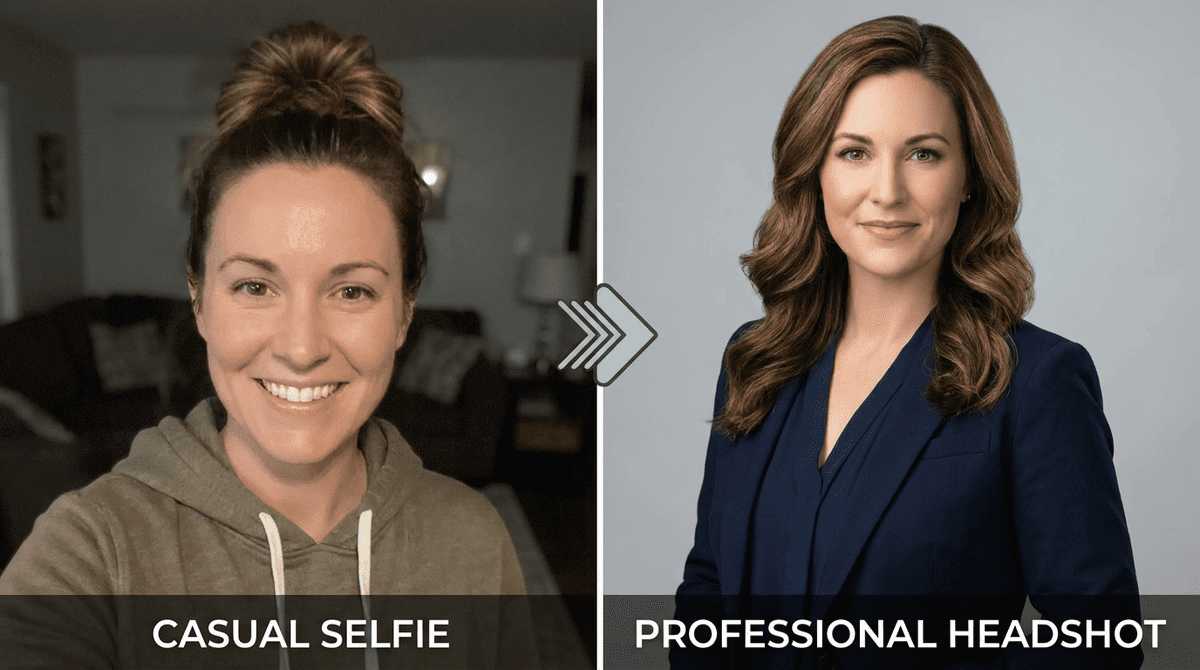
How do you make a professional headshot from a selfie?
1. Upload one clear photo of yourself
A selfie or a phone photo is fine, as long as your face is clear, well lit and roughly facing the camera. No sunglasses, no heavy filters, and only you in the frame.
2. Choose your styles
Pick Women or Men, then choose one or more of the 11 styles: suits, blazers, smart-casual, office, city and outdoor settings, each with its own lighting. Each style you choose makes one headshot.
3. Review, adjust and download
Each style takes a minute or two, so keep the tab open. Then open any headshot to preview it, change its background to one of 12 preset colours, a custom colour or your own background image, and download the one you like.
Which headshot styles can you choose?
The styles are written to cover the situations people actually need a headshot for, from a bank's staff page to a designer's portfolio. Pick two or three that suit your field rather than all of them.
Corporate and executive
Dark suits and blazers, office or neutral studio backdrops, even and confident light. Styles such as Charcoal Office, Navy Urban, Navy Blazer Office and Navy Executive Power suit finance, law, consulting and senior roles.
Modern professional
Lighter suits and blazers with a city or bright office behind, such as Light Blue Suit, Brown City View, Green Blazer Classic and Light Blue Power Suit. Good for tech, sales, marketing and most LinkedIn profiles.
Approachable and smart-casual
Softer outfits and outdoor light, like Plaid Smart-Casual, Beige Outdoor and Tan Suit Outdoor. Right for coaches, healthcare, education, real estate and anyone whose clients need to feel at ease.
Plain portrait
A clean, evenly lit portrait on a light background, such as Light Gray Portrait or Grey + Sky Blue, which works almost anywhere, including speaker bios and ID-style staff photos.
Who uses an AI headshot generator?
Job seekers
A clear, professional photo makes a LinkedIn profile look complete and trustworthy to recruiters. If you don't have a recent one, this is the quickest way to get one that fits the jobs you're applying for. See LinkedIn headshot for platform tips.
Teams and small companies
A team page where every photo was taken in a different place looks messy. Give everyone the same style and the same background colour and the page looks like one shoot. Corporate headshots covers doing it for a whole team.
Freelancers and consultants
Your photo sits on your website, proposals, Upwork or Fiverr profile and email signature. A consistent, friendly professional headshot across all of them helps people remember you.
Speakers, authors and founders
Conference programmes, book jackets, press kits and podcast pages all ask for a headshot, often at short notice. Generate a few styles and keep a formal and a relaxed version ready.
Will it still look like you?
That's the whole point, and it's what the generator is told first. Each style keeps your face shape, features, skin tone, hairline, facial hair, glasses if you wear them, and your age, and changes the clothes, background, lighting and camera. Your head is turned to face the camera and straightened even if your selfie was taken at an angle, so the result looks like a proper portrait rather than an arm's-length snapshot.
The photo you upload matters more than anything else. A sharp, front-facing photo in daylight gives the closest likeness. A dark, blurry or heavily filtered selfie gives the AI less to go on, and the result can drift. If one style doesn't look like you, try it again or upload a better photo; don't settle.
How much does an AI headshot cost?
Each style costs 2 credits, so choosing three styles uses 6 credits. Changing the background of a finished headshot is 2 credits as well. Credits come from a one-time pack (from $2; pack credits never expire) or a monthly plan. You need a free account, and there's no watermark on any headshot you download.
For a sense of scale: a photographer's headshot session usually costs far more and takes an appointment. AI headshots are not a replacement for a great photographer when you need one, but for a profile photo this week, they're hard to beat.
AI headshot or a photographer?
| AI headshot | Photographer | |
|---|---|---|
| Time | A few minutes, from your phone | Booking, travel and the session |
| Cost | 2 credits per style | Usually a session fee, often much more |
| Choice | Try 11 styles and many backgrounds | What you shoot on the day |
| Likeness | Very close from a good selfie; check every result | Exactly you |
| Best for | LinkedIn, CVs, team pages, quick bios | Press, book covers, brand campaigns |
How do you take the right selfie for it?
- Face a window. Soft daylight from the front is the best free light there is. Avoid a bright window behind you.
- Hold the phone at eye level, an arm's length away, or ask someone to take it from about two metres.
- Keep a neutral or slight smile, eyes open, and your face fully visible: hair off the eyes, no hat, no sunglasses.
- Turn off beauty filters and portrait blur. The AI needs your real features to keep them.
- Use a recent photo. If you've changed your hair or grown a beard, the headshot should show that too.
What can't AI headshots do?
- Make an official ID, passport or visa photo. Those have strict rules and usually must be unedited; use the passport photo maker and check your country's rules.
- Generate several people at once. It makes headshots of one person from one photo; run each team member separately.
- Copy a specific outfit you describe. The styles are fixed; for a particular jacket or dress, use the AI photo editor on your headshot afterwards.
- Guarantee every result. Small details like earrings, glasses frames or a collar can come out differently. Pick the best and regenerate the rest.
What happens to your photo?
Your selfie is uploaded so the AI can use it, and the headshots are made by models run on fal.ai. Finished headshots are saved in your library so you can download them again, and you can delete them at any time. Your photos aren't used to train AI models and aren't sold. Details in the privacy policy.