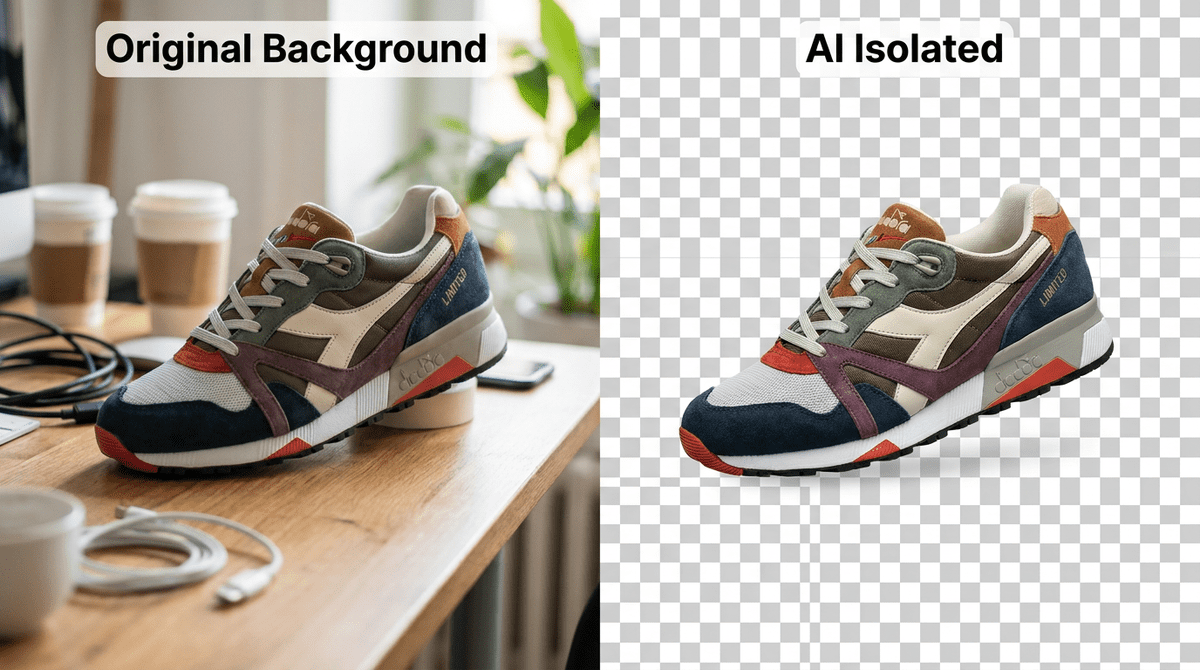
How do you remove the background from a picture?
1. Drop your photo on this page
JPG, PNG or WebP, up to 16 MB. The photo opens in the Pixel Shine editor with Remove BG already selected, so there is nothing to find.
2. Press Remove background
Sign in if you haven't, then press the button. The AI finds the subject, separates it from everything behind it, and replaces the background with transparency. It usually takes a few seconds.
3. Download the PNG
You get a PNG with a real transparent layer, so it sits cleanly on any colour, photo or slide. Keep editing in the same window if you want: crop it, resize it, add a watermark, or have AI generate a new background.
That's the whole job. There is no brush to drag around the edges and no layer mask to clean up, which is what makes background removal slow in Photoshop or GIMP.
What does the background remover actually do to your photo?
It runs a dedicated background-removal model, not a general image generator. The difference matters. A generator asked to "remove the background" redraws the whole picture, and you get softened edges, guessed hair and sometimes a slightly different face. A segmentation model works out which pixels belong to the subject and which don't, keeps your original pixels exactly as they were, and adds a transparent layer (an alpha channel) where the background used to be.
So the person or product in the result is your photo, not a copy of it. Fine detail such as loose hair, fur, shoe laces and the gaps between fingers is kept where the model can see it. If that model is ever unavailable, the tool falls back to Google's Nano Banana Pro image model so the job still gets done, which is the one time the subject may be lightly redrawn.
Who uses a background remover, and for what?
Online sellers: white-background product photos
Marketplaces want the product on plain white. Amazon, for example, asks for a pure white background on a listing's main image. Shoot the product anywhere with decent light, remove the background, and place the cutout on white. Every photo in your catalogue then matches, even when they were taken on different days in different rooms. For a ready-made white version, see product photo background remover.
Creators: thumbnails, stickers and posts
A cutout of yourself is the base of most YouTube thumbnails: you on one side, big text on the other. The same PNG works as a sticker in Instagram Stories or WhatsApp, or as a layer in a Reel cover. Because the edges are transparent, you can add an outline or a drop shadow in any design app.
Job seekers: a cleaner profile photo
A good photo of you against a messy kitchen or a crowded street looks less professional than it should. Take the background away and put the cutout on a plain colour for LinkedIn, a CV or a company directory. If you'd rather have a proper studio-style portrait, the AI headshot generator makes one from a selfie.
Designers and small businesses: logos and marketing
A logo saved as a JPG comes with a white box around it. Removing that box gives you a transparent logo for slides, watermarks and websites. See make a logo transparent for logos and signature background remover for scanned signatures.
Students and teachers: projects and presentations
Cut a person, animal or object out of a photo and drop it straight onto a slide or poster without the rectangle of background around it. It looks far tidier than a pasted photo.
What can you do with the cutout next?
The transparent PNG is the useful part: put it anywhere. In the same editor you can crop it to a square or a 16:9 frame, resize it to exact pixels, compress it for the web, or turn it into a PDF, all without leaving the page.
If you want a new background rather than none, use Generate BG in the editor (also 2 credits). It asks the AI for a backdrop (a soft studio blur, a gradient, warm bokeh, greenery, or anything you describe) and blends your subject into it with matching light. For a full scene change, such as you on a beach or in an office, the AI background changer app is built for exactly that.
Is the background remover free?
Background removal runs on an AI model on a server, so it uses credits: 2 credits per photo, and only when it works. If the removal fails, nothing is charged. Credits come from a one-time pack (from $2, and pack credits never expire) or a monthly plan you can cancel at any time. You need a free account to use them.
There is no watermark on the result, on any plan. The other tools in the editor (crop, resize, rotate, compress, convert, watermark, meme and image to PDF) run in your browser and are free.
How does it compare with remove.bg, Canva and your phone?
| Option | What it's good at | What to know |
|---|---|---|
| Pixel Shine | A real cutout with original pixels, then crop, resize, compress or a new AI background in the same place. | 2 credits per photo; no watermark; needs an account. |
| remove.bg | Very good cutouts and a long-standing API for developers. | Free downloads are preview-sized; full resolution uses its own credits. |
| Canva | Handy if the cutout is going straight into a Canva design. | The background remover is part of Canva's paid plans. |
| iPhone (iOS 16 and later) | Touch and hold the subject in Photos to lift it out, free. | Works on clear subjects; little control, and you still need somewhere to put it. |
| Photoshop | Full manual control for difficult edges. | A paid subscription and real skill needed for the fiddly parts. |
If you remove a background once a year, your phone may be enough. If you do product photos, thumbnails or profile pictures regularly, a tool that cuts out cleanly and lets you finish the image in one place saves the most time.
How do you get the cleanest cutout?
- Contrast helps. A dark jacket against a dark wall is harder to separate than the same jacket against a light one. If you can choose, shoot against something plain and different in colour.
- Keep the subject sharp. Motion blur and soft focus blur the edge itself, so the model has to guess where it is.
- Leave a little space around the subject. A shoe cut off by the edge of the frame stays cut off in the result.
- Light the subject evenly. Strong shadows on the background can be read as part of the subject, especially under products.
- Use the largest photo you have. Fine detail like hair survives better when there are more pixels to work with.
What can't the background remover do?
- It decides what the subject is. In a busy photo with several people or objects it keeps what looks like the main subject; if you want only one of three people, crop to them first.
- Glass, smoke, veils and very fine hair against a similar colour are the hardest cases. Expect them to be good, not perfect.
- It removes the background; it doesn't fix the subject. A blurry photo stays blurry. Run it through the image upscaler first if you need it sharper.
- It won't produce an official passport or visa photo on its own. Those have rules about size, head position and background colour; the passport photo background page explains what to do.
What happens to your photo?
To remove the background, your photo is sent to fal.ai, the service that runs the AI model, and the result comes back to you. Your images are not used to train AI models and are not sold. The result is saved in My Creations in your account so you can download it again later, and you can delete it there at any time. See the privacy policy for the details.