AI Photo Restoration Free Online — Bring Old and Damaged Photos Back
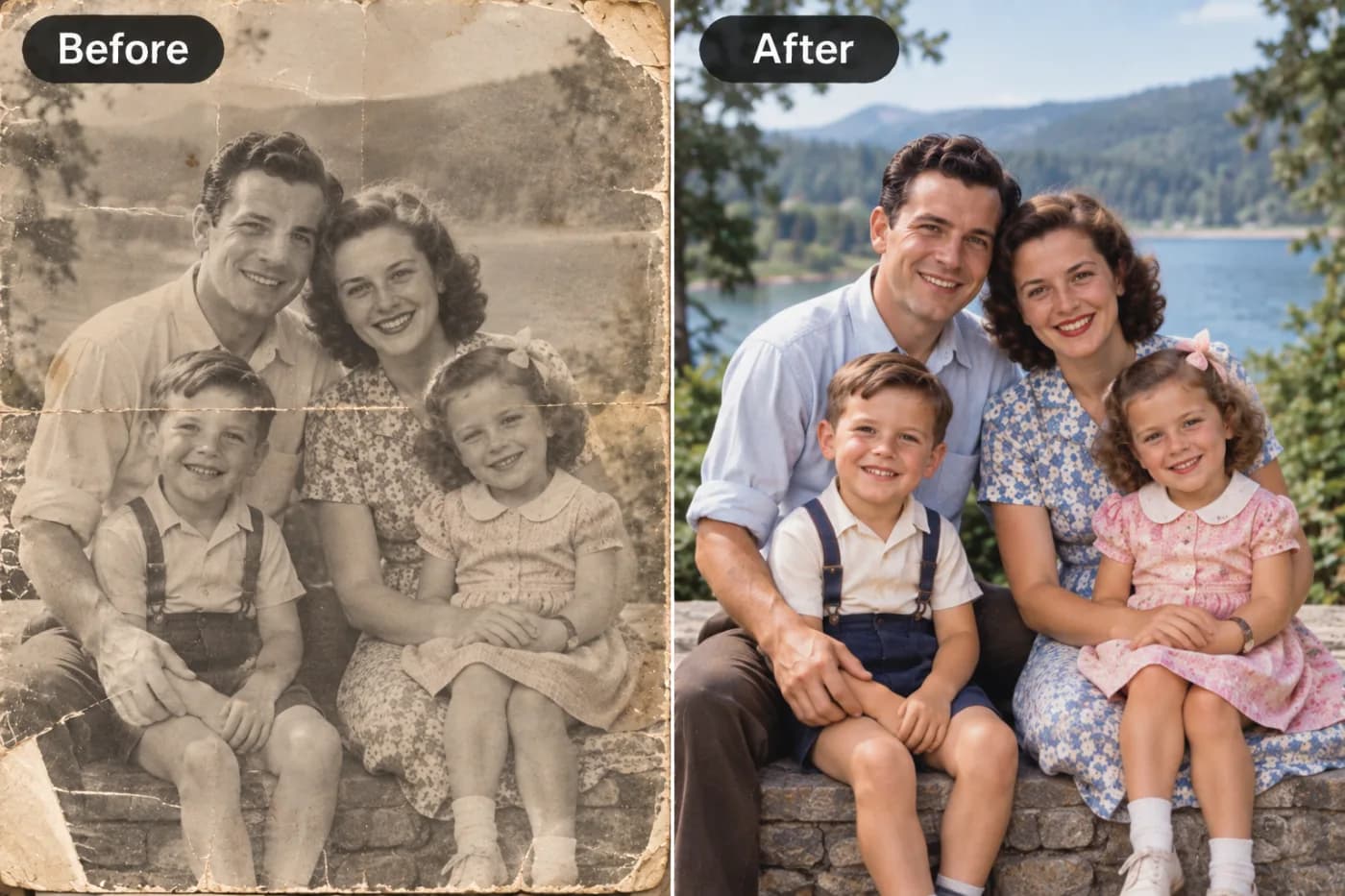
Old and damaged photos can be beautifully restored using AI. Pixel Shine offers free online photo restoration that removes grain, sharpens detail, and revives faded memories.
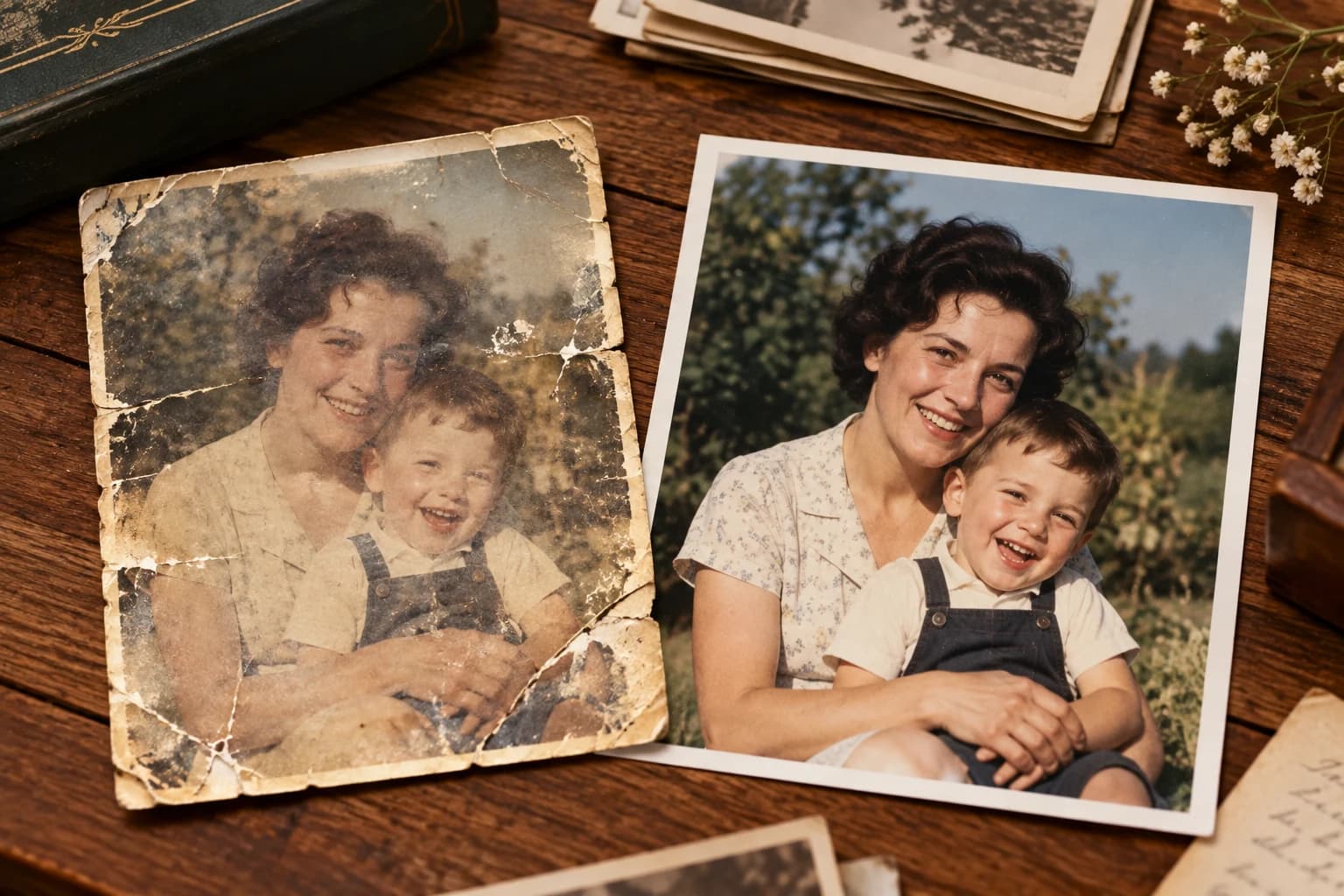
AI photo restoration free online has quietly become one of the most searched-for solutions among people trying to save fading family memories, and for good reason. Millions of printed photographs from the 1950s through the early 2000s are now sitting in shoeboxes, albums, and attics, slowly degrading from humidity, sunlight, and simple handling. When you scan one of these and look at it on a modern screen, the damage jumps out: faded color, deep scratches, torn corners, blurry faces, and that soft, washed-out quality that old prints tend to develop.
Until recently, the only way to fix a badly damaged photo was to pay a professional retoucher $30 to $150 per image, or spend hours learning Photoshop clone-stamp techniques. Today, AI-powered restoration can repair much of that damage in seconds, entirely free and directly online. Pixel Shine offers exactly this kind of tool with no watermark and no mandatory sign-up for its Normal upscale mode. In this guide, you'll learn how to restore damaged photos with AI, what the technology can and cannot fix, and the exact step-by-step workflow to bring your old and damaged photos back to life.
Why Old Photos Degrade in the First Place
Understanding why photos fall apart helps you set realistic expectations for restoration. Physical prints are made of light-sensitive dyes and emulsions layered on paper, and those dyes are chemically unstable over time.
Fading and color shift. The magenta and cyan dyes in color prints break down faster than yellow, which is why photos from the 1970s and 80s often develop that orange or reddish cast. UV light from windows accelerates this dramatically, sometimes bleaching a photo in under a decade.
Physical damage. Scratches, creases, and torn corners come from handling, stacking, and improper storage. Sticky album pages (the notorious "magnetic" albums of the 80s) chemically bonded to prints and pulled off emulsion when removed.
Scanning artifacts. Even undamaged photos lose quality when digitized on a cheap flatbed scanner. Dust, low resolution, and moiré patterns from halftone printing all reduce clarity.
Silvering and mold. Black-and-white prints can develop a metallic silver sheen, and any photo stored in humidity above 60% risks mold spotting.
The result is that a scanned old photo carries several problems at once: it's low-resolution, faded, noisy, and physically damaged. Traditional editing tackles these one at a time. Modern AI restoration addresses many of them simultaneously, which is exactly why it feels almost magical when you first try it.
How Pixel Shine Restores Damaged Photos
Pixel Shine approaches restoration through a combination of AI upscaling and detail reconstruction rather than a single filter. When you upload a damaged or low-resolution scan, the AI analyzes the image, identifies faces, edges, textures, and noise patterns, then reconstructs missing detail based on what it has learned from millions of high-quality reference photos.
Resolution recovery. The core engine intelligently increases resolution, so a small, soft 400-pixel-wide scan can be enlarged 2x or 4x while adding believable detail rather than just stretching pixels. This is the single biggest visual improvement for most old photos.
Face enhancement. The AI recognizes human faces and rebuilds soft or blurry facial features, restoring eyes, skin texture, and hairlines that a simple sharpen filter would leave muddy.
Noise and grain reduction. Scanning noise and film grain get cleaned up without smearing important detail, giving the photo a crisp, modern look.
Pixel Shine offers two modes. The Normal upscale is completely free, unlimited, and requires no sign-in, making it ideal for restoring a whole album of family photos in one sitting. The Pro AI mode uses credits and applies deeper generative reconstruction for the most severely damaged images. Crucially, Pixel Shine never adds a watermark, so your restored photos are ready to print or share immediately.
Step-by-Step: Restore an Old Photo for Free
Follow these steps to restore your first damaged photo using Pixel Shine's free tools.
1. Scan or photograph the original. For best results, scan the print at 600 DPI on a flatbed scanner. If you don't have a scanner, lay the photo flat in bright, even daylight (avoid direct sun and flash glare) and shoot straight down with your phone. A better source scan means a dramatically better restoration.
2. Go to Pixel Shine and open the Upscaler. Navigate to the upscale tool. You do not need to create an account for the Normal mode, so you can start immediately.
3. Upload your scanned image. Drag and drop the file or click to browse. Pixel Shine accepts common formats like JPG, PNG, and WEBP.
4. Choose your enhancement mode. Start with Normal upscale for free, unlimited processing. Select a 2x scale for already-decent scans, or 4x for very small, low-resolution images.
5. Let the AI process. Restoration typically completes in a few seconds. The AI enhances resolution, sharpens faces, and reduces noise automatically.
6. Compare and download. Review the before-and-after preview. If faces look sharper and detail has returned, download the full-resolution result. There's no watermark, so the file is print-ready.
7. Reprocess if needed. For stubbornly damaged photos, try the Pro AI mode, which uses credits, for deeper reconstruction.
8. Save a backup. Store both the original scan and the restored version so you always keep the archival source.
Pro Tips for Better Restoration Results
Always start from the highest-quality scan possible. AI restoration amplifies whatever you feed it. A 600 DPI scan will restore far better than a hurried phone snapshot at an angle. This single factor influences results more than any setting.
Crop out borders and album backgrounds before uploading. White paper borders and busy album pages can confuse detail reconstruction. Tightly cropping to just the photo lets the AI focus its processing power on the subject.
Don't over-upscale small images. Jumping straight to 4x on a tiny, noisy scan can create artifacts. Try 2x first, evaluate, and only push higher if the result still looks soft.
Process faces and full scenes separately for group shots. If a photo has multiple small faces, restoring it once may not perfectly sharpen every face. Consider cropping to individual faces for portraits you plan to enlarge and frame.
Use Pro mode for the photos that matter most. Reserve your free Pro AI credits for the irreplaceable images, like a wedding portrait or a photo of a relative who has passed. The deeper generative reconstruction is worth it for heirloom-grade results.
Restore before you colorize or edit further. Always run restoration and upscaling first, then apply any color correction or creative edits afterward on the clean, high-resolution version.
Common Mistakes to Avoid
Uploading a low-effort phone photo of a print. The most common mistake is photographing a print at an angle under a lamp, capturing glare and distortion. This bakes in problems the AI then tries to "restore," producing odd results. Take two minutes to scan or shoot flat in daylight.
Expecting AI to invent missing content. If half a face is physically torn away, AI restoration sharpens and enhances what remains but cannot reliably reconstruct large missing regions with perfect accuracy. Set expectations: it repairs degradation, not total loss.
Over-processing until it looks fake. Running an image through upscaling repeatedly, or pushing to maximum scale unnecessarily, can create a plasticky, over-smoothed look. One well-chosen pass usually beats three aggressive ones.
Ignoring the original resolution. Trying to turn a 200-pixel thumbnail into a poster-sized print will disappoint. Know that AI adds believable detail but works best with a reasonable starting resolution.
Not keeping the original scan. Some people delete their source file after restoring. Always archive the untouched scan, because future AI tools will be even better, and you'll want to reprocess from the original rather than a compressed export.
Real-World Use Cases for Photo Restoration
Family reunions and memorial slideshows. People frequently restore a grandparent's wedding photo or a childhood family portrait to display at reunions, anniversaries, or funerals. A sharp, faded-corrected image projected on a screen carries far more emotional impact than a blurry original.
Genealogy and family history projects. Amateur genealogists building family trees on sites like Ancestry restore old portraits so they can attach clear, recognizable faces to each ancestor. Restoration turns a barely-visible face into a proper record.
Reprinting and framing heirlooms. A common goal is enlarging a small vintage photo to frame for a wall. Because Pixel Shine upscales resolution and removes watermarks, the restored file prints crisply at larger sizes that the original never could.
Digitizing entire albums. Families scanning decades of photos use the free, unlimited Normal mode to batch-improve hundreds of images before archiving them to cloud storage, ensuring the digital copies look better than the aging prints.
Restoring damaged documents and postcards. Beyond portraits, people restore old letters, military records, vintage postcards, and newspaper clippings, recovering legible text and detail from faded, stained originals.
AI Restoration vs. Traditional Photoshop Retouching
For decades, serious photo restoration meant Adobe Photoshop and a skilled retoucher. Understanding how AI compares helps you choose the right approach.
Speed. A professional retoucher might spend one to three hours on a badly damaged photo. AI restoration completes in seconds. For an album of 200 photos, that's the difference between weeks of work and an afternoon.
Cost. Professional restoration runs $30 to $150 per image, while freelance clone-stamp work in Photoshop demands both the software subscription and considerable skill. Pixel Shine's Normal restoration is free with no watermark.
Consistency. AI applies the same quality reconstruction to every image. Manual retouching quality varies with the artist's skill and fatigue.
Where humans still win. For museum-grade restoration of catastrophically damaged photos, torn in half, with large missing regions, a human artist can still make judgment calls and paint in content that AI can't fully reconstruct. The best modern workflow is hybrid: run AI restoration first to handle 90% of the work, then hand off only the most severe cases to a specialist. For nearly all family photos, AI alone produces results that would have cost hundreds of dollars just a few years ago.
Who Uses AI Photo Restoration and Why
Families and hobbyists make up the largest group, restoring personal photos of parents, grandparents, and childhood memories to preserve and share them. Their goal is emotional: keeping loved ones' faces clear and vivid for future generations.
Genealogists and family historians restore ancestor portraits to document lineage accurately, wanting recognizable faces attached to each name in the tree.
Small photography studios and print shops offer restoration as an add-on service, using AI to deliver fast turnaround and then charging clients for the convenience and finishing touches.
Museums, archives, and local historical societies digitize and enhance collections of historic community photos, making them viewable and searchable online.
Content creators and documentary makers restore archival footage stills and old photos to include in videos, family history channels, and heritage projects where visual clarity matters. Across all these groups, the shared motivation is the same: recovering irreplaceable visual history quickly and affordably.
What AI Can (and Can't) Restore in Old Photos
Setting realistic expectations helps you get the best results and know when to reach for the Pro tier.
What AI does exceptionally well. AI upscaling shines at increasing resolution while reconstructing detail — turning a small, soft scan into a larger, sharper image. It reduces the grain and noise common in old film scans and early digital photos, and it sharpens faces and edges that time and low resolution had blurred. For the vast majority of old photos, this alone produces a dramatic before-and-after improvement.
What AI handles well with the Pro tier. Heavily degraded images — very low resolution, significant softness, or serious noise — benefit from the more advanced Pro AI upscale, which reconstructs finer detail and copes better with difficult sources. This is where a barely-usable photo can become genuinely presentable.
What has limits. AI reconstructs based on what it learned from millions of images, so it recovers plausible detail — but it can't invent information that's entirely gone. A face that's a featureless blur can be sharpened and enlarged, but tiny details that were never captured can't be perfectly resurrected. Extreme physical damage like large tears may need dedicated repair.
The realistic takeaway: for the overwhelming majority of faded, small, grainy, or soft old photos, AI upscaling produces a transformation that feels like magic — sharper, cleaner, larger, and ready to reprint. Just approach it as enhancement and reconstruction, not literal time travel.
Preparing Your Old Photos for Restoration
The quality of your input dramatically affects your results, so a little prep goes a long way — especially with physical prints.
Scan physical photos at high resolution. If you're working from a printed photo, scan it at a high DPI (600 DPI or more for small prints) rather than snapping it with your phone. A clean, high-resolution scan gives the AI far more real detail to work with than a phone photo taken at an angle with glare.
Scan flat and evenly lit. Place the photo flat on the scanner glass to avoid distortion, and make sure it's clean and dust-free. For photos you must photograph instead, use even, indirect lighting to avoid glare and shadows.
Capture the full detail you have. Don't crop tightly or compress heavily before restoring — start from the most complete, highest-quality digital version of the photo you can produce. You can always crop later.
Work from the original, not a copy of a copy. Each time an image is re-saved as a compressed JPG, it loses a little quality. Start from the closest thing to the original you have.
Organize before you start. If you're restoring a batch of family photos, gather and scan them all first, then process them together. This is a great weekend project for digitizing a whole box of memories.
Good preparation ensures the AI has the richest possible source to reconstruct from — and it's the single biggest factor you control in the final quality.
Advanced Techniques for Stubborn Photos
Some old photos resist a single enhancement pass. Here are advanced approaches for the difficult cases.
Two-stage enhancement. For extremely small, low-quality scans, run the Normal mode at 2x first, download the result, then run that improved image through again. This staged approach can produce cleaner results than a single aggressive 4x pass because each stage works with progressively better input.
Switch to Pro AI for severe degradation. When a photo is badly faded, heavily grained, or very soft, the Pro AI mode's deeper generative reconstruction often recovers detail the Normal mode can't. These hardest cases are where credits are best spent.
Isolate and enhance faces separately. For treasured group portraits, crop each important face into its own image and enhance individually. This focuses the AI's face-reconstruction on one subject at a time, then you can reassemble or use the sharpened crops for individual keepsakes.
Pre-clean before uploading. If your scan has obvious dust specks or a strong color cast, a quick basic cleanup before enhancement can help the AI focus on real detail rather than treating dust as content.
Compare modes side by side. Run the same image through both Normal and Pro, then choose whichever looks most natural. Sometimes Normal's lighter touch actually looks better on already-decent photos, while Pro wins on the roughest scans.
Frequently Asked Questions
Is AI photo restoration really free online?Yes. Pixel Shine's Normal upscale and restoration mode is completely free, unlimited, and requires no sign-up. You can restore as many photos as you like without a watermark. The Pro AI mode uses credits for deeper reconstruction.
Can AI fix a torn or scratched photo?AI restoration excellently handles scratches, noise, fading, and softness. For small tears and creases, it often reduces their visibility significantly. For large physically missing sections, AI enhances what remains but can't perfectly reconstruct content that no longer exists in the image.
Do I need to install any software?No. Pixel Shine runs entirely online at Pixel Shine. There's nothing to download or install, and it works on both desktop and mobile.
Will restoration add a watermark to my photo?No. Pixel Shine never adds watermarks, so your restored images are immediately ready to print, frame, or share.
What resolution should I scan old photos at?Scan at 600 DPI for standard prints. This gives the AI enough source detail to work with. If a print is very small, you can even scan at 1200 DPI to maximize the input quality.
Can I restore black-and-white photos?Yes. The AI enhances resolution, sharpens faces, and reduces noise on black-and-white images just as it does for color. Restoration and colorization are separate steps.
How long does it take to restore one photo?Most restorations complete in just a few seconds. Even large batches of album scans can be processed in a single afternoon using the free unlimited mode.
Is it safe to upload my private family photos?Pixel Shine processes your images to deliver the restored result. As with any online tool, only upload photos you're comfortable processing through a cloud service, and always keep your original scans backed up locally.
Key Takeaways
Restoring old and damaged photos no longer requires expensive professionals or advanced Photoshop skills. AI photo restoration free online can recover resolution, sharpen faces, reduce noise, and revive faded family memories in seconds. The keys to great results are simple: start from the best possible scan, crop tightly, choose the right upscale level, and reserve Pro mode for your most precious images.
Pixel Shine makes this accessible to everyone with free, unlimited, watermark-free restoration and no mandatory sign-up. Whether you're digitizing an entire album or rescuing a single irreplaceable portrait, the tools are ready right now. Head to Pixel Shine, upload your first damaged photo, and bring your memories back to life for free.