Old Hollywood Glamour AI: Turn Any Photo into a Golden Age Portrait
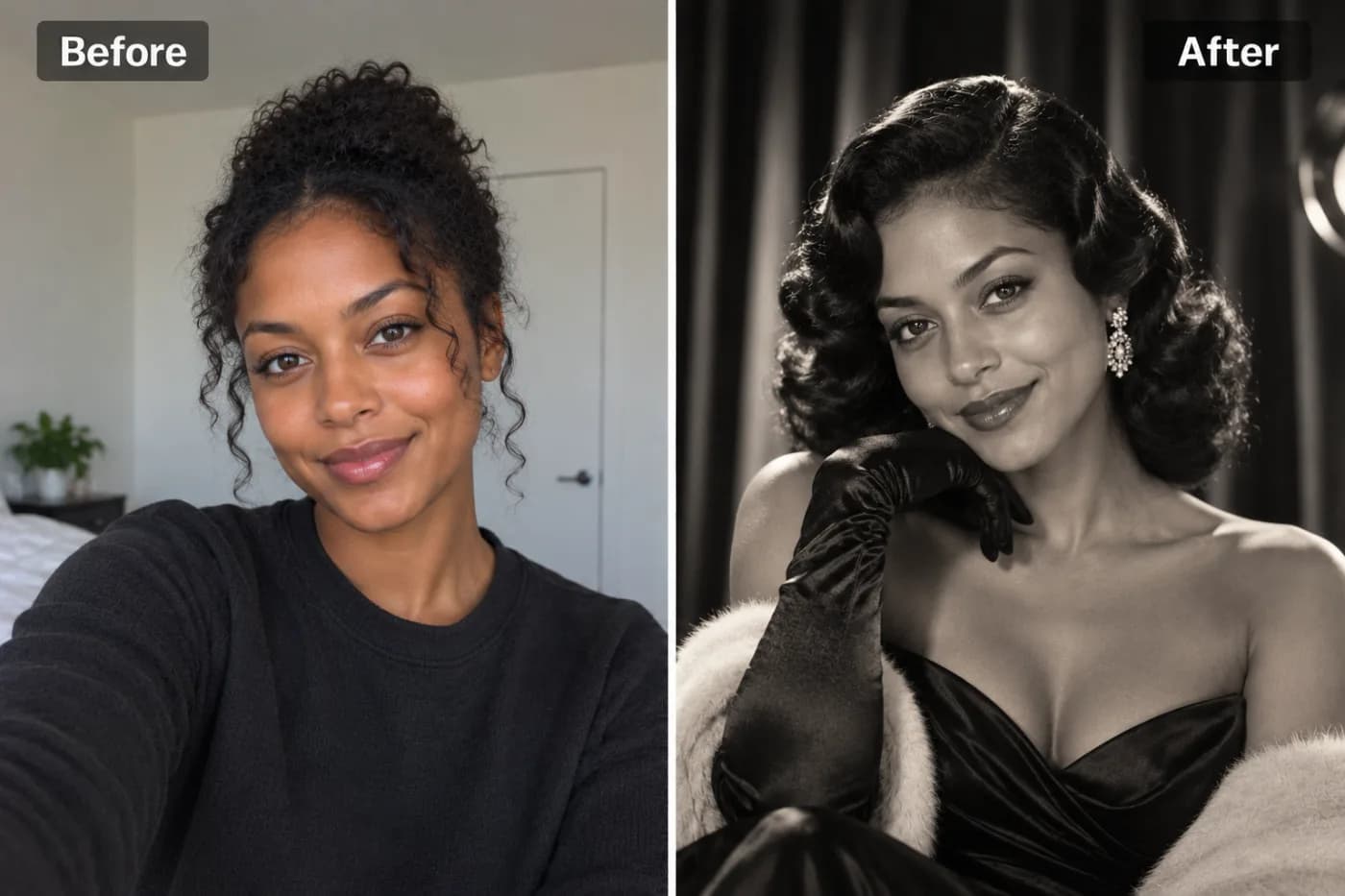
Old Hollywood had a specific magic — dramatic lighting, glowing skin, silver-screen elegance that made every portrait look like a still from a classic film. AI can give any photo that timeless glamour in seconds.
There's nothing quite like the timeless elegance of an old Hollywood glamour portrait — dramatic lighting, flawless monochrome tones, sculpted shadows, and that unmistakable silver-screen sophistication. Now you can turn any photo into a golden age portrait with AI, capturing the exact aesthetic that made 1950s stars look like living legends. Pixel Shine's old Hollywood glamour filter reads your photo and reimagines it in classic studio style: the soft-yet-dramatic key lighting, the elegant grayscale (or richly warm vintage) grade, and the poised, cinematic mood of a bygone era. No vintage camera, no professional lighting rig, no studio — just your photo and a click.
This aesthetic never goes out of style, which is exactly why the vintage Hollywood portrait AI trend keeps resurfacing across social media and Pinterest. People use it for striking profile pictures, elegant wall art, anniversary gifts, and that one photo that makes them look genuinely iconic. Best of all, Pixel Shine's 1950s glamour photo filter runs online with no app or subscription, and exports without a watermark. Here's how to create your own silver-screen portrait.
What Makes Old Hollywood Glamour So Iconic
The golden age of Hollywood, roughly the 1930s through the 1950s, produced a portrait style so refined it still defines "glamour" nearly a century later. Understanding its signature elements shows why the AI filter is so effective.
Dramatic, sculpted lighting. Studio photographers used a technique now called Paramount or butterfly lighting — a key light placed high and in front to carve out cheekbones and create a small shadow under the nose. It's flattering, dramatic, and instantly recognizable.
Rich monochrome (or warm vintage) tones. Classic Hollywood portraits were shot in luminous black and white with deep blacks, bright highlights, and silky midtones. Some fall into a warm sepia or golden vintage grade. The AI reproduces this signature tonal range.
Soft focus and glow. A gentle diffusion softened skin and added a dreamy halo around highlights, giving stars that ethereal, flawless quality.
Poised, elegant styling. Waved hair, refined makeup, and a confident, composed expression complete the look.
The AI filter layers all of these — the lighting, the tonal grade, the soft glow, the elegant mood — onto your photo, transforming a casual snapshot into something that belongs on a vintage movie poster.
Why AI Nails the Vintage Look So Well
Recreating authentic old Hollywood glamour with a real camera is genuinely difficult. It requires understanding classic lighting setups, owning or renting studio lights, styling hair and makeup to the era, and mastering black-and-white photography — skills that took studio photographers years to perfect. Even modern professionals charge a premium for this specific vintage portrait style.
AI already knows the formula. The model has effectively studied countless classic Hollywood portraits, so it understands the lighting geometry, the tonal grade, and the soft-glow finish. It applies all of it automatically, adapting to your specific face and photo.
It handles the hard parts for you. The dramatic key lighting that takes real photographers a full setup to achieve? The AI simulates it. The luminous monochrome grade that requires careful post-processing? Automatic. The flattering soft focus? Built in.
It's easy to perfect. Because the effect is generative, you can regenerate to fine-tune the drama, the glow, or the tonal mood until it's exactly right. A real studio shoot is a costly one-shot; the AI lets you iterate endlessly. And since each generation costs just 2 credits with no watermark, you can try it on a few photos before choosing one for a large framed print.
Step-by-Step: Create Your Golden Age Portrait
1. Open Pixel Shine. Go to Pixel Shine and navigate to the Creative AI Photo Effects section, then select the Old Hollywood Glamour effect. No download or account needed to start.
2. Choose an elegant photo. Old Hollywood glamour rewards poise. Pick a clear, front-facing or slightly-angled portrait with a composed, confident expression. A head-and-shoulders shot suits the classic portrait framing best.
3. Upload your image. Drag and drop or click to browse. JPG and PNG both work. Use the original, high-quality file so the AI has plenty of detail to sculpt with light.
4. Apply the glamour effect. Click generate and let the AI restyle your lighting, tone, and mood into the classic Hollywood aesthetic. This usually takes 15 to 30 seconds.
5. Review the drama. Check how the sculpted lighting and monochrome grade landed on your features. If you want more or less drama, regenerate — each pass interprets the vintage style a little differently.
6. Download watermark-free. Save your golden age portrait in full resolution. Pixel Shine won't stamp a watermark across it, so it's ready to frame or post immediately.
7. Upscale for framing. These portraits look stunning printed and framed. Run the result through Pixel Shine's credit-based Normal Upscaler so the fine tones and soft glow stay crisp at large sizes.
Pro Tips for a Stunning Silver-Screen Portrait
Choose a composed, confident expression. Old Hollywood glamour is about poise. A serene, self-assured look — chin slightly lifted, gaze direct — captures the star quality far better than a casual grin.
Front-facing or a slight three-quarter angle works best. These angles let the AI apply the classic sculpted key lighting most effectively, carving out flattering cheekbones and jawline.
Start with even lighting. A source photo without harsh, messy shadows gives the AI a clean canvas to add its own dramatic studio lighting. Chaotic original lighting can fight the effect.
Keep styling elegant. Simple, refined clothing and hair translate best into the vintage aesthetic. Busy patterns or very modern accessories can clash with the timeless mood.
Regenerate to dial in the drama. Some passes are moodier, some softer and dreamier. Generate a few versions and choose the one with the perfect balance of drama and glow.
Pair with a glow up first. For extra polish, run the AI Glow Up Filter beforehand to perfect skin and lighting, then apply the Hollywood glamour effect for a flawless finish.
Common Mistakes to Avoid
Using a casual, low-energy photo. Old Hollywood glamour depends on poise and mood. A goofy or overly casual source undercuts the elegant, iconic vibe. Bring some composure to the pose.
Starting with harsh, messy lighting. If your source photo has chaotic shadows or a strong color cast, it can interfere with the AI's clean, dramatic studio lighting. A more neutral, evenly lit photo gives the best base.
Cluttered or modern backgrounds. A busy or obviously contemporary background can break the timeless illusion. A simple backdrop works best, or use Pixel Shine's Background Remover for full control.
Expecting a perfect era-accurate costume. The AI applies lighting, tone, and mood — it's not a full wardrobe stylist. Embrace the overall glamour rather than expecting a specific vintage gown.
Skipping the upscale before framing. The soft glow and fine tonal gradients can appear low-res when enlarged. Always run the free upscaler before printing a framed portrait.
Old Hollywood vs. Other Portrait Styles
The old Hollywood glamour effect occupies a distinct niche among portrait styles, and knowing how it compares helps you choose the right look.
Old Hollywood glamour is dramatic, timeless, and elegant — sculpted monochrome lighting and vintage sophistication. It's ideal for statement portraits, framed wall art, and anyone who wants to look genuinely iconic.
Modern AI headshots aim for clean, professional, contemporary polish — perfect for LinkedIn and corporate profiles, but without the artistic drama. Pixel Shine's AI Headshot Generator covers this need.
Trendy aesthetics like coastal cowgirl or a glow up filter deliver of-the-moment, lifestyle-driven looks, while the old Hollywood effect is deliberately nostalgic and formal.
The advantage of Pixel Shine is that all these styles live under one roof. You can create a dramatic Hollywood portrait, a polished professional headshot, and a trendy aesthetic shot from the same photo without switching apps or paying separately for each. Since each generation costs just 2 credits and carries no watermark, you can explore several styles and decide which best captures the mood you're after — whether that's timeless elegance or modern cool.
Who Uses the Old Hollywood Glamour Filter
Anniversary and gift shoppers create elegant vintage portraits of loved ones as framed presents — a timeless, deeply personal gift that feels far more special than a standard photo.
Content creators and photographers use the effect for striking, editorial-style posts that stand out from typical modern selfies and evoke classic sophistication.
Brides and event-goers experiment with the glamour look for vintage-themed weddings, galas, and formal celebrations, often creating matching portraits for the whole party.
Actors and performers use dramatic Hollywood-style portraits for headshots, promotional material, and social branding that signals artistry and presence.
Everyday users simply love seeing themselves reimagined as a silver-screen icon — it's a confidence boost and a genuinely beautiful image worth framing.
What unites them is the desire for that timeless, elegant drama without a costly studio session. Pixel Shine delivers it watermark-free, with no app and no subscription, so anyone can become a golden age star in seconds.
Frequently Asked Questions
Is the old Hollywood glamour filter free?Pixel Shine's old Hollywood glamour effect runs on credits, with no subscription. Credits are bought in one-off packs from ₹166 and never expire.
Do I need an account or an app?You need a free account, but no app. Pixel Shine runs online at Pixel Shine with nothing to download.
Will my portrait have a watermark?No. Pixel Shine exports clean, watermark-free images ready to frame, post, or print.
What photo works best for a golden age portrait?A clear, front-facing or slightly-angled head-and-shoulders portrait with a composed, confident expression and even lighting produces the most authentic silver-screen result.
Is the portrait always black and white?The effect captures the classic Hollywood aesthetic, which often features luminous monochrome tones, though it can also lean into warm vintage grades. Regenerate to explore different interpretations.
Can I use it for a formal or professional portrait?Yes, though for standard corporate headshots the AI Headshot Generator may suit better. The Hollywood glamour effect is ideal for artistic, dramatic, statement portraits.
Can I print and frame my portrait?Absolutely. Download the full-resolution image and run it through Pixel Shine's free upscaler first so the fine tones and glow stay crisp when enlarged.
How long does it take?Most portraits render in 15 to 30 seconds.
Key Takeaways
The old Hollywood glamour filter turns any photo into a timeless golden age portrait — sculpted dramatic lighting, luminous tones, and silver-screen elegance — without a studio, vintage camera, or editing skills. For the most iconic result, start with a composed, well-lit, front-facing photo, regenerate to dial in the drama, and upscale before framing.
Pixel Shine makes the whole experience simple, with no download, no subscription, no watermark, and free unlimited upscaling for gallery-quality prints. Whether you want a striking profile picture, elegant wall art, or a heartfelt vintage gift, your silver-screen portrait is a click away. Head to Pixel Shine and get your old Hollywood glamour portrait now.