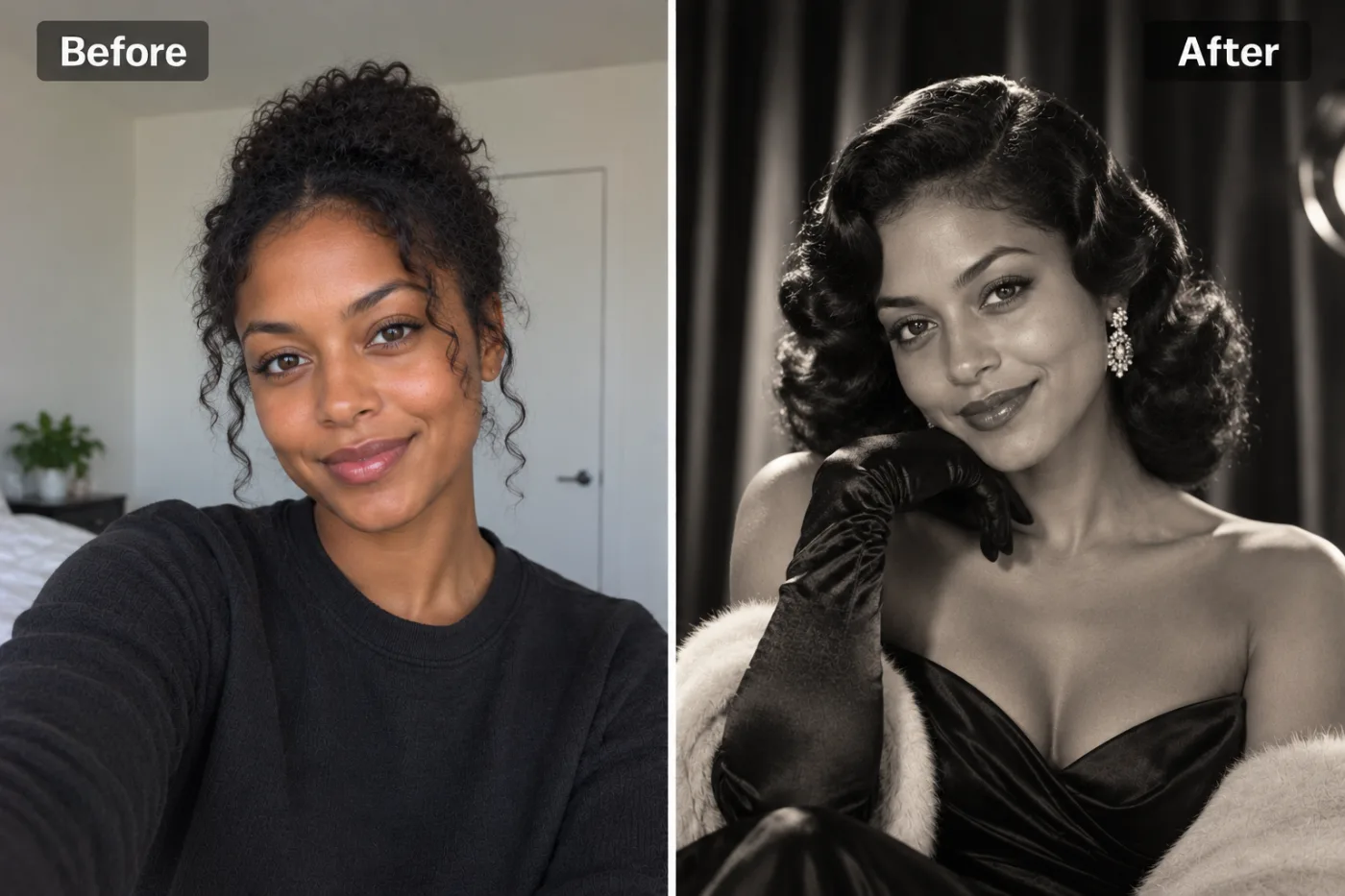
What is the Old Hollywood glamour look?
From the 1930s to the 1950s, film studios kept portrait photographers on staff to make their stars look larger than life. George Hurrell, who shot for MGM, is the most famous of them. Their portraits had a recognisable recipe: a single hard light from above and in front, deep black shadows, skin that glowed, hair set in glossy waves, and gowns or dinner jackets that caught the light.
Those pictures still define what "glamour" looks like. The lighting has a name in photography, Paramount or butterfly lighting, after the small shadow it leaves under the nose. It's why the trend keeps coming back: almost everyone looks dramatic in it.
This app recreates that portrait from a normal selfie. It dresses you in 1950s-style formalwear, styles your hair the period way, lights you like a studio star, and renders it in rich black and white or sepia. Your face and identity stay exactly as they are, and the result looks like a real photograph rather than a painting.
How did the look change from the 1930s to the 1950s?
The 1930s
The most dramatic decade: hard spotlights, deep shadows, slinky bias-cut satin gowns, platinum finger waves and pencil-thin brows. Portraits were often shot from slightly below to make stars look statuesque.
The 1940s
Hair grew longer and softer, in rolls and waves. Shoulders got structure, and portraits became a little warmer and more approachable, though still lit like a film.
The 1950s
Full skirts, strapless gowns, gloves and pearls, short curled hair, and a sharper, cleaner light. Men's portraits settled on the dinner jacket and the slicked side parting. This is the decade the app's formalwear is based on.
You can lean towards an earlier decade with the settings: Moody lighting and the Studio setting get closest to the high-contrast 1930s feel, while Golden hour softens things towards the 1940s.
What will you be wearing?
For gowns
Satin or silk evening gowns, often off the shoulder, with long gloves, drop earrings or pearls, and sometimes a fur stole, as in our example. Hair is set in finger waves or soft pin curls.
For tuxedos
A dinner jacket with a crisp shirt and bow tie, hair slicked and parted. Men get the classic leading-man portrait.
The finish
Black and white or warm sepia, with a soft film-like sharpness. Skin keeps its natural texture; the glow comes from the light, not from smoothing.
You can't pick the outfit itself in this app. If you have something specific in mind, such as a red gown in colour, describe it in the AI photo editor.
How do the setting and lighting options change it?
Auto gives the classic studio portrait from our example. The two settings let you move it.
Lighting: Moody
The most Hurrell-like: one light, deep shadow, high contrast. The best choice for a dramatic black-and-white print.
Lighting: Studio
Clean, controlled light with a bright catchlight in the eyes, like a studio publicity photo.
Lighting: Golden hour
Warmer and softer, often in sepia. It feels more romantic than dramatic.
Setting: Studio or Indoors
Studio keeps the plain backdrop and drapes. Indoors puts you in a period room, such as a hotel lobby or a dressing room.
Setting: City street
A night street with lights behind you, like a still from a film noir.
Soft daylight and Bright & airy work too, but they lighten the drama, which is the point of the look. Use them when you want something softer for a profile picture.
Tips for a better glamour portrait
- Turn your face slightly to one side. Three-quarter angles were the studio standard, and they make the lighting more sculpted.
- Lift your chin a little and keep your eyes on the camera. Film-star portraits are confident.
- Hair up or down both work. If your hair is curly, as in our example, the app styles it into period waves.
- Take off modern accessories you don't want kept, such as a baseball cap. Earrings and necklaces are often restyled to match the era.
- A plain expression works as well as a smile. Many classic portraits are calm, with just a hint of a smile.
What it won't do
- Make it look like a specific star. You stay you. It copies the style of the era, not any actor's face.
- Keep your clothes. The formalwear replaces them, since that's half of the look.
- Give full colour by default. The classic look is black and white or sepia. For colour, open the result in the AI photo editor and ask for colour.
- Work well with groups. It's a solo portrait. For two people, try the couple photoshoot.
Where do people use these portraits?
Profile pictures
A black-and-white glamour portrait stands out on LinkedIn for creative roles, on Instagram, and on dating apps.
Themed parties
Great Gatsby or Oscars-night parties: make one for each guest and print them as place cards or invitations.
Framed prints
Black and white looks beautiful framed. Run the portrait through the image upscaler before printing it large.
Actors and performers
A quick way to see a period look before booking a real shoot, or for a vintage-themed show poster.
Like the retro look? Try the Renaissance portrait for an oil-painting take, or the old money aesthetic for quiet luxury in colour.
What happens to your photo?
Your selfie is sent to our image-model partner, fal.ai, to make the portrait, and nowhere else. It isn't used to train AI models and is never sold, and you own both the selfie and the portrait.
Your portraits are saved in My Creations, so you can download them again. Delete any of them there at any time, or ask us to delete your account and everything in it.


