How to Fix a Blurry Photo Online for Free — No Software Needed
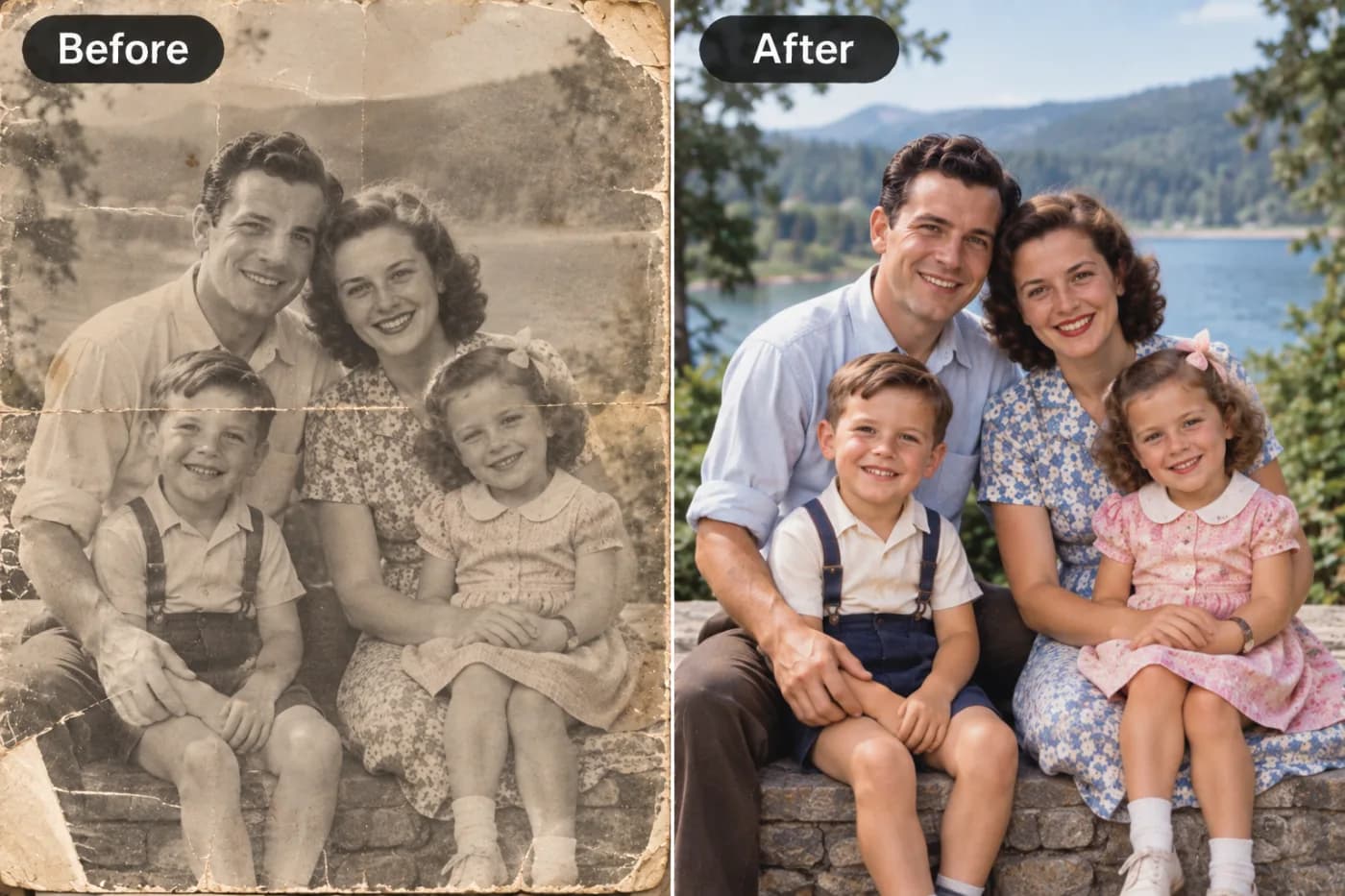
A blurry photo does not have to be a wasted photo. With AI-powered tools like Pixel Shine, you can fix blurry images online for free in just a few clicks.
Learning how to fix a blurry photo online for free feels like a small miracle the first time it works — that irreplaceable shot you thought was ruined suddenly snaps into focus. Whether it's a candid photo of your kid mid-laugh, an old scanned family portrait, or a product image you need for your online store, blur is one of the most frustrating problems in digital photography. And until recently, the only real fix was expensive desktop software, a steep learning curve, and hours of manual tinkering.
That's no longer the case. Modern AI can now analyze a soft, out-of-focus image, reconstruct fine detail, and sharpen edges with a precision that used to require a professional retoucher. In this guide, you'll learn exactly how to unblur an image online, why photos go blurry in the first place, and how to use Pixel Shine's free tool to fix blurry photos with no watermark and no mandatory sign-up. By the end, you'll be able to rescue almost any soft image in under a minute — completely free.
Why Photos Turn Out Blurry in the First Place
Before you can fix a blurry photo, it helps to understand what caused the blur — because different types respond differently to correction. Studies of consumer photo libraries suggest that roughly 1 in 5 casual smartphone shots are soft enough that people notice, and the reasons fall into a handful of predictable buckets.
Motion blur happens when either the camera or the subject moves while the shutter is open. A running toddler, a passing car, or simply shaky hands in low light will smear detail across the frame.
Focus blur occurs when the camera locks focus on the wrong plane — the background is sharp but your subject's face is soft, a common issue with phone cameras that guess where to focus.
Low-light noise forces cameras to use slower shutter speeds and higher ISO, producing grainy, mushy images that read as blurry even when technically in focus.
Compression and resizing degrade images when they're texted, uploaded to social media, or saved repeatedly, stripping away the fine data that keeps edges crisp. Old scanned prints and screenshots suffer here too. Knowing your blur type helps you set realistic expectations — AI handles focus softness and compression damage exceptionally well, and can meaningfully improve mild motion blur.
How Pixel Shine Fixes Blurry Photos Automatically
Pixel Shine approaches blur the way a skilled retoucher would, but in seconds rather than hours. Instead of applying a single blunt sharpening filter across the whole image — the trick most old tools used, which just amplifies noise — its AI upscaler analyzes the picture region by region and reconstructs plausible detail based on millions of training examples.
Here's what that means in practice. When you upload a soft image, the AI identifies edges, textures, and structures — an eyelash, the weave of fabric, the lettering on a sign — and rebuilds them at a higher fidelity than the original file contained. It simultaneously increases resolution, so a small, soft 800-pixel photo can become a crisp, print-ready image several times larger. This combination of deblurring and upscaling is why AI results look natural rather than crunchy or over-sharpened.
The Normal upscale mode is completely free, unlimited, and requires no sign-up, making it ideal for everyday blur fixes. For heavily damaged or professionally critical images, the Pro AI mode uses credits to apply a more aggressive reconstruction model. Crucially, Pixel Shine never stamps a watermark on your output — the fixed photo is yours to download and use however you like.
Step-by-Step: How to Fix a Blurry Photo for Free
Follow these steps to unblur and sharpen your image in about 60 seconds:
1. Open the tool. Go to Pixel Shine and open the AI Upscaler. You don't need to create an account to use the free Normal mode, so you can start immediately.
2. Upload your blurry photo. Click the upload area or drag your image directly onto it. Pixel Shine accepts standard formats including JPG, PNG, and WebP. For best results, upload the highest-quality version of the file you have — never a screenshot of a screenshot.
3. Choose your enhancement mode. Select Normal upscale for free, unlimited fixes that work beautifully on most everyday blur. If your image is severely degraded or you need maximum detail recovery for print, switch to Pro AI mode, which uses credits.
4. Set your output scale. Pick 2x or 4x depending on how large you need the final image. Even if you don't need a bigger file, upscaling helps the AI reconstruct sharper detail.
5. Process the image. Click enhance and let the AI work. Most photos finish in a few seconds; larger files may take slightly longer.
6. Compare and download. Use the before/after preview to confirm the improvement, then download your fixed photo. There's no watermark, so it's ready to print, post, or share instantly. If the result looks over-processed, re-upload and try a lower scale factor.
Pro Tips for the Sharpest Possible Results
A few insider habits separate a decent fix from a genuinely impressive one:
Always start with the original file, not a compressed copy. Every time an image is texted, screenshotted, or re-saved, it loses data the AI could have used. Dig out the version straight from your camera roll or the original download whenever possible.
Match the scale to the damage. For lightly soft photos, 2x is plenty and looks the most natural. Reserve 4x for small images you need to enlarge substantially — going too big on an already-decent photo can look artificial.
Fix blur before you crop or edit. Run the deblur pass first so the AI has the full frame of context to work with, then crop and color-correct afterward.
For faces, check the eyes and teeth. These are the areas people notice most. If the eyes look sharp and natural after processing, the whole portrait will read as fixed.
Try both modes on important photos. Run the free Normal mode first; if a treasured photo needs more, run it through Pro AI mode to compare. The difference on heavily damaged images can be dramatic.
Deblur old scans at high resolution. When digitizing prints, scan at 600 DPI or higher, then let the AI clean up the softness — you'll preserve far more detail than fixing a low-res scan.
Common Mistakes to Avoid When Fixing Blur
Even with a powerful AI tool, a few missteps can undercut your results:
Over-sharpening in pursuit of perfection. Some blur is physical — the data simply isn't there. Pushing a 4x upscale on a badly smeared motion shot can introduce halos and unnatural texture. Aim for a natural-looking improvement rather than an impossible one.
Uploading tiny thumbnails and expecting miracles. A 100-pixel-wide image has almost nothing for the AI to reconstruct. The larger and higher-quality your source, the better the outcome. Find the biggest version you can.
Fixing a screenshot instead of the source. Screenshotting a blurry Instagram photo and then trying to fix that screenshot stacks compression on compression. Always go back to the original file.
Ignoring the before/after preview. It's tempting to download immediately, but the comparison view catches over-processing and lets you adjust the scale before committing. Take the extra three seconds to look.
Assuming every blur type is fixable. Focus softness and compression damage clean up beautifully; severe motion blur where the subject traveled far across the frame is genuinely hard for any tool. Set realistic expectations and you'll rarely be disappointed.
Real-World Scenarios Where This Saves the Day
The need to fix a blurry photo shows up in more situations than you'd expect:
Rescuing precious memories. A slightly out-of-focus photo from a birthday, graduation, or a grandparent who's no longer around is exactly the kind of irreplaceable image AI deblurring was built for. You can't reshoot it, so recovering it matters.
E-commerce product listings. Sellers on Etsy, eBay, and Amazon lose sales when product photos look soft. A quick sharpen makes listings look professional and trustworthy, which directly affects conversion.
Real estate and rentals. Blurry listing photos scare off buyers. Agents routinely clean up interior shots that came out soft in dim rooms.
Social media content. Creators fixing a great-but-slightly-soft shot before posting keep their feed looking polished and consistent.
Documents and receipts. A blurry photo of a receipt, whiteboard, or handwritten note becomes legible again after sharpening, which is a lifesaver for expense reports and study notes. In each case, the free Normal mode handles the job without cost, watermarks, or sign-up hassle.
AI Deblurring vs. Traditional Sharpening Tools
It's worth understanding why AI has largely replaced the sharpening sliders in older software. Traditional sharpening — the unsharp mask you'll find in most editors — works by increasing contrast along edges it detects. It can make an image *look* crisper, but it doesn't add real information; push it too far and you get ugly halos, amplified noise, and a brittle, over-processed appearance.
AI deblurring is fundamentally different. Rather than exaggerating existing edges, it predicts and reconstructs the detail that blur destroyed, informed by patterns learned from millions of sharp images. That's why AI can recover facial features, fabric texture, and text that a sharpening slider could never recover.
Desktop tools like Photoshop offer powerful manual control, but they cost a subscription, require skill, and take time. Free online sharpeners are convenient but often stamp watermarks, cap resolution, or force sign-ups. Pixel Shine sits in the sweet spot: the reconstruction quality of modern AI, delivered free online, with no watermark and no account needed for the Normal mode. For most people, that's a better trade than either extreme.
Who Uses AI Blur Fixing and Why
A surprisingly broad range of people reach for AI deblurring. Parents and families restore soft snapshots of milestones they can never recreate. Online sellers and small-business owners sharpen product photos to look professional without hiring a photographer. Real estate agents clean up dim, soft interior shots to make listings shine. Content creators and social media managers keep their feeds crisp and consistent. Students and remote workers salvage blurry photos of notes, slides, and documents so they're readable again. Genealogy and history enthusiasts revive faded, out-of-focus scans of old family prints. What unites them is the same goal: recovering a usable, clear image from one that seemed beyond saving — quickly, freely, and without watermarks getting in the way of the final result.
Fixing Blurry Wedding and Event Photos
Weddings are, paradoxically, one of the hardest environments to photograph well — which is exactly why so many wedding pictures end up soft. Understanding the causes helps you set the right expectations when you go to fix them.
Low light is the biggest villain. Receptions are dim by design, full of candlelight and mood lighting. To capture anything, cameras slow their shutter and raise ISO, which introduces motion blur and grainy softness. Even professionals fight this constantly.
Movement is everywhere. People dancing, walking down the aisle, tossing bouquets, and clinking glasses are all in motion, and any movement during a slow exposure smears detail.
Guest phone photos often capture unrepeatable candid moments but with limited cameras, shaky hands, and poor lighting — resulting in soft, noisy images.
Old wedding photos from previous generations bring their own problems: film grain, fading, physical damage, and the softness introduced when prints are scanned or photographed. A grandparent's wedding portrait may be the only copy in existence.
Because these images are irreplaceable — you cannot restage a wedding — recovering them matters far more than fixing an ordinary snapshot. And AI is remarkably good at exactly the kinds of blur weddings produce: low-light softness, compression damage, and focus errors.
Enhancing Photos Without a Watermark
To appreciate a truly watermark-free enhancer, it helps to understand why watermarks are so common in the first place. AI image enhancement isn't free to run — every image processed consumes real computing power on expensive servers. Companies have to recover that cost somehow, and watermarks are the most common lever they pull.
The typical playbook works like this: a tool lets you enhance an image and preview a beautiful result, but the free download is either watermarked, capped at a low resolution, or blocked entirely until you subscribe. The watermark isn't there to protect anyone — it's a hostage tactic designed to convert you into a paying customer. Some tools go further, requiring an account and email before you can even see your result, then bombarding you with upgrade prompts.
Others use subtler tricks: a small watermark you don't notice until you zoom in, resolution limits that make the free output useless for print, or a limited number of free enhancements before the paywall drops. The result is a frustrating experience where "free" comes with strings attached. A tool that genuinely enhances images with no watermark — and lets you download the full-resolution result without an account — is doing something meaningfully different, and it's worth knowing how to spot it.
Frequently Asked Questions
Can you really fix a blurry photo for free?Yes. Pixel Shine's Normal upscale mode fixes blurry photos completely free, with no usage limits and no sign-up required. You only need credits if you choose the more aggressive Pro AI mode for severely damaged images.
Will there be a watermark on my fixed photo?No. Pixel Shine never adds a watermark to your output. Whatever image you download is clean and ready to print, post, or sell.
Do I need to create an account?Not for the free Normal upscale mode. You can upload and fix a blurry photo without signing up at all, which makes it ideal for quick, one-off fixes.
What kinds of blur can AI actually fix?AI handles focus softness, compression damage, low-resolution softness, and mild motion blur very well. Severe motion blur — where the subject moved dramatically across the frame — is the hardest for any tool, though even then you'll usually see improvement.
Is my photo safe and private when I upload it?Yes. Your images are processed to deliver your result and aren't repurposed. Since no account is needed for the free mode, you can also fix photos without tying them to a profile.
How large can I make the fixed image?You can upscale 2x or 4x, turning a small soft image into a much larger, print-ready file. Even if you don't need a bigger file, upscaling helps the AI reconstruct sharper detail.
Does it work on old scanned photos?Absolutely. Old scans are one of the best use cases — the AI cleans up softness and grain while enhancing detail, which is perfect for restoring family memories.
What if the result looks over-sharpened?Simply re-upload and choose a lower scale factor, like 2x instead of 4x. A gentler pass usually produces the most natural-looking fix.
Key Takeaways
Fixing a blurry photo online no longer requires expensive software or technical skill. Modern AI can reconstruct lost detail, sharpen soft edges, and enlarge images all at once — turning a shot you thought was ruined into something clear and usable. Pixel Shine makes this genuinely free with its Normal upscale mode: no watermarks, no forced sign-up, and no usage caps, with a credit-based Pro AI mode for images that need extra muscle.
The best part is how little effort it takes. Upload, choose your mode, and download a sharper result in about a minute. Whether it's a treasured memory or a product photo, your blurry image deserves a second chance. Try it free at Pixel Shine and see how much detail AI can bring back.