How to Get a Professional Headshot from a Selfie Using AI (Free)
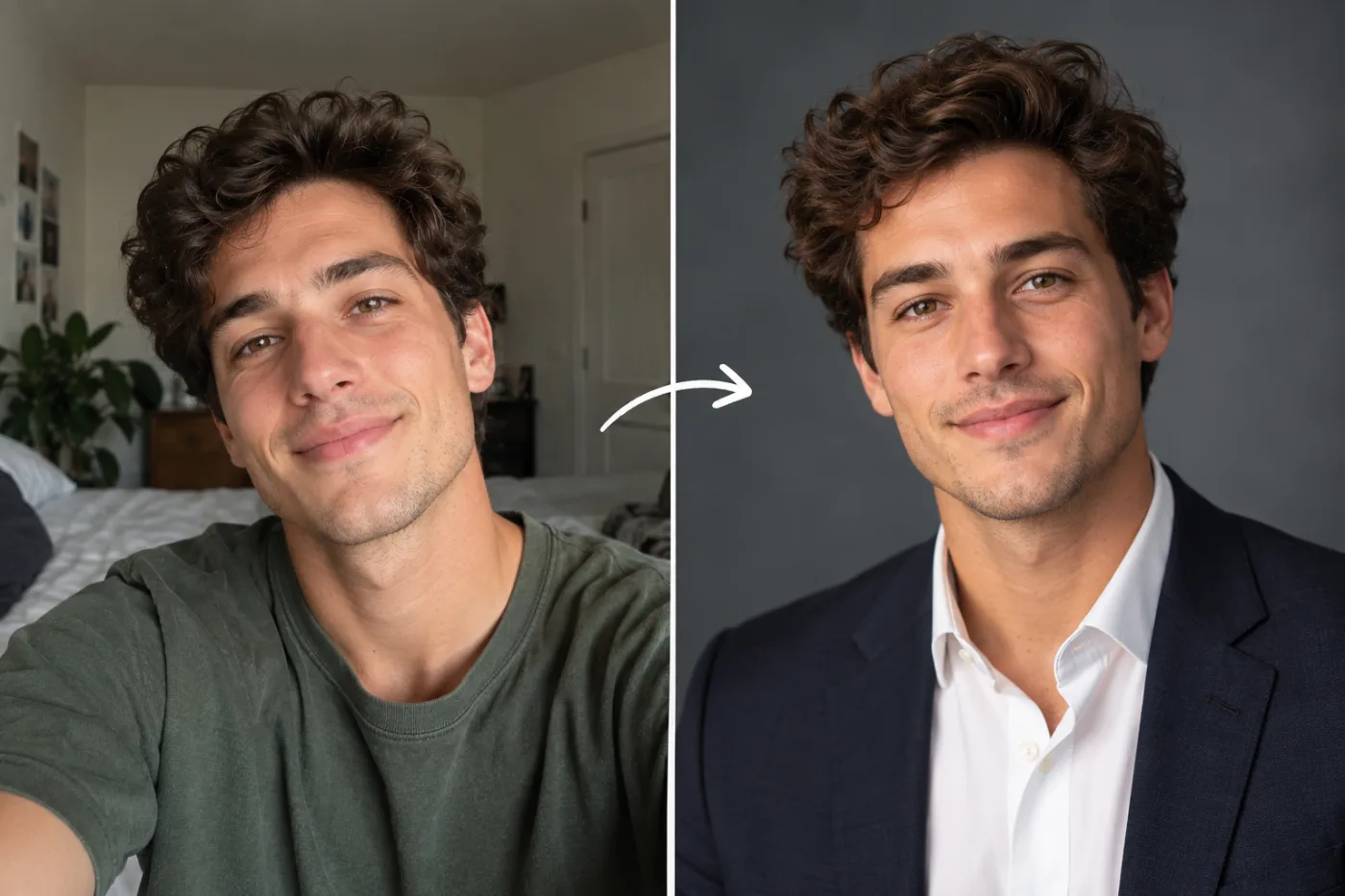
Professional headshots cost $200–600 with a real photographer. AI can turn a decent selfie into a studio-quality professional portrait for free. Here's exactly how to get the best possible result.
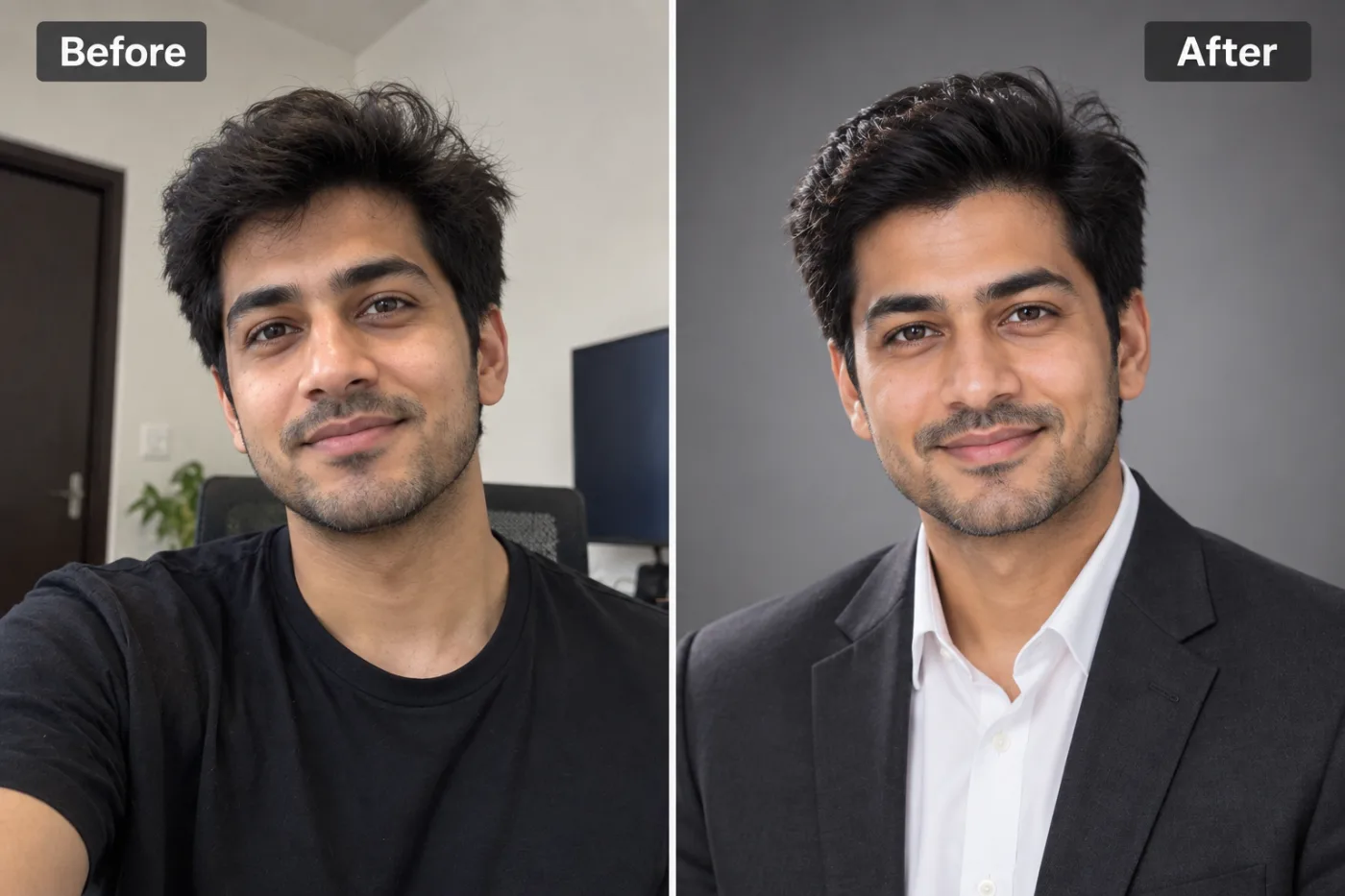
Getting a professional headshot from a selfie for free used to sound too good to be true — but AI has made it genuinely possible. With Pixel Shine's AI Headshot Generator at Pixel Shine, you upload a normal selfie and get back a polished, professional-looking headshot: clean background, flattering light, business-appropriate framing — the kind of photo that costs $150 to $400 at a studio. And you can try it free.
Here's why this matters right now. Your LinkedIn profile photo, your company directory picture, your speaker bio, your email signature — all of these judge you in a fraction of a second. Studies consistently show that professional headshots dramatically increase profile views and perceived competence. Yet booking a photographer is expensive, time-consuming, and awkward for a lot of people.
An AI headshot generator collapses that entire process. Instead of scheduling a shoot, dressing up, and traveling to a studio, you turn a selfie into a professional photo in minutes, from your couch. There's no watermark on your results and no studio-style photoshoot required.
Why AI Headshots Have Become Genuinely Good
A few years ago, AI-generated headshots ranged from uncanny to comical — melted ears, seven fingers, faces that were almost-but-not-quite the person. That era is over. Modern AI headshot generators produce results that pass as real professional photography in most contexts, and understanding why helps you trust the output.
The leap came from AI models learning what professional portraiture actually looks like — the specific lighting setups photographers use, the shallow depth-of-field that blurs backgrounds, the flattering angles, and the neutral or softly graded backdrops common in corporate headshots. The AI applies these learned conventions to your face while preserving your identity.
Crucially, good AI headshot tools keep *you* recognizable. The goal isn't to generate a generic attractive stranger; it's to present the real you at your best — well-lit, well-framed, professionally styled. Your bone structure, your smile, your defining features carry through; what changes is the production quality around them.
The practical result is that a casual selfie taken on your phone can become an image that looks like it came from a $300 studio session. For LinkedIn, resumes, company pages, and professional profiles, that's transformative. The barrier that used to require money, scheduling, and often social anxiety has collapsed into a free upload — and the output is finally good enough that people can't tell the difference.
What Makes a Headshot Look Professional
To get great results, it helps to know what actually separates a professional headshot from a random selfie — because these are the exact qualities the AI is recreating.
Clean, non-distracting background. Professional headshots use neutral, softly blurred, or solid backgrounds so nothing competes with your face. A messy bedroom or busy street instantly reads as 'amateur.' The AI replaces distraction with a clean backdrop.
Flattering, even lighting. Studio headshots use soft light that minimizes harsh shadows and evens skin tone. Selfies lit by overhead bulbs or window glare look unpolished; the AI corrects the lighting to a professional standard.
Proper framing and crop. Professional headshots frame the head and shoulders with the right amount of headroom and the eyes positioned in the upper third. The AI recomposes to this standard.
Sharp focus on the face. A crisp, well-focused face with a gently blurred background creates that premium, depth-of-field look. The AI simulates this separation.
Business-appropriate presentation. The overall vibe reads as competent and approachable — the emotional impression a good headshot conveys.
When the AI applies all of these to your selfie simultaneously, the result crosses the line from 'phone photo' to 'professional portrait.' Knowing these elements also helps you pick a source selfie that gives the AI the best raw material to work with.
Step-by-Step: Turn Your Selfie into a Professional Headshot
Step 1 — Take or choose a good selfie. Use a clear, front-facing photo where your whole face is visible and evenly lit. Face a window for soft natural light. Look at the camera and keep a relaxed, natural expression.
Step 2 — Go to Pixel Shine and open the AI Headshot Generator. It's under the platform's tools.
Step 3 — Upload your selfie. Drag and drop or browse to select it. A higher-quality source gives the AI more to work with.
Step 4 — Select your headshot style. Choose the professional look that fits your context — corporate, business casual, or whatever the tool offers that matches your industry.
Step 5 — Generate. Let the AI apply professional lighting, a clean background, proper framing, and polished styling. This typically takes under a minute.
Step 6 — Review the results. Check that you still look recognizably yourself and that the lighting, background, and framing read as professional.
Step 7 — Regenerate for options. Run it again to get variations, then pick the strongest one. Small changes in expression or lighting can make a real difference.
Step 8 — Download watermark-free. Save your professional headshot in full quality.
Step 9 — Use it everywhere. Upload it to LinkedIn, your resume, your company profile, your email signature, and your speaker bios. One good headshot works across every professional touchpoint.
Pro Tips for the Best AI Headshot
Tip 1 — Start with a sharp, well-lit selfie. The single biggest factor in a great AI headshot is a clear source photo. Face soft, even light and avoid harsh shadows across your face.
Tip 2 — Keep your expression natural and approachable. A relaxed, slight smile with eye contact reads as confident and warm — the ideal professional vibe. Avoid extreme expressions.
Tip 3 — Use a clean background even in the source. While the AI replaces the background, starting with a simpler one helps it separate you cleanly and preserve your edges.
Tip 4 — Frame yourself head-and-shoulders. Give the AI a proper headshot composition to work from rather than a full-body or extreme close-up shot.
Tip 5 — Generate several and compare. The best headshot is often the third or fourth result. Produce a few options and choose the most flattering, natural one.
Tip 6 — Match the style to your industry. A creative field can lean more relaxed; finance or law suits a more formal look. Pick the style that fits how your audience expects you to present.
Common Mistakes to Avoid
Mistake 1 — Using a poorly lit or blurry selfie. The AI can only work with what you give it. A dark, grainy, or out-of-focus source produces a weaker headshot. Invest thirty seconds in a good selfie first.
Mistake 2 — Choosing an extreme angle. A dramatic up-nose shot or a heavy side profile gives the AI less facial data and can distort the result. Front-facing or a slight angle works best.
Mistake 3 — Expecting a completely different face. A good AI headshot presents the real you professionally — it's not a total transformation. If you want it to look like you, embrace that it will look like you, just polished.
Mistake 4 — Settling on the first generation. People often accept the first output and miss a better one. Always generate a few and compare before choosing.
Mistake 5 — Picking a mismatched style. A hyper-formal headshot for a casual creative role (or vice versa) sends the wrong signal. Match the professional style to your actual field and audience.
AI Headshots vs. Studio Photographers vs. Paid AI Apps
Where does a free AI headshot generator fit against the alternatives? Let's compare honestly.
Vs. a studio photographer: A professional shoot costs $150 to $400+, requires scheduling and travel, and takes days to deliver edited images. The upside is a human directing you and unlimited creative control. The downside is cost, time, and the awkwardness many people feel on camera. AI wins decisively on speed, price, and convenience; a studio still edges it for a truly bespoke, art-directed result.
Vs. paid AI headshot apps: Many AI headshot services charge $20 to $50, require you to upload 10-20 photos, make you wait hours for a batch, and sometimes watermark or gate the best results. Pixel Shine lets you generate from a single selfie, get results in minutes, and download watermark-free.
Vs. just using a raw selfie: No contest — a raw selfie with a cluttered background and phone lighting undercuts your professional image. Even a quick AI headshot is a major upgrade.
The standout advantage of Pixel Shine is that the headshot generator lives inside an all-in-one platform with free browser tools. The same account also covers background removal, upscaling, photo editing, and creative effects — so you're not paying a single-purpose app for one deliverable. For most people who just need a solid professional profile photo, free AI is now the obvious first stop.
Who Uses AI Headshots from Selfies
Job seekers refresh their LinkedIn and resume photos to make a stronger first impression on recruiters — professional headshots measurably increase profile engagement.
Remote workers and freelancers who never had a company photoshoot create polished profile pictures for their portfolios, client proposals, and professional platforms.
Small business owners and consultants produce headshots for their websites, About pages, and marketing without the expense of a studio session.
Speakers and authors generate clean bio photos for conference programs, book jackets, and media kits on short notice.
Students and new grads entering the job market get a professional-looking headshot without spending money they don't have.
Real estate agents, coaches, and service professionals whose personal image is central to their business keep their headshots current and consistent across every platform.
The common thread is that a professional headshot used to be a gated privilege — something you paid for and scheduled. Now anyone with a selfie and a few minutes can have one. For people whose careers benefit from looking polished online (which is nearly everyone), that access is genuinely leveling.
Frequently Asked Questions
Can I really get a professional headshot from a selfie for free?Pixel Shine's AI Headshot Generator turns a selfie into a professional-looking headshot for 2 credits, with no subscription.
Do I need to upload lots of photos?No. You can generate a headshot from a single clear selfie — no need to submit a large batch like some paid apps require.
Will the headshot still look like me?Yes. A good AI headshot preserves your recognizable features and presents you professionally — better lighting, clean background, proper framing — while keeping it clearly you.
Is it good enough for LinkedIn?Absolutely. AI headshots are ideal for LinkedIn, resumes, company profiles, and email signatures, where a clean, professional photo makes a strong first impression.
How long does it take?Usually under a minute per generation, compared to days for a studio to deliver edited photos.
What makes a good source selfie?A clear, front-facing, evenly lit photo with your full face visible and a relaxed, natural expression works best.
Is there a watermark on the free headshots?No. Your downloads are clean and watermark-free.
How does it compare to a real photographer?AI is far cheaper, faster, and more convenient. A studio offers more bespoke art direction, but for a standard professional profile photo, AI now produces results that read as genuinely professional.
Key Takeaways
A professional headshot used to mean a studio booking and a $150-to-$400 bill. Now you can turn an ordinary selfie into a polished, professional-looking headshot in minutes — free — with Pixel Shine's AI Headshot Generator. The AI recreates what makes studio portraits work: clean background, flattering light, proper framing, and sharp focus, all while keeping you recognizably yourself.
The recipe for a great result is simple: start with a clear, well-lit, front-facing selfie, pick a style that matches your industry, generate a few variations, and choose the most natural one. Downloads come watermark-free, and there's no studio session required.
Whether you're job hunting, building a personal brand, or just tired of your outdated profile picture, this is the fastest path to looking your professional best. Get Your AI Headshot Free → at Pixel Shine.