Best AI Headshot Generators Compared: Which One Is Worth It?
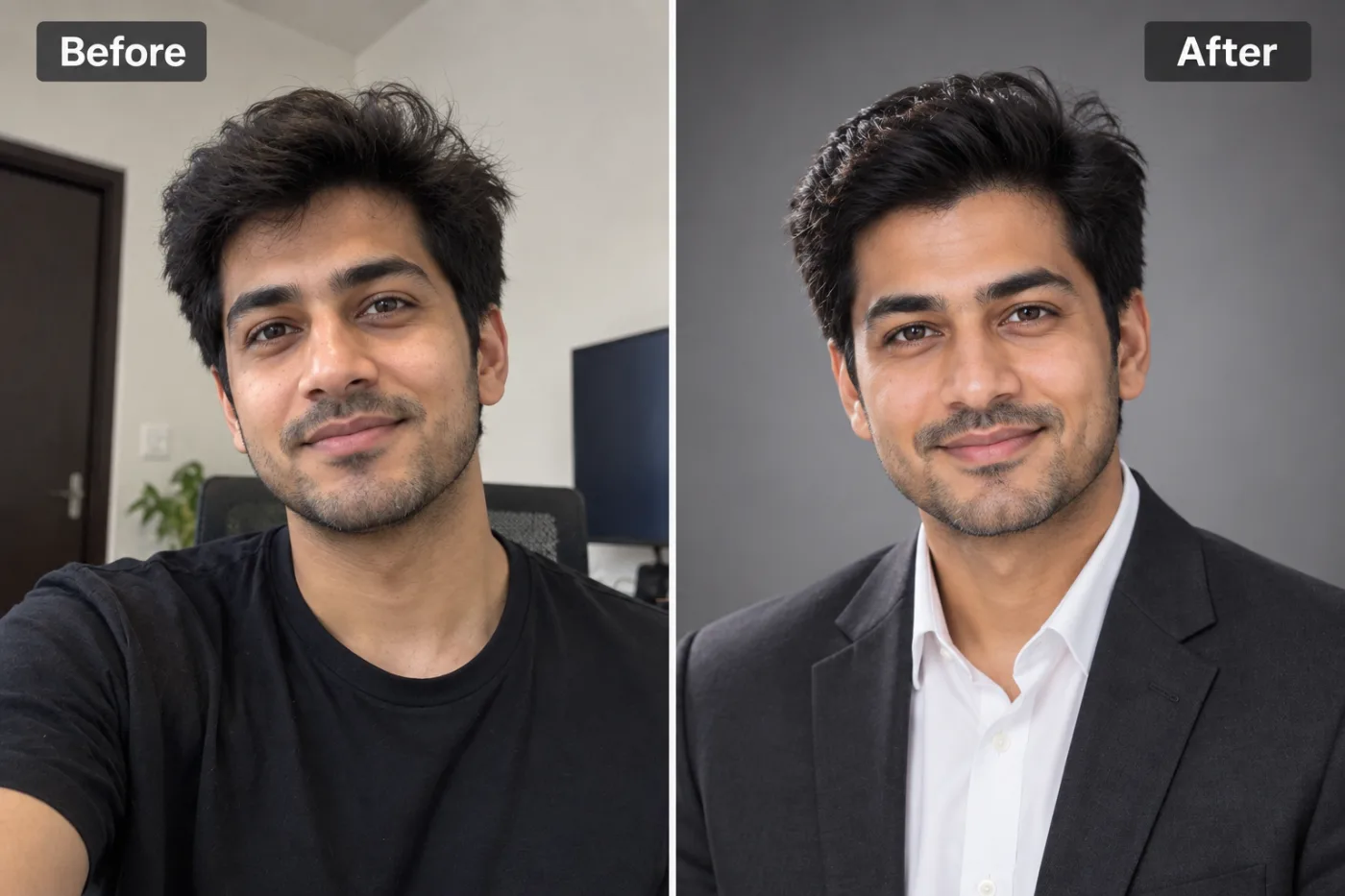
AI headshot generators have exploded in 2025. We compared the top tools head-to-head to find which ones actually deliver professional-quality results.
Choosing the best AI headshot generator in 2025 comes down to a few things that matter more than the marketing hype: how realistic the results look, how much you pay, how many photos you need to upload, and how long you wait. The category has exploded — dozens of tools now promise professional headshots from a handful of selfies — but they vary wildly in price (from free to $60+), turnaround (instant to 24 hours), and quality (genuinely studio-grade to uncanny-valley disappointing).
If you're comparing options like Aragon AI, HeadshotPro, and others, this guide cuts through the noise. We'll lay out the criteria that actually determine whether you'll be happy with your headshots, compare how the major approaches stack up, explain where the money goes, and show where Pixel Shine fits as a pay-as-you-go alternative that lets you test the waters for 2 credits. Whether you need a polished LinkedIn photo, a corporate directory shot, or a personal-brand image, by the end you'll know exactly what to look for and which tool matches your budget and needs.
The Criteria That Actually Matter
Before comparing specific tools, you need a scorecard. These five factors determine your satisfaction far more than any feature list.
Realism. The single most important factor. Good AI headshots look like a professional photographer took them; bad ones have that subtly-wrong AI sheen — plastic skin, mismatched lighting, or a face that's almost-but-not-quite you. Always look at real user samples, not just the polished marketing gallery.
Likeness accuracy. A stunning headshot that doesn't look like you is useless for a LinkedIn profile people need to recognize. The best tools preserve your actual features rather than generating a generic attractive stranger.
Price and structure. Costs range from free trials to $60+ packages. Some charge per package of images, others per credit. Watch for tools that require a large upfront payment before you see any result.
Number of source photos required. Some tools demand 10-20 selfies to train on; others work from just a few. Fewer required photos means less hassle.
Turnaround time. This ranges from instant to 24-48 hours. If you need a headshot today, batch-training tools that take a day won't work.
Keep these five in mind as your scorecard. The right tool is the one that scores well on the factors that matter to your specific situation — not the one with the longest feature list.
How the Major Approaches Compare
AI headshot tools generally fall into a few camps, and understanding them helps you predict quality and cost.
Train-a-model tools (like Aragon AI and HeadshotPro). You upload 10-20 photos, the service trains a custom model on your face over several hours, then generates dozens or hundreds of variations. Pros: high likeness accuracy and lots of variety. Cons: higher cost (typically $30-60), longer wait (hours to a day), and you must gather many source photos. These are aimed at people who want a big batch of polished options and don't mind paying and waiting.
Instant-generation tools. You upload one or a few photos and get results in seconds to minutes. Pros: fast, cheap or free to start, minimal source photos needed. Cons: sometimes less variety than the heavy train-a-model services. This is the sweet spot for people who want a good headshot quickly without a big commitment.
All-in-one platforms (like Pixel Shine). Headshot generation sits alongside background removal, upscaling, and photo editing. Pros: you're not paying for a single-use tool, and you can polish results with other features in the same place. Pay as you go: 2 credits per headshot, no subscription.
The train-a-model camp wins on sheer volume and variety; the instant camp wins on speed, cost, and convenience. Which is "best" depends entirely on whether you value a huge batch of options or a fast, affordable, good-enough result you can get today.
Step-by-Step: How to Test and Choose
Rather than gambling on one tool, here's a smart process to find your best fit without wasting money.
Step 1: Define your actual need. Are you after one great LinkedIn photo, or a variety pack of 100 images for different uses? This alone narrows the field between instant tools and train-a-model services.
Step 2: Gather your source photos. Collect several clear, well-lit photos of yourself from different angles with varied expressions. Even instant tools produce better results with good input. (Our companion guide on taking the perfect source photo covers this in depth.)
Step 3: Start with a cheap option first. Before paying $40-60 for a train-a-model service, test a pay-per-headshot tool. Go to Pixel Shine and try the AI Headshot Generator.
Step 4: Evaluate the results on your scorecard. Check realism (does the skin look natural?), likeness (does it actually look like you?), and whether the style fits your industry.
Step 5: Decide if free is enough. For many people, a solid free-tier headshot is all they need for LinkedIn or a resume. If it works, you're done — no payment required.
Step 6: Only pay if you need more. If you genuinely want dozens of styled variations, then consider a paid train-a-model package. But test free first so you're paying for a real need, not a guess.
This order — free test before paid commitment — is how you avoid buyer's remorse.
Pro Tips for Better AI Headshots
Regardless of which tool you pick, these habits dramatically improve your results.
Feed it good source photos. AI headshot quality is downstream of input quality. Clear, well-lit, front-facing photos with a neutral background produce far better results than dark, blurry selfies.
Provide variety in your source set. Different angles, expressions, and lighting help the AI understand your face more fully, improving likeness across the generated set.
Choose styles that match your industry. A creative professional can go bolder; someone in finance or law should pick conservative, traditional styles. The best headshot is the one that fits your field's norms.
Prioritize likeness over glamour. A headshot that makes you look great but unrecognizable defeats the purpose. Pick the results that still clearly look like you.
Upscale the winner. Once you've chosen your favorite headshot, run it through an upscaler for crisp, high-resolution output suitable for print and large displays. Pixel Shine has this built in.
Keep the background flexible. If you want to place your headshot on a specific brand color or scene, generate it and then use background removal to composite it exactly where you need it.
Common Mistakes to Avoid
These errors lead people to overspend or end up with headshots they can't use.
Paying before testing. The biggest mistake. Committing $40-60 to a train-a-model service before seeing whether AI headshots even work for your face is a gamble. Test a pay-as-you-go tool first.
Uploading poor source photos. Dark, blurry, or low-variety selfies produce disappointing results no matter how good the tool is. Garbage in, garbage out.
Chasing glamour over likeness. Picking the most flattering result that doesn't look like you creates an awkward disconnect when people meet you or view your profile.
Ignoring industry fit. A flashy, stylized headshot can undercut credibility in a conservative field. Match the style to your profession.
Skipping the resolution step. Downloading a small, soft image and then trying to use it for print or a large banner. Upscale your final pick for versatility.
Where the Money Goes (and When Free Wins)
It's worth being clear-eyed about pricing so you don't overpay for capacity you won't use.
Train-a-model services charge for compute and variety. When you pay $40-60, you're funding the custom model training on your face plus the generation of dozens or hundreds of images. If you genuinely want a big variety pack — different outfits, backgrounds, and styles for various uses — that can be worth it.
But most people need one or two good headshots. For a LinkedIn photo, a resume, an email signature, or a team page, you don't need 100 variations. You need one solid, professional, recognizable image. Paying premium prices for volume you'll never use is the most common overspend in this category.
This is exactly where pay-as-you-go tools win. Pixel Shine's AI Headshot Generator turns one selfie into a professional headshot. Each headshot costs 2 credits, credits are cheap and you buy only what you use — no big subscription, no large package fee.
The honest guidance: if you need a variety pack for a personal brand across many channels, a paid train-a-model tool may suit you. If you need a great headshot or two, start free. Most people are in the second group and never need to pay.
Who Uses AI Headshot Generators
The audience is broad and growing fast. Job seekers replace casual selfies with professional headshots for LinkedIn, resumes, and applications — often the highest-impact profile upgrade you can make. Remote workers and freelancers who never meet clients in person need a polished digital presence.
Founders and executives want consistent, professional imagery for bios, press, and speaking engagements. Sales and real estate professionals put their face on everything from email signatures to marketing materials. Entire teams and companies generate matching headshots for staff pages and directories (often more practical than coordinating a group photo shoot).
Consultants, coaches, and personal brands need a range of images for websites, courses, and social channels. And plenty of everyday professionals simply want a decent headshot without booking a $200+ photographer session.
What unites them is wanting a professional image without the cost and scheduling of a traditional shoot. Starting free with Pixel Shine lets any of them see the quality before spending a dollar.
Frequently Asked Questions
What is the best AI headshot generator in 2025?It depends on your need. Train-a-model tools like Aragon AI and HeadshotPro excel at large variety packs but cost $40-60 and take hours. For a fast, affordable, good-quality headshot, an instant pay-as-you-go tool like Pixel Shine's AI Headshot Generator is often the better fit — try it for 2 credits before paying for a package anywhere.
Are AI headshots good enough for LinkedIn?Yes. Modern AI headshots are realistic enough for LinkedIn, resumes, and professional profiles, provided you pick results that clearly look like you and match your industry's style.
How much do AI headshots cost?Train-a-model services typically run $30-60 per package. Pay-as-you-go tools like Pixel Shine charge per headshot instead: 2 credits each, from packs starting at ₹166 (about $2).
Is there a free AI headshot generator?Pixel Shine's AI Headshot Generator creates a professional headshot from one selfie for 2 credits, with no subscription.
How many photos do I need to upload?It varies. Train-a-model tools often want 10-20 photos; instant tools work with just a few. More good-quality, varied source photos always improve results.
Do AI headshots actually look like me?The best tools preserve your real features. To maximize likeness, upload clear, varied source photos and choose results that still clearly resemble you rather than the most glamorous option.
What's a good alternative to Aragon AI?Pixel Shine is a solid free-to-start alternative, especially if you want to test quality before committing money or need background removal and upscaling in the same platform.
How long do AI headshots take?Instant tools deliver results in seconds to minutes. Train-a-model services can take several hours to a day because they train a custom model first.
Key Takeaways
The best AI headshot generator in 2025 isn't a single winner — it's the one that fits your specific need. If you want a huge variety pack and don't mind paying $40-60 and waiting hours, train-a-model services like Aragon AI deliver volume. But most people just need one or two professional, recognizable headshots, and for them, a fast pay-as-you-go tool is the smarter play.
The golden rule: test free before you pay. Pixel Shine's AI Headshot Generator lets you see the quality on your own face, then decide if you need more. Head to Pixel Shine, try it, and let the results — not the marketing — make your decision.