AI Retro Bollywood Photo Filter: Transform Your Photo into a 1970s Film Still
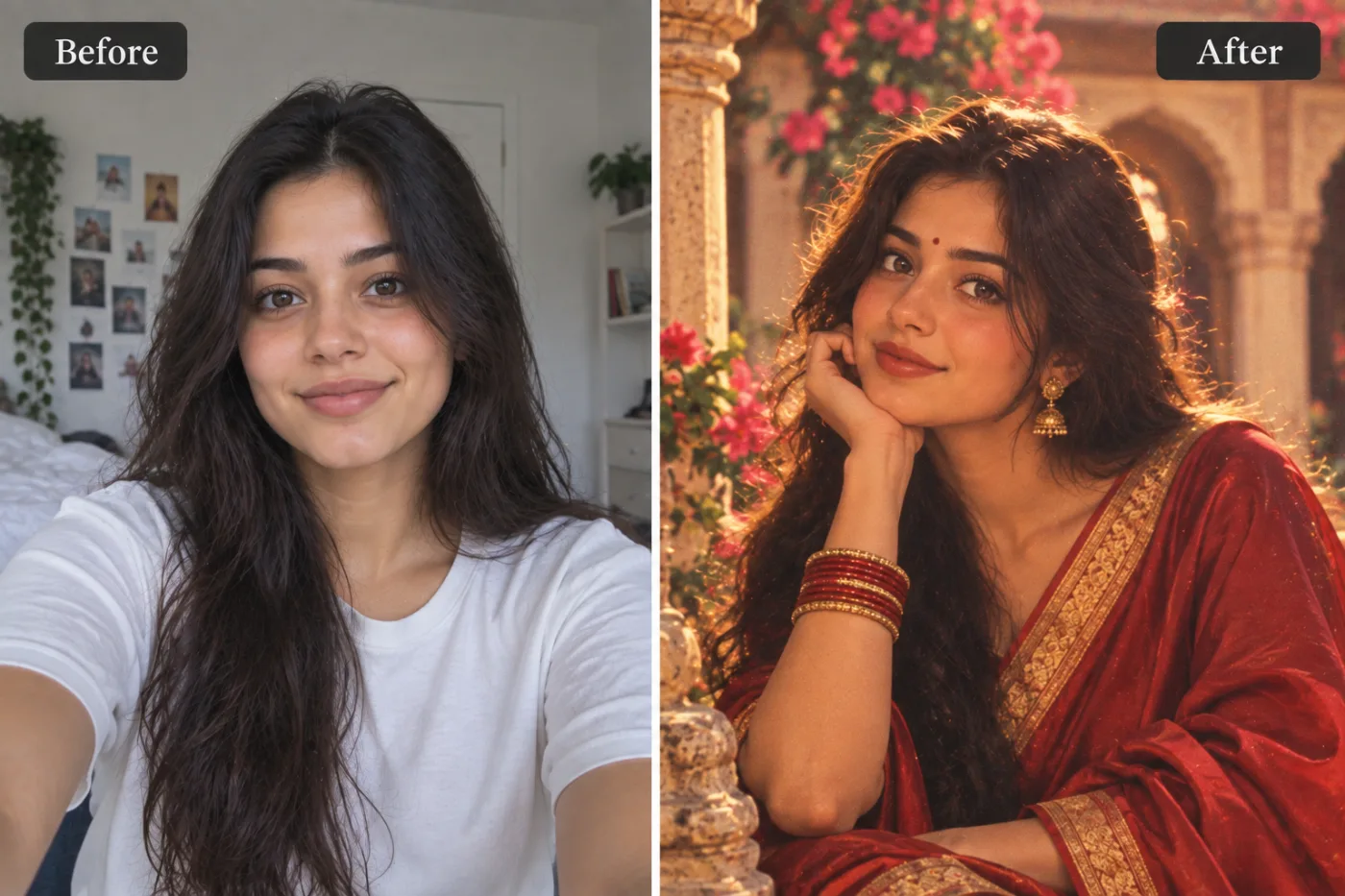
The golden age of Bollywood cinema had a specific visual magic — warm, oversaturated colours, film grain, dramatic lighting, and a timeless glamour. AI can apply the whole aesthetic to any photo instantly.
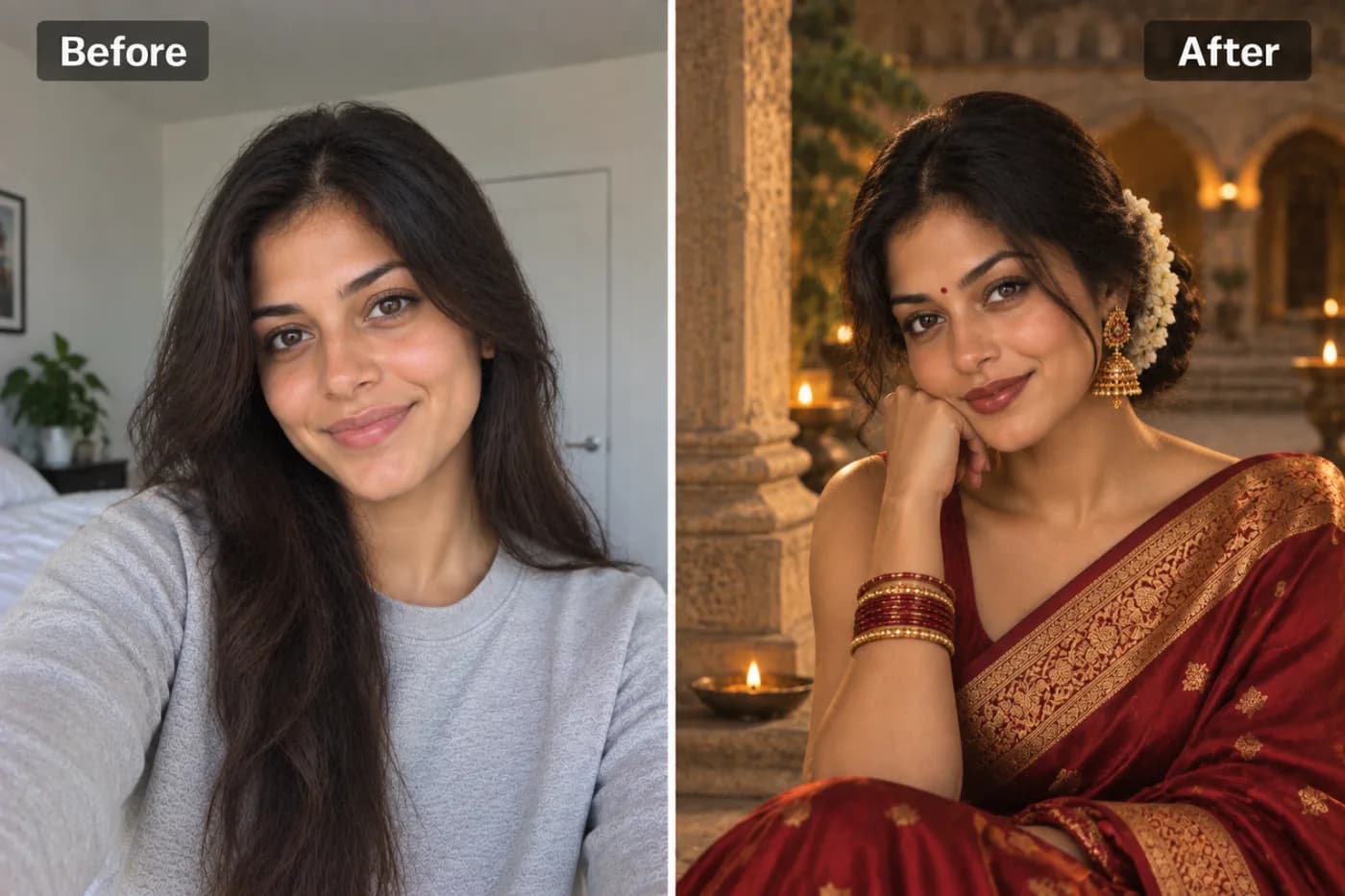
There's something irresistible about the golden era of Hindi cinema — the soft grainy film, the dramatic lighting, the technicolor romance of the 1960s and 70s. With an AI retro Bollywood filter, you can drop yourself straight into that world, transforming an ordinary selfie into a vintage movie-poster portrait that looks like it was shot on a classic film set. No costume rental, no studio, no photographer — just your photo and a few clicks.
This vintage Bollywood photo effect does more than slap a sepia tone on your picture. Modern AI understands the whole aesthetic: the warm color grading, the soft focus glow, the dramatic shadows, the ornate styling, even that unmistakable film-grain texture. The result feels like a still pulled from a beloved classic.
On Pixel Shine, the Bollywood photo filter online free tool runs online. In this guide, you'll learn what defines the retro Bollywood look, how to get authentic results, the mistakes that make it look cheap, and why Pixel Shine's pay-as-you-go credits make it the perfect place to give your photos that golden-era magic.
What Defines the Golden-Era Bollywood Look
To understand why a retro Indian photo filter AI works so well, it helps to know what visual ingredients it's recreating. The classic Bollywood aesthetic isn't one thing — it's a carefully layered combination.
Warm, saturated color grading is central. Think rich reds, deep golds, and warm skin tones that glow. The color palette of vintage Hindi cinema was lush and romantic, far from today's cool, desaturated looks.
Soft-focus glow gives portraits that dreamy, slightly hazy quality — a diffusion effect that flatters the face and adds a touch of old-Hollywood-meets-Mumbai glamour.
Dramatic, directional lighting creates the classic chiaroscuro of movie posters: a bright key light on the face with rich falling shadows that add depth and drama.
Film grain and texture are the finishing touch. Real celluloid had a fine grain that modern digital photos lack, and adding it back instantly signals "vintage."
Finally, there's styling and composition — the poster-like framing, the ornate touches, the theatrical mood. A good AI weaves all of these together automatically, so your photo doesn't just look old, it looks intentionally, gloriously cinematic in the way only that golden era achieved.
Why AI Beats Manual Vintage Editing
You could try to recreate a vintage Bollywood photo effect manually in an editor — adjusting curves, adding grain layers, painting in shadows, and tweaking color balance for an hour. Most people who attempt this end up with something that looks like a generic old-photo filter, missing the specific magic of the Bollywood aesthetic.
The reason AI does it better is that it was trained on the actual look. Rather than you guessing at the right warm tone or grain intensity, the model has learned the relationship between all those elements from thousands of reference images. It knows that the golden-era glow requires a particular combination of color temperature, soft-focus radius, and shadow depth working together — not just one slider pushed to an extreme.
AI also handles your face intelligently. A manual grain-and-color pass treats your whole photo the same way, often making skin look muddy or dull. A trained model applies the cinematic lighting to your features specifically, enhancing them the way a real film cinematographer would light a leading actor.
And it's dramatically faster. What would take a skilled editor 30 to 60 minutes, Pixel Shine's Bollywood photo filter online free does in under a minute — with more consistent, authentic results and zero technical skill required.
Step-by-Step: Get the Retro Bollywood Look
Here's how to transform your photo on Pixel Shine:
Step 1 — Open Pixel Shine and navigate to the Retro Bollywood tool in the Creative AI Photo Effects section. It runs on desktop or phone — no app needed.
Step 2 — Upload your photo. Pick a clear image where your face is well-lit and visible. Portrait-style shots work best for that movie-poster feel. JPG and PNG are both fine.
Step 3 — Select the retro Bollywood style. Choose the golden-era look and, if the tool offers variations, pick the intensity or specific mood you're after.
Step 4 — Generate. Start the transformation and let the AI apply the warm grading, soft glow, dramatic lighting, and film grain. This typically takes 10 to 30 seconds.
Step 5 — Review your portrait. Check that the lighting flatters your face and the vintage effect feels authentic rather than overdone. If it's too heavy or too subtle, adjust settings or re-upload a different source photo.
Step 6 — Regenerate to compare. Create a couple of versions and compare which captures the classic vibe best.
Step 7 — Download. Save your retro Bollywood portrait in full resolution with no watermark. It's ready to print as a poster, share on social media, or use as a striking profile picture.
Start to finish, the process usually takes under two minutes.
Pro Tips for Authentic Retro Results
Start with a portrait-oriented photo. The golden-era Bollywood look is built around poster-style framing, so a head-and-shoulders or three-quarter shot suits it far better than a wide landscape.
Use dramatic or directional lighting in your source. If your original photo already has some shadow and dimension, the AI has more to work with and the cinematic effect deepens. Flat, evenly lit selfies produce flatter results.
Lean into classic styling. Traditional or elegant outfits, jewelry, and hairstyles amplify the vintage feel. A modern hoodie fights the aesthetic; a saree or a sharp classic look enhances it.
Don't fear a bit of grain. Some people instinctively want a clean, sharp image, but the film grain is what sells the era. Embrace it — it's the signature of the look.
Match your background. A neutral or warm-toned background blends beautifully with the golden grading. A bright modern setting can clash with the vintage mood.
Try warm and cooler variations if the tool offers them. The classic look is warm, but a slightly moodier grade can feel more dramatic and poster-like for certain faces.
Common Mistakes to Avoid
Overdoing the intensity. Cranking the vintage effect to maximum can bury your features under grain and haze until you're barely recognizable. A balanced setting looks far more authentic and premium.
Using a low-quality source photo. Grain and soft focus on top of an already blurry image just look muddy. Start with the sharpest, clearest photo you have.
Ignoring the outfit and setting. A retro grade on a photo taken in an obviously modern setting — with a laptop or a car visible — creates a jarring mismatch. Choose source photos that suit the era.
Expecting it to fix bad lighting. The AI enhances lighting but can't fully rescue a harshly backlit or overexposed original. Good input still matters.
Downloading the first attempt without comparing. The first result might be too warm or too heavy. Regenerate and compare — the second or third version often nails the golden-era balance far better.
Perfect Occasions for Retro Bollywood Portraits
The AI retro Bollywood filter shines for all kinds of moments and projects. Wedding and pre-wedding shoots are a natural fit — couples love recreating the romance of classic cinema for save-the-dates, invitations, and framed prints that feel timeless and personal.
Festival and celebration posts get an instant upgrade when you give your outfit-of-the-day a golden-era glow instead of a standard filter. It stands out in a feed full of ordinary photos.
Themed parties and events — retro Bollywood nights, anniversary celebrations, or Sangeet functions — become richer when guests can turn their photos into vintage movie stills as keepsakes.
Social media profile pictures benefit from the dramatic, cinematic look that grabs attention and feels distinctive.
Gifts are another sweet use — transform a photo of your parents or grandparents into a classic-era poster and print it. There's real emotional weight in seeing a loved one styled like the film stars of their youth. Because each portrait costs just 2 credits and downloads without a watermark, you can make an entire series for a family album without a studio bill.
Who Loves the Retro Bollywood Filter
Couples and newlyweds use it to give engagement and wedding content a romantic, cinematic edge that feels far more special than a standard photo.
Content creators and influencers create eye-catching themed posts that stand out and rack up engagement, especially during festival seasons.
Families transform old and new photos into vintage posters as heartfelt gifts — imagine surprising your parents with a golden-era portrait of themselves.
Event photographers and planners offer AI retro portraits as a fun add-on for themed events, giving guests instant, shareable keepsakes.
Nostalgia lovers and film buffs simply enjoy stepping into the aesthetic of the movies they grew up adoring. One user created a full set of retro Bollywood portraits of her whole family, printed them as a gallery wall, and said it was the most-complimented decor in her home. The filter turns everyday photos into something that feels like art with history.
Frequently Asked Questions
Is the retro Bollywood filter free to use?Pixel Shine's creative tools run on credits, with packs starting at ₹166 and no subscription. You pay only for what you create.
What makes a photo look authentically Bollywood-retro?The combination of warm color grading, soft-focus glow, dramatic directional lighting, and film grain. Pixel Shine's AI applies all of these together for an authentic golden-era look rather than a generic old-photo filter.
Will there be a watermark on my download?No. Pixel Shine lets you download your retro Bollywood portrait without a watermark, unlike many competing tools.
What photo should I use for the best result?A clear, well-lit, portrait-oriented photo works best. Classic or elegant styling and a bit of dramatic lighting in the original enhance the effect.
Can I use old family photos?Yes, as long as they're reasonably clear. Transforming photos of parents or grandparents into vintage posters is one of the most popular uses.
Does it work on my phone?Yes. Pixel Shine runs on your phone, so you can create and download retro Bollywood portraits directly from your phone.
How long does the transformation take?Most conversions finish in 10 to 30 seconds depending on image size and demand.
Can I print the result as a poster?Yes. Downloads are full resolution, and you can even use Pixel Shine's free upscaler to boost the size for large prints.
Key Takeaways
An AI retro Bollywood filter transports your photos to the golden era of Hindi cinema — warm grading, soft glow, dramatic lighting, and authentic film grain — without a costume, a studio, or a photographer. The secret to great results is starting with a clear, portrait-oriented photo, embracing classic styling, and keeping the effect balanced rather than overdone.
Pixel Shine makes it genuinely free to start, adds no watermarks, and pairs the retro filter with upscaling for poster-quality prints, all in one online platform. Whether you're creating wedding content, festival posts, or a nostalgic gift for family, head to Pixel Shine, upload your photo, and step into the timeless magic of classic Bollywood in under two minutes.