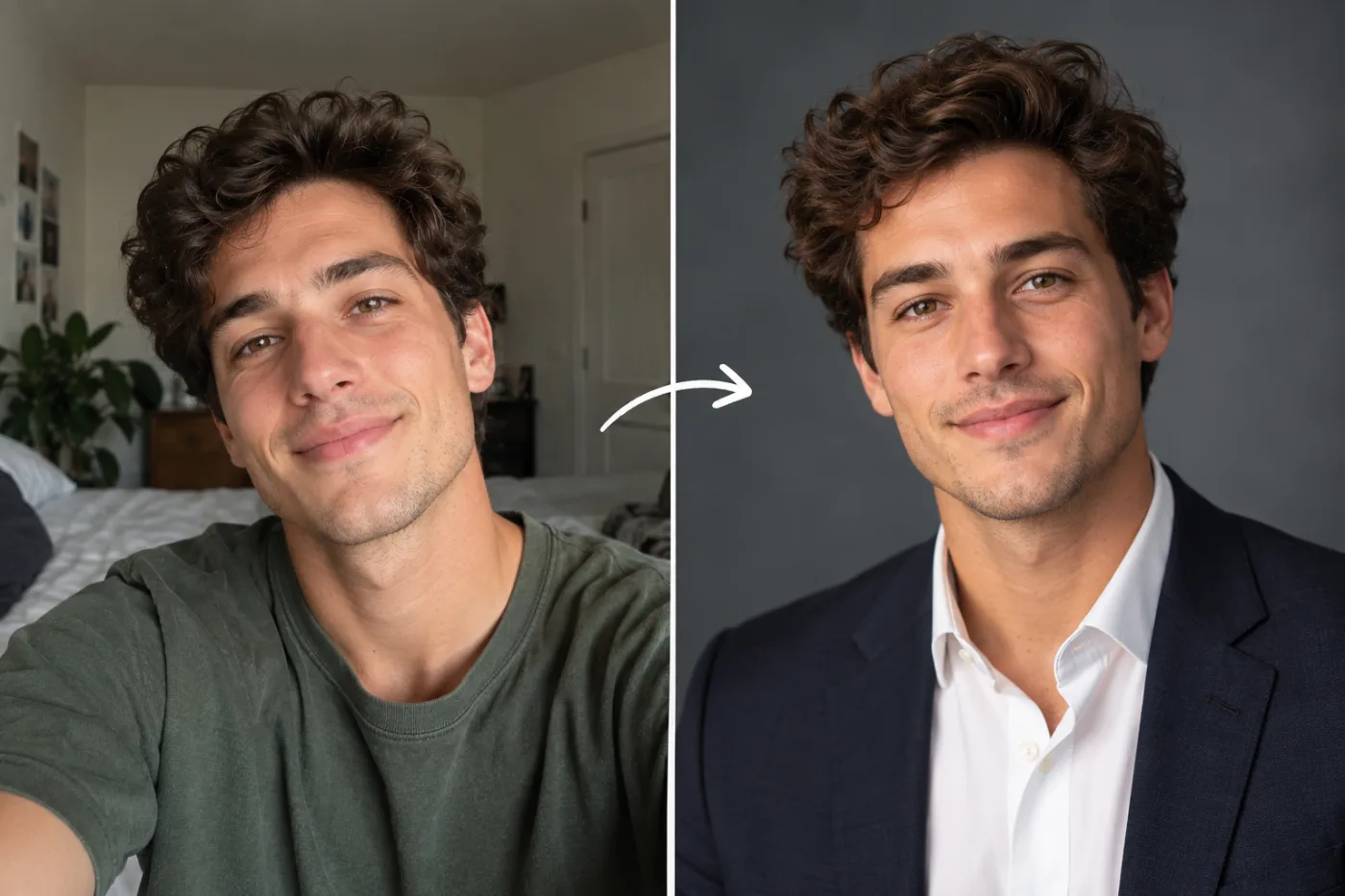
How to Make a Professional LinkedIn Headshot from a Selfie (Free)
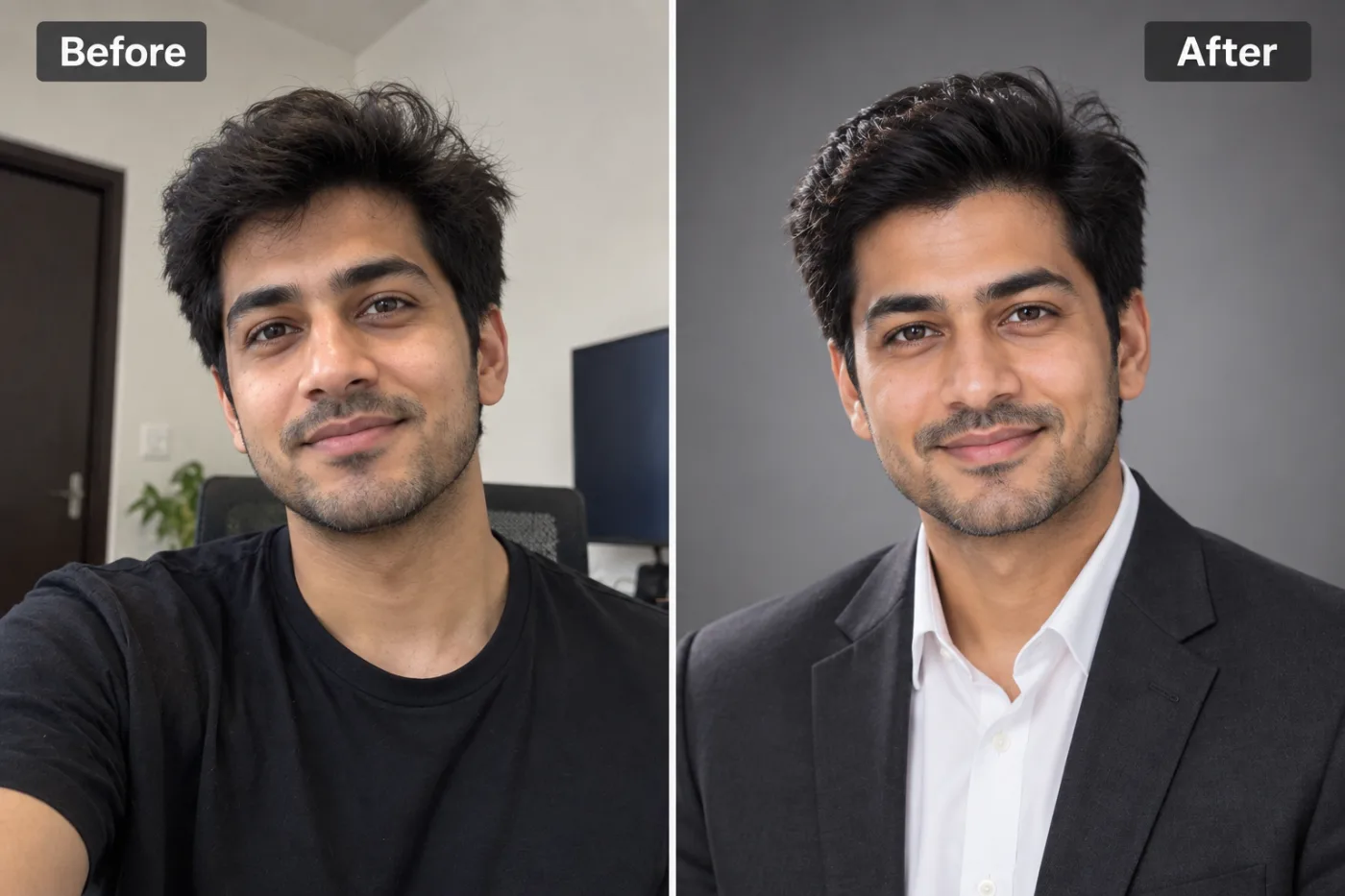
You don't need a photographer for a great LinkedIn photo. Here's how to turn a selfie into a professional AI headshot, free.
Creating a professional LinkedIn headshot from a selfie for free is now completely realistic, and it can genuinely transform how recruiters, clients, and colleagues perceive you. Your LinkedIn profile photo is the single most-viewed element of your entire profile, and research consistently shows that profiles with professional headshots receive up to 14 times more views and significantly more connection requests than those with casual or missing photos. Yet booking a professional photographer costs $150 to $400 and eats up half a day, which is exactly why so many people settle for a cropped vacation photo or an awkward webcam shot.
AI changes this equation entirely. With Pixel Shine, you can turn an ordinary selfie into a polished, studio-quality professional headshot in minutes, with no photographer, no expensive session, and no watermark. In this guide, you'll learn exactly how to convert a selfie into a LinkedIn-ready headshot, which selfies work best as input, the step-by-step process, and the pro tricks that make AI-generated headshots look natural rather than artificial. Whether you're job hunting, building a personal brand, or simply overdue for a profile refresh, this is the fastest, cheapest way to look your professional best.
Why Your LinkedIn Photo Matters More Than You Think
Most people underestimate how much their profile photo influences professional outcomes. The data tells a clear story about first impressions in a professional context.
Recruiters judge in milliseconds. Studies of hiring behavior show that people form impressions of competence, trustworthiness, and likability within about 100 milliseconds of seeing a face. A blurry, poorly lit, or overly casual photo works against you before anyone reads a single word.
Profiles with photos get vastly more engagement. LinkedIn's own data indicates that a profile with a photo is far more likely to be viewed and to receive InMail responses and connection requests. A professional-quality photo amplifies this further.
The bar has risen. As remote work and virtual networking have grown, your online presence often is the first (and sometimes only) impression you make. A cropped party photo signals that you don't take your professional brand seriously.
Consistency builds trust. A clean, professional headshot that matches your resume, email signature, and other platforms creates a coherent personal brand.
The challenge has always been access: not everyone can afford or schedule a professional shoot. That gap is exactly what AI headshot generation closes, giving anyone a credible professional photo from a single selfie.
How Pixel Shine Turns Selfies Into Professional Headshots
Pixel Shine's AI Headshot Generator transforms an ordinary selfie into a professional portrait by analyzing your facial features and generating a polished version with professional lighting, clean backgrounds, and business-appropriate styling, while keeping your actual likeness intact.
Facial likeness preservation. The AI studies the structure of your face in the uploaded selfie, your features, proportions, and expression, so the generated headshot still looks like you, not a stranger.
Professional lighting and framing. Where your selfie might have harsh shadows or flat phone-camera lighting, the AI applies the kind of soft, flattering studio lighting a professional photographer would use, along with proper headshot framing.
Clean, business-ready backgrounds. Instead of your bedroom or a busy street, the generated headshot places you against neutral, professional backdrops appropriate for LinkedIn and corporate use.
Attire and polish. The output looks put-together and professional, elevating a casual selfie into something suitable for a résumé or company directory.
Pixel Shine makes this accessible without the traditional cost or complexity. Results come without watermarks, so your finished professional photo is ready to upload to LinkedIn immediately. There's no studio booking, no travel, and no waiting days for edited proofs.
Step-by-Step: Selfie to LinkedIn Headshot
Follow this process to create your professional headshot from a selfie using Pixel Shine.
1. Take a good source selfie. Face a window in soft, natural daylight (not direct sun). Hold the phone at eye level, roughly arm's length away, and keep your head and shoulders in frame. Use a neutral expression or a genuine, relaxed smile. Avoid heavy filters, sunglasses, and hats.
2. Go to Pixel Shine and open the AI Headshot Generator. Navigate to the headshot tool to begin.
3. Upload your selfie. Drag and drop or select your photo. A clear, well-lit, front-facing selfie gives the AI the best material to work with.
4. Choose your style preferences. Select professional options that match your industry, such as a business or corporate look, and an appropriate background.
5. Generate the headshot. The AI processes your selfie and produces a polished professional portrait in a short time.
6. Review the results. Check that the headshot still looks like you, with natural features and a flattering, professional finish. Confirm the lighting and background suit your industry.
7. Download your headshot. Save the watermark-free result at full quality.
8. Upload to LinkedIn. In LinkedIn, click your profile photo, upload the new headshot, and use the built-in cropping to center your face. Aim for your head and shoulders to fill most of the frame.
9. Refresh other platforms. Reuse the same headshot on your resume, email signature, and other professional profiles for a consistent personal brand.
Pro Tips for Natural-Looking AI Headshots
Start with a sharp, front-facing selfie. The AI works best when it can clearly see your facial features. A slightly blurry or heavily angled selfie limits how accurately it can preserve your likeness. Take a few options and pick the clearest.
Use even, natural lighting in your source photo. Facing a window produces soft, flattering light that helps the AI generate the most realistic result. Harsh overhead light or strong shadows on one side make the job harder.
Keep your expression genuine. A relaxed, natural smile or calm, confident expression translates better than an exaggerated pose. LinkedIn favors approachable professionalism.
Match the style to your industry. A creative professional can lean slightly more relaxed, while finance, law, and corporate roles benefit from more formal styling and neutral backgrounds. Choose settings accordingly.
Generate a few variations. Create multiple options, then pick the one that looks most like you and most professional. Small differences in lighting and framing can make one clearly better.
Check the eyes and hairline closely. These are the areas people notice most. The best AI headshot is one where your eyes look natural and your hairline matches reality, so scrutinize these before finalizing.
Common Mistakes to Avoid
Using a low-quality or filtered selfie. Heavy beauty filters, low resolution, and poor lighting all degrade the AI's ability to preserve your real appearance. Start with a clean, unfiltered, well-lit photo for the most authentic headshot.
Choosing a headshot that looks nothing like you. The goal is a professional version of yourself, not a different person. If a generated result has altered your features too much, regenerate or pick a variation that clearly reads as you, so people recognize you at meetings and interviews.
Over-formalizing for a casual industry. A startup designer in a stiff suit against a corporate gray backdrop can feel off-brand. Match the formality to your actual field.
Ignoring LinkedIn's cropping. Uploading without adjusting the crop can leave your face too small or off-center. LinkedIn headshots should have your head and shoulders filling most of the frame.
Using different photos across platforms. Having one photo on LinkedIn, another on your resume, and a third on your company page fractures your personal brand. Pick one strong headshot and use it consistently everywhere.
Real-World Use Cases
Active job seekers. Candidates refreshing their LinkedIn before a job search generate a professional headshot to make a strong first impression on recruiters, who often view the photo before reading the profile.
Remote workers and freelancers. People who rarely meet clients in person rely on their online headshot as their primary professional face. A polished AI headshot builds instant credibility on LinkedIn, Upwork, and personal websites.
Sales and client-facing professionals. Account executives and consultants use consistent, professional headshots across email signatures and profiles to build trust with prospects before the first call.
Recent graduates on a budget. New grads entering the job market often can't justify $300 for a photographer. An AI headshot from a selfie gives them a professional image for free.
Speakers, authors, and personal brands. Anyone building a public professional presence needs a strong headshot for bios, conference programs, and podcast features, and AI lets them refresh it anytime without a new photo shoot.
AI Headshots vs. Traditional Photographers
Deciding between an AI headshot and a traditional photo shoot comes down to cost, speed, and purpose.
Cost. A professional headshot session typically runs $150 to $400, and premium studios charge more. Pixel Shine generates headshots with no watermark on the result, at 2 credits each.
Speed. A photo shoot requires booking, travel, the session itself, and days of waiting for edited proofs. AI produces a finished headshot in minutes, from your couch.
Flexibility. With AI, you can regenerate variations, try different styles, and update your look whenever you want, no rescheduling required. Traditional shoots lock you into whatever you captured that day.
Where photographers still add value. For executive portraits used in major press, large printed marketing materials, or when you want a highly customized artistic direction, a skilled human photographer offers control and authenticity that matters at that level. For the vast majority of professionals who simply need a clean, credible LinkedIn photo, AI delivers excellent results at a fraction of the cost and time. Many people now use AI for everyday professional needs and reserve a paid shoot only for special high-stakes occasions.
Who Uses AI Headshots and Why
Job seekers top the list, wanting a professional photo that helps them stand out to recruiters and hiring managers without spending money during an already stressful search.
Freelancers and remote professionals need credible headshots for client platforms and personal sites, since their online image often replaces in-person first impressions entirely.
Students and early-career professionals use AI headshots to look polished on LinkedIn while on a tight budget.
Sales, real estate, and consulting professionals rely on trustworthy, consistent headshots to build rapport with clients before meeting them.
Entrepreneurs and personal brands refresh their headshots frequently for bios, speaking engagements, and press features, valuing the ability to update their look on demand. Across all these groups, the shared goal is projecting professionalism and trustworthiness affordably, quickly, and whenever they need it.
Frequently Asked Questions
Can I really make a LinkedIn headshot from a selfie for free?Pixel Shine's AI Headshot Generator creates a professional headshot from a selfie for 2 credits, with no subscription and no watermark, ready to upload to LinkedIn.
Will the AI headshot still look like me?Yes. The AI preserves your facial features and likeness while adding professional lighting, framing, and background. Start with a clear, front-facing selfie for the most accurate result, and choose the variation that best resembles you.
What kind of selfie works best as input?A sharp, well-lit, front-facing photo taken in soft natural light, with your head and shoulders visible, no sunglasses or hats, and a neutral or genuinely relaxed expression.
Is it okay to use an AI headshot on LinkedIn?Yes, as long as it still genuinely represents your appearance so people recognize you. The aim is a professional version of yourself, not a misleading or heavily altered image.
How long does it take to generate a headshot?Just a few minutes from upload to download, far faster than booking and attending a traditional photo shoot.
Do I need to install any app?No. Pixel Shine runs online at Pixel Shine, so you can create your headshot on desktop or mobile with nothing to install.
Can I choose the background and style?Yes. You can select professional styles and backgrounds appropriate for your industry, from formal corporate looks to slightly more relaxed creative styles.
Can I use the same headshot elsewhere?Absolutely, and you should. Using one consistent, professional headshot across LinkedIn, your resume, email signature, and other profiles strengthens your personal brand and helps people recognize you everywhere.
Key Takeaways
A professional LinkedIn headshot is one of the highest-impact upgrades you can make to your professional presence, and you no longer need a photographer or a big budget to get one. By turning a good selfie into a polished, studio-quality portrait, AI lets you make a strong first impression on recruiters and clients in minutes. The keys are simple: start with a clear, well-lit, front-facing selfie, match the style to your industry, generate a few variations, and choose the one that looks most like you.
Pixel Shine makes this fast, affordable, and watermark-free. Ready to upgrade your first impression? Head to Pixel Shine, upload a selfie, and get your professional LinkedIn headshot today.