Free Photo Resolution Increaser — AI Tool That Actually Works
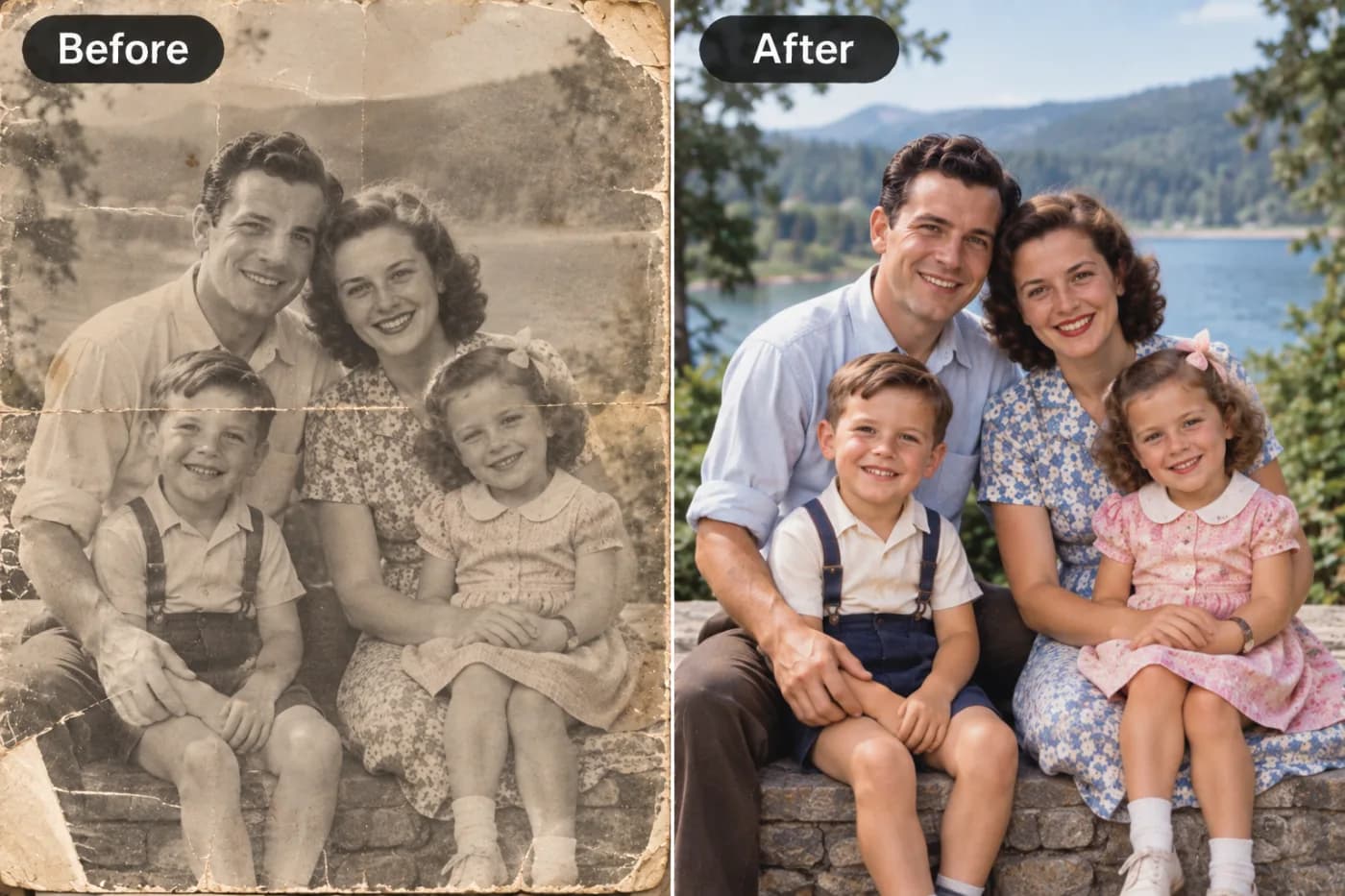
A free photo resolution increaser that works — Pixel Shine uses AI super-resolution to enlarge images while genuinely improving sharpness and detail.
If you've ever searched for a photo resolution increaser free tool, you already know the frustration: dozens of sites promise magic, but most either plaster watermarks across your result, cap you after one or two images, or force you to hand over your email before you can download anything. Finding an AI tool that actually works — and stays free — feels rarer than it should be.
The good news is that AI has genuinely transformed what's possible. A modern tool to increase photo resolution with AI doesn't just stretch your image bigger; it analyzes the content and rebuilds fine detail, so a soft, small photo comes out crisp and clear. This is a completely different technology from the resizers built into your phone or operating system.
In this guide, we'll cut through the noise and show you how Pixel Shine works as a genuine free resolution booster — unlimited Normal upscaling, no watermarks, and no mandatory account. You'll learn exactly how to upscale photo resolution step by step, the tricks that separate great results from mediocre ones, and where this kind of tool fits into real projects. If you've been let down by fake free tools before, this is the practical, honest breakdown you've been looking for.
Why Most Free Resolution Tools Disappoint
The internet is littered with photo resolution increasers that call themselves free but aren't, and understanding why helps you spot the good ones. The watermark trap is the most common. You upload your image, wait for processing, and the result looks great — until you notice a semi-transparent logo stamped across it. Removing it costs money, so the "free" tool was really just a demo.
The signup wall is another. Some sites let you process an image but block the download behind a mandatory account, then flood your inbox with upsell emails. Others give you one free credit and immediately push a subscription.
Then there's the quality problem. Many so-called AI upscalers are just running basic interpolation dressed up with marketing language. They enlarge the image but leave it blurry, because there's no real deep-learning reconstruction happening under the hood.
Hidden resolution caps frustrate users too — a tool might refuse to output anything above a certain size unless you upgrade, defeating the entire purpose. And slow, ad-heavy interfaces bury the actual tool under pop-ups and redirects. The result of all this is a landscape where genuinely finding a free tool that increases photo resolution with real AI, no watermark, and no gatekeeping is the exception rather than the rule — which is exactly the gap Pixel Shine was built to fill.
How Pixel Shine Actually Boosts Photo Resolution
Pixel Shine's resolution increaser is built on genuine AI super-resolution, not the interpolation tricks that make lesser tools disappointing. When you upload a photo, the deep-learning model examines its structure — edges, textures, patterns, faces — and predicts what the missing high-resolution detail should look like based on training across millions of real image pairs.
The free Normal mode handles the vast majority of everyday needs: enlarging web images, sharpening social media photos, boosting product shots, and cleaning up compressed pictures. It's genuinely unlimited and requires no sign-up, so you can process image after image without hitting a wall.
The Pro AI mode steps in when you need maximum reconstruction — heavily degraded photos, detailed portraits, or professional print work. It runs on a more powerful model using credits, delivering the kind of detail recovery that rivals expensive desktop software.
Crucially, Pixel Shine never watermarks your output. Whether you use Normal or Pro, the file you download is clean and ready for personal or commercial use. Combined with the no-mandatory-signup policy for Normal upscaling, Pixel Shine removes the friction that makes other free tools frustrating. You upload, upscale, and download — that's the entire experience, with real quality at every step.
Step-by-Step: Increasing Your Photo Resolution
Boosting your photo's resolution with Pixel Shine takes under a minute. Here's the full walkthrough.
1. Visit Pixel Shine and open the Upscale tool. No account is needed for the free Normal upscaler, so you can begin right away without any setup.
2. Upload your photo. Drag your image into the upload zone or click to browse your files. JPG, PNG, and WEBP formats are all supported directly.
3. Pick your enlargement factor. Choose 2x to double the dimensions or 4x to quadruple them. For example, a 600x400 photo at 4x becomes a detailed 2400x1600 image, ideal for print or large displays.
4. Choose Normal or Pro AI mode. For free, unlimited upscaling, select Normal. If your photo is badly degraded or contains important facial detail, switch to Pro AI mode for the strongest reconstruction.
5. Start the upscale. Click the button and let Pixel Shine process. Most images finish in just a few seconds.
6. Review the result. Zoom into the enhanced image to inspect edges, textures, and any faces. Compare it against the original to confirm the resolution boost.
7. Download your high-resolution photo. Save the finished file straight to your device. There's no watermark and no signup gate blocking your download — the clean, enlarged image is yours to use anywhere immediately.
Pro Tips for Sharper, Cleaner Results
Getting the most from a resolution increaser comes down to a handful of smart practices.
Always start from the highest-quality source available. If you have both a thumbnail and a full version of an image, upscale the full version. The AI has more real detail to work with, so results look far more natural.
Don't over-reach on the factor. A 2x upscale is often plenty and produces cleaner output than forcing 4x on a very small image. Match the enlargement to what you genuinely need.
Reserve Pro AI mode for the hard cases. Portraits, old photos, and heavily compressed images benefit most from the more powerful model, while everyday web images do beautifully in free Normal mode.
Do resolution first in your workflow. Upscale before cropping, color grading, or retouching so all your edits apply to the full-detail image.
Inspect at 100% zoom before using the file. The preview can look perfect while subtle artifacts hide in the full-size result — a quick full-zoom check saves headaches later.
For graphics and text, verify legibility. After upscaling screenshots or logos, confirm that letters and lines stayed crisp rather than developing soft halos, and re-run in a different mode if needed.
Common Mistakes to Avoid
A few recurring errors can hold back your results even with a strong tool.
Re-upscaling an already-upscaled file. Once you've enlarged an image, running it through again to go even bigger often introduces artifacts. If you need more size, go back to the original source and choose a higher factor from the start.
Feeding the tool a heavily compressed screenshot. Screenshots saved and re-saved as JPEG accumulate blocky artifacts. The AI will still improve them, but starting from a cleaner PNG capture yields much better output.
Stretching before upscaling. Manually distorting an image to fit a frame before enlarging warps the subject. Upscale proportionally first, then crop to your desired shape.
Using the wrong mode. Running Normal mode on a badly damaged old photo leaves noise the Pro AI model would clean up. Choose the mode that fits your image's condition.
Skipping the final quality check. Trusting the thumbnail and downloading without inspecting at full size means you might use an image with hidden flaws. Always confirm the full-resolution result looks right before it goes into your project.
Real-World Scenarios Where This Saves the Day
A reliable photo resolution increaser earns its keep across countless situations.
Online marketplaces. Sellers on Amazon, eBay, and Etsy face strict minimum-dimension rules — often 1000 pixels or more — to unlock zoom. Enlarging older or supplier-provided product photos meets those rules without a reshoot.
Print projects. A 900-pixel image looks fine online but prints muddy at 8x10. Boosting it past 3000 pixels first delivers crisp, professional prints, posters, and photo books.
Rescuing web finds. You track down the ideal reference photo, graphic, or meme, but it's only 350 pixels wide. Upscaling makes it usable in designs, presentations, and content.
Family photo archives. Small scans and old phone pictures come out soft. Increasing their resolution readies them for framing and albums at full clarity.
Marketing creative. Turning a small logo or found image into a sharp banner, ad, or thumbnail keeps campaigns looking polished on modern high-DPI screens instead of pixelated and amateurish.
Pixel Shine vs. Other Resolution Increasers
How does Pixel Shine stack up against the alternatives crowding the market?
Against basic online resizers, there's no contest. Those tools use interpolation that averages pixels and always softens the image. Pixel Shine reconstructs real detail, producing sharper output rather than a bigger blur.
Against watermark-and-signup "free" tools, Pixel Shine's advantage is that it's actually free and actually usable. No logo across your image, no mandatory account for Normal upscaling, no one-image demo limit — you get clean, downloadable results without gatekeeping.
Against paid desktop software like Topaz Gigapixel, Pixel Shine offers comparable AI super-resolution quality without the upfront cost, heavy installation, or need for a powerful computer. Everything runs online.
Against subscription-based web upscalers, Pixel Shine's free Normal tier covers everyday needs at no cost, while the Pro AI mode gives you a credit-based option for the toughest jobs. The overall value proposition is simple: professional-grade results, no friction, and a genuinely free path for the majority of use cases, with a powerful paid tier available only when you truly need it.
Who Relies on Free Resolution Boosters
The people reaching for a free photo resolution increaser span every corner of digital life. E-commerce sellers enlarge product images to satisfy marketplace zoom requirements and win more buyer confidence. Freelance designers rescue low-res client assets — logos, headshots, stock photos — so they fit into high-resolution layouts. Social media managers and creators sharpen thumbnails and banners to look crisp on retina displays.
Small business owners upgrade DIY product and storefront photos without hiring a photographer. Bloggers and marketers boost the resolution of images pulled into articles, ads, and email campaigns. Families and hobbyists restore old scanned photos for albums and framing. What ties them together is a practical goal: they have an image that's too small or too soft for the job, and they need it sharp and print-ready fast — without paying, signing up, or accepting a watermark that ruins the result.
Frequently Asked Questions
Is Pixel Shine's photo resolution increaser really free?Yes. The Normal upscaler is free, unlimited, and needs no sign-up. You can boost the resolution of as many photos as you like without paying or hitting a hidden cap.
Does it add a watermark to my photos?No. Pixel Shine never watermarks your images. Every downloaded file is clean and ready for personal or commercial use.
Do I have to create an account?Not for the free Normal upscaler — you can upload, process, and download without registering.
How much can it increase my photo's resolution?You can typically choose 2x or 4x enlargement, quadrupling the pixel dimensions at 4x. For extreme sizes, you can run additional passes from the source.
Will the enlarged photo look blurry?No. Unlike basic resizers that blur images, Pixel Shine's AI reconstructs detail, so your enlarged photo comes out sharper and clearer than a simple stretch.
What file formats can I upload?Common formats like JPG, PNG, and WEBP are supported directly, with no need to convert your file beforehand.
Does it work on phones and tablets?Yes. Pixel Shine runs on any device, so you can increase photo resolution on desktop, laptop, tablet, or phone.
When should I use Pro AI mode instead of Normal?Use Pro AI mode for heavily degraded photos, important portraits, or demanding print work where you need maximum detail recovery. Normal mode handles everyday enlarging perfectly.
Key Takeaways
A photo resolution increaser is only useful if it's genuinely free, genuinely watermark-free, and genuinely powered by real AI — and that combination is rarer than the marketing suggests. Pixel Shine delivers on all three, with an unlimited Normal upscaler that needs no sign-up, clean output every time, and a Pro AI tier for the toughest jobs.
Instead of stretching pixels into a blur, it reconstructs real detail so your photos come out sharp and print-ready in seconds. Stop wrestling with fake free tools and see the difference for yourself — head to Pixel Shine and increase your photo's resolution free right now.