Coastal Cowgirl Aesthetic: AI Photo Filter & Style Guide
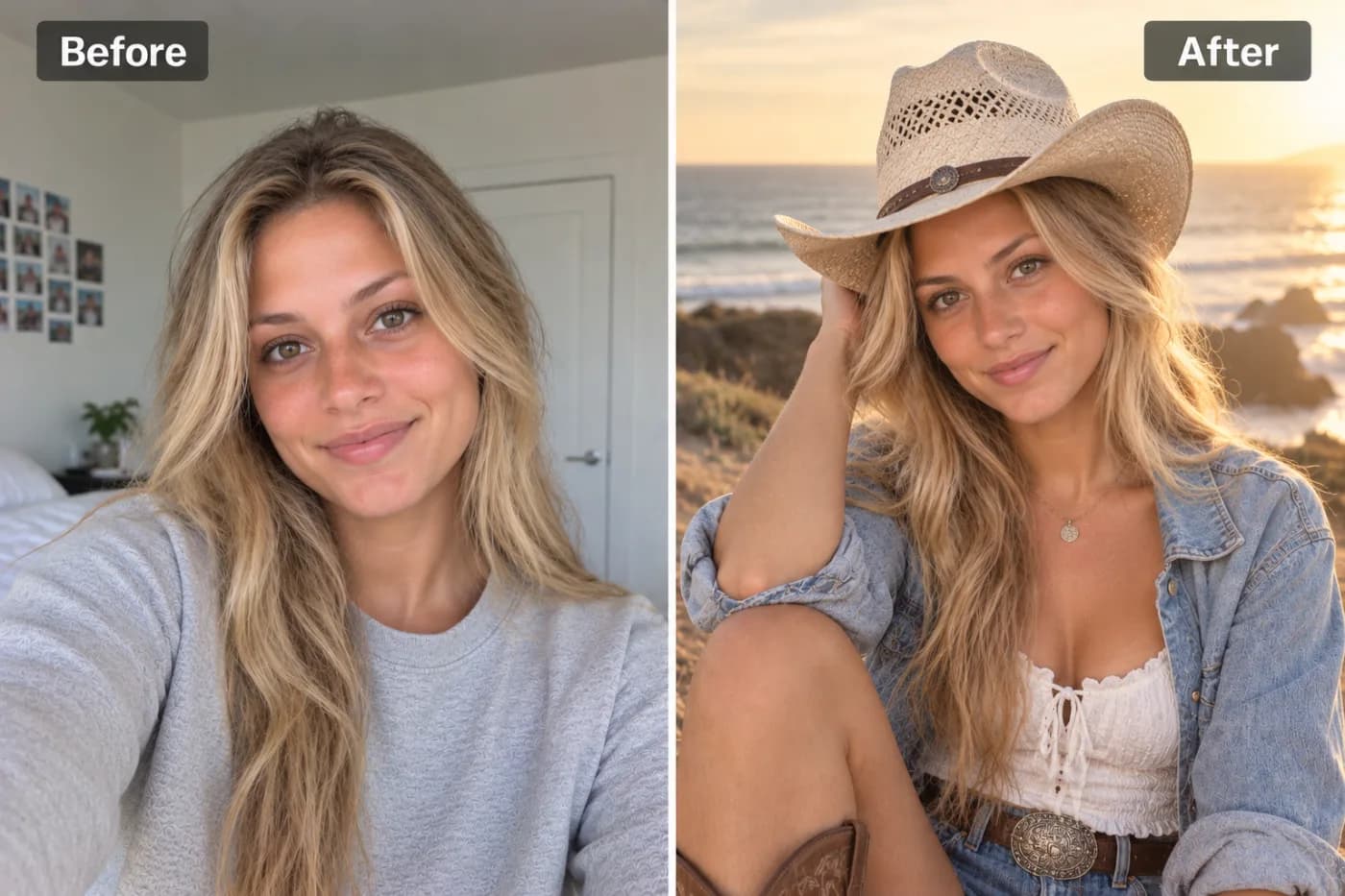
Coastal cowgirl is one of the most searched aesthetics of the last few years — that perfect blend of beach sunshine and Western grit. AI can apply the whole look to any photo you already have.
The coastal cowgirl aesthetic is having a major moment, and now you can apply that sun-bleached, beachy-Western vibe to any photo with an AI filter. Picture the coastal cowgirl look: soft linen and denim, weathered leather boots, a straw cowboy hat, salt-air waves in the hair, and a warm, golden-hour glow that blends ocean-breeze softness with rustic ranch edge. Pixel Shine's coastal cowgirl filter reads your photo and reimagines it in exactly this dreamy, sunkissed style — no styled photoshoot, no beach trip, no wardrobe budget required.
This aesthetic exploded across TikTok and Pinterest, racking up hundreds of millions of views as people fell for its effortless mix of relaxed coastal calm and confident cowgirl charm. The problem is that actually *shooting* the look means a beach location, the right outfit, and perfect golden-hour timing. An AI aesthetic photo filter skips all of it. Upload a normal photo, and the AI handles the styling, lighting, and mood. Best of all, you can try the coastal cowgirl filter online on Pixel Shine with no app and no subscription. Here's how to nail the look.
What Defines the Coastal Cowgirl Aesthetic
To understand why the AI filter works so well, it helps to know what makes this style so recognizable. Coastal cowgirl is a fusion of two aesthetics that shouldn't work together but absolutely do.
The coastal half brings light, airy neutrals — cream, sand, soft blue, and white. Think linen dresses, flowy fabrics, natural textures, sun-kissed skin, and that hazy, warm beach light. It's relaxed, effortless, and a little windswept.
The cowgirl half adds rustic Western grit — a straw or felt cowboy hat, worn leather boots, denim, turquoise jewelry, and a confident, grounded posture. It's the edge that keeps the look from being just another beach photo.
The magic is in the blend. The AI applies coastal softness to the lighting and palette while layering in cowgirl styling cues, producing that unmistakable golden-hour-on-the-ranch-by-the-sea feeling. The color grade leans warm and slightly desaturated, the light is soft and directional, and the overall mood is calm, confident, and sun-drenched. That specific combination is what people mean when they say "coastal cowgirl," and it's what the filter is tuned to deliver.
Why Use an AI Filter Instead of a Real Shoot
Recreating the coastal cowgirl aesthetic for real is surprisingly demanding. You'd need a coastal location, golden-hour timing (a window of maybe 30 minutes), a curated wardrobe of linen and leather, and ideally a photographer who understands the vibe. That's a lot of coordination — and money — for a single aesthetic.
An AI filter removes every one of those barriers. No beach nearby? Doesn't matter. Wrong season, wrong outfit, midday harsh light? The AI restyles it anyway. You get the location feel, the wardrobe cues, and the golden-hour glow applied to a photo you already have.
It's instant and repeatable. A real shoot is a one-shot deal; if the light or outfit is off, you're out of luck. The AI lets you regenerate until the vibe is perfect, and you can apply the aesthetic to dozens of photos in the time a single shoot would take.
It's cheap to experiment. Each coastal cowgirl generation costs 2 credits with no subscription, so you can test the look on a few photos, compare results, and download the best one without a watermark. For an aesthetic that's all about effortlessness, an effortless tool just makes sense.
Step-by-Step: Get the Coastal Cowgirl Look
1. Head to Pixel Shine. Open Pixel Shine and go to the Creative AI Photo Effects section, then select the Coastal Cowgirl filter. No download or account required to start.
2. Pick a flattering source photo. Choose a clear photo where your face and upper body are visible. A relaxed, natural pose suits the aesthetic best — coastal cowgirl is about effortless confidence, not stiff posing.
3. Upload your image. Drag and drop or click to browse. JPG and PNG both work. Use the original file rather than a screenshot for the cleanest styling.
4. Apply the filter. Click generate and let the AI restyle your lighting, palette, and wardrobe cues into the coastal cowgirl aesthetic. This usually takes 15 to 30 seconds.
5. Review the vibe. Check whether the golden-hour glow, warm palette, and Western touches landed the way you wanted. If it feels off, regenerate — because the effect is generative, each pass interprets the aesthetic slightly differently.
6. Download watermark-free. Save your coastal cowgirl photo in full resolution. Pixel Shine won't stamp a watermark across it, so it's ready to post immediately.
7. Upscale for a crisp finish. For Instagram feature-quality or prints, run the result through Pixel Shine's credit-based Normal Upscaler to sharpen and enlarge before sharing.
Pro Tips for the Dreamiest Coastal Cowgirl Photos
Choose warm-toned source photos. Since the aesthetic leans golden and sun-kissed, starting with a warmly lit or neutral photo helps the AI achieve that glow more naturally than a cool, blue-toned image.
Lean into relaxed poses. A candid, easygoing stance — hand on a hat brim, hair caught in a breeze, a soft smile — matches the effortless coastal cowgirl mood far better than a rigid, formal pose.
Neutral or earthy outfits help. If your source photo already features cream, denim, tan, or white, the AI's palette blends more seamlessly. Bright neon clothing fights the soft aesthetic.
Simple backgrounds win. A clean or natural background gives the AI room to apply the coastal atmosphere. A cluttered indoor scene can muddy the vibe — or pair the filter with Pixel Shine's Background Remover for full control.
Regenerate for the perfect glow. The golden-hour quality can vary between passes. Generate a few versions and pick the one where the light feels most magical.
Stack with a glow up. For an extra-polished finish, run the AI Glow Up Filter afterward to perfect the lighting and skin tone.
Common Mistakes to Avoid
Starting with a harsh, cold-lit photo. Fluorescent office light or a flash-heavy night shot fights the warm, soft coastal cowgirl mood. Choose a photo with softer, warmer light when possible.
Overly busy backgrounds. A crowded, high-contrast background distracts from the dreamy aesthetic. Simpler is better, or remove the background entirely first.
Neon or clashing outfits. Bright, saturated clothing pulls against the muted, earthy palette the aesthetic depends on. Neutrals and denim translate best.
Expecting an exact outfit swap. The AI applies styling cues and mood; it's not a precise digital dress-up tool. Embrace the overall vibe rather than expecting a specific boot brand or hat shape.
Forgetting to upscale for prints. The soft, hazy look can appear low-res when enlarged. Run the free upscaler before printing so the aesthetic stays crisp and gallery-worthy.
Coastal Cowgirl and Other Trending AI Aesthetics
Coastal cowgirl is one of a whole family of viral aesthetic filters, and part of the fun is exploring how they compare — and which suits you.
Coastal cowgirl is warm, sun-bleached, and effortlessly confident, blending beach softness with Western edge. It's ideal for summer, travel, and laid-back lifestyle content.
Old Hollywood glamour goes the opposite direction — dramatic monochrome, sculpted lighting, and vintage elegance. Great for a bold, timeless portrait.
Clean girl and soft glam aesthetics focus on polished, minimal, dewy looks, while bolder trends like anime or claymation transform you entirely.
The advantage of using Pixel Shine is that all of these live in one place. You can try the coastal cowgirl filter, then experiment with old Hollywood, a glow up, or a claymation portrait without hopping between apps or paying for each one separately. Because each generation costs just 2 credits and carries no watermark, testing a few aesthetics on the same photo to find your signature look takes only a few minutes. It's the easiest way to discover which viral vibe fits you best.
Who Loves the Coastal Cowgirl Filter
Lifestyle and fashion creators use it to nail an on-trend aesthetic for feed cohesion without booking a location shoot — perfect for summer content calendars.
Travelers and beachgoers apply it to vacation photos to elevate a casual snapshot into a curated, magazine-worthy moment.
Brides and event-goers experiment with the vibe for Western-themed weddings, bachelorette trips, and country-coastal celebrations, often making matching photos for the whole group.
Pinterest and mood-board enthusiasts generate aesthetic images to build out boards and personal branding, since the filter delivers that curated, editorial feel instantly.
Everyday users simply love seeing themselves in a dreamy, sun-kissed style that feels aspirational yet natural.
What unites them is the desire for a specific, trendy aesthetic without the logistics of achieving it in real life. Pixel Shine delivers it watermark-free, with no app and no subscription, so anyone can capture the coastal cowgirl moment in seconds.
Frequently Asked Questions
Is the coastal cowgirl filter free online?Pixel Shine's coastal cowgirl filter runs on credits, with no subscription. Credits are bought in one-off packs from ₹166 and never expire.
Do I need to sign up or download anything?Just a free account. Pixel Shine runs online at Pixel Shine, so there's nothing to download.
Will there be a watermark on my photo?No. Pixel Shine exports clean, watermark-free images ready to post or print.
What is the coastal cowgirl aesthetic exactly?It's a blend of beachy coastal softness — linen, neutrals, golden light — with rustic Western cowgirl elements like straw hats, denim, and leather boots, all wrapped in a warm, sun-kissed mood.
What photo works best for this filter?A clear, warmly lit photo with a relaxed pose and neutral or earthy clothing. Simple backgrounds and soft lighting help the AI achieve the dreamy vibe.
Can I use it on old vacation photos?Yes. The filter is great for elevating casual travel and beach snaps into a curated, aesthetic look.
Can I combine it with other effects?Yes. Pair it with Pixel Shine's Glow Up Filter for perfect lighting or the Background Remover for full control over the scene.
How long does it take?Most photos render in 15 to 30 seconds.
Key Takeaways
The coastal cowgirl aesthetic blends sun-bleached beach softness with rustic Western charm, and Pixel Shine's filter lets you capture that dreamy, golden-hour vibe on any photo — no shoot, no location, no wardrobe budget. For the best results, start with a warmly lit photo, a relaxed pose, and neutral tones, then regenerate until the glow feels magical.
The whole thing runs online on Pixel Shine, with no download, no subscription, no watermark, and free unlimited upscaling for crisp, share-ready images. Whether you're building a Pinterest board, elevating vacation photos, or just chasing a viral vibe, the coastal cowgirl look is a click away. Head to Pixel Shine and try the Coastal Cowgirl filter now.