AI Astronaut Photo Maker: Put Yourself in Space for Free
Space exploration is cool again — and AI lets anyone join the mission. Upload a selfie and get a photorealistic image of yourself in a full NASA-quality spacesuit, floating in orbit or standing on the lunar surface.
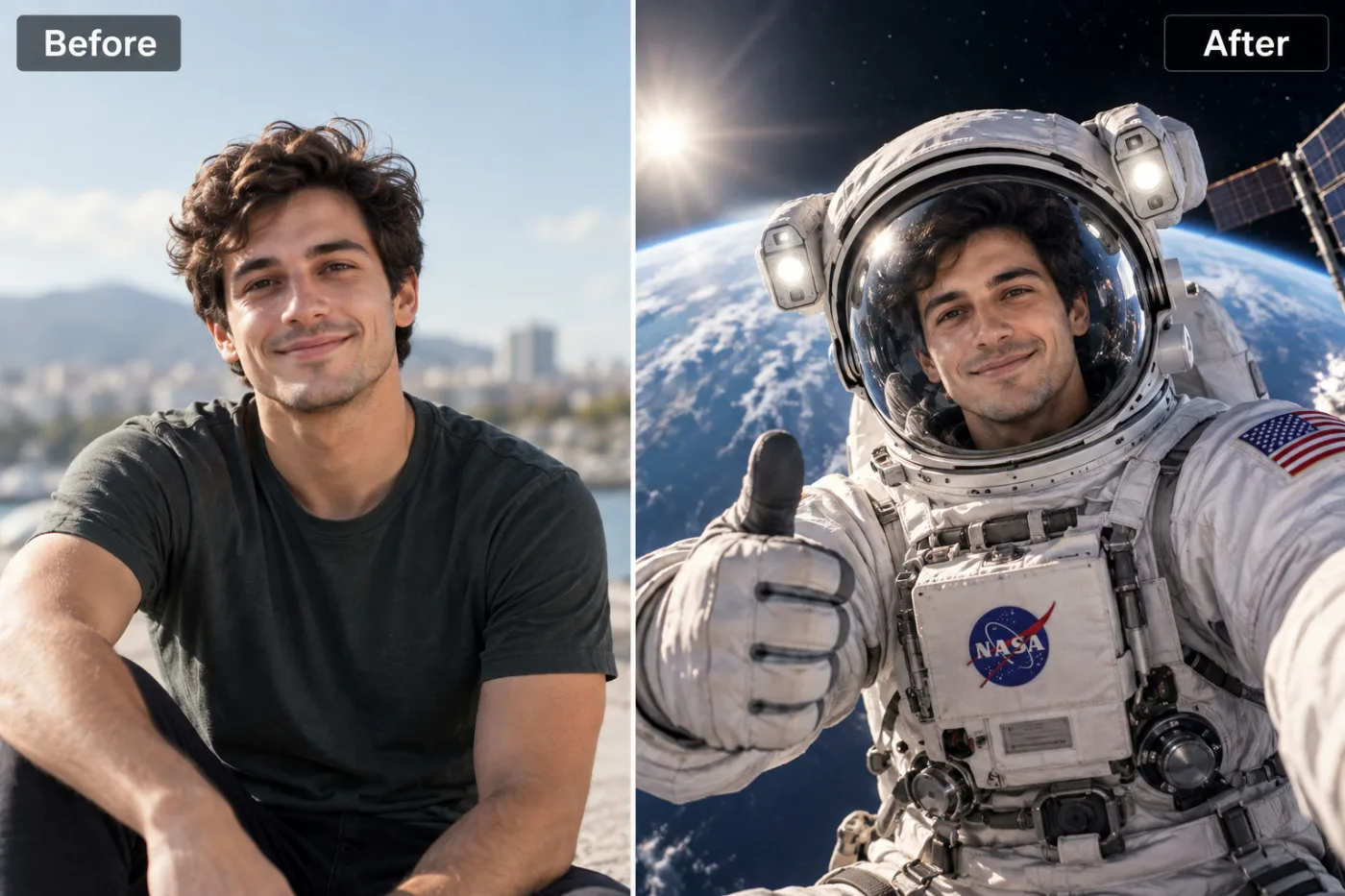
Ever wanted to see yourself floating among the stars in a full spacesuit? An AI astronaut photo maker lets you put yourself in space for free, turning an ordinary selfie into a jaw-dropping cosmic portrait — you in a detailed astronaut suit, helmet visor reflecting distant galaxies, Earth glowing behind you. Pixel Shine's astronaut photo effect does exactly this: upload a normal photo, and the AI places you in a realistic space scene, complete with the suit, the helmet, and the stunning celestial backdrop. No green screen, no costume, no NASA clearance required.
Space imagery is universally captivating — it's aspirational, dramatic, and just plain cool. That's why the "put yourself in space AI" trend has taken off across social media, with people transforming into astronauts for profile pictures, posters, kids' room art, and unforgettable gifts. The best part is that Pixel Shine's space photo effect runs online with no app or subscription, and exports without a watermark. This guide covers how the astronaut effect works, the exact steps to create yours, pro tips for a realistic result, and who's using it.
What the AI Astronaut Effect Creates
The astronaut photo effect isn't a simple sticker of a helmet pasted over your head — it's a full generative transformation that builds a believable space scene around you.
A detailed spacesuit. The AI outfits you in a realistic astronaut suit, rendering the fabric texture, chest control panel, and suit lighting so it looks like you're genuinely geared up for a mission.
The iconic helmet and visor. A properly rendered helmet frames your face, often with a reflective visor that can catch highlights from the surrounding space scene — a small detail that dramatically sells the realism.
A cinematic space backdrop. Behind you, the AI generates a cosmic environment: the star-scattered blackness of space, the curve of Earth glowing blue below, nebulae, or a lunar surface. This backdrop is what turns a portrait into an epic.
Realistic lighting integration. Crucially, the AI matches the lighting on your face and suit to the scene, so you look like you belong in the shot rather than pasted on top of it.
Because it's generative, each render produces a slightly different space scene — a different Earth angle, star pattern, or lighting mood — giving you variety to choose from every time you generate.
Why AI Beats a Studio or Photoshop for Space Photos
Getting a convincing astronaut photo the traditional way is a serious undertaking. A studio shoot with a real spacesuit prop, green screen, and professional compositing can run hundreds of dollars and requires a skilled editor to make the space background look believable. DIY Photoshop compositing, meanwhile, demands real skill — masking, lighting matching, and color grading — and even then it's easy to end up with an obviously fake cut-and-paste look.
AI does the compositing for you. The model generates the suit, helmet, and space scene as an integrated whole, automatically matching lighting and perspective so everything looks cohesive. There's no manual masking and no telltale hard edges.
It's instant and free to iterate. A studio shoot is a one-time, expensive event. The AI lets you regenerate as many space scenes as you like in seconds, so you can pick the perfect Earth angle or star field.
No skill required. You don't need to know a single thing about photo editing. Upload, generate, done. And because each generation costs just 2 credits with no watermark, you can try a few versions before picking a favorite for a large print. For 99% of people, the AI route delivers a better result faster and for a fraction of the cost.
Step-by-Step: Put Yourself in Space
1. Open Pixel Shine. Go to Pixel Shine and navigate to the Creative AI Photo Effects section, then choose the Astronaut Photoshoot effect. No download or account is needed to begin.
2. Select a clear face photo. Since the helmet frames your face, choose a photo where your face is well-lit and front-facing. A head-and-shoulders shot works best because the AI focuses on placing your face inside the helmet.
3. Upload your image. Drag and drop or click to browse. JPG and PNG both work. Use the original file for the sharpest facial detail inside the visor.
4. Generate your space scene. Click generate and let the AI build your spacesuit, helmet, and cosmic backdrop. This typically takes 15 to 30 seconds.
5. Review the result. Check how your face sits inside the helmet and how the space scene looks behind you. If the lighting or background isn't quite right, regenerate — each pass creates a fresh space environment.
6. Download watermark-free. Save your astronaut portrait in full resolution. Pixel Shine doesn't stamp a watermark across it, so it's ready to share or print immediately.
7. Upscale for posters. Space portraits look incredible printed large. Run the image through Pixel Shine's credit-based Normal Upscaler first so the suit details, stars, and Earth stay crisp at poster size.
Pro Tips for a Realistic Astronaut Photo
Use a front-facing, well-lit face. The helmet frames your face directly, so clear, even lighting on a front-facing photo produces the most convincing result. Harsh side shadows can look odd inside a helmet.
Choose a neutral or confident expression. Astronaut portraits look best with a calm, heroic vibe. A slight smile or a determined look reads as authentic mission-ready confidence.
Keep hair and accessories simple. Since the AI fits a helmet around your head, very large hats or elaborate hairstyles in the source can complicate the fit. A simpler head shape helps the helmet sit naturally.
Regenerate for the best backdrop. The space scene varies each time — different Earth angles, star densities, and lighting. Generate several versions and pick the most cinematic one.
Match the mood you want. Want a dramatic deep-space look or a bright Earth-orbit glow? Regenerating gives you different atmospheres to choose from until you land the vibe you're after.
Upscale before printing. For a framed poster or a kid's wall art, always run the free upscaler so the fine suit and star details stay sharp when enlarged.
Common Mistakes to Avoid
Using a side-profile or angled photo. The helmet is designed to frame a front-facing face. A steep profile or a photo shot from below fights the helmet fit and can look unnatural. Choose a straight-on portrait.
Starting with a dark or blurry face. Since your face shows through the visor, a poorly lit or out-of-focus source makes the most important part of the image weak. Use a clear, well-lit photo.
Expecting a specific real spacesuit. The AI generates a realistic-style suit, not a replica of a particular NASA or SpaceX design. Embrace the cinematic interpretation rather than expecting exact accuracy.
Settling for the first render. The space backdrop varies with each generation. If the first Earth angle or star field isn't perfect, regenerate — it's just 2 more credits, and the next one might be stunning.
Skipping the upscale for large prints. Space scenes have tons of fine detail — stars, suit textures, Earth's surface — that can soften when printed big. Always upscale first for gallery-quality prints.
Creative Ways to Use Your Astronaut Photo
The astronaut effect is one of the most versatile creative filters because space imagery fits so many contexts.
Profile pictures and avatars. An astronaut portrait instantly stands out in a sea of ordinary selfies — perfect for social media, gaming profiles, and creative branding.
Kids' room and nursery art. Turn a photo of your child into an astronaut and print it as framed wall art. It's a magical, personalized decoration that sparks imagination — and a favorite among parents.
Gifts for space lovers. Anyone fascinated by space, rockets, or sci-fi will love a custom astronaut portrait of themselves as a birthday or holiday gift.
Event and party themes. Space-themed birthdays, science fair projects, and classroom activities all benefit from personalized astronaut photos of the participants.
Motivational posters. "Reach for the stars" hits differently when it's literally you among them. Some people print their astronaut portrait as a desk or wall motivator.
Because Pixel Shine is watermark-free and costs just 2 credits per image, you can create astronaut versions of your whole family or friend group and print an entire cosmic gallery.
Who Uses the AI Astronaut Photo Maker
Parents create astronaut portraits of their kids for bedroom art, birthday invitations, and keepsakes — it's one of the most popular family uses of the tool.
Space and sci-fi enthusiasts make cosmic profile pictures and personal art that reflects their passion for the stars.
Teachers use astronaut photos of students for space-unit projects, bulletin boards, and end-of-year keepsakes that kids adore.
Content creators generate eye-catching, share-worthy space portraits that stop the scroll and stand out from typical selfies.
Gift-givers surprise the space lover in their life with a custom astronaut portrait printed on a poster, mug, or canvas.
What they all have in common is wanting an epic, aspirational image without the cost or complexity of a studio composite. Pixel Shine delivers it in seconds, with no app, no subscription and no watermark — so putting yourself, your kid, or your whole class in space is genuinely effortless.
Frequently Asked Questions
Can I put myself in space with AI for free?Pixel Shine's astronaut photo maker runs on credits, with no subscription. Credits are bought in one-off packs from ₹166 and never expire.
Do I need an account or an app?You need a free account, but no app. Pixel Shine runs online at Pixel Shine with nothing to download.
Will my astronaut photo have a watermark?No. Pixel Shine exports clean, watermark-free images ready to share or print.
What photo works best for the astronaut effect?A clear, well-lit, front-facing head-and-shoulders photo. Since the helmet frames your face, even lighting and a straight-on angle produce the most convincing result.
Is the spacesuit an accurate NASA replica?The AI generates a realistic-style astronaut suit and helmet, not an exact replica of a specific agency's design. It's a cinematic interpretation built for a stunning portrait.
Can I make an astronaut photo of my child?Yes, and it's one of the most popular uses. Kids' astronaut portraits make magical wall art, invitations, and keepsakes.
Can I print my astronaut portrait as a poster?Yes. Download the full-resolution image and run it through Pixel Shine's free upscaler first so the stars, suit, and Earth stay crisp at large sizes.
How long does it take?Most astronaut photos render in 15 to 30 seconds.
Key Takeaways
An AI astronaut photo maker lets you put yourself — or your kids — in space in seconds, complete with a realistic spacesuit, helmet, and a cinematic cosmic backdrop. No studio, no green screen, no editing skills needed. For the best result, use a clear, front-facing, well-lit photo, regenerate to find the most stunning space scene, and upscale before printing.
Pixel Shine makes the whole experience simple, with no download, no subscription, no watermark, and free unlimited upscaling for poster-perfect prints. Whether it's a bold profile picture, a magical kid's room decoration, or a gift for the space lover in your life, your cosmic portrait is a click away. Head to Pixel Shine and put yourself in space now.