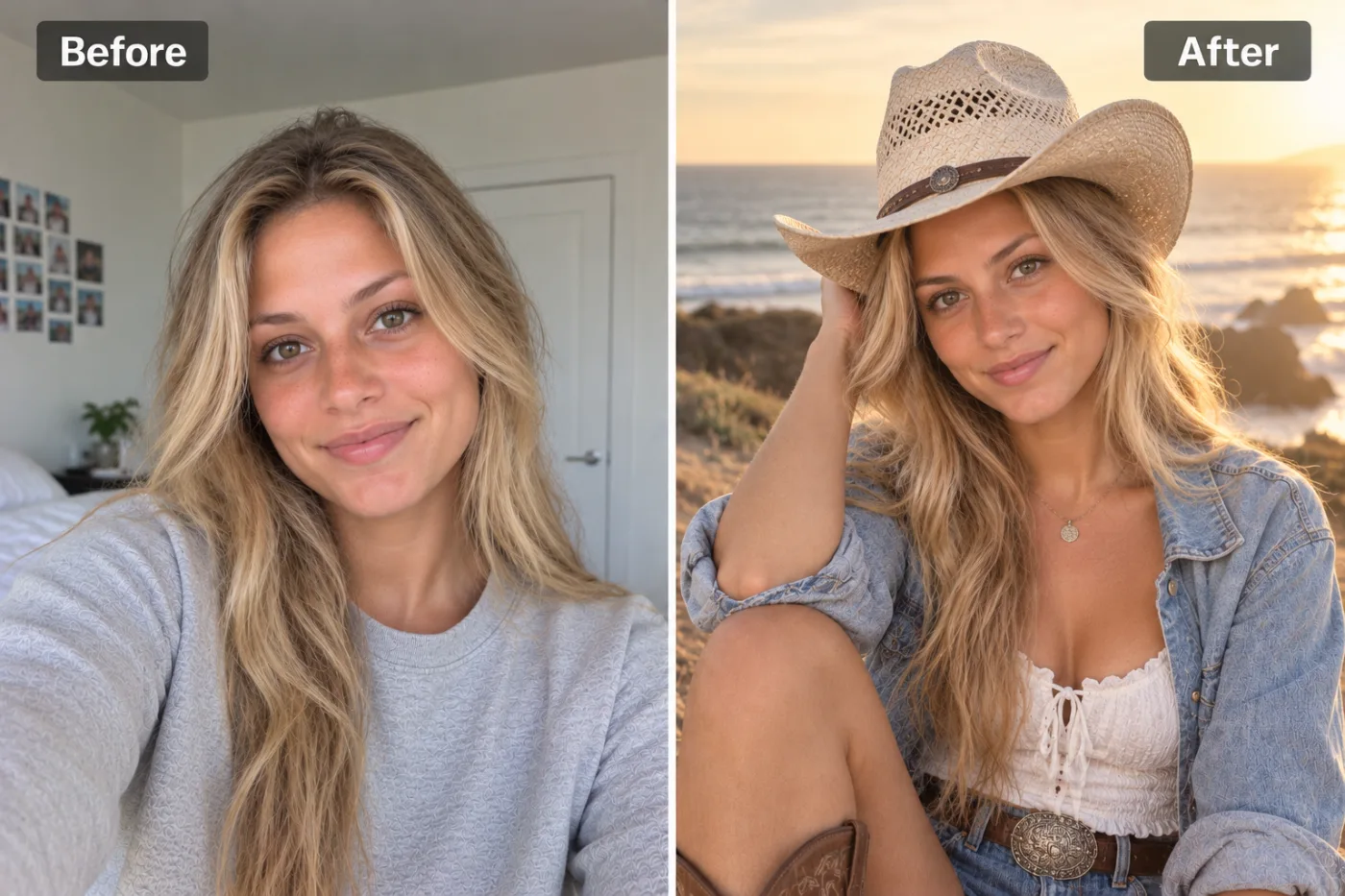
What is the coastal cowgirl aesthetic?
Coastal cowgirl is a mash-up of two very different worlds: the ranch and the beach. Picture a straw cowboy hat and western boots, but paired with light-wash denim, white linen and lace, loose sun-bleached hair and the warm light of an evening by the sea. It's relaxed, romantic and a little bit country, without the dust.
The look took off on social feeds in 2023 and has stayed around since, often alongside its cousins, coastal grandmother and cowboy-core. Its colours are easy to spot: soft blues, white, cream, sand and a hint of tan leather. Its mood is golden hour, every time.
What does the app do to your photo?
It restyles you for a coastal cowgirl shoot and photographs you there. It adds the straw cowboy hat, light denim and white linen or lace, subtle western accessories such as a belt buckle or boots, and beachy, sun-bleached hair. Then it places you somewhere breezy and ocean-adjacent, lit by warm, low golden-hour sun.
Your face stays exactly as it is. The result is built to look like a real photograph, with natural skin texture, real shadows and believable light, not like a painting or an obvious filter. That's what makes it useful for a profile picture: people see you, just on a better evening.
Who tries the coastal cowgirl look?
Anyone curious about the trend
You don't need to buy a hat, boots and a denim jacket to find out if the style suits you. Try it on a selfie first.
Creators and influencers
Post a coastal cowgirl set without a trip to the beach or a styled shoot. It's a quick way to join a trending theme while it's hot.
Fashion and boutique sellers
Use the results as mood shots for a western or beachwear collection, to show the vibe before a real campaign shoot.
Brides and bachelorette planners
Western-beach bachelorettes and "last rodeo" parties are popular. Make a themed photo of the bride for the invite or group chat.
Moodboard makers
Collect a set of yourself in the look to plan an outfit, a holiday wardrobe or a real photoshoot with a photographer.
Settings: change the place and the light
Both settings start on Auto, which gives the seaside sunset look. Change them to take the styling somewhere else.
| Setting | Try | Result |
|---|---|---|
| Setting | Beach | Sand, calm water and open sky, the purest coastal look |
| Setting | Outdoors | A scenic spot such as a path or a terrace, more ranch than beach |
| Setting | Garden | Wildflowers and greenery, a softer country version |
| Setting | City street | Western styling in town, a fashion-week street-style take |
| Lighting | Golden hour | Warm low sun and a glowing rim around your hair and hat |
| Lighting | Bright & airy | Light, high-key and summery, almost washed out |
| Lighting | Moody | Darker, richer and more dramatic, for an evening feel |
How to style a convincing coastal cowgirl photo
- Start with your hair down. Loose hair turns into the beachy waves that define the look more naturally than an updo.
- Use daylight. Photos taken near a window or outdoors blend most convincingly into golden-hour light.
- Face and shoulders visible. The hat and jacket are built around them; a tight face crop leaves the styling with nothing to work on.
- Skip sunglasses. They hide your eyes, and the hat already gives the photo its shape.
- Run it a few times. Hats, tops and poses change every run. Pick the version you'd actually wear.
What the app won't do
- Dress you in a specific item. It styles the look in general. To try a particular jacket or dress, describe it in the outfit changer.
- Place you at a real beach. The coast is invented. It won't recreate Malibu or a particular resort.
- Change your face or body. Only your clothes, hair styling, setting and light change.
- Keep your exact pose every time. It may sit you on rocks, lean you on a fence or walk you along the sand.
More aesthetic trends to try
If coastal cowgirl suits you, try the old money aesthetic for camel coats and quiet luxury, or the Y2K aesthetic for a flash-lit early-2000s party look. For a polished portrait with a hat and coat but a city backdrop, the outfit changer lets you describe the exact look.
Ideas for your coastal cowgirl photos
A summer profile picture
Golden light and a straw hat say summer instantly. Crop it square in the crop tool for a profile.
A themed carousel
Make three or four versions with different settings, beach, garden, street, and post them together.
A trip teaser
Going somewhere sunny? Post your coastal cowgirl photo as a countdown before the real holiday photos.
What are the key pieces of a coastal cowgirl outfit?
The straw cowboy hat
The single most important piece. Natural straw, a wide brim and a relaxed shape keep it beachy rather than rodeo.
Light-wash denim
A cropped denim jacket, denim shorts or a long denim skirt. Light and faded, never dark indigo.
White linen or lace
A lace top, a linen shirt or a floaty white dress softens the western pieces and keeps it summery.
Western details
A belt with a big buckle, cowboy boots, a little turquoise jewellery or a bandana. One or two is enough.
Beachy hair and light
Loose, sun-bleached waves and warm evening light finish the look. The app adds both.
Want to see one exact piece on yourself, say a white maxi dress with boots? Describe it in the outfit changer and pick Beach as the setting.
Coastal cowgirl, coastal grandmother or cowboy-core?
They're often mixed up. Coastal grandmother is calm and classic: cream knits, linen trousers, a beach house kitchen, no western touches at all. Cowboy-core is the full western look, dark denim, leather and suede, in a desert or ranch setting. Coastal cowgirl sits between the two: the western hat and boots, but the light colours, lace and seaside mood of the beach. This app is built for that middle ground.
Price, and where your photo goes
Each photo uses 2 credits, charged only when the image arrives. Packs from $2 never expire. If your country has a free trial running, you'll see it above the upload and your first photo is free.
The selfie is sent to fal.ai, our image-model partner, only to create the restyled photo. We never sell it or use it to train AI. Your results live in My Creations, where you can delete them whenever you want.


