How to Get Consistent Corporate Team Headshots for Free
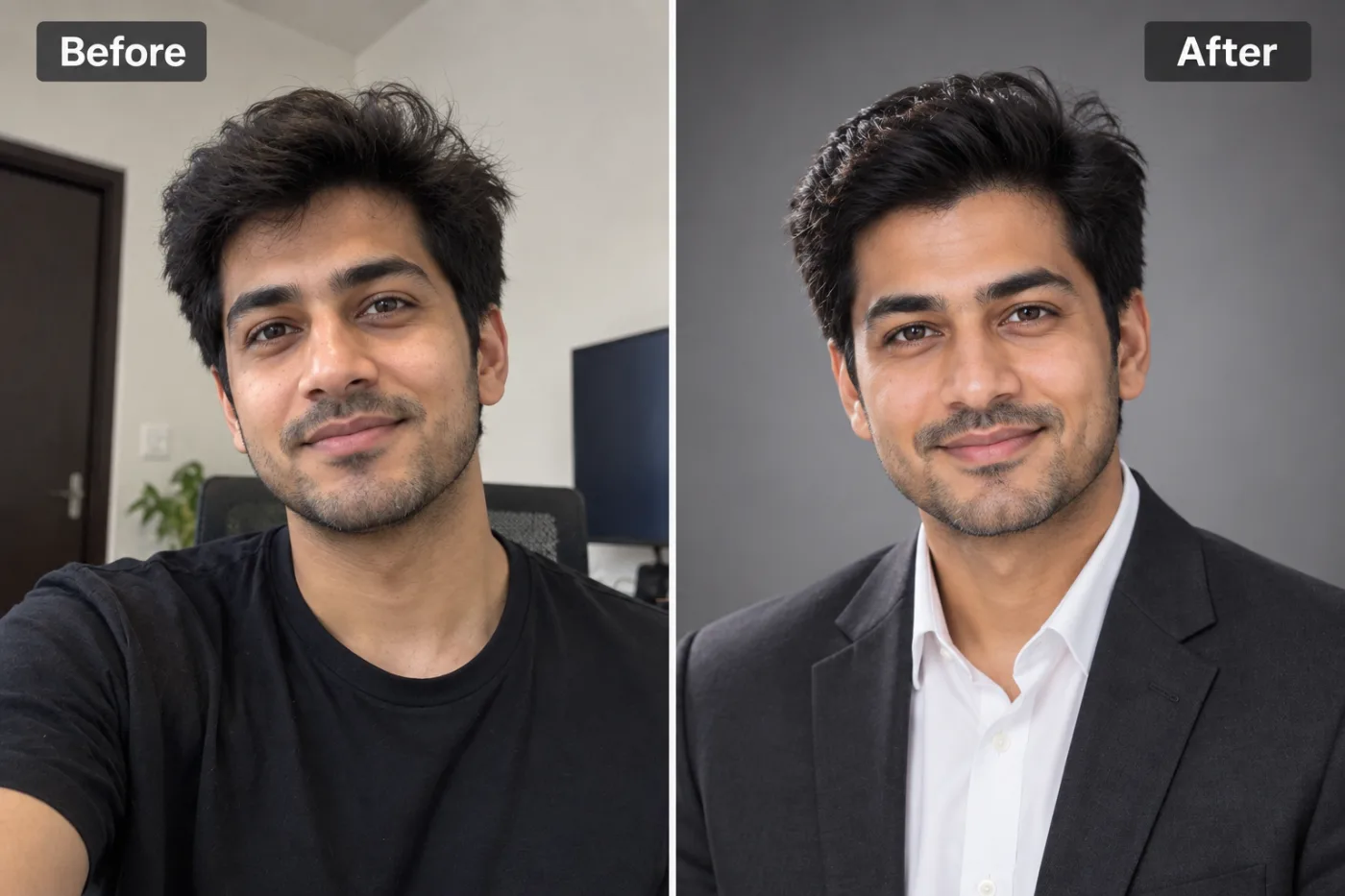
Matching, professional team headshots make a company look credible. Here's how to generate them for free with AI — no studio day required.
Getting consistent corporate team headshots for free used to be a logistical nightmare, but AI has completely changed the game. If you've ever tried to coordinate professional photos for an entire team, you know the pain: scheduling a photographer, herding remote employees, matching lighting and backgrounds across everyone, and paying $100 to $300 per person. For a 20-person company, that's easily $4,000 and weeks of coordination, and the moment someone new joins, your team page looks mismatched again. This is exactly why so many company About pages feature a jarring collage of selfies, cropped group photos, and headshots taken years apart.
Pixel Shine offers a dramatically simpler path. Using its AI Headshot Generator, every team member can turn a simple selfie into a professional headshot, and by applying consistent style and background settings, you can achieve a unified, polished look across your entire team, with no photographer, no watermark, and no scheduling headaches. In this guide, you'll learn how to create consistent corporate team headshots for free, coordinate a distributed team, maintain visual consistency, and keep your look uniform even as your company grows. It's the modern, budget-friendly way to make your whole team look professional.
Why Consistent Team Headshots Are So Hard to Get
The struggle to get uniform team photos comes from real logistical and financial barriers that only worsen as teams grow and go remote.
Scheduling across busy calendars. Coordinating a single day when every team member is available for a photographer is difficult even for co-located teams, and often impossible for distributed ones.
Remote and hybrid work. With employees spread across cities or countries, flying a photographer to everyone (or everyone to a studio) is impractical and expensive.
Cost that scales linearly. At $100 to $300 per person, professional headshots for a growing team become a serious budget line, and there's no volume shortcut with traditional photography.
The consistency problem. Even when you do organize a shoot, matching backgrounds, lighting, framing, and styling across dozens of people is genuinely hard. Different photographers, different days, and different studios produce noticeably different looks.
Constant churn. New hires arrive, others leave, and within months your carefully coordinated team page is a patchwork again, requiring another mini-shoot to fix.
These friction points explain why so many companies simply give up and accept a mismatched grid of employee photos. AI headshot generation removes nearly all of this friction, letting anyone contribute a consistent-looking headshot from wherever they are, whenever they onboard.
How Pixel Shine Creates Consistent Team Headshots
Pixel Shine enables consistent corporate headshots by letting every team member generate a professional portrait from a selfie using the same style and background settings, producing a unified look without a coordinated photo shoot.
Standardized styling. When each person selects the same professional style and background options in the AI Headshot Generator, the resulting headshots share a coherent visual language, similar lighting, framing, and backdrop, so they look like a set rather than a random collection.
Location independence. Because the tool runs online, a team member in New York and one in Manila can each generate their headshot from home. There's no travel, studio, or shared schedule required.
Likeness preservation. Each generated headshot still looks like the individual, applying professional polish while keeping their real features recognizable.
Effortless scaling. Onboarding a new hire six months later? They follow the same simple steps with the same settings and instantly match the existing team gallery.
Pixel Shine makes this affordable and fast: outputs carry no watermark, so headshots are ready to drop straight onto your website or directory. Instead of a multi-thousand-dollar shoot and weeks of coordination, a manager can share a short style guide, and the whole team generates matching professional headshots on their own time.
Step-by-Step: Coordinate Consistent Team Headshots
Here's how a team lead or HR manager can roll out consistent AI headshots across a company.
1. Define a headshot style standard. Decide on the look: the professional style, background color or type, and general framing you want everyone to use. Write this down as a short, shareable guideline.
2. Prepare a selfie guideline for the team. Instruct everyone to take a sharp, front-facing selfie in soft natural light (facing a window), at eye level, head and shoulders in frame, no sunglasses or hats, and a neutral or relaxed expression.
3. Share the Pixel Shine link and instructions. Send the team the AI Headshot Generator link along with the exact style and background settings to select, so everyone uses identical options.
4. Each member uploads their selfie. Every team member visits the tool, uploads their selfie, and applies the agreed-upon settings.
5. Generate and review. Each person generates their headshot and confirms it looks like them and matches the team standard. They can try a couple of variations.
6. Collect the finished headshots. Team members download their watermark-free results and submit them through a shared folder or your HR system.
7. Review for consistency. The coordinator checks the full set together, confirming backgrounds, framing, and styling are cohesive. Ask anyone whose photo looks off to regenerate with the correct settings.
8. Publish and document. Add the headshots to your website, directory, and profiles. Save the style guide so future hires can match the look exactly.
Pro Tips for a Cohesive Team Look
Lock in one background choice for everyone. The fastest way to make headshots look like a set is a shared background. Pick a single professional backdrop and require every team member to use it, this alone creates strong visual unity.
Standardize the selfie conditions. Ask everyone to shoot facing a window with similar framing. Consistent input lighting leads to more consistent generated output across the team.
Create a one-page visual guide. Include an example headshot and the exact settings to choose. People follow a clear visual reference far better than written instructions alone.
Have one person review the full grid. Before publishing, view all headshots side by side. Seeing them together makes any outliers obvious, and those individuals can quickly regenerate.
Keep the style guide for onboarding. Store your settings and guidelines so every future hire matches the existing team automatically, preventing your page from drifting back into inconsistency.
Try a couple of variations. Encourage team members to generate a couple of variations and submit the one that best matches the standard and looks most like them, rather than accepting the first result.
Common Mistakes to Avoid
Not defining a standard upfront. If you let everyone choose their own style and background, you'll recreate the exact mismatched-grid problem you were trying to solve. Agree on settings before anyone starts.
Inconsistent selfie quality. If some people submit crisp window-lit selfies and others send dark, blurry ones, the generated headshots won't match well. Provide clear selfie instructions to level the input quality.
Skipping the group review. Publishing headshots individually as they come in, without ever viewing the full set together, lets inconsistencies slip through. Always review the complete grid before going live.
Over-formalizing for your culture. A casual creative agency forcing stiff corporate styling can look inauthentic. Match the standard to your actual company brand and culture.
Failing to document the process. If you don't save your settings and guidelines, the next round of hires won't match, and you'll be back to a patchwork within months. Treat the style guide as a living onboarding asset.
Real-World Use Cases
Startup and SMB About pages. Small and growing companies use AI headshots to give their team page a professional, unified look without a photographer, instantly boosting credibility with visitors and investors.
Remote and distributed teams. Fully remote companies whose members span multiple countries generate matching headshots from home, achieving consistency that would be impossible to coordinate physically.
Fast-growing companies with frequent hiring. Organizations onboarding new people every month use a documented style guide so each hire's headshot matches the existing team automatically, keeping the directory cohesive.
Sales and consulting firms. Client-facing teams present a polished, trustworthy united front across LinkedIn, proposals, and the company site, reinforcing professionalism at every touchpoint.
Conferences and event pages. Companies preparing speaker or team lineups for events generate consistent headshots quickly, ensuring the whole roster looks coordinated in programs and promotional material.
AI Team Headshots vs. Hiring a Photographer
Choosing between AI headshots and a traditional team shoot depends on your budget, team distribution, and how often your roster changes.
Cost. A photographer charging $100 to $300 per person means thousands of dollars for a mid-sized team, plus reshoots for new hires. Pixel Shine's credits are inexpensive and results are watermark-free, which keeps team headshots affordable.
Logistics. Traditional shoots require aligning everyone's schedules and, for remote teams, expensive travel. AI headshots let each person generate theirs independently, from anywhere, on their own time.
Consistency over time. With a documented AI style guide, headshots stay uniform as people join and leave. Traditional photography drifts out of sync the moment you hire someone after the shoot.
Scalability. AI scales effortlessly to teams of any size at no additional per-person cost. Photography costs scale linearly with headcount.
Where a photographer still fits. For executive leadership portraits used in major press, annual reports, or large-scale marketing, a professional shoot may still be warranted for the top few individuals. Many companies now use AI headshots for the whole team and reserve professional photography only for a handful of leadership images, capturing most of the savings while keeping premium quality where it counts most.
Who Uses Team Headshots and Why
Startup founders and small business owners use consistent team headshots to make their company look established and trustworthy on the About page, often when trying to win customers or investors on a tight budget.
HR and people-operations teams coordinate headshots for directories and onboarding, valuing a repeatable process that keeps the company gallery cohesive as headcount changes.
Remote-first companies rely on AI to solve the otherwise impossible problem of getting matching professional photos from a globally distributed workforce.
Marketing teams need unified team imagery for the website, pitch decks, and campaigns that reinforce a professional brand identity.
Agencies and consultancies present a polished, consistent team to clients across proposals and profiles. For all of these users, the shared goal is a professional, unified team image achieved affordably, quickly, and without ongoing coordination pain.
Frequently Asked Questions
Can I get corporate team headshots for free?At a fraction of a photographer's fee. Each team member uses Pixel Shine's AI Headshot Generator at 2 credits per headshot, and results have no watermark. By having everyone use the same settings, you get a consistent, professional team gallery.
How do I make everyone's headshots look consistent?Define a standard before you start: the same professional style, the same background, and the same selfie conditions (soft window light, front-facing, head and shoulders). Share these settings with the whole team so everyone's output matches.
Do all team members need accounts?Each person uses the AI Headshot Generator with their own account. The Normal upscale mode requires no sign-in; the headshot generator needs a free account.
How do we keep new hires consistent with the existing team?Document your exact settings and selfie guidelines as an onboarding asset. Each new hire follows the same steps and instantly matches the existing headshot gallery.
Will the headshots still look like each employee?Yes. The AI preserves each person's real facial features while adding professional lighting, framing, and background, so everyone remains recognizable.
How long does it take to headshot a whole team?Since each person generates their own in minutes, an entire team can complete their headshots within a day, versus weeks of coordinating a traditional shoot.
Can remote employees participate?Absolutely. That's a key advantage. Because the tool runs online, remote and distributed team members generate matching headshots from home with no travel required.
Is a watermark added to the headshots?No. Pixel Shine produces watermark-free headshots ready to publish directly on your website, directory, and profiles.
Key Takeaways
Consistent corporate team headshots no longer require a photographer, a coordinated shoot day, or a four-figure budget. With AI, every team member can generate a professional headshot from a selfie, and by standardizing style and background settings, you achieve a unified, polished look across your entire team, even a fully remote one. The keys to success are defining a clear standard upfront, giving good selfie instructions, reviewing the full set for consistency, and documenting the process for future hires.
Pixel Shine makes this fast, affordable, and watermark-free. Ready to give your team page a professional upgrade? Head to Pixel Shine, share the style guide with your team, and build a consistent, credible team gallery today.