
HD
4K
✦
✦
✓
☁️ Pixel Shine

Profile Picture Upscaler

Make a small or blurry profile photo sharp again for LinkedIn, Instagram, WhatsApp, YouTube or a work directory. Upscale it, then crop it square or into a circle.

📤
Drop your image here
or click to browse from your device
or drop image anywhere
Supports JPG · JPEG · PNG · WEBP · up to 16 MB
By uploading you agree to our Terms of Use and Privacy Policy
Profile Picture Upscaler — before (low resolution photo)Low-Res Input
Profile Picture Upscaler — after (sharper, larger result)✨ 4K AI Upscaled
On this page
  1. How do you fix a blurry profile picture?
  2. Why do profile pictures look blurry?
  3. Who needs a sharper profile picture?
  4. Does upscaling change your face?
  5. Tips for a great profile photo
  6. Is fixing a profile picture free?

How do you fix a blurry profile picture?
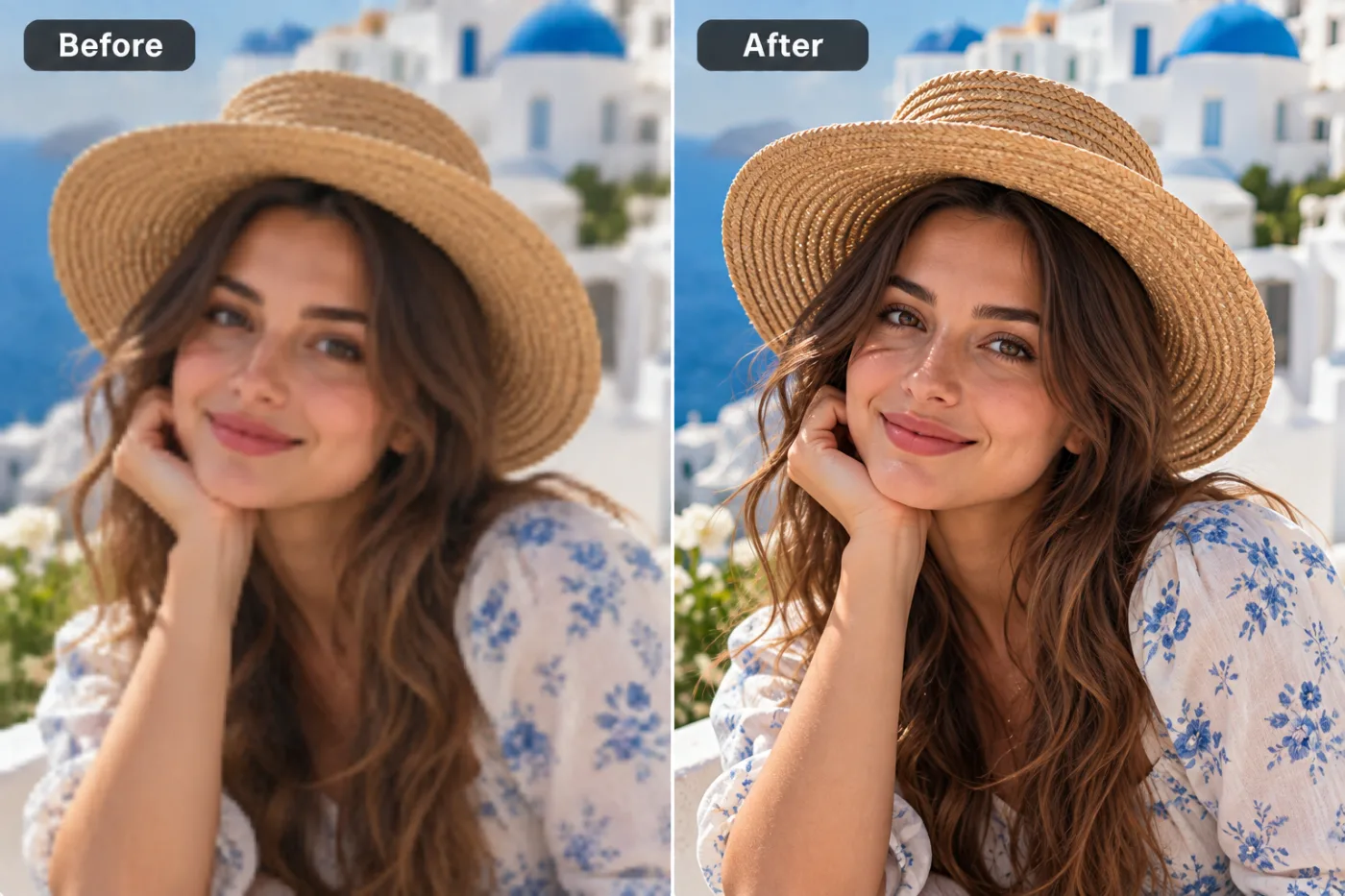
A slightly soft portrait of a woman in a straw hat next to a sharper version with clearer hair and skin detail
A soft portrait upscaled with clearer hair, skin and fabric. Made with the Image Upscaler app.

1. Pick the best photo you have

The original from your camera roll, not a copy saved from a chat or a social site, which is usually compressed.

2. Upscale with Pro AI

Drop it here and choose Pro AI (2 credits) at 2×. It rebuilds eyes, hair and skin detail, which is exactly what makes a small face look sharp.

3. Crop it square or round

Use the crop tool: Square for most platforms, or Circle for a round PNG with transparent corners. Then download.

Why do profile pictures look blurry?

Three usual reasons. The photo was cropped from a bigger picture, so the face is only a small part of it. It was saved from a chat or social app, which compresses images heavily. Or the platform shows it larger than it is, for example a 200-pixel image on a LinkedIn profile viewed on a big screen. Each platform also recompresses what you upload, so starting sharp matters.

PlatformA safe size to upload
LinkedInAt least 400 × 400 pixels
YouTube800 × 800 pixels
Instagram, WhatsApp, XAround 1,000 × 1,000 for a crisp result everywhere
Work tools (Slack, Teams, Zoom)500 × 500 or more

Platforms change their recommendations from time to time; when in doubt, a sharp square of about 1,000 pixels works almost everywhere.

Who needs a sharper profile picture?

Job seekers

Recruiters see your LinkedIn photo first. A sharp, well-lit face looks more professional than a blurry crop of a party photo. For a full studio-style portrait, see LinkedIn headshot.

Creators

Your channel icon appears on every video and comment. Upscale it so it's crisp on TVs and big monitors, not just phones.

Small businesses

A shop's logo or owner photo on WhatsApp Business, Google Business Profile and Instagram should look clean wherever customers see it.

Teams

Directory and chat photos taken from old group shots can be upscaled so everyone's picture looks equally sharp.

Does upscaling change your face?

Normal mode never changes anything; it only enlarges and sharpens. Pro AI aims to keep your likeness and usually does, but it redraws fine detail, so look closely at your eyes, teeth and hairline. If something looks slightly different, run it again; each run is a fresh attempt. Don't use it to change how you look for profiles where people need to recognise you.

Tips for a great profile photo

  • Face fills most of the frame, with a little space above your head.
  • Soft light from the front, like a window, flatters everyone.
  • Plain background. If yours is busy, the background remover or AI photo editor can replace it.
  • Look at the camera and keep it recent.
  • Use the same photo everywhere so people recognise you across platforms.

Is fixing a profile picture free?

Cropping and a Normal 2× enlargement are free. The Pro AI pass, the one that makes a small face look genuinely sharp, is 2 credits for one photo, and you're only charged if it succeeds. One pack from $2 is enough to fix your picture on every platform you use.

More use cases
Free Old Photo Enhancer & RestorerFree 4K Image UpscalerFree Anime & AI-Art Upscaler

Guides

All headshots & portraits guides →
How to Enhance and Unblur Your Profile Picture for Free
11 min read
How to Upscale Your Profile Picture for LinkedIn & Professional Use
11 min read
Free 4K Image Upscaler — AI Tool for Ultra-HD Photo Quality
11 min read
AI Image Upscaler: Enhance Any Photo to 4K Quality
11 min read
More Free Tools

All your image tools in one place

The browser tools are free with no watermark · the AI tools use credits

🗜️Image CompressorOpen →🔀Image ConverterOpen →✂️Crop ImageOpen →🔄Rotate & FlipOpen →↔️Resize ImageOpen →🔖Add WatermarkOpen →😂Meme GeneratorOpen →📄Image to PDFOpen →🫥Blur ImageOpen →🔳QR Code GeneratorOpen →
Pricing

Monthly plans or one-time credits.

Profile Picture Upscaler and every other browser tool are free and unlimited. Credits are only for the AI features — 2 credits per generation. Go monthly for the lowest price per credit and cancel any time, or buy an add-on whose credits never expire.

Starter
₹415/mo≈ $5
24 credits every month12 AI generations · ₹17.3 per credit

Try the AI tools every month.

Creator
₹996/mo≈ $12
64 credits every month32 AI generations · ₹15.6 per credit

Regular edits for your feed.

StudioBest value
₹2,075/mo≈ $25
150 credits every month75 AI generations · ₹13.8 per credit

The lowest price per credit.

Renews monthly · cancel anytime in Settings, no further charges · monthly credits refresh each renewal and don't carry over. 2 credits per AI generation; the free tools stay free.

See full pricing and questions

FAQ

Frequently Asked Questions

How do I make my profile picture clearer?
Upscale the original photo with Pro AI at 2×, then crop it square or into a circle. Upload the result to your profile.
What size should a profile picture be?
A sharp square of around 1,000 × 1,000 pixels works almost everywhere. LinkedIn asks for at least 400 × 400 and YouTube recommends 800 × 800.
Why does my profile picture look blurry?
Usually because it was cropped from a bigger photo, saved from a chat app, or is shown larger than it is. Start from the original and upscale it.
Will it change my face?
Normal never does. Pro AI aims to keep your likeness but redraws fine detail, so check the result and run it again if needed.
Can I make it round?
Yes. Use the crop tool's Circle shape for a round PNG with transparent corners.
How much does it cost?
Pro AI costs 2 credits per photo. Normal 2× upscaling and cropping are free.
Can I change the background too?
Yes. Remove it with the background remover, or describe a new one in the AI photo editor.
Is there a watermark?
No. Your new profile picture downloads clean, ready to upload.