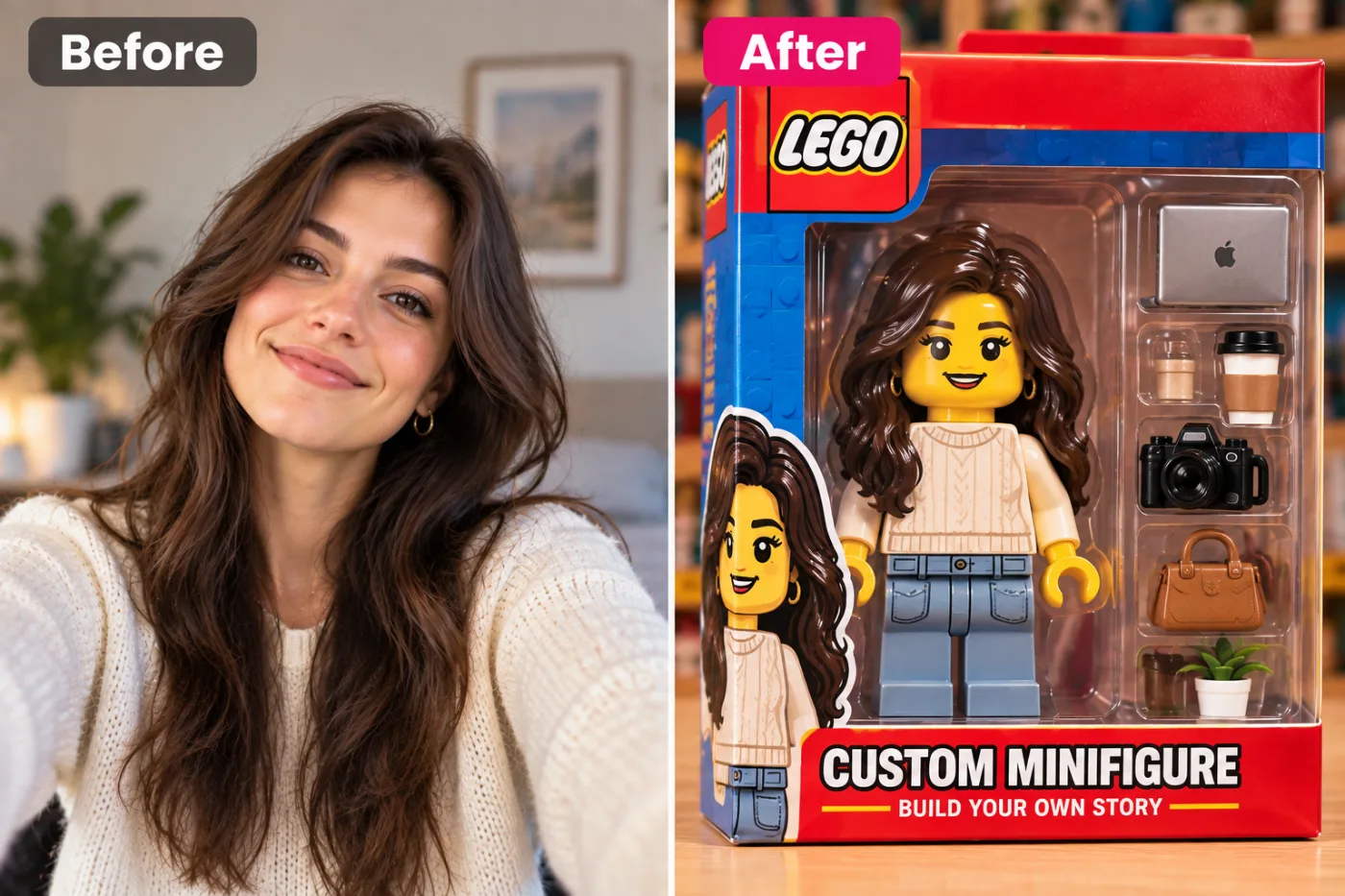
Turn Your Photo into a 3D Figurine with AI
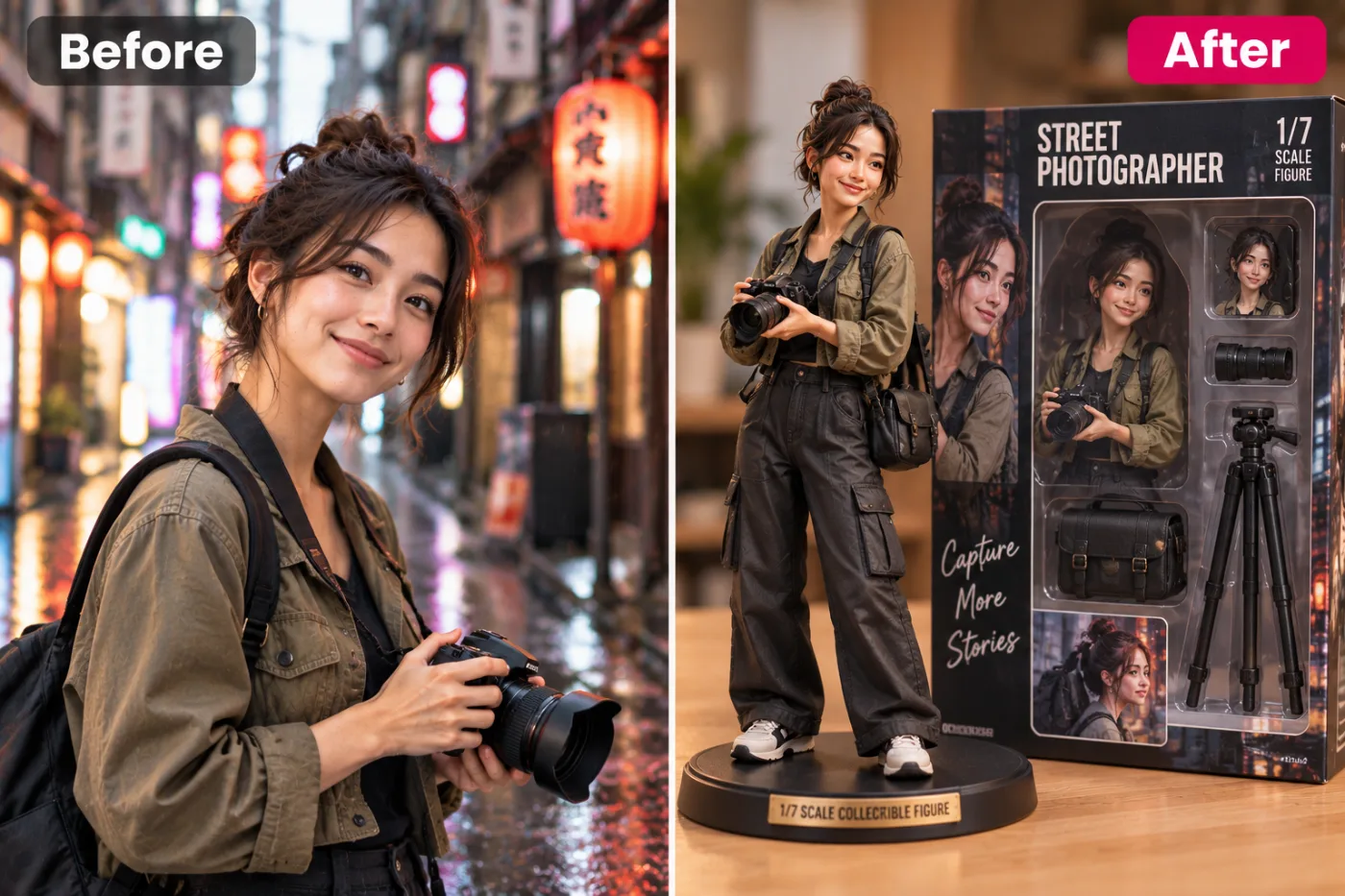
Custom 3D figurines cost hundreds of dollars and take weeks to produce. AI can render a photorealistic 3D figurine portrait from any selfie in seconds — no 3D printing or manufacturing required.
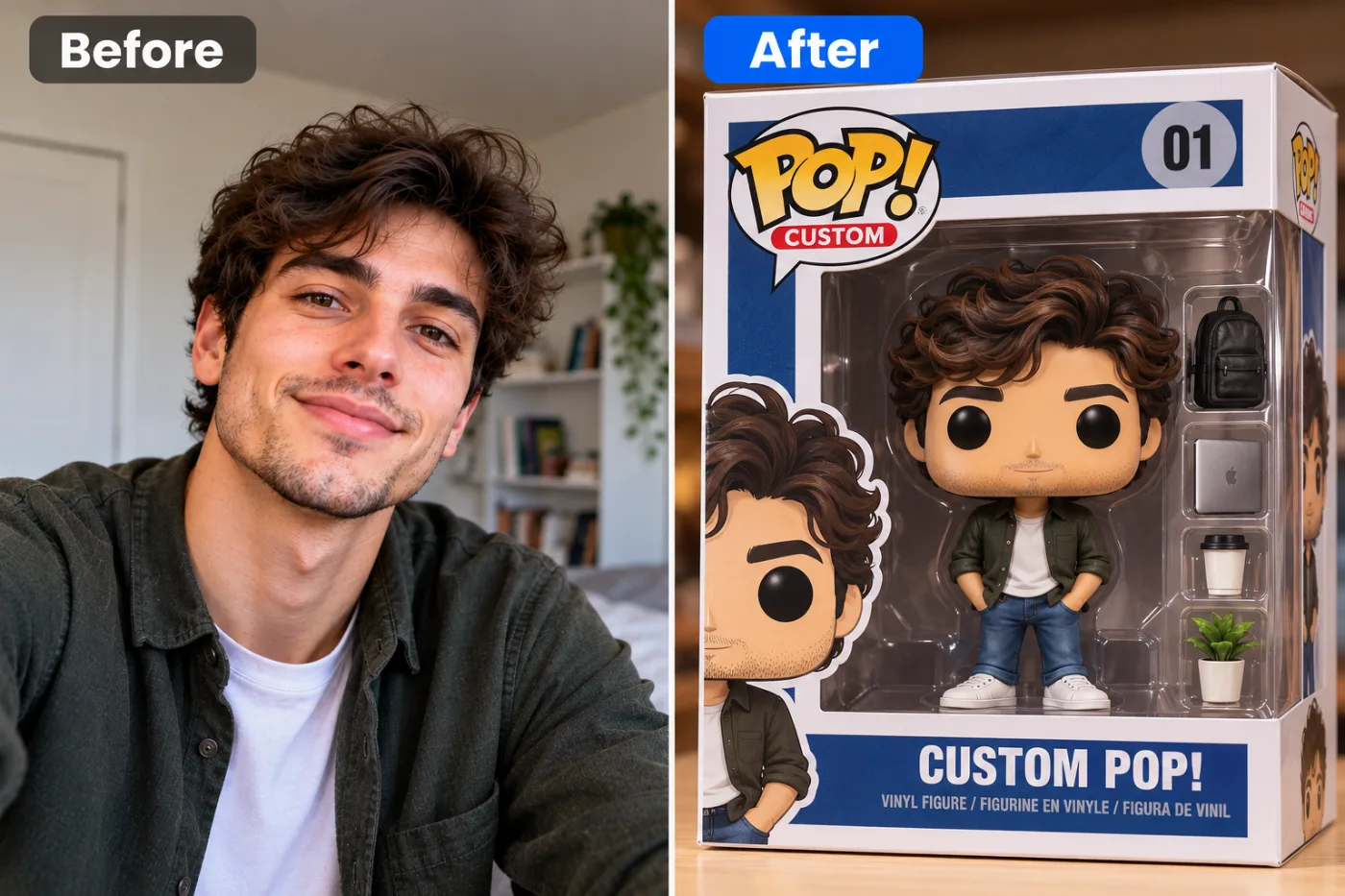
Ever wanted to see yourself as a collectible action figure, complete with a blister-pack box and accessories? With an AI 3D figurine from photo tool, you can turn any picture into a hyper-realistic 3D toy in under a minute — no 3D modeling software, no sculpting skills, and no cost to start. Upload a selfie, and the AI renders you as a fully packaged action figure that looks straight off a store shelf.
This trend has exploded across social media, and for good reason. To turn a photo into an action figure AI-style, the model reimagines your face, outfit, and pose as molded plastic, adds realistic toy packaging with your "name" printed on it, and even throws in themed accessories. The result is playful, shareable, and honestly a little addictive to make.
On Pixel Shine, the 3D toy from photo AI tool runs entirely online. In this guide, you'll learn exactly how it works, how to get a figurine that actually looks like you, the mistakes that ruin the effect, and why Pixel Shine's pay-as-you-go credits make it the best place to create your own collectible.
What the AI Action Figure Effect Actually Does
The action figure photo maker free effect is more involved than a simple stylization. When you upload your photo, the AI performs a multi-layered transformation to sell the illusion of a real, boxed toy.
First, it converts your likeness into molded-plastic form — that slightly glossy, sculpted look real action figures have, with simplified textures and toy-like proportions while keeping your recognizable features. Your face, hair, and outfit get reinterpreted as if a factory designed a figure based on you.
Next, it builds the packaging. This is what makes the effect pop: a blister pack or box with a cardboard backing, a clear plastic bubble over the figure, a brand-style header with a name, and often a tagline or logo. The packaging framing is what transforms a stylized portrait into a believable product shot.
Then it adds accessories — themed props that match your persona, like a laptop for a developer, a camera for a photographer, or a coffee cup, arranged in the packaging the way real figures include extra hands and weapons.
Finally, it renders realistic studio lighting and shadows so the whole thing looks professionally photographed. On Pixel Shine, all of this happens automatically from a single upload.
Choosing the Right Photo and Theme
The photo you feed the 3D figurine from photo tool has a huge impact on how good your action figure turns out. Because the AI is recreating your whole body as a toy, a full-body or three-quarter shot works best — it gives the model your pose, outfit, and proportions to sculpt. A tight face crop leaves the AI guessing at everything below the neck.
Clear, well-lit photos are essential. Since the effect adds glossy plastic textures and studio lighting, a sharp original ensures your features translate cleanly into the figure. Blurry or dim photos produce mushy, unconvincing toys.
Outfit matters more than you'd think. A distinctive outfit — a uniform, a themed costume, bold colors, or professional attire — makes a far more interesting figure than a plain t-shirt. The more character your clothing has, the more your figurine looks like a genuine themed collectible.
Think about your theme and accessories. Are you a "software developer edition" with a laptop, a "chef edition" with a whisk, or a "fitness edition" with dumbbells? Choosing a persona helps the AI pick fitting accessories and packaging text. On Pixel Shine, it's easy to experiment with different source photos and themes to find the coolest collectible version of yourself.
Step-by-Step: Create Your 3D Action Figure
Here's the complete process on Pixel Shine:
Step 1 — Go to Pixel Shine and open the 3D Figurine tool in the Creative AI Photo Effects section. It runs on desktop or mobile, with no download required.
Step 2 — Upload your photo. For the best result, use a clear, well-lit full-body or three-quarter shot showing your outfit and pose. JPG and PNG both work.
Step 3 — Select the action figure style. Choose the 3D figurine effect, and if the tool offers theme options or packaging styles, pick the persona that fits you.
Step 4 — Generate. Start the transformation and let the AI sculpt your plastic figure, build the packaging, add accessories, and light the scene. This usually takes 15 to 40 seconds.
Step 5 — Review your figurine. Check that your face is recognizable, the packaging looks convincing, and the accessories fit your theme. If the pose or likeness is off, re-upload a clearer full-body photo.
Step 6 — Regenerate for variety. Try a few versions — different photos or themes yield surprisingly different collectibles.
Step 7 — Download. Save your action figure image in full resolution with no watermark. Share it on social media, print it, or set it as a fun profile picture.
The whole process typically takes under two minutes from upload to download.
Pro Tips for the Best Action Figure
Use a full-body photo whenever possible. The AI sculpts your entire figure, so giving it your full pose and outfit produces a dramatically more complete and convincing toy than a headshot.
Wear something with character. Distinctive outfits — uniforms, costumes, bold colors, or professional gear — make your figure look like a real themed collectible instead of a generic figure.
Pose intentionally. A dynamic or confident stance in your source photo translates into a more dramatic, display-worthy figure than a slouched candid.
Pick a clear theme for cohesive accessories. Deciding you're the "photographer edition" or "gamer edition" helps the AI choose props and packaging text that tie the whole thing together.
Use a clean, uncluttered background in your source photo. The AI will replace it with packaging, and a busy original background can occasionally bleed into the result.
Upscale for printing. If you want to print your figurine as a poster or card, run the result through Pixel Shine's free Normal Upscale to boost resolution without losing detail — on credits and unlimited.
Common Mistakes to Avoid
Uploading only a face crop. The action figure effect needs your body and outfit to work well. A tight headshot forces the AI to invent everything below the neck, often unconvincingly. Use a full-body shot.
Choosing a plain, forgettable outfit. A basic t-shirt makes a boring figure. The more distinctive your clothing, the more your collectible pops.
Using a blurry or dark photo. The glossy plastic look amplifies flaws in low-quality originals. Start with a sharp, well-lit image.
Standing in an awkward or cut-off pose. If your source photo crops your legs or arms oddly, the figure inherits those problems. Choose a photo where your full form is visible and naturally posed.
Accepting the first result without regenerating. The packaging text or accessories might not fit on the first try. Generate a few versions and keep the best one.
AI Figurines vs. Custom 3D-Printed Toys
If you've ever looked into getting a real custom action figure of yourself, you know it's expensive and slow. Services that 3D-print a physical figurine from photos typically cost anywhere from $50 to $200 or more, take one to three weeks to produce and ship, and give you a single physical object you can't easily change.
An AI 3D figurine from photo is a completely different proposition. It's quick to start on Pixel Shine, delivers your figure in under a minute, and lets you create variations — different themes, outfits, and packaging — at 2 credits each. You get a high-quality digital image perfect for social media, profile pictures, digital gifts, and printing.
Of course, the two serve different needs. If you want a tangible object on your shelf, 3D printing is the way. But if you want the fun, the shareable image, the viral social post, or a digital keepsake — and you want it instantly and cheaply — the AI version wins easily. Many people even use the AI image as a mockup or gift card before deciding whether to invest in a physical print. On Pixel Shine, there's no watermark, so your digital collectible looks clean and professional wherever you share it.
Who's Making AI Action Figures
Social media users are the driving force — the action figure trend racks up huge engagement, and everyone wants their own "collectible edition" to post.
Professionals and teams create themed figures for their roles — a "developer edition," "nurse edition," or "teacher edition" — that make hilarious and shareable LinkedIn or team-channel posts.
Content creators and brands turn themselves or mascots into action figures for eye-catching promotional content and merchandise mockups.
Gift-givers make personalized figurines of friends and family as birthday surprises, printed on cards or mugs.
Gamers and hobbyists create collectible versions of themselves in their gaming personas for Discord avatars and profile art. One user made an entire "office edition" set of figures for every member of their team and shared it at a company meeting — it became the most-liked post the company page had ever published. The blend of personalization and playfulness makes these figures endlessly shareable.
Frequently Asked Questions
Is the AI action figure maker free?Pixel Shine's creative tools run on credits, with packs starting at ₹166 and no subscription. You pay only for what you create.
What photo works best for an action figure?A clear, well-lit full-body or three-quarter shot showing your outfit and pose gives the best result. Face-only crops force the AI to invent your body.
Will the figure look like me?Yes. The AI keeps your recognizable features while reinterpreting you as a molded-plastic toy, so friends will still know it's you.
Is there a watermark on the download?No. Pixel Shine lets you download your action figure image without a watermark, unlike many competing apps.
Can I add themed packaging and accessories?Yes. The effect builds realistic toy packaging and adds accessories that fit your persona, often with a name and tagline on the box.
Does it work on mobile?Absolutely. Pixel Shine runs on your phone, so you can create and download figurines directly from your phone.
Can I print my figurine image?Yes. Downloads are full resolution, and you can use Pixel Shine's free upscaler to boost the size for prints, cards, or posters.
How long does it take to generate?Most figurines finish in 15 to 40 seconds depending on image size and current demand.
Key Takeaways
An AI 3D figurine from photo turns any picture into a collectible action figure — molded plastic, realistic packaging, themed accessories, and studio lighting — in under a minute, with no modeling skills or cost to start. The secret to a great result is using a clear, full-body photo with a distinctive outfit and a defined theme, then regenerating to find the best version.
Pixel Shine makes it genuinely free to start, adds no watermarks, and pairs the figurine effect with a free unlimited upscaler for print-quality output — all in one online platform. Whether you're chasing the viral trend, making a gift, or building a team "edition" set, head to Pixel Shine, upload your photo, and see yourself boxed up as the collectible you've always deserved to be.