AI Astronaut Photo Maker
Upload a selfie and AI puts you in a space suit against the stars — right here. Free and instant.
Click anywhere in this box or drag a photo in. Set the options on the left, then hit Generate — your original stays untouched, you always see both.
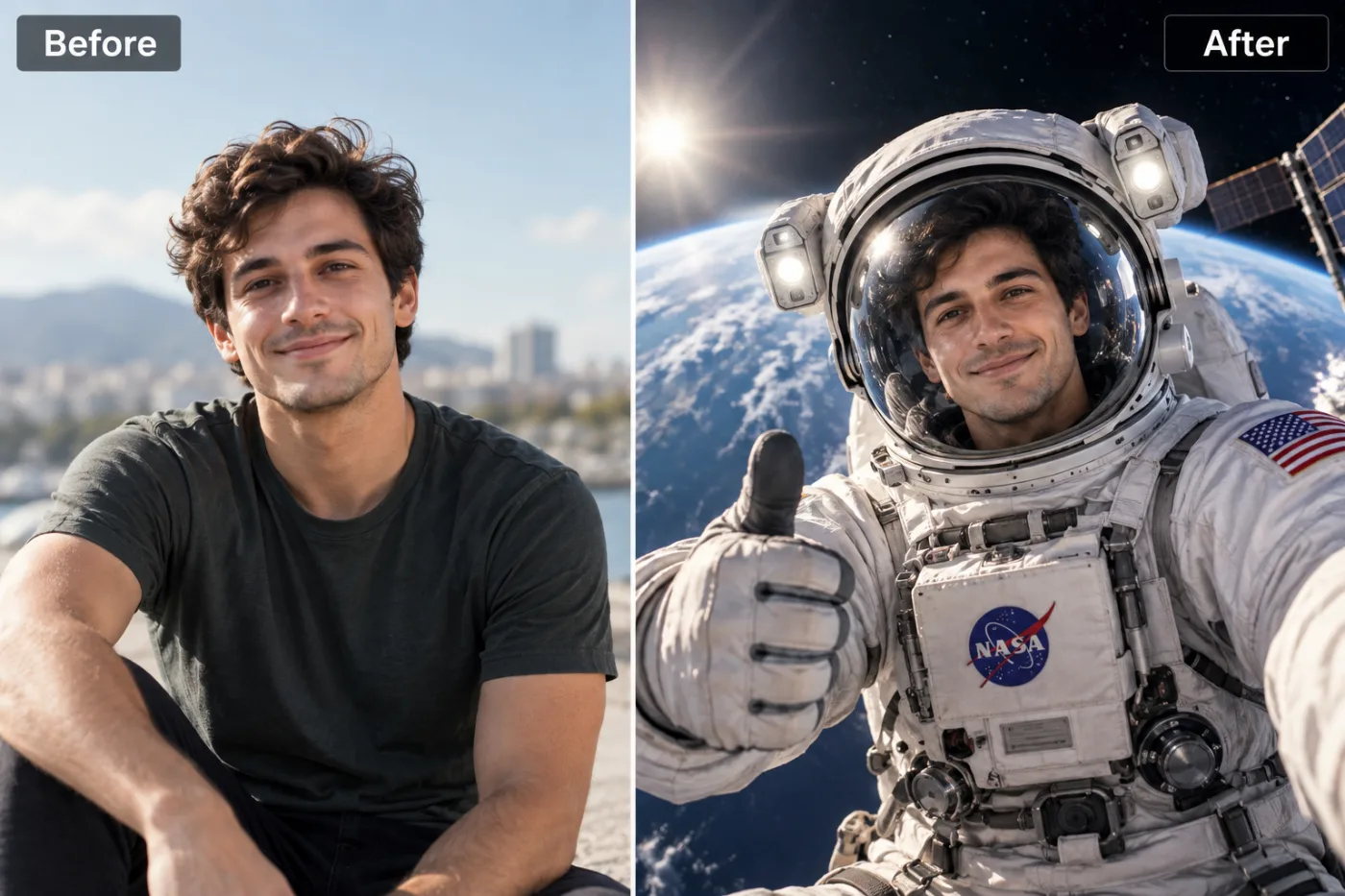
+ Choose a photoSee it in action — real before & after
How to use AI Astronaut Photo Maker
Upload a photo
A clear selfie or portrait works best — the more visible the face, the more recognisable the result, which is the entire point.
Pick the look
Choose a preset or describe your own. Novelty styles respond well to specific, slightly absurd detail.
Generate and share
Full resolution, no watermark. Regenerating is cheap, and with these it is usually worth it.
Why use AI Astronaut Photo Maker
What AI Astronaut Photo Maker does
Turn a selfie into a dramatic astronaut space portrait.
Still recognisably you
A novelty image only works if people can tell who it is. Features and proportions are preserved inside the new form.
Genuinely finished-looking
Real texture, believable lighting and proper shading, rather than an obvious filter laid over a photo.
Ready in seconds
The whole appeal is immediacy. By the time you have explained the idea, the image exists.
Cheap enough to iterate
These are tools you run several times. At 2 credits a go, that is expected rather than wasteful.
Works on groups and pets
Friends, family and animals can all go through it, which is usually funnier than doing it alone.
What AI Astronaut Photo Maker changes
Transform this person into an astronaut on a spacewalk: a detailed, realistic white space suit with the helmet's clear visor showing their face, giving a thumbs-up as they float in orbit with the Earth curving below, a bright sun flare and part of a space station's solar panels in the frame. Keep the person's face and identity exactly the same.
Your face, bone structure and skin tone are held fixed on every generation — only what is described above is changed.
AI Astronaut Photo Maker for the ideas worth an hour of someone's attention
Novelty images have a short half-life and a high hit rate. Generating them while the idea is current is most of the value.
Birthdays and celebrations
A personalised image is a better card than a bought one and takes less time to produce.
Trend participation
Style trends run for days. Generating the look while it is live is the whole point.
Gifts and prints
Stickers, mugs and framed prints of the ones that turn out unexpectedly well.
Pets as the subject
Reliably the best-received category, for reasons nobody needs explained.
Key highlights of AI Astronaut Photo Maker
Benefits
Costs almost nothing
A pack starts at $2 and covers several attempts.
No skill required
No editing, no prompt craft, no software.
Works on a phone
Which is where the photo and the group chat both already are.
No subscription needed
One-time pack credits sit there until the next idea. Monthly plans are optional.
Full resolution
Good enough to print the ones that deserve it.
What people use it for
What it is mainly used for
Upload a selfie and AI puts you in a space suit against the stars — right here. Free and instant.
Novelty profile pictures
An avatar that makes someone stop scrolling.
Joining a trend while it is live
Trends move in days, and being late to one is worse than skipping it.
Stickers and merch
Print the good ones. Flat, high-contrast styles survive being printed small.
Pet portraits with a concept
Costumes, figurines, historical portraits. Consistently the best-received output.
Prompt ideas
Novelty prompts reward specific and slightly absurd detail. Naming a material, a scale or a setting produces a much better joke than asking for something "funny".
Keep it short
Three or four specific clauses beat a paragraph. Long prompts dilute every instruction in them, including the one you cared about.
Name the framing
Close-up, head and shoulders, full body, centred, offset. Framing decides what the image is actually of.
Avoid asking for text in the image
Generated lettering is still unreliable. Ask for empty space where the text should go and add real type afterwards.
Pick the ratio first
Generating square and cropping to vertical throws away part of the frame. Choose the shape before you generate.
Try another model
If a prompt is being ignored, switching between Nano Banana Pro, GPT Image and Seedream 4.5 often resolves it faster than rewording.
Describe the light
Direction, softness and colour temperature. Light does more to how a photograph feels than any other single thing you can specify.
More about AI Astronaut Photo Maker
There's something universally fun about seeing yourself as an astronaut — it's the kind of photo that gets saved and shared. Renting a real space suit obviously isn't an option, so this builds the look around your photo instead.
Upload a selfie and the AI suits you up in a detailed, realistic space suit with a reflective helmet visor, dramatic rim lighting and a backdrop of stars, Earth, or a spacecraft interior — while your face stays exactly the same.
It's a popular pick for anyone searching 'ai astronaut photo maker' or 'space suit photo ai free' — a novelty portrait for kids' rooms, space-themed parties, school projects, or just a fun profile picture upgrade.
Tips for the most dramatic astronaut portrait
- A clear, front-facing photo with your face and shoulders visible works best.
- Simple backgrounds help the AI build the space scene around you cleanly.
- Re-run it a couple of times — the backdrop (stars, Earth, spacecraft) varies each generation.
- Works great for kids' photos too — a popular space-themed birthday or bedroom print.
- Choose the aspect ratio before generating rather than cropping afterwards.
- If one model ignores part of your instruction, switch to the other and run it again.
- Keep the original file. It is a better base for the next attempt than a generated image is.
- For a matching set, keep the same source photo and style and change only one variable.
- Nothing you upload is published, shared or added to a gallery — but do not upload anything you would not want to leave your device at all.
- The free on-device tools — compress, convert, crop, resize, rotate — cost no credits, so use them for mechanical work.
- If a result is nearly right, say what is wrong with it in the next run rather than starting over.
It runs online — nothing to install. Explore the rest of our AI Creative Apps, or open the full AI photo editor for more control.
Frequently Asked Questions
How do I make an astronaut photo with AI?
Is it free?
What photo works best?
Will it still look like me?
Does it work on pets?
Can I put several people in one image?
Can I print it or sell it?
Find another way to use Pixel Shine
Explore tools grouped by the outcome you want, including social media, LinkedIn, ecommerce, real estate, photography, creators and weddings.


