✍️
🎨
✦
✦
✓
☁️ Pixel Shine

Change Photo Background With AI

Describe a new background (a studio wall, a beach at sunset, a modern office, a city at night) and AI puts you or your product there, with the light adjusted so it looks like you were really there.

📤
Drop your image here
or click to browse from your device
or drop image anywhere
Supports JPG · JPEG · PNG · WEBP · up to 16 MB
By uploading you agree to our Terms of Use and Privacy Policy
Change Photo Background With AI — example result (AI Edited)
On this page
  1. How do you change the background of a photo?
  2. Change the background or remove it?
  3. Who changes photo backgrounds?
  4. How do you make it look real?
  5. What can't it do?
  6. What does it cost?

How do you change the background of a photo?
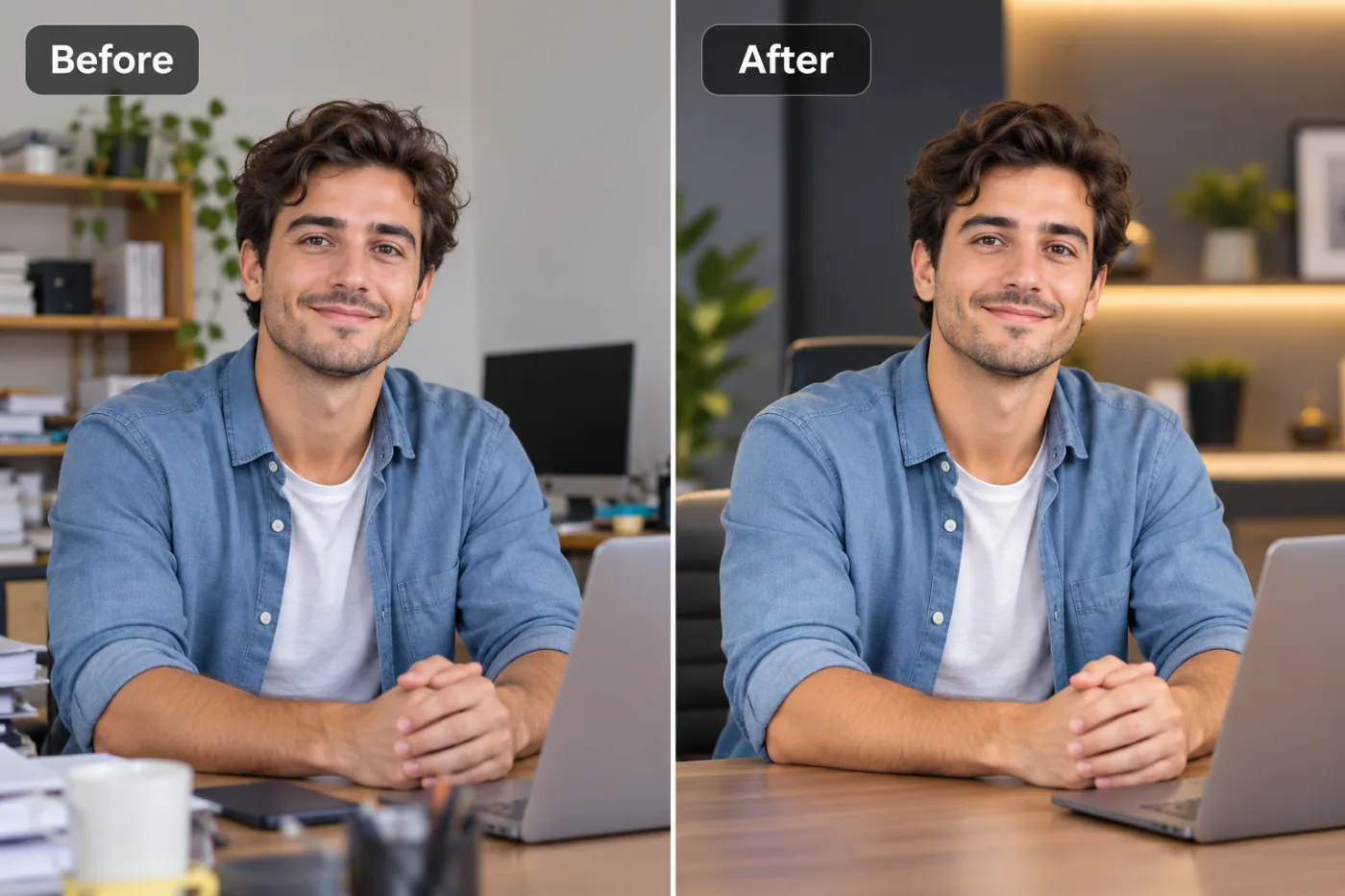
A man at a cluttered home desk next to the same man in a bright, modern office
The same person, moved from a cluttered desk to a clean office. Made with the Background Changer app.

1. Upload the photo

A person, a pet or a product, as clear and well lit as possible. Drop it on this page to open the editor.

2. Describe the new background

Be specific about place, time and light: "a bright Scandinavian living room, morning light", "a plain warm grey studio wall", "a rooftop in Mumbai at dusk with city lights".

3. Generate and download

The edit costs 2 credits. The subject stays as it was, and its light and colour are adjusted to the new scene. Not right? Rephrase and run it again.

Change the background or remove it?

They sound similar but give different results. Removing the background (with the background remover) gives you the subject on transparency, a cutout to place on your own design or a plain white. Changing the background with AI builds a whole new scene behind the subject and blends the light, shadows and colour so it looks like one photograph.

You wantUse
A cutout on transparency or pure whiteBackground remover
A realistic new scene behind youChange background with AI (this page)
One tap, no typingAI background changer app
A new background for a product listingProduct photo background remover, or describe a styled scene here

Who changes photo backgrounds?

Professionals

Swap a bedroom or kitchen behind your portrait for a clean office or a neutral studio for LinkedIn, a speaker bio or a company website.

Online sellers

Show one product in several settings for ads and social posts: a café table, a gym bag, a gift on a wooden shelf, without a separate shoot for each.

Creators

Build thumbnails and Reels covers with dramatic, on-theme backgrounds behind you.

Anyone with a good photo in a bad place

A great smile in front of a car park, a construction site or a crowd. Keep the moment, change the place.

How do you make it look real?

  • Match the light. If your photo was taken in soft daylight, ask for a daylight scene; a night city behind a sunlit face looks fake.
  • Match the angle. A photo taken from above suits a background seen from above.
  • Say what to keep: "keep the person exactly the same" helps when the subject is close to the edge.
  • Leave some depth. "Softly out of focus" behind a portrait looks like a real camera did it.
  • Keep it believable for the purpose. For a professional profile, an office or studio beats a tropical beach.

What can't it do?

  • Keep tiny edges perfect every time. Flyaway hair and see-through objects can blend; run it again or simplify the request.
  • Change the background without touching the light. That's on purpose, so the subject fits; for an untouched subject, remove the background instead.
  • Put people in places to mislead. Don't use it to fake where someone was or to deceive; see the terms.

What does it cost?

Each background change is 2 credits, charged only when it works. Packs start at $2 and never expire. No watermark is added. For any other edit by description, see the AI photo editor.

Guides

All background removal guides →
How to Change a Photo Background with AI (Free)
11 min read
How to Use AI to Perfect Your Product Photography for Free
11 min read
Edit Photos Without Photoshop: A Free AI Alternative
11 min read
AI Photo Editor for Real Estate: Brighten Rooms, Fix Lighting, Remove Clutter
11 min read
Pricing

Monthly plans or one-time credits.

Change Photo Background With AI and every other browser tool are free and unlimited. Credits are only for the AI features — 2 credits per generation. Go monthly for the lowest price per credit and cancel any time, or buy an add-on whose credits never expire.

Starter
₹415/mo≈ $5
24 credits every month12 AI generations · ₹17.3 per credit

Try the AI tools every month.

Creator
₹996/mo≈ $12
64 credits every month32 AI generations · ₹15.6 per credit

Regular edits for your feed.

StudioBest value
₹2,075/mo≈ $25
150 credits every month75 AI generations · ₹13.8 per credit

The lowest price per credit.

Renews monthly · cancel anytime in Settings, no further charges · monthly credits refresh each renewal and don't carry over. 2 credits per AI generation; the free tools stay free.

See full pricing and questions

FAQ

Frequently Asked Questions

How do I change the background of a photo with AI?
Upload the photo, describe the new background with the place, time and light, and generate. The subject stays the same and is relit to fit the new scene.
What's the difference between changing and removing a background?
Removing gives a cutout on transparency. Changing builds a realistic new scene behind the subject and blends the light so it looks like one photo.
Will it change my face?
It's told to keep the person exactly as they are. The light on the subject is adjusted to match the scene, but features stay the same.
Can I use it for product photos?
Yes. Describe a styled setting, such as a marble counter, a wooden table or a gym floor, to show a product in use.
How much does it cost?
2 credits per background change, only when it works, with no watermark.
Is there a one-tap version?
Yes, the AI Background Changer app, which picks a fitting background without you typing.
Why does my edit look fake?
Usually because the light or angle doesn't match. Ask for a scene with the same kind of light as your photo, and add 'softly out of focus' behind portraits.
Can I get a plain white background?
For a pure white background, remove the background and convert to JPG, which fills it with white for free.