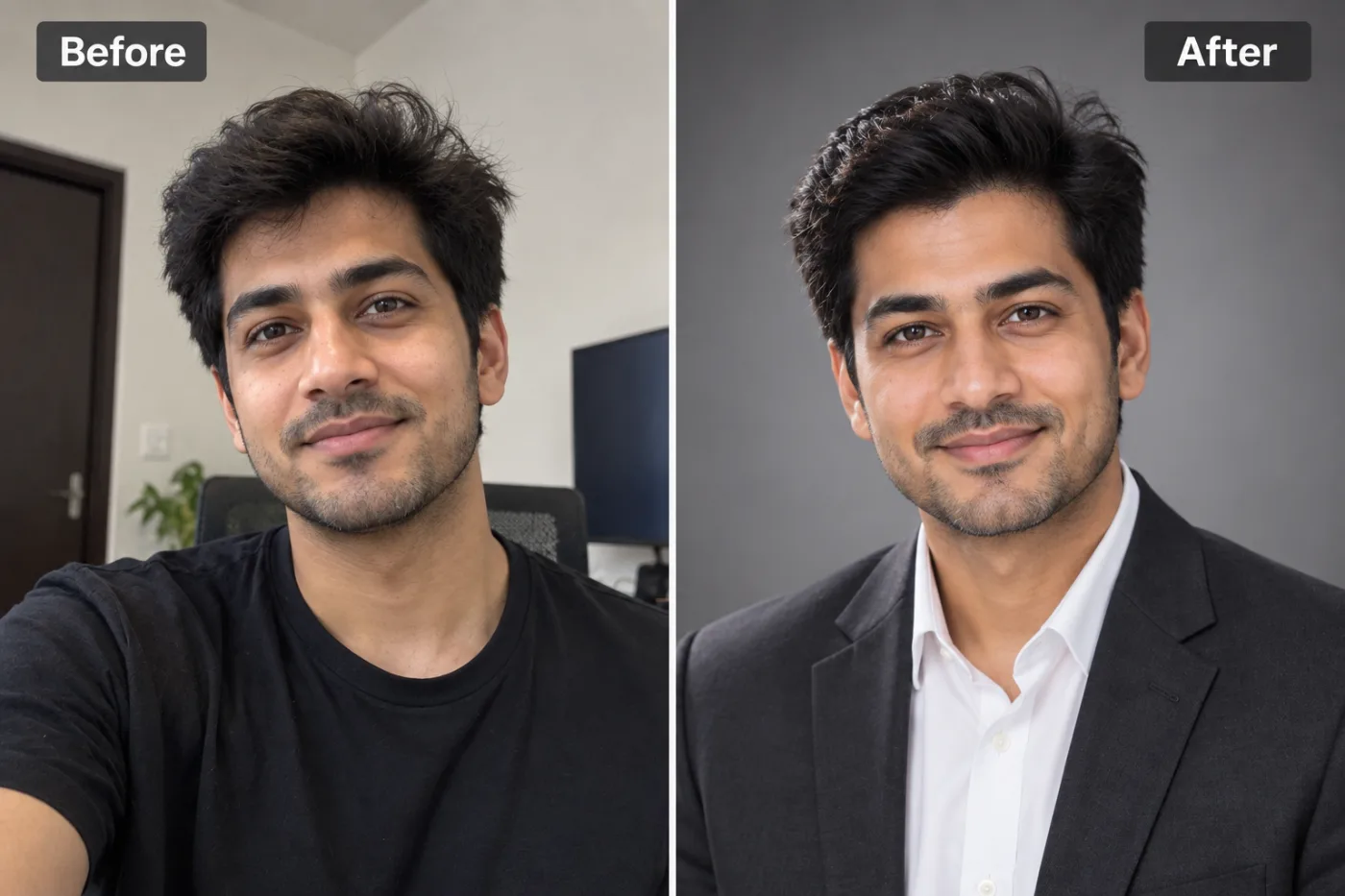
What makes a headshot look professional?
A professional headshot isn't about expensive clothes. It's a handful of things photographers do every time: your head and shoulders fill most of the frame, your eyes sit about a third of the way down, the light is soft and comes from the front, and the background is plain enough that nothing competes with your face.
A phone selfie usually gets all of those wrong. The camera is too close, so your nose looks bigger. The light comes from a ceiling bulb or a window to one side. And the background is your kitchen. This app fixes the framing, light, clothes and background together, and leaves your face alone.
The result looks like a photo from a studio session, not an illustration. That matters: a headshot is meant to show people what you actually look like when they meet you.
Which clothes and backgrounds can you choose?
Two settings, both on Auto to start. Auto gives a formal business look on a neutral grey studio background.
Suit & tie
The most formal option. Right for law, finance, consulting and anywhere a suit is the norm.
Blazer, no tie
Smart without being stiff. It's the most common look on LinkedIn today and suits nearly every job.
Smart casual
A neat shirt or top with no jacket. Good for tech, design, start-ups and teaching.
Shirt & sweater
Relaxed and warm, the look of a team page at a friendly company.
Keep my clothes
Leaves your outfit as it is and only fixes light, framing and background. Choose it when you're already dressed for the part.
For the background, Neutral grey is the classic studio look and Plain white is the cleanest. Office, blurred suggests a workplace behind you; Outdoor gives soft greenery, which feels approachable; Dark is moody and works well for creative roles and speaker bios.
How do you take a selfie that makes a good headshot?
- Hold the phone at eye level and an arm's length away. Shooting from below or too close distorts your face, and the app keeps your face as it is.
- Face a window. Soft daylight on your face gives the most natural result; avoid a single overhead bulb.
- Keep your expression relaxed: a small, real smile reads as friendly and confident.
- Wear your glasses if you normally do. If the lenses catch a reflection, tilt your head slightly down.
- Use the back camera if someone can take it for you. It's sharper than the front one, and sharpness carries through to the headshot.
- Skip beauty filters. The app keeps your skin texture natural, and a filtered selfie makes the result look waxy.
AI headshot or a photographer?
A good photographer costs anywhere from a modest fee to a few hundred dollars and takes an appointment, a commute and a session. For a LinkedIn update or a CV photo, that's a lot. An AI headshot from your own selfie costs a few credits and takes a minute, and you can redo it whenever you change jobs or haircuts.
A photographer still wins when the stakes are high: a company leadership page, a book cover, a press kit, or when you want help with posing and expression. They can also shoot a whole team in matching light. If you need several styles or headshots for a team, our AI headshot generator makes a full set from a few photos.
What it can't do
- ID photos. Don't use it for a passport, visa or driving licence. Those need an unedited photo, and an AI headshot will be rejected.
- Change how you look. It won't slim your face, change your hairstyle or make you look younger. That's on purpose: a headshot should match the person who turns up to the interview.
- Rescue a blurry selfie. If the original is blurry or very dark, the face has too little detail to keep. Retake it in better light.
- Match a company's exact style. If your employer has a set background colour or crop, check the result against it. Plain white and Neutral grey are the easiest to match.
Where can you use your headshot?
Profiles with a clear, professional photo get noticed more by recruiters. Use the 1:1 shape: LinkedIn shows your photo as a small circle. Then make a matching LinkedIn banner.
CVs and job applications
In much of Europe, Asia and the Middle East a photo on the CV is normal. In the US and UK it usually isn't, so check before adding one.
Company and team pages
A clean grey or white background drops neatly into a team grid. For a more stylised work avatar, see the corporate avatar.
Email signatures and speaker bios
A small, sharp headshot makes an email or a conference programme feel personal. The Dark background stands out on a speaker page.
What are the most common headshot mistakes?
- A photo that's years old. If you've changed your hair, glasses or beard, people notice on the first video call. Make a new headshot whenever your look changes.
- Cropping a group or party photo. A face cut out of a wedding photo looks like exactly that. Start from a photo of just you.
- Too far away. In a full-body photo your face is tiny in the little circle LinkedIn shows. Head and shoulders should fill the frame.
- A busy background. Bookshelves, posters and other people pull the eye away from your face. Neutral grey and Plain white solve it.
- Overdoing it. A headshot that looks noticeably better than you in person can backfire in an interview. Choose the version that's you on a good day.
- The wrong shape. Use 1:1 for LinkedIn and most profile pictures; 4:5 suits CVs and team pages, where a slightly taller frame looks natural.
None of these needs a photographer to fix. A recent selfie at eye level, the right attire, and a plain background covers almost all of it.
What happens to your selfie?
It's sent to our image-model partner, fal.ai, to make your headshot, and to no one else. It isn't used to train AI models and is never sold. You own both the selfie and the headshot.
Your headshots are saved in My Creations, so you can download them again for the next application. Delete any of them there whenever you want, or ask us to delete your account and everything in it.


