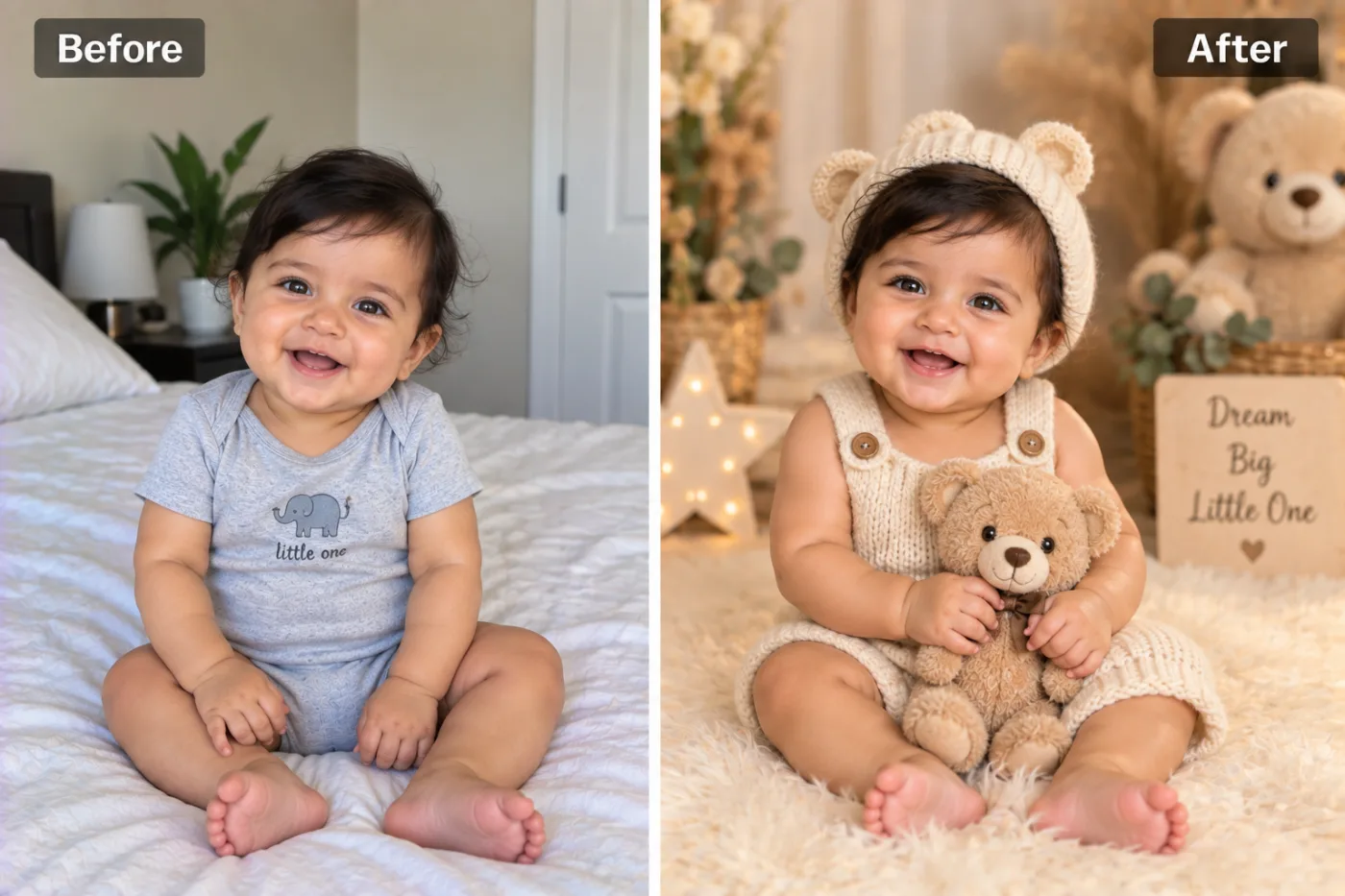
What does the AI baby photoshoot make?
It turns a normal photo of your baby into the kind of picture a newborn photographer would take: a knitted bear-ear bonnet and a cream romper, a soft teddy to hold, a fluffy rug, and warm, neutral props such as pampas grass and a little star-shaped light. The colours are soft creams and beiges, lit by gentle window light.
Your baby's face, expression and features are kept exactly as they are in your photo. That's the part that matters to parents, and it's what the app is built around: the outfit, props and room change, the baby doesn't.
It's a good fit for parents who missed the newborn shoot, can't fit one into the budget, or just want a lovely picture from a moment they caught on their phone.
Is an AI photoshoot safer than a newborn shoot?
It avoids the parts of a newborn shoot that worry people most. Studio newborn photography often means a long session, a warm room, and posing a sleeping baby in baskets or on props, which experienced photographers do very carefully and often as a composite of several photos.
With AI, your baby is never posed at all. You take a normal photo however your baby happens to be sitting or lying, and the props are added afterwards. No one has to balance a newborn on anything.
A real photographer still gives you something AI can't: a real record of that day, and prints from an actual camera. Many parents do both, using AI for monthly milestone pictures in between.
What's the best age for a baby photoshoot?
Photographers usually suggest three windows. Newborn shoots happen in the first two weeks, when babies sleep a lot and curl up. The sitter shoot comes at around six to nine months, when a baby can sit up and smile at the camera. And the first-birthday shoot, often with a cake, marks the end of the first year.
With AI you don't have to hit those windows. You can make a studio portrait from a photo taken on any day, at any age, which is why parents use it for every month of the first year instead of just one or two shoots. The app works best once your baby's face is clear and awake in the photo; for a sleepy newborn with eyes closed, the result is softer and less detailed.
If you're expecting and planning a real newborn shoot, book it before the birth: good newborn photographers fill up early. Use AI for everything in between.
What do the Stage and Lighting options do?
Stage changes how old your baby looks in the picture. Leave it on As in photo for a portrait of your baby as they are today.
Newborn
Shows your baby as a newborn. Parents use it to imagine the newborn photo they never got, but it's the AI's guess, not a real record of how your baby looked.
6 months
Shows your baby at about six months. Fun for a milestone card, but again an imagined version.
Toddler
Shows your child at about two. Expect the face to change more, because toddlers look quite different from babies.
Young child
Shows your child at about five. The biggest jump, so treat it as a playful "what might they look like" rather than a prediction.
Lighting sets the mood. Soft daylight is natural and gentle. Bright & airy is the white, light look many newborn photographers use. Golden hour adds warm, low sun. Studio is crisp and even. Moody is darker and richer, beautiful for a framed print. Auto keeps the warm pastel window light from our example.
How do you take a photo that works?
- Make sure the face is sharp. A tiny bit of motion blur on a wriggling baby is the most common reason a result looks off; take a burst and pick the clearest.
- Daylight from a window is best. Avoid the flash, which flattens the face and gives red eyes.
- A happy or calm expression carries straight through to the portrait, so the smile in your photo is the smile you get.
- Keep hands, bottles and dummies away from the face where you can. The app has to guess at anything covered.
- One baby per photo. For twins or siblings, try a photo of each child separately.
- Any background is fine. A messy bed or a busy living room is replaced completely.
What are its limits?
- Changing ages is a guess. Newborn, 6 months, Toddler and Young child show an imagined version of your child, not how they did or will look.
- The outfit is set. You get the bear-ear bonnet and knit romper look. For a different theme, such as a festival outfit or a christmas jumper, try the christmas photo or describe it in the AI photo editor.
- Hands and feet. Tiny fingers and toes are hard for any AI. If one looks odd, generate again.
- Very small or blurry faces. If your baby is a small part of a wide photo, crop in closer before uploading.
Baby photoshoot ideas to try
Monthly milestones
Take a photo on the same day each month and run it through with the same lighting. You get a matching set for the first year.
Birth announcement
A soft studio portrait makes a lovely announcement card. Add the name and date afterwards in the free photo editor.
Grandparents' gift
A framed print of the portrait is a simple present. Run it through the image upscaler first for a sharp print.
First birthday invitations
Use a portrait from the year as the front of the invitation, with the Bright & airy light.
Wondering what your baby will look like?
Expecting? The AI baby predictor imagines a baby from both parents' photos.
What happens to photos of your child?
Your photo is sent to our image-model partner, fal.ai, to make the portrait, and to no one else. It isn't used to train AI models and is never sold, and you own both your photo and the portrait.
Your portraits are saved in My Creations, which only you can see when signed in. Delete any of them there at any time, or ask us to delete your account and everything in it. Please only upload photos of your own child, or with the parents' permission.


