Vinyl Figure Maker
Big-head vinyl collectible styling. Set the options to suit you, and download the result at full resolution with no watermark.
Click anywhere in this box or drag a photo in. Set the options on the left, then hit Generate — your original stays untouched, you always see both.
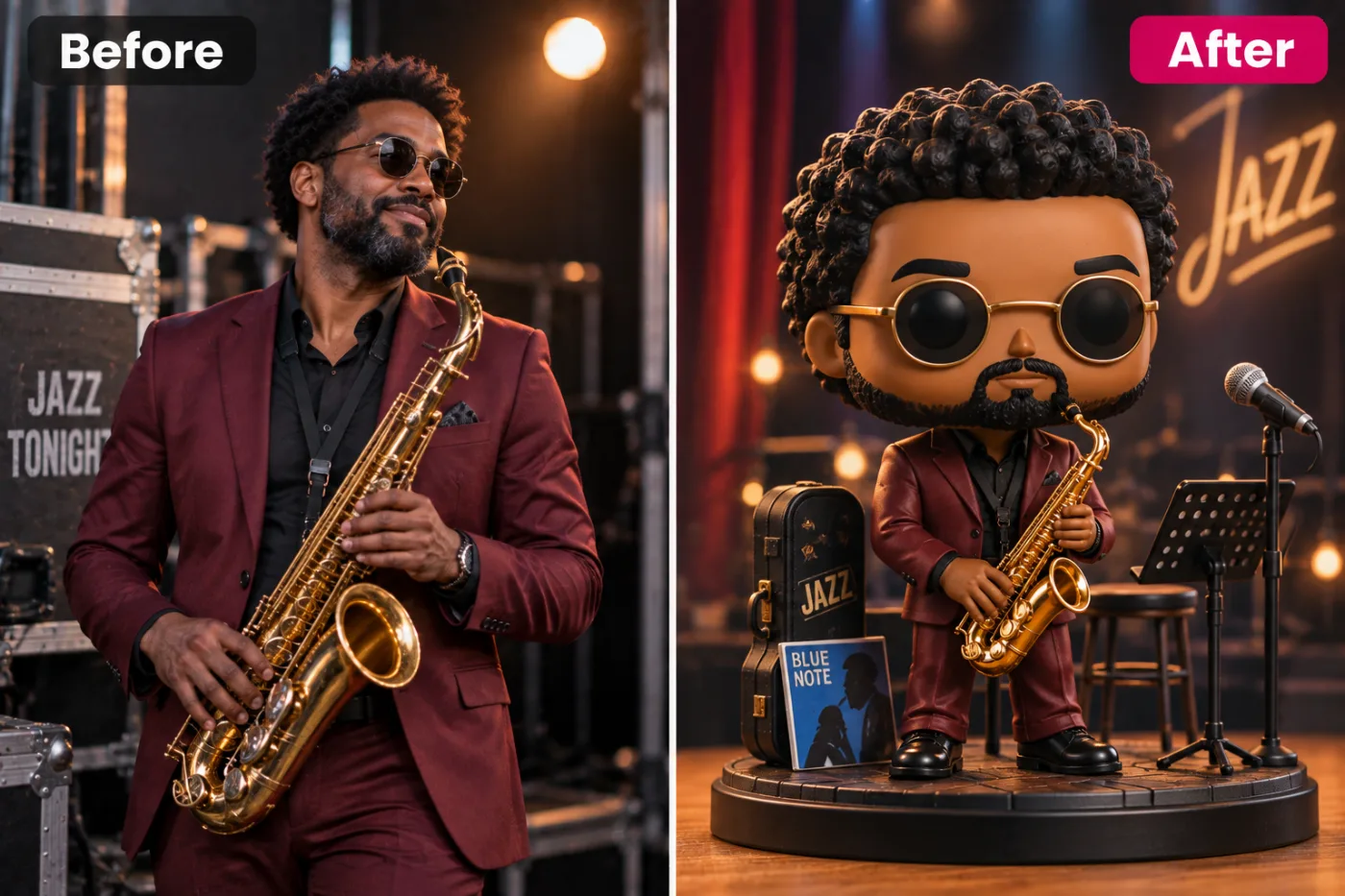
+ Choose a photoSee it in action — real before & after
How to use Vinyl Figure Maker
Upload a photo
A clear selfie or portrait works best — the more visible the face, the more recognisable the result, which is the entire point.
Pick the look
Choose a preset or describe your own. Novelty styles respond well to specific, slightly absurd detail.
Generate and share
Full resolution, no watermark. Regenerating is cheap, and with these it is usually worth it.
Why use Vinyl Figure Maker
What Vinyl Figure Maker does
Big-head vinyl collectible styling.
Ready in seconds
The whole appeal is immediacy. By the time you have explained the idea, the image exists.
Cheap enough to iterate
These are tools you run several times. At 2 credits a go, that is expected rather than wasteful.
Works on groups and pets
Friends, family and animals can all go through it, which is usually funnier than doing it alone.
Sized for sharing
Choose the ratio so it lands correctly in a chat, a story or a feed.
No watermark
Nothing stamped across it, which matters for something whose whole purpose is being sent to people.
What Vinyl Figure Maker changes
Render this person as a stylised vinyl collectible figure: oversized head with simplified features and black dot eyes, a small simplified body, matte moulded plastic finish, and clean product lighting. Preserve the same person's recognizable identity from the uploaded reference: face shape, forehead, cheekbones, jawline, eye shape and spacing, eyebrows, nose, lips, natural asymmetry, age appearance, skin tone and distinctive features. Do not replace them with a generic AI face or beautify/idealize their features. Keep natural skin texture and pores; avoid waxy smoothing, exaggerated eyes, reshaped facial features and artificial symmetry. Change only what the app's requested transformation requires. For photographic results, use realistic camera detail: natural skin texture and pores, believable eyes and hair strands, coherent lighting and shadows, correct anatomy and perspective, and matching sharpness across face, neck and body. Avoid waxy skin, over-retouching, distorted features, face-morphing and pasted-on faces. If the app intentionally creates artwork, render the requested medium consistently across the whole image instead of forcing photorealism.
Your face, bone structure and skin tone are held fixed on every generation — only what is described above is changed.
Vinyl Figure Maker for the ideas worth an hour of someone's attention
Novelty images have a short half-life and a high hit rate. Generating them while the idea is current is most of the value.
Birthdays and celebrations
A personalised image is a better card than a bought one and takes less time to produce.
Trend participation
Style trends run for days. Generating the look while it is live is the whole point.
Gifts and prints
Stickers, mugs and framed prints of the ones that turn out unexpectedly well.
Pets as the subject
Reliably the best-received category, for reasons nobody needs explained.
Key highlights of Vinyl Figure Maker
Benefits
Three models to choose from
Nano Banana Pro, GPT Image and Seedream 4.5 handle the same job differently. If one result is not right, another model often is.
Every aspect ratio
Square, 4:5, 9:16, 16:9 and more, chosen before generating so nothing important gets cropped away afterwards.
Full resolution, no watermark
The download is the full generated image with nothing overlaid — usable in print, in a listing or commercially.
The free tools stay free
Compress, convert, crop, resize, rotate and the rest are unlimited, with no account and no credit cost.
Your original is never modified
Every result is a new image. The file you uploaded stays exactly as it was on your device.
What people use it for
What it is mainly used for
Big-head vinyl collectible styling. Set the options to suit you, and download the result at full resolution with no watermark.
Stickers and merch
Print the good ones. Flat, high-contrast styles survive being printed small.
Pet portraits with a concept
Costumes, figurines, historical portraits. Consistently the best-received output.
Office and team in-jokes
A whole team put through the same look, which is funnier than any one of them alone.
Party and event invitations
A personalised, slightly ridiculous invitation image.
Prompt ideas
Novelty prompts reward specific and slightly absurd detail. Naming a material, a scale or a setting produces a much better joke than asking for something "funny".
Ask for no text
"No text or lettering in the image" — generated type is where these images most often fall apart.
Be concrete, not complimentary
"Soft light from the left, plain grey background" gives the model something to act on. "Beautiful, high quality, 8k" gives it nothing at all.
Change one thing at a time
If a result is close, edit a single detail and run it again. Rewriting the whole prompt gives you an unrelated image and no information about what the change did.
Say what must not change
A short exclusion — "do not change the face", "keep the label text" — is often more effective than any amount of positive description.
Keep it short
Three or four specific clauses beat a paragraph. Long prompts dilute every instruction in them, including the one you cared about.
Name the framing
Close-up, head and shoulders, full body, centred, offset. Framing decides what the image is actually of.
More about Vinyl Figure Maker
Some of these exist for a good reason and some exist because they are funny, and that is a legitimate reason too. Vinyl Figure Maker belongs to the second group — the kind of image you generate, send to three people, and get an immediate reaction from.
That does not mean the result should be sloppy. The thing that makes a novelty portrait land is that the person is still recognisable inside it. A figurine, an avatar or a costume that could be anyone is not funny; the same image where you can immediately tell who it is gets screenshotted. So identity preservation applies here exactly as it does to a professional headshot.
Each generation costs 2 credits from a one-time pack, which never expires. These are the tools people run four or five times to get the one that is genuinely good, and the pricing assumes that.
Getting the best result from Vinyl Figure Maker
- Check hands, text, jewellery and glasses in any result before sharing it — those are still where image models most often slip.
- Choose the aspect ratio before generating rather than cropping afterwards.
- If one model ignores part of your instruction, switch to the other and run it again.
- Keep the original file. It is a better base for the next attempt than a generated image is.
- For a matching set, keep the same source photo and style and change only one variable.
- Nothing you upload is published, shared or added to a gallery — but do not upload anything you would not want to leave your device at all.
- The free on-device tools — compress, convert, crop, resize, rotate — cost no credits, so use them for mechanical work.
- If a result is nearly right, say what is wrong with it in the next run rather than starting over.
It runs online — nothing to install. Explore the rest of our AI Creative Apps, or open the full AI photo editor for more control.
Frequently Asked Questions
How does the vinyl figure maker work?
What photo should I upload?
Is the vinyl figure maker free?
Will it still look like me?
Do you watermark the download?
Does it work on pets?
Can I put several people in one image?
Can I print it or sell it?
Find another way to use Pixel Shine
Explore tools grouped by the outcome you want, including social media, LinkedIn, ecommerce, real estate, photography, creators and weddings.


