AI Product Photoshoot
Studio product shots without a studio. Set the options to suit you, and download the result at full resolution with no watermark.
Click anywhere in this box or drag a photo in. Set the options on the left, then hit Generate — your original stays untouched, you always see both.
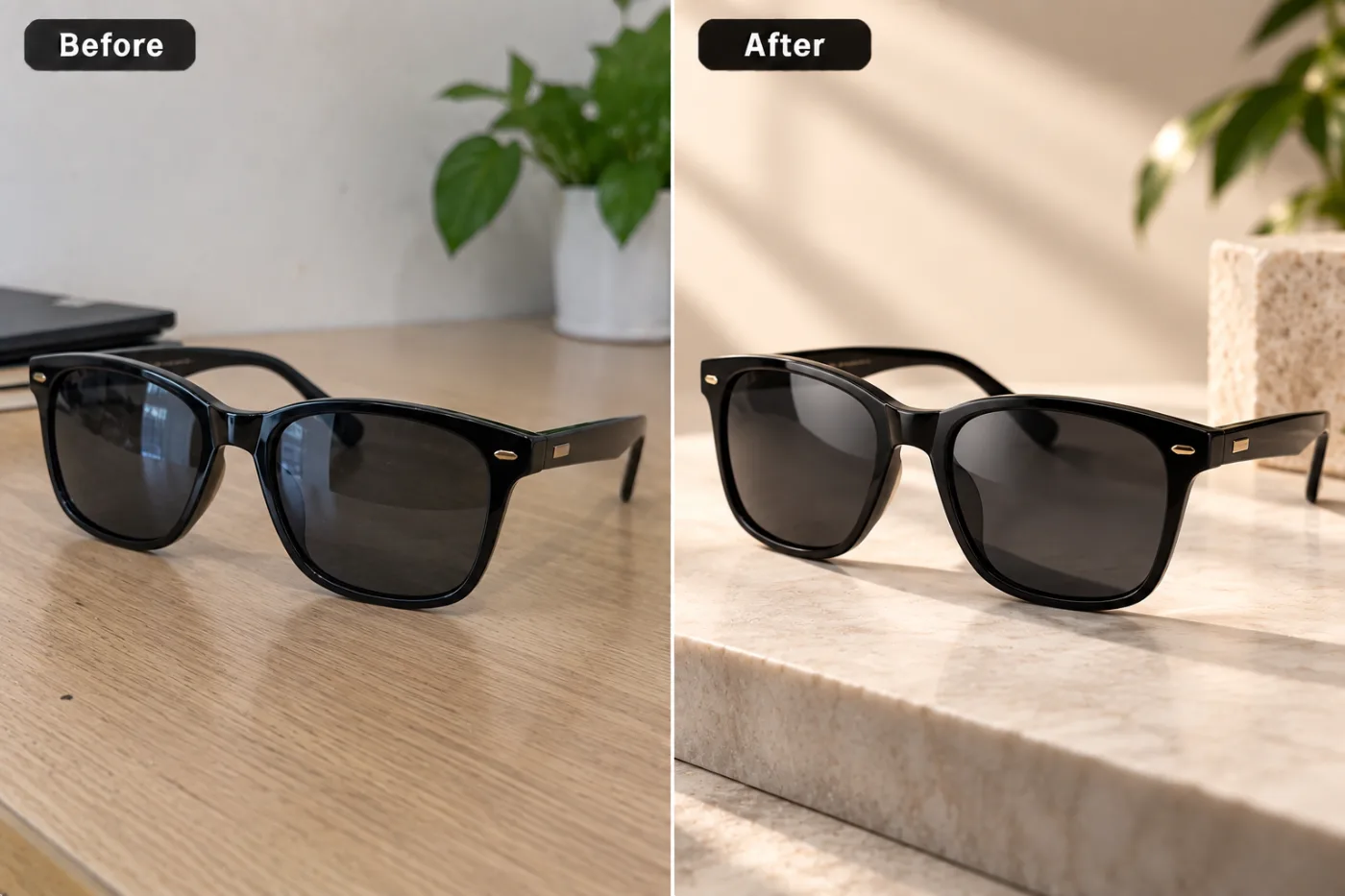
+ Choose a photoSee it in action — real before & after
How to use AI Product Photoshoot
Photograph the product
On a plain surface in soft daylight, shot square-on or at a consistent angle. Even a phone photo is enough — what matters is that the product is sharp and the whole of it is in frame.
Choose the setting
White sweep, studio, lifestyle, marble, natural or gradient. White for the main listing image, the others for gallery shots and ads.
Generate and download
Full resolution with no watermark, ready to upload to a listing or drop into a layout.
Why use AI Product Photoshoot
What AI Product Photoshoot does
Studio product shots without a studio.
Marketplace-compliant main images
Pure #FFFFFF, product centred with even margins, soft contact shadow — the specification Amazon, Flipkart and most marketplaces check against.
The material reads correctly
A specular highlight is what tells a viewer whether something is matte plastic, brushed metal or glazed ceramic. Getting it wrong makes a product look fake.
Contact shadows
The small dark area where the product meets the surface. Without it, the product appears to hover and the whole image looks composited.
Colour kept accurate
Colour drift is the most expensive error in product photography, because it is what returns and complaints are about.
The product itself is not altered
Shape, proportions, logos and labels are preserved. The lighting and the setting change; the thing you are selling does not.
What AI Product Photoshoot changes
Restage this product as a professional lifestyle studio photograph. Unless a background is given below, stand it on a travertine stone plinth with warm natural sunlight falling across it, soft leaf shadows on a cream wall and a green plant at the edge of the frame. A believable contact shadow and reflection. For photographic results, use realistic camera detail: natural skin texture and pores, believable eyes and hair strands, coherent lighting and shadows, correct anatomy and perspective, and matching sharpness across face, neck and body. Avoid waxy skin, over-retouching, distorted features, face-morphing and pasted-on faces. If the app intentionally creates artwork, render the requested medium consistently across the whole image instead of forcing photorealism.
Your face, bone structure and skin tone are held fixed on every generation — only what is described above is changed.
AI Product Photoshoot for every image a listing needs
A product needs more than one photo. The main image, the gallery, the ad creative and the banner all have different requirements.
Seasonal variants
The same product restyled for a campaign without a reshoot.
Catalogue and print
Full resolution for a printed catalogue, packaging insert or trade sheet.
Main listing images
Pure white, compliant margins, contact shadow. The image that has to pass validation before anything else matters.
Gallery and detail shots
Studio backdrops and angles that show material, finish and scale.
Key highlights of AI Product Photoshoot
Benefits
Your original is never modified
Every result is a new image. The file you uploaded stays exactly as it was on your device.
Cheap enough to iterate
Packs start at $2. Generating the same image three ways and keeping the best is the intended workflow, not an expensive mistake.
No studio and no courier
The sample stays where it is. There is nothing to book and nothing to ship.
Cheap per image
A pack starts at $2. A studio day starts in the hundreds and does not include revisions.
Same day, not next month
New product photographed in the morning and listed in the afternoon.
What people use it for
What it is mainly used for
Studio product shots without a studio. Set the options to suit you, and download the result at full resolution with no watermark.
New product launches
Photos ready before the sample has finished being unpacked.
Second-hand and resale
A clean, well-lit image is most of what makes a used item look worth the asking price.
Jewellery and small items
Where the specular highlight is the product — metal and stones live or die on the lighting.
Clothing and accessories
Fabric texture and drape rendered so the material reads as what it is.
Prompt ideas
Describe the surface, the light and the shadow. Product prompts fail by being aspirational — "premium look" means nothing, while "white marble, soft light from the upper left, soft contact shadow" means exactly one thing.
Avoid asking for text in the image
Generated lettering is still unreliable. Ask for empty space where the text should go and add real type afterwards.
Pick the ratio first
Generating square and cropping to vertical throws away part of the frame. Choose the shape before you generate.
Try another model
If a prompt is being ignored, switching between Nano Banana Pro, GPT Image and Seedream 4.5 often resolves it faster than rewording.
Describe the light
Direction, softness and colour temperature. Light does more to how a photograph feels than any other single thing you can specify.
Re-run before rewriting
Generation is not deterministic. The same prompt twice gives two different results, and the second is sometimes simply better.
Name the surface
"White marble", "pale oak", "brushed concrete", "seamless white sweep". The surface sets the whole character of the shot.
More about AI Product Photoshoot
A product photoshoot is the cost most small sellers underestimate. A studio day runs into the hundreds before you count the samples couriered there and back, and it produces one set of images — which is a problem the first time a marketplace changes its requirements or a campaign needs a different background. AI Product Photoshoot produces catalogue-ready images from a photo taken on a table.
Commercial product photography is unglamorous and rule-bound. The main image usually has to be on pure white with the product filling most of the frame. The material has to read correctly, which means a specular highlight that describes whether something is matte, brushed or glossy. There has to be a contact shadow, or the product floats. Colour has to be accurate, because colour is what returns get argued about. Those constraints are the tool's actual brief.
Upload the product shot, pick the background and lighting, and download. Each generation costs 2 credits from a one-time pack, so producing a white version, a studio version and a lifestyle version of one product is a few cents' worth of credits rather than a second shoot.
Getting the best result from AI Product Photoshoot
- Always request the contact shadow.
- Name the material so the highlight is right; this is what separates a real-looking product shot from a render.
- Check colour against the physical product before publishing — colour accuracy is what returns are about.
- Verify that label and logo text is unchanged and still legible.
- Generate the same product on two or three backgrounds and test which converts.
- Use the largest original you have; print collateral needs the resolution.
- Keep the original photograph as the master for every future variant.
- Start from the largest, least compressed original you have — a screenshot of a photo has already lost detail that cannot be recovered.
It runs online — nothing to install. Explore the rest of our AI Creative Apps, or open the full AI photo editor for more control.
Frequently Asked Questions
How does the ai product photoshoot work?
What photo should I upload?
Is the ai product photoshoot free?
Do you watermark the download?
Will the images meet Amazon's requirements?
Does it change the product itself?
Can I get a consistent look across a whole catalogue?
What about lifestyle shots, not just plain backgrounds?
Find another way to use Pixel Shine
Explore tools grouped by the outcome you want, including social media, LinkedIn, ecommerce, real estate, photography, creators and weddings.


