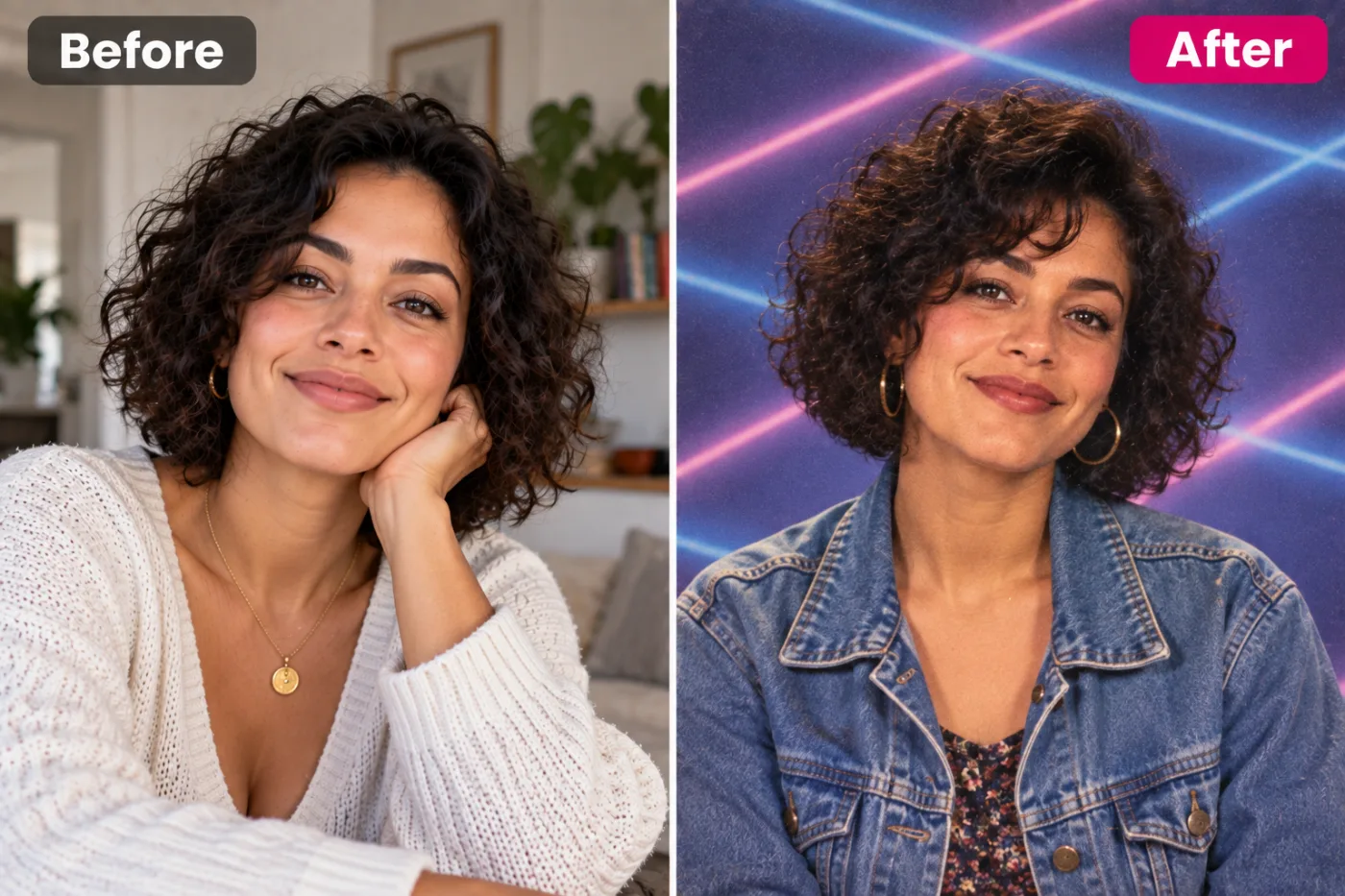
What is the AI yearbook trend?
In October 2023, an AI yearbook feature in a photo app went viral on TikTok. People uploaded selfies and got back school portraits that looked straight out of a 1990s yearbook: big hair, denim, awkward poses and those famous laser-beam backgrounds. Millions of videos later, it has come back every school season since.
The appeal is the gap between now and then. You see yourself as you might have looked in a school hall with a flash camera and a stack of yearbook forms, complete with the hairstyles and clothes of the era. It's funny, a little nostalgic, and it suits everyone, whether or not they were at school in the 90s.
This app makes the same kind of photo. It keeps your face and identity exactly as they are, and changes the backdrop, the lighting, your hair styling and your clothes to fit the period. The result looks like a real photograph, not a drawing.
What did real 90s yearbook photos look like?
If you were at school in the 90s, you'll remember picture day: a queue in the gym, a photographer with a comb and a mirror, and thirty seconds on a stool in front of a backdrop. The backdrops were the stars. Most schools used a mottled blue or grey canvas, painted to look like clouds. Portrait studios added the famous laser background in the late 80s and 90s, along with gradients and fake bookshelves.
The look came from the equipment. A big flash on or near the camera gave flat, bright light with a soft shadow behind the head. Film added warmth and grain, and the prints were often slightly soft. Poses were stiff on purpose: shoulders turned, head tilted, hands sometimes folded on a fake fence.
The fashion did the rest: big fringes, curtains haircuts, scrunchies, denim jackets, flannel shirts, chokers and patterned tops. The app adds some of that styling to your clothes and hair, which is why the result feels like a real photo from the era rather than a costume.
Which yearbook backdrop should you choose?
Backdrop is the one setting, and it sets the whole mood. Laser grid is selected to start.
Laser grid
Neon pink and blue beams on a purple background: the signature backdrop of the trend and of 90s portrait studios. The one most people share.
Mottled blue
The cloudy blue canvas that was the real default in school photos for years. It looks the most authentic.
Marbled grey
Soft grey with a marbled texture. Quieter and more grown-up; it's the senior-photo look.
Gradient sunset
Warm orange to purple, like a mall portrait studio. Bright and fun, especially with a big smile.
Library
Rows of books behind you, the backdrop for teachers and staff pages. Funny if you post it as "my teacher photo".
How do you get a convincing yearbook photo?
- Look straight at the camera with your shoulders square. That's the pose every school photographer asked for.
- Smile like it's picture day. A slightly forced school-photo smile adds to the joke; a natural one gives a lovely portrait.
- Use even, front light. The app adds soft flash; a strong side light in your selfie fights against it.
- Hair down shows the retro styling best. The app restyles hair slightly for the era, and loose hair gives it the most to work with.
- Any clothes are fine. The app gives you 90s clothes, often denim, flannel or a patterned top.
- Make a set: one of each backdrop, posted as a carousel, is how most people share the trend.
What it does and doesn't change
It changes the backdrop, the light, the film look, your clothes and your hair styling, a little. It keeps your face, eye colour, skin tone and expression. You won't get a different haircut, but you might get more volume, a side part or bangs that suit the decade.
It doesn't add the yearbook page itself, with names and quotes. If you'd like to make a full page, add your name and a quote underneath in the free photo editor, which has a text tool.
And it doesn't make you younger. If you want the full "me at 16" effect, the age progression app can show you at a different age first, and you can run the result through this one.
Ideas for your yearbook photos
A TikTok or Reels carousel
Post all five backdrops in a row, set to a 90s song. That's the classic way the trend is shared.
A class reunion invite
Ask everyone in a group chat to make theirs, then put them together on a reunion invitation or a shared album.
Friends and family
Make one for your parents and see how close it is to their real 90s school photo. Then compare them side by side.
A team icebreaker
Teams make one each for a fun channel or a "guess who" game. Library is perfect for the manager.
Profile pictures
Mottled blue makes a surprisingly good profile picture: clean background, flattering flash.
Like the retro look? The Polaroid photo gives a 90s instant-film print, the Y2K aesthetic jumps to the early 2000s, and the prom photoshoot completes the school memories.
Do you need the TikTok app or ChatGPT for it?
No. The trend started in a phone app, and you can also try it in ChatGPT or Gemini by asking for "a 1990s school yearbook portrait of this person with a laser background, soft flash and 90s clothes, keeping the face the same". That works, but you'll have to try a few wordings, and free plans limit how many images you can make in a day.
This app runs in your browser, needs no download and has the backdrops built in, so you only pick one and press Generate.
What happens to your selfie?
It's sent to our image-model partner, fal.ai, to make your yearbook photo, and nowhere else. It's not used to train AI models and is never sold, and both the selfie and the photo are yours.
Your photos are kept in My Creations, where you can download or delete them at any time. You can also ask us to delete your account and everything in it.


