Ad Creative Generator
Ad visuals from a product photo. Set the options to suit you, and download the result at full resolution with no watermark.
Click anywhere in this box or drag a photo in. Set the options on the left, then hit Generate — your original stays untouched, you always see both.
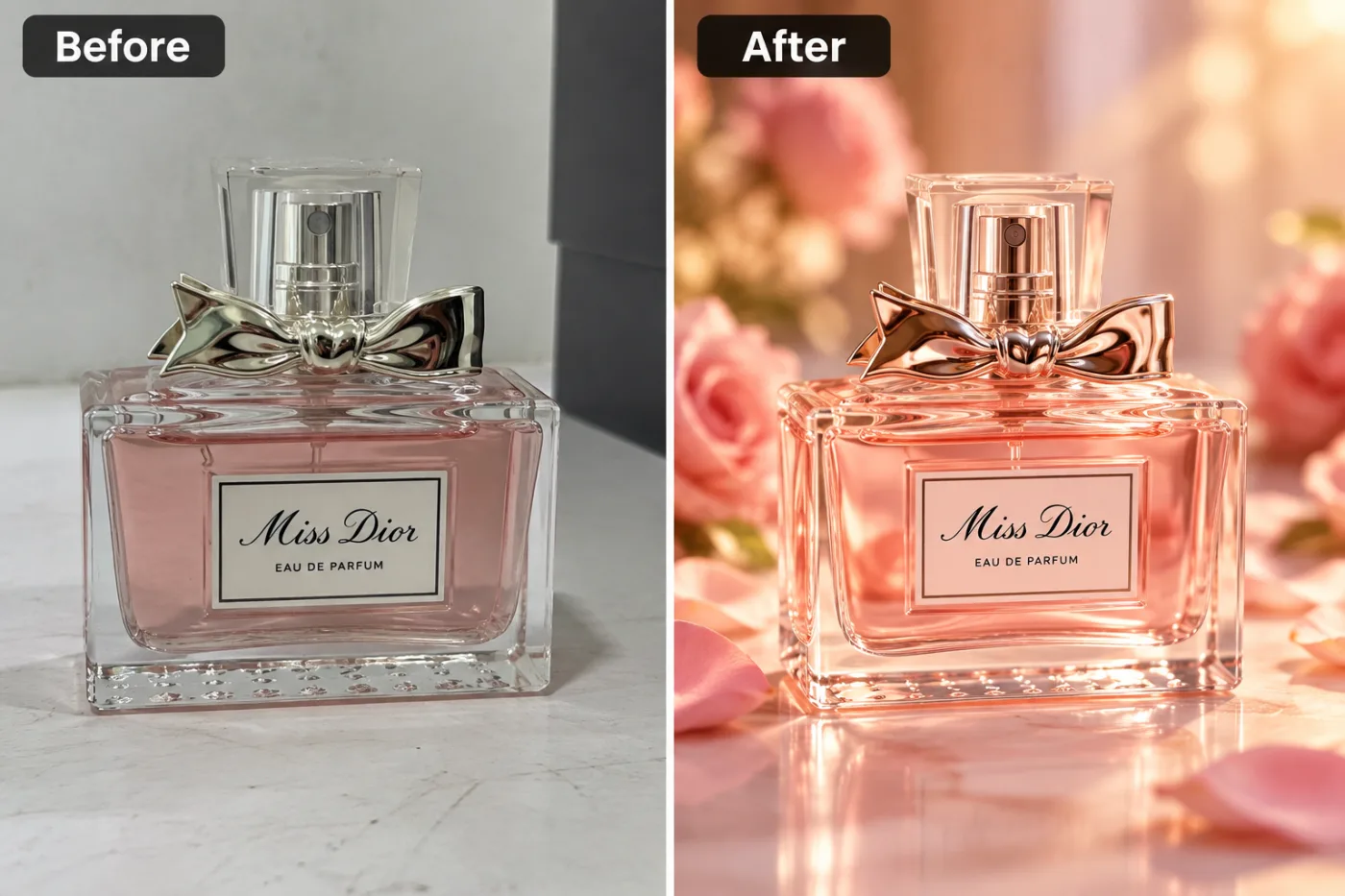
+ Choose a photoSee it in action — real before & after
How to use Ad Creative Generator
Photograph the product
On a plain surface in soft daylight, shot square-on or at a consistent angle. Even a phone photo is enough — what matters is that the product is sharp and the whole of it is in frame.
Choose the setting
White sweep, studio, lifestyle, marble, natural or gradient. White for the main listing image, the others for gallery shots and ads.
Generate and download
Full resolution with no watermark, ready to upload to a listing or drop into a layout.
Why use Ad Creative Generator
What Ad Creative Generator does
Ad visuals from a product photo.
The product itself is not altered
Shape, proportions, logos and labels are preserved. The lighting and the setting change; the thing you are selling does not.
Consistent across a catalogue
One background and one lighting setup applied to every product, which is what makes a listing page look professional.
Lifestyle scenes without a location
A styled surface with props defocused behind, generated rather than staged.
Any ratio a channel needs
Square for listings, 4:5 for a feed, wide for a banner, all from the same source photo.
Marketplace-compliant main images
Pure #FFFFFF, product centred with even margins, soft contact shadow — the specification Amazon, Flipkart and most marketplaces check against.
What Ad Creative Generator changes
Turn this product photo into a polished advertising image. Unless a background is given below, stage the product on a glossy reflective surface surrounded by props that echo what it is — fresh flowers and scattered petals for a fragrance, for example — with a softly blurred background in a colour that complements the product and a warm, glowing light. A striking composition with the product as the clear focal point. For photographic results, use realistic camera detail: natural skin texture and pores, believable eyes and hair strands, coherent lighting and shadows, correct anatomy and perspective, and matching sharpness across face, neck and body. Avoid waxy skin, over-retouching, distorted features, face-morphing and pasted-on faces. If the app intentionally creates artwork, render the requested medium consistently across the whole image instead of forcing photorealism.
Your face, bone structure and skin tone are held fixed on every generation — only what is described above is changed.
Ad Creative Generator for every image a listing needs
A product needs more than one photo. The main image, the gallery, the ad creative and the banner all have different requirements.
Lifestyle and in-use scenes
The product on a real surface in a real room, which is what converts once the listing has been opened.
Ad and social creative
Backgrounds with deliberate empty space for a headline, in each platform's ratio.
Seasonal variants
The same product restyled for a campaign without a reshoot.
Catalogue and print
Full resolution for a printed catalogue, packaging insert or trade sheet.
Key highlights of Ad Creative Generator
Benefits
Full resolution, no watermark
The download is the full generated image with nothing overlaid — usable in print, in a listing or commercially.
The free tools stay free
Compress, convert, crop, resize, rotate and the rest are unlimited, with no account and no credit cost.
Your original is never modified
Every result is a new image. The file you uploaded stays exactly as it was on your device.
Cheap enough to iterate
Packs start at $2. Generating the same image three ways and keeping the best is the intended workflow, not an expensive mistake.
No studio and no courier
The sample stays where it is. There is nothing to book and nothing to ship.
What people use it for
What it is mainly used for
Ad visuals from a product photo. Set the options to suit you, and download the result at full resolution with no watermark.
Food and drink
Lighting that makes food look appetising rather than clinical, which is a genuinely different setup.
Wholesale and trade sheets
Print-resolution product images for a catalogue or a line sheet.
Amazon and marketplace listings
The white main image, generated to specification rather than argued with after a rejection.
Shopify and Etsy stores
A consistent catalogue look across products photographed weeks apart.
Prompt ideas
Describe the surface, the light and the shadow. Product prompts fail by being aspirational — "premium look" means nothing, while "white marble, soft light from the upper left, soft contact shadow" means exactly one thing.
Change one thing at a time
If a result is close, edit a single detail and run it again. Rewriting the whole prompt gives you an unrelated image and no information about what the change did.
Say what must not change
A short exclusion — "do not change the face", "keep the label text" — is often more effective than any amount of positive description.
Keep it short
Three or four specific clauses beat a paragraph. Long prompts dilute every instruction in them, including the one you cared about.
Name the framing
Close-up, head and shoulders, full body, centred, offset. Framing decides what the image is actually of.
Avoid asking for text in the image
Generated lettering is still unreliable. Ask for empty space where the text should go and add real type afterwards.
Pick the ratio first
Generating square and cropping to vertical throws away part of the frame. Choose the shape before you generate.
More about Ad Creative Generator
Upload the product shot, pick the background and lighting, and download. Each generation costs 2 credits from a one-time pack, so producing a white version, a studio version and a lifestyle version of one product is a few cents' worth of credits rather than a second shoot.
Marketplace photography is a compliance exercise before it is a creative one. The main image has to be on pure white, the product has to fill most of the frame, and a rejection costs days. Ad Creative Generator is built to those rules rather than to a general idea of a nice photo.
The detail that separates a real product shot from an obvious composite is the contact shadow — the small dark area where the object meets the surface. Without it the product hovers. It is the cheapest possible fix and the one most often missing.
Getting the best result from Ad Creative Generator
- Keep the original photograph as the master for every future variant.
- Start from the largest, least compressed original you have — a screenshot of a photo has already lost detail that cannot be recovered.
- Soft, even light in the source photo gives the best result almost regardless of what you are generating.
- Judge every result at full size, not zoomed out. Problems hide at small sizes.
- Generate two or three times before deciding. Results vary between runs, and the first is not reliably the best.
- Check hands, text, jewellery and glasses in any result before sharing it — those are still where image models most often slip.
- Choose the aspect ratio before generating rather than cropping afterwards.
- If one model ignores part of your instruction, switch to the other and run it again.
It runs online — nothing to install. Explore the rest of our AI Creative Apps, or open the full AI photo editor for more control.
Frequently Asked Questions
How does the ad creative generator work?
What photo should I upload?
Is the ad creative generator free?
Do you watermark the download?
Will the images meet Amazon's requirements?
Does it change the product itself?
Can I get a consistent look across a whole catalogue?
What about lifestyle shots, not just plain backgrounds?
Find another way to use Pixel Shine
Explore tools grouped by the outcome you want, including social media, LinkedIn, ecommerce, real estate, photography, creators and weddings.


