Glamour Headshot Generator
Red-carpet polish on an ordinary photo. Set the options to suit you, and download the result at full resolution with no watermark.
Click anywhere in this box or drag a photo in. Set the options on the left, then hit Generate — your original stays untouched, you always see both.
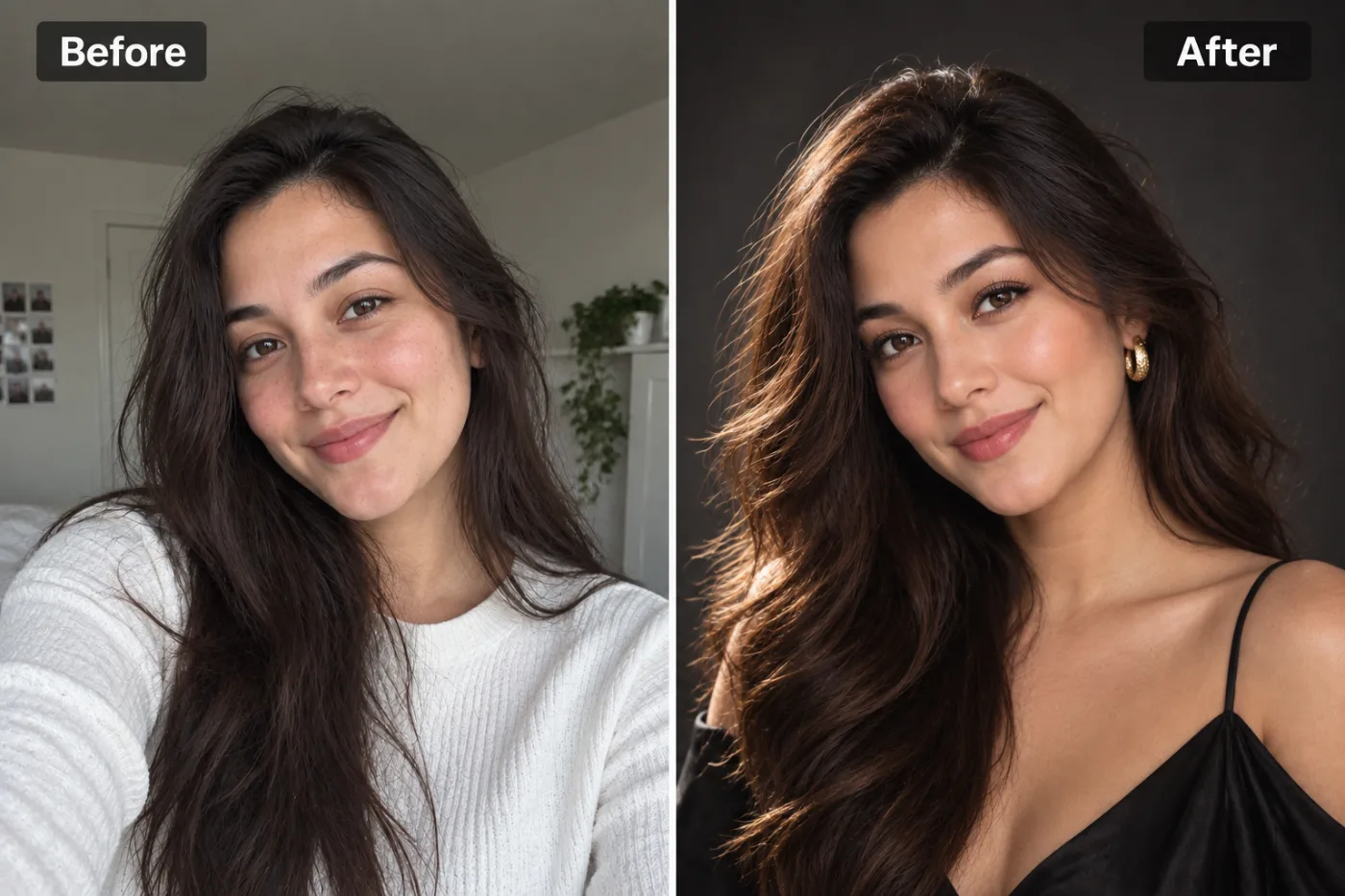
+ Choose a photoSee it in action — real before & after
How to use Glamour Headshot Generator
Upload a clear photo of your face
A front-facing JPG, PNG or WEBP where both eyes are visible and the light is even. A plain phone selfie taken near a window is genuinely better source material than a dim photo from a good camera.
Pick the style you need
Corporate, LinkedIn, executive, creative, outdoor or plain white. The choice sets the wardrobe, the background and how hard the lighting is — or write your own brief if you have something specific in mind.
Generate and download
Compare the original against the result, regenerate if the tie or the crop is not right, then download at full resolution. No watermark, and nothing is added to the image.
Why use Glamour Headshot Generator
What Glamour Headshot Generator does
Red-carpet polish on an ordinary photo.
Wardrobe appropriate to the field
A suit reads differently from an open collar, and both read differently from a lab coat. The styling is matched to where the photo is going rather than applied as one generic look.
ID and application safe
The plain-white style gives flat even light with no shadow behind the head, which is what passport, visa and application photos are usually rejected for.
Consistent across a team
Run the same style over everyone's photos and the About page stops looking like a collage of holiday snaps. Consistency in a team grid is more noticeable than the quality of any single portrait.
Full resolution, no watermark
Downloads are the full generated resolution with nothing overlaid, so the same file works for a 200px avatar and a printed conference badge.
Retake it whenever you change
New haircut, new role, new glasses. Regenerating costs 2 credits instead of booking another session, so the photo can stay current.
What Glamour Headshot Generator changes
Produce a glamour studio portrait in the style of a magazine cover shoot, framed from the chest up, with a poised, confident editorial expression. Keep their own hair colour and length, styled glossy and polished — soft voluminous waves or a sleek groomed cut. Unless attire is given below, dress them in an elegant black satin evening top with small gold earrings, or a black tuxedo jacket over an open-collar shirt. Unless a background is given below, use a deep, dark seamless backdrop. Warm, directional beauty light from one side, a soft glow on the skin and immaculate grooming. Preserve the same person's recognizable identity from the uploaded reference: face shape, forehead, cheekbones, jawline, eye shape and spacing, eyebrows, nose, lips, natural asymmetry, age appearance, skin tone and distinctive features. Do not replace them with a generic AI face or beautify/idealize their features. Keep natural skin texture and pores; avoid waxy smoothing, exaggerated eyes, reshaped facial features and artificial symmetry. Change only what the app's requested transformation requires. For photographic results, use realistic camera detail: natural skin texture and pores, believable eyes and hair strands, coherent lighting and shadows, correct anatomy and perspective, and matching sharpness across face, neck and body. Avoid waxy skin, over-retouching, distorted features, face-morphing and pasted-on faces. If the app intentionally creates artwork, render the requested medium consistently across the whole image instead of forcing photorealism.
Your face, bone structure and skin tone are held fixed on every generation — only what is described above is changed.
Glamour Headshot Generator for every kind of profile
The same face, styled for where the photo is actually going. A leadership page, a hiring portal and a conference badge all want different things from a portrait.
Creative and agency profiles
A textured or coloured backdrop and characterful directional light, for fields where looking identical to a bank's website is the wrong signal.
Speaker and press kits
Higher-contrast lighting and generous negative space around the head, so an event page can crop it square or wide without cutting into your face.
Team directories at scale
One style applied across dozens of photos taken on different phones in different rooms, which is the usual state of an internal directory.
LinkedIn and hiring profiles
Smart-casual dress, a softly blurred background with depth, approachable expression. The look recruiters skim past thousands of and register as competent.
Key highlights of Glamour Headshot Generator
Benefits
No subscription needed
Buy a one-time pack whose credits never expire, or go monthly for the lowest price per credit and cancel any time.
Three models to choose from
Nano Banana Pro, GPT Image and Seedream 4.5 handle the same job differently. If one result is not right, another model often is.
Every aspect ratio
Square, 4:5, 9:16, 16:9 and more, chosen before generating so nothing important gets cropped away afterwards.
The free tools stay free
Compress, convert, crop, resize, rotate and the rest are unlimited, with no account and no credit cost.
Your original is never modified
Every result is a new image. The file you uploaded stays exactly as it was on your device.
What people use it for
What it is mainly used for
Red-carpet polish on an ordinary photo. Set the options to suit you, and download the result at full resolution with no watermark.
Conference and panel submissions
Speaker forms almost always demand a high-resolution headshot at short notice, usually the week the deadline lands.
Medical, legal and finance profiles
Fields where clients read the portrait as a signal of seriousness before they read a word of the biography.
Real-estate and sales collateral
Agent photos appear on listings, signage and cards, at every size from a thumbnail to a poster.
Academic and research pages
Faculty directories are usually an assortment of decades-old photos. A current one, consistently lit, stands out immediately.
Prompt ideas
You do not need to write a prompt at all — the style presets cover most cases. If you want something specific, keep the brief short and name only what you care about: the clothing, the background, the light and the expression.
Pick the ratio first
Generating square and cropping to vertical throws away part of the frame. Choose the shape before you generate.
Try another model
If a prompt is being ignored, switching between Nano Banana Pro, GPT Image and Seedream 4.5 often resolves it faster than rewording.
Describe the light
Direction, softness and colour temperature. Light does more to how a photograph feels than any other single thing you can specify.
Re-run before rewriting
Generation is not deterministic. The same prompt twice gives two different results, and the second is sometimes simply better.
Name the clothing precisely
"Charcoal suit, white shirt, no tie" gives a far more predictable result than "business clothes", which could mean almost anything.
Say what the background should be
"Plain mid-grey seamless backdrop" or "softly blurred modern office". Naming it stops the model choosing something distracting for you.
More about Glamour Headshot Generator
Teams get more out of this than individuals do. A directory where every portrait was taken in a different room on a different phone looks disorganised in a way nobody comments on but everybody notices. Running one style across all of them fixes the page more than improving any single photo would.
A studio headshot session costs between $150 and $500 in most cities, takes half a day once you count travel and wardrobe, and hands you a gallery three weeks later. For a photo that lives at 200 pixels wide next to your name, that is a strange amount of money and time. Glamour Headshot Generator produces the same kind of image from a photo already on your phone.
What matters in a professional headshot is boring and specific: even light on the face with no hard shadow across one eye, a background that does not compete, clothing that reads as appropriate for your field, and an expression that looks like you on a good day rather than you being told to smile. Those are the things this tool controls. Your face, bone structure and skin tone are held exactly as they are — the wardrobe, the light and the backdrop are what change.
Getting the best result from Glamour Headshot Generator
- For a matching set, keep the same source photo and style and change only one variable.
- Nothing you upload is published, shared or added to a gallery — but do not upload anything you would not want to leave your device at all.
- The free on-device tools — compress, convert, crop, resize, rotate — cost no credits, so use them for mechanical work.
- If a result is nearly right, say what is wrong with it in the next run rather than starting over.
- Start with a front-facing photo where both eyes are clearly visible — a slight angle is fine, a strong three-quarter turn is not.
- Soft, even light beats bright light. Facing a window on an overcast day is close to ideal.
- Avoid direct overhead light: it drops shadows into the eye sockets and under the nose, which the model then has to guess its way out of.
- Skip photos already run through a beauty filter — smoothed skin gives the model less structure to work from and the result looks waxy.
It runs online — nothing to install. Explore the rest of our AI Creative Apps, or open the full AI photo editor for more control.
Frequently Asked Questions
How does the glamour headshot generator work?
What photo should I upload?
Is the glamour headshot generator free?
Will it still look like me?
Do you watermark the download?
Can I use the result on LinkedIn, a CV or a company website?
Is it acceptable for a passport or visa photo?
Do I need several photos of myself, like a trained model?
Find another way to use Pixel Shine
Explore tools grouped by the outcome you want, including social media, LinkedIn, ecommerce, real estate, photography, creators and weddings.


