Doctor Headshot Generator
Clinical profile photos for medical directories. Set the options to suit you, and download the result at full resolution with no watermark.
Click anywhere in this box or drag a photo in. Set the options on the left, then hit Generate — your original stays untouched, you always see both.
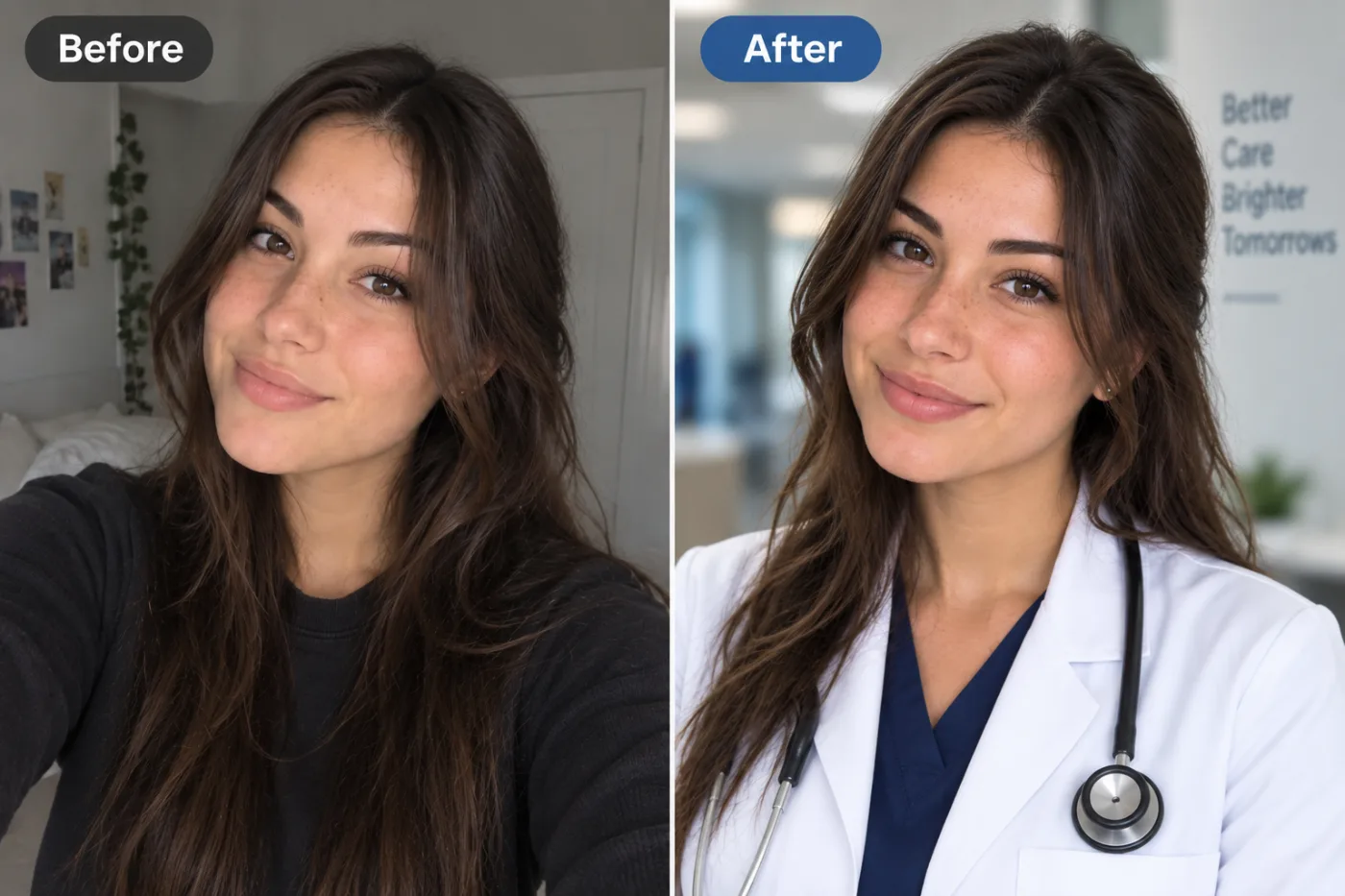
+ Choose a photoSee it in action — real before & after
How to use Doctor Headshot Generator
Upload a clear photo of your face
A front-facing JPG, PNG or WEBP where both eyes are visible and the light is even. A plain phone selfie taken near a window is genuinely better source material than a dim photo from a good camera.
Pick the style you need
Corporate, LinkedIn, executive, creative, outdoor or plain white. The choice sets the wardrobe, the background and how hard the lighting is — or write your own brief if you have something specific in mind.
Generate and download
Compare the original against the result, regenerate if the tie or the crop is not right, then download at full resolution. No watermark, and nothing is added to the image.
Why use Doctor Headshot Generator
What Doctor Headshot Generator does
Clinical profile photos for medical directories.
Retake it whenever you change
New haircut, new role, new glasses. Regenerating costs 2 credits instead of booking another session, so the photo can stay current.
Your face stays your face
Identity preservation is the whole job. Bone structure, eye shape, skin tone and the details that make you recognisable are held fixed; only clothing, lighting and background are generated.
Even, professional lighting
A soft key with a fill on the shadow side — the standard portrait setup. No hard nose shadow, no blown-out forehead, no colour cast from an office ceiling light.
Backgrounds that stay out of the way
Neutral grey, softly defocused office, dark low-key or plain white. Each one is chosen because it makes the face read first, which is the only thing a headshot has to do.
Wardrobe appropriate to the field
A suit reads differently from an open collar, and both read differently from a lab coat. The styling is matched to where the photo is going rather than applied as one generic look.
What Doctor Headshot Generator changes
Produce a medical professional headshot, framed from the chest up, with a calm, reassuring smile. Keep their own hair and hairstyle, just neatly groomed. Unless attire is given below, dress them in a clean white clinical coat over navy scrubs, with a stethoscope around the neck. Unless a background is given below, use a bright hospital or clinic corridor, softly out of focus behind them. Bright, even, clean lighting. Preserve the same person's recognizable identity from the uploaded reference: face shape, forehead, cheekbones, jawline, eye shape and spacing, eyebrows, nose, lips, natural asymmetry, age appearance, skin tone and distinctive features. Do not replace them with a generic AI face or beautify/idealize their features. Keep natural skin texture and pores; avoid waxy smoothing, exaggerated eyes, reshaped facial features and artificial symmetry. Change only what the app's requested transformation requires. For photographic results, use realistic camera detail: natural skin texture and pores, believable eyes and hair strands, coherent lighting and shadows, correct anatomy and perspective, and matching sharpness across face, neck and body. Avoid waxy skin, over-retouching, distorted features, face-morphing and pasted-on faces. If the app intentionally creates artwork, render the requested medium consistently across the whole image instead of forcing photorealism.
Your face, bone structure and skin tone are held fixed on every generation — only what is described above is changed.
Doctor Headshot Generator for every kind of profile
The same face, styled for where the photo is actually going. A leadership page, a hiring portal and a conference badge all want different things from a portrait.
Creative and agency profiles
A textured or coloured backdrop and characterful directional light, for fields where looking identical to a bank's website is the wrong signal.
Speaker and press kits
Higher-contrast lighting and generous negative space around the head, so an event page can crop it square or wide without cutting into your face.
Team directories at scale
One style applied across dozens of photos taken on different phones in different rooms, which is the usual state of an internal directory.
LinkedIn and hiring profiles
Smart-casual dress, a softly blurred background with depth, approachable expression. The look recruiters skim past thousands of and register as competent.
Key highlights of Doctor Headshot Generator
Benefits
Cheap enough to iterate
Packs start at $2. Generating the same image three ways and keeping the best is the intended workflow, not an expensive mistake.
Ready in about a minute
Upload, choose, generate. The slow parts of a headshot — scheduling, travel, wardrobe, waiting on the retoucher — are removed entirely.
Costs a fraction of a session
A pack of credits starts at $2 and covers several attempts. A studio sitting starts in the low hundreds and covers one.
No photoshoot nerves
Being photographed makes most people tense, and tension shows in the jaw and eyes. Working from a photo you already like sidesteps that completely.
Print-ready output
The resolution holds up on a badge, a business card or a printed programme, not only on screen.
What people use it for
What it is mainly used for
Clinical profile photos for medical directories. Set the options to suit you, and download the result at full resolution with no watermark.
Refreshing a photo that has aged
If the portrait predates a haircut, glasses or a decade, the mismatch is the first thing anyone who meets you notices.
A LinkedIn photo that is not a cropped wedding shot
The most common professional headshot on the internet is someone cut out of a group photo. This replaces it in a minute.
A new starter who joined remotely
Nobody is flying someone in for a photographer. One selfie matched to the company style closes the gap in the team grid.
Consultants and freelancers
When the proposal is the product, the portrait at the top of it does real work. A studio-grade photo raises the floor on a cold pitch.
Prompt ideas
You do not need to write a prompt at all — the style presets cover most cases. If you want something specific, keep the brief short and name only what you care about: the clothing, the background, the light and the expression.
Pick the ratio first
Generating square and cropping to vertical throws away part of the frame. Choose the shape before you generate.
Try another model
If a prompt is being ignored, switching between Nano Banana Pro, GPT Image and Seedream 4.5 often resolves it faster than rewording.
Describe the light
Direction, softness and colour temperature. Light does more to how a photograph feels than any other single thing you can specify.
Re-run before rewriting
Generation is not deterministic. The same prompt twice gives two different results, and the second is sometimes simply better.
Name the clothing precisely
"Charcoal suit, white shirt, no tie" gives a far more predictable result than "business clothes", which could mean almost anything.
Say what the background should be
"Plain mid-grey seamless backdrop" or "softly blurred modern office". Naming it stops the model choosing something distracting for you.
More about Doctor Headshot Generator
The unglamorous truth about profile photos is that most people are using one they do not like. It is a cropped wedding photo, or a selfie taken in a car, or a portrait from a job two roles ago — kept because replacing it meant organising something. Doctor Headshot Generator removes the organising.
There is a reason recruiters and clients form an impression from a portrait before reading a word: it is the only part of a profile that is processed instantly. An evenly lit photo against a neutral background reads as competent, and a dim phone snap reads as indifferent, regardless of what the text underneath says.
Teams get more out of this than individuals do. A directory where every portrait was taken in a different room on a different phone looks disorganised in a way nobody comments on but everybody notices. Running one style across all of them fixes the page more than improving any single photo would.
Getting the best result from Doctor Headshot Generator
- Skip photos already run through a beauty filter — smoothed skin gives the model less structure to work from and the result looks waxy.
- Sunglasses, hats and hands near the face all obscure the features that identity preservation depends on.
- A plain wall behind you is not required, but a very busy background makes a clean separation harder.
- Generate two or three times. Small differences in the source photo change the tie, the collar and the light noticeably.
- Check the hands, collar and glasses in the result before using it — those are the details generative models are still most likely to get subtly wrong.
- If the expression looks stiff, try a source photo where you were mid-sentence rather than posing.
- For a team, run the same style across everyone rather than letting each person choose — the grid matters more than each portrait.
- Keep the original file. It is the best starting point for a different style later, and a generated image is not.
It runs online — nothing to install. Explore the rest of our AI Creative Apps, or open the full AI photo editor for more control.
Frequently Asked Questions
How does the doctor headshot generator work?
What photo should I upload?
Is the doctor headshot generator free?
Will it still look like me?
Do you watermark the download?
Can I use the result on LinkedIn, a CV or a company website?
Is it acceptable for a passport or visa photo?
Do I need several photos of myself, like a trained model?
Find another way to use Pixel Shine
Explore tools grouped by the outcome you want, including social media, LinkedIn, ecommerce, real estate, photography, creators and weddings.


