AI Gym Transformation Photo
Upload a photo and AI shows a motivating, toned physique preview — right here. Free and instant.
Click anywhere in this box or drag a photo in. Set the options on the left, then hit Generate — your original stays untouched, you always see both.
+ Choose a photoSee it in action — real before & after
How to use AI Gym Transformation Photo
Upload the photo
Any JPG, PNG or WEBP. The more resolution the original has, the more the retouch has to work with — detail cannot be invented from a heavily compressed file.
Choose the fix
Pick the correction you need, or describe it in a sentence. Being specific about what to change, and what to leave alone, is most of the skill.
Compare, then download
Check the original against the result at full size before you commit. Download is full resolution, no watermark.
Why use AI Gym Transformation Photo
What AI Gym Transformation Photo does
Preview a leaner, more toned version of yourself for motivation.
Fixes what the camera got wrong
Colour casts, uneven exposure, flash shine, red eye, harsh shadow — the failures of the room and the lens rather than of the subject.
Restrained by default
Over-retouching is the most common mistake in the category. The defaults are deliberately conservative.
Consistent across a set
Apply the same correction to every photo from one event so the whole set matches rather than each frame looking individually processed.
No editor to learn
No frequency separation, no dodge and burn, no masks. The pass that takes an experienced retoucher ten minutes takes a sentence.
Full resolution out
The download is not a downscaled preview. It goes straight into a print, a listing or a profile.
What AI Gym Transformation Photo changes
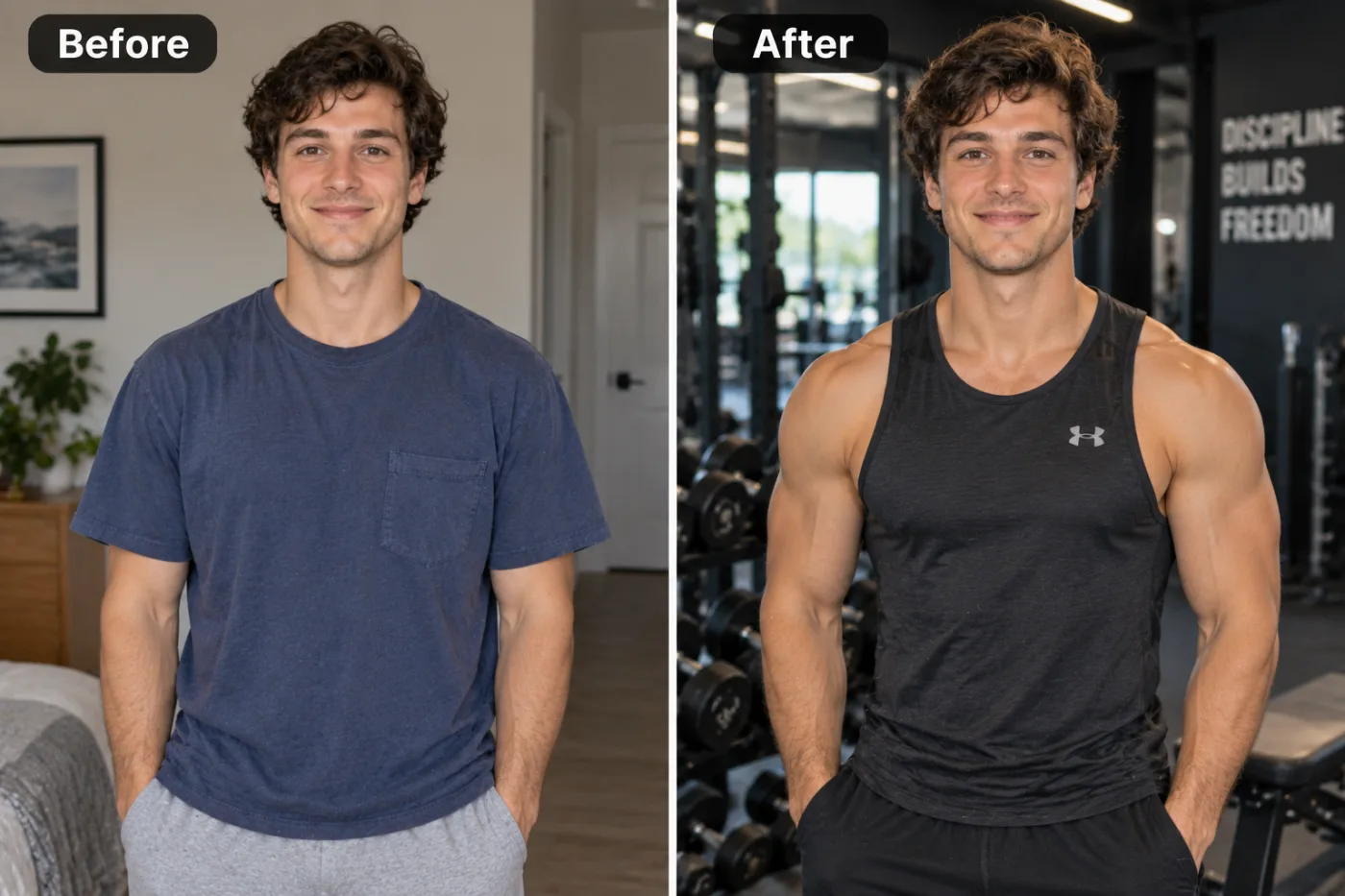
Transform this photo into a fitness-motivation photo of the same person, keeping their pose and framing: give them a toned, athletic, visibly fit physique, dressed in a black training tank top and shorts, in a modern gym with dumbbell racks and equipment behind, under dramatic gym lighting. Keep the person's face and identity exactly the same — this is a motivational style edit, not a medical depiction.
Your face, bone structure and skin tone are held fixed on every generation — only what is described above is changed.
AI Gym Transformation Photo for the fixes that actually come up
Most retouching is a handful of recurring problems. Each one has a specific fix rather than a general "enhance" slider.
Portraits and profile photos
Temporary blemishes, shine, stray hair and flash red-eye — the four things that stop an otherwise good photo of a person being usable.
Colour and exposure correction
Fluorescent green, tungsten orange, a flat grey day. Getting the white balance right fixes photos people assume are unfixable.
Event and group photos
One consistent pass across a whole set, so the album reads as a single shoot.
Product and listing photos
Dust, fingerprints, glare and colour accuracy, which is what marketplace returns are usually argued over.
Key highlights of AI Gym Transformation Photo
Benefits
Cheap enough for a whole set
A pack starts at $2, so fixing every photo from an event is realistic rather than something you do to one and give up on.
Nothing to install
Works on a phone as readily as a laptop.
Predictable results
A named fix does the named thing. There is no single mystery "enhance" button doing five things at once.
Print and marketplace ready
Full resolution with no watermark, which is what a listing or a printer actually needs.
Credits never expire
Buy once, use them whenever the next batch of photos turns up.
What people use it for
What it is mainly used for
Upload a photo and AI shows a motivating, toned physique preview — right here. Free and instant.
Event albums
Hundreds of frames from one room, all needing the same correction rather than individual attention.
Dating profiles
Corrected colour and exposure, without the smoothing that reads instantly as filtered.
Documentation and comparison photos
Two photos matched for light and colour so the difference between them is the actual subject.
Older phone photos
Noise and compression from an earlier phone, cleaned up enough to print.
Prompt ideas
Name the specific problem and, just as importantly, say what to leave alone. Retouching prompts fail by being too broad — "make it better" invites the model to change things you were happy with.
Keep it short
Three or four specific clauses beat a paragraph. Long prompts dilute every instruction in them, including the one you cared about.
Name the framing
Close-up, head and shoulders, full body, centred, offset. Framing decides what the image is actually of.
Avoid asking for text in the image
Generated lettering is still unreliable. Ask for empty space where the text should go and add real type afterwards.
Pick the ratio first
Generating square and cropping to vertical throws away part of the frame. Choose the shape before you generate.
Try another model
If a prompt is being ignored, switching between Nano Banana Pro, GPT Image and Seedream 4.5 often resolves it faster than rewording.
Describe the light
Direction, softness and colour temperature. Light does more to how a photograph feels than any other single thing you can specify.
More about AI Gym Transformation Photo
Fitness motivation content is everywhere, and a stylised 'future you' photo is a fun, harmless way to visualize a goal — not a medical prediction, just an energising piece of motivation art.
Upload a photo and the AI applies gym lighting, workout styling and an athletic mood while keeping your actual face and identity. People use it for motivation boards, before-you-start posts, or just for fun.
This ai gym transformation photo tool is popular with anyone searching 'fitness physique ai free' or 'ai muscle photo generator' for motivation content, vision boards, or a fun progress-goal image to pin up — not as a guarantee of real results.
Tips for the best motivational result
- A clear, well-lit photo gives the most natural gym-styled result.
- Remember this is stylised motivation art, not a fitness or medical forecast.
- Pair it with a real workout plan — the photo is the spark, not the substitute.
- Save it as a lock-screen or vision-board image for daily motivation.
- If the result looks smoothed, say so explicitly in the next run and ask for less.
- Keep the original. Retouching from an already-retouched file compounds the artefacts.
- Do not expect detail to appear that the camera never recorded; a blurred photo can be sharpened, not reconstructed.
- For documentation photos, match the light between frames rather than perfecting either one alone.
- Start from the largest, least compressed original you have — a screenshot of a photo has already lost detail that cannot be recovered.
- Soft, even light in the source photo gives the best result almost regardless of what you are generating.
- Judge every result at full size, not zoomed out. Problems hide at small sizes.
It runs online — nothing to install. Explore the rest of our AI Creative Apps, or open the full AI photo editor for more control.
Frequently Asked Questions
How does the gym transformation photo work?
Is this a real transformation?
Is it free?
Will my skin end up looking artificial?
Does it change my face shape or body?
Can it rescue a blurred or very dark photo?
Can I use it on a whole set of photos?
Find another way to use Pixel Shine
Explore tools grouped by the outcome you want, including social media, LinkedIn, ecommerce, real estate, photography, creators and weddings.


