AI Pixel Art Avatar Maker
Upload a selfie and AI turns it into a retro 8-bit pixel art avatar — right here. Free and instant.
Click anywhere in this box or drag a photo in. Set the options on the left, then hit Generate — your original stays untouched, you always see both.
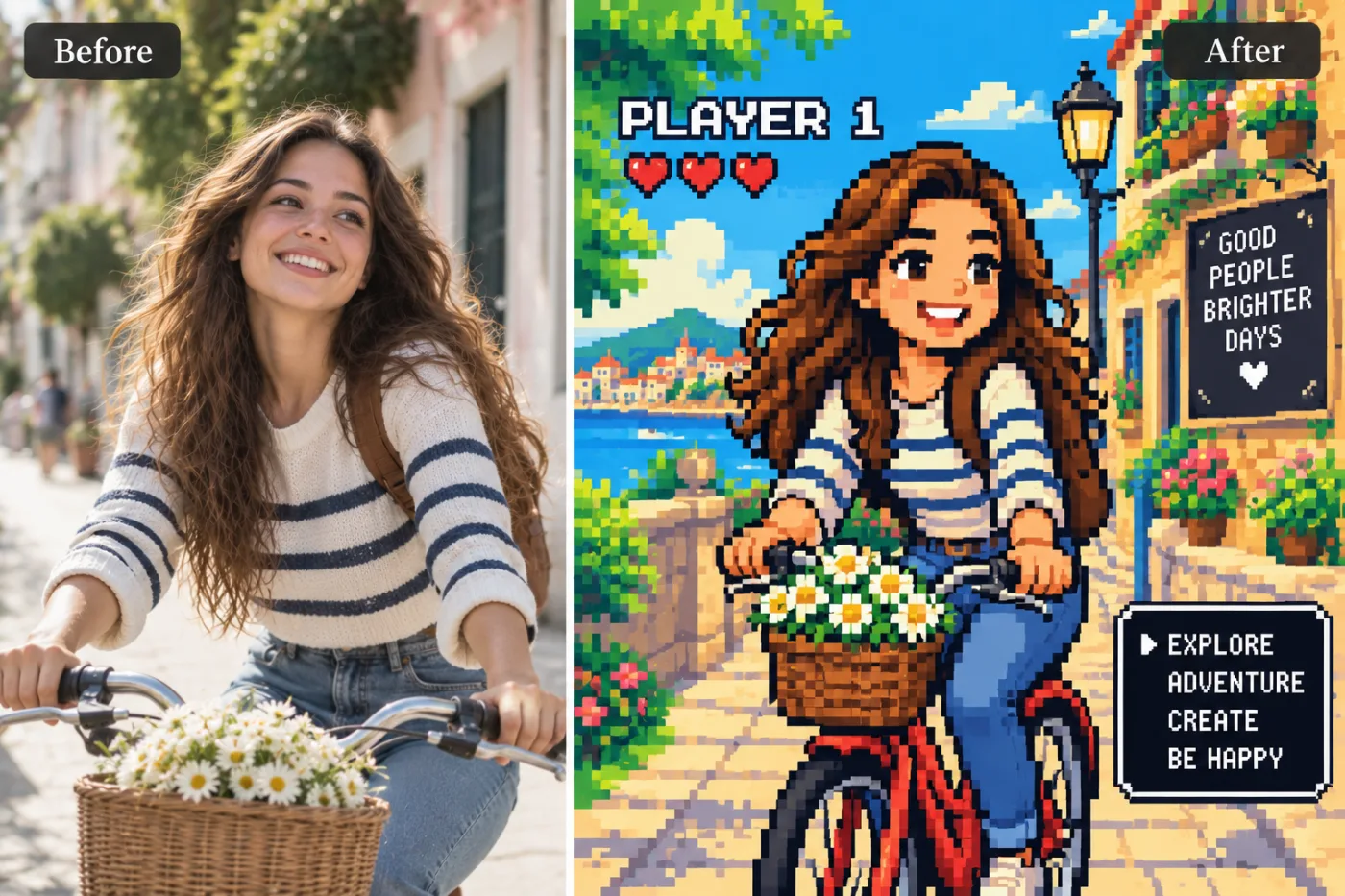
+ Choose a photoSee it in action — real before & after
How to use AI Pixel Art Avatar Maker
Upload the photo
A clear JPG, PNG or WEBP. Portraits work best when the face fills a reasonable part of the frame — a distant full-body shot gives the model very little face to work from.
Pick the style or write your own
Choose a preset, or describe the medium you want: line weight, palette, texture, era. Naming the medium precisely is what separates a good result from a vague one.
Generate and download
Full resolution, no watermark. Good enough to print, use as an avatar, or send to someone as a gift.
Why use AI Pixel Art Avatar Maker
What AI Pixel Art Avatar Maker does
Turn a selfie into a retro 8-bit pixel art avatar.
Cheaper than a commission by orders of magnitude
An illustrated portrait typically runs from $40 to several hundred. A pack of credits starts at $2.
Recognisable after the conversion
Facial proportions and the details that identify a person are carried into the new medium rather than replaced by a generic character face.
A real change of medium
Brush texture, ink weight, cel shading, moulded plastic, woven canvas. The material of the image changes, not just its colours.
Consistent across a set
Run several photos through the same style and they look like one commission rather than a pile of unrelated experiments.
Backgrounds restyled to match
A stylised subject on a photographic background looks pasted in. The whole frame is converted together.
What AI Pixel Art Avatar Maker changes
Convert this photo into a bright 16-bit pixel-art video-game scene: visible square pixels, a cheerful limited palette and simplified features. Keep the person's clothes and what they are doing — riding a bike, holding a drink — and set them in a sunny pixel-art world built on their location, like a colourful seaside town with flowers. Add a small game HUD: a PLAYER 1 label with three hearts in the top corner. Keep the person's likeness recognisable in pixel form.
Your face, bone structure and skin tone are held fixed on every generation — only what is described above is changed.
AI Pixel Art Avatar Maker for prints, avatars and gifts
The same conversion serves very different ends — a profile picture, a framed print, a card, a set of matching avatars for a group.
Creative reference
A quick look at a concept in a given medium before committing to commissioning it properly.
Profile pictures and avatars
A stylised portrait stands out in a feed of photographs, and it stays readable when a platform shrinks it to 40 pixels.
Prints and framed gifts
A converted portrait of a person, a couple or a pet is the kind of gift people keep, and it costs the price of the frame.
Cards and invitations
An illustrated portrait sits on a card in a way a photograph usually does not, without needing a designer.
Key highlights of AI Pixel Art Avatar Maker
Benefits
The free tools stay free
Compress, convert, crop, resize, rotate and the rest are unlimited, with no account and no credit cost.
Your original is never modified
Every result is a new image. The file you uploaded stays exactly as it was on your device.
Cheap enough to iterate
Packs start at $2. Generating the same image three ways and keeping the best is the intended workflow, not an expensive mistake.
Done in under a minute
No brief, no back and forth, no revision round. Upload and generate.
Try several styles for the price of one commission
Compare mediums on the same photo instead of committing to the first description that sounded good.
What people use it for
What it is mainly used for
Upload a selfie and AI turns it into a retro 8-bit pixel art avatar — right here. Free and instant.
Social content and trends
Style trends move in days. Generating the look while it is current beats commissioning it for after it has passed.
An avatar that is not another selfie
Stylised portraits read as a deliberate choice in a grid of photographs, and they stay legible at tiny sizes.
A gift that took no planning
A parent, a partner or a pet converted into a print, ordered the same evening.
Group and team sets
Everyone in one style — for an About page, a group chat, a wedding party or a D&D table.
Prompt ideas
Presets cover the common styles. If you write your own, describe the medium as a maker would: line, colour, texture, era. Vague adjectives like "beautiful" or "high quality" do nothing; "thick ink outlines, flat colour, halftone shading" does a great deal.
Set the framing
"Bust, shoulders up" for an avatar, "full figure" for a poster. This decides how much of the style you actually see.
Ask for clean space if text is going on it
"Leave the upper third uncluttered" gives a title somewhere to go, which is the usual reason a good cover fails.
Be concrete, not complimentary
"Soft light from the left, plain grey background" gives the model something to act on. "Beautiful, high quality, 8k" gives it nothing at all.
Change one thing at a time
If a result is close, edit a single detail and run it again. Rewriting the whole prompt gives you an unrelated image and no information about what the change did.
Say what must not change
A short exclusion — "do not change the face", "keep the label text" — is often more effective than any amount of positive description.
Keep it short
Three or four specific clauses beat a paragraph. Long prompts dilute every instruction in them, including the one you cared about.
More about AI Pixel Art Avatar Maker
Pixel art has stayed a favourite in gaming culture for decades — there's something nostalgic and instantly recognisable about an 8-bit character. This turns your actual photo into one.
Upload a selfie and the AI converts it into a retro pixel-art character: visible square pixel blocks, a limited retro game colour palette, and a flat arcade-style background — like a character-select screen from a classic console game.
It's a popular pick for anyone searching 'ai pixel art avatar maker' or 'photo to pixel art online' wanting a distinctive gaming profile picture for Discord, Steam, Twitch, or a retro-styled forum avatar.
Tips for the cleanest pixel art avatar
- A clear, front-facing photo with simple lighting gives the cleanest pixel conversion.
- Bold, distinct hair and clothing colours translate best into a limited pixel palette.
- A plain background helps the AI build a clean arcade-style backdrop.
- Use it as a matching avatar across Discord, Steam, and Twitch for a consistent retro look.
- Start from the largest, least compressed original you have — a screenshot of a photo has already lost detail that cannot be recovered.
- Soft, even light in the source photo gives the best result almost regardless of what you are generating.
- Judge every result at full size, not zoomed out. Problems hide at small sizes.
- Generate two or three times before deciding. Results vary between runs, and the first is not reliably the best.
- Check hands, text, jewellery and glasses in any result before sharing it — those are still where image models most often slip.
- Choose the aspect ratio before generating rather than cropping afterwards.
- If one model ignores part of your instruction, switch to the other and run it again.
It runs online — nothing to install. Explore the rest of our AI Creative Apps, or open the full AI photo editor for more control.
Frequently Asked Questions
How do I turn my photo into pixel art with AI?
Is it free?
Can I use it as a gaming profile picture?
Will the portrait still look like the person?
Can I use the result commercially or print it?
Does it work on pets and objects, or only people?
Why does the same photo give different results each time?
Find another way to use Pixel Shine
Explore tools grouped by the outcome you want, including social media, LinkedIn, ecommerce, real estate, photography, creators and weddings.


