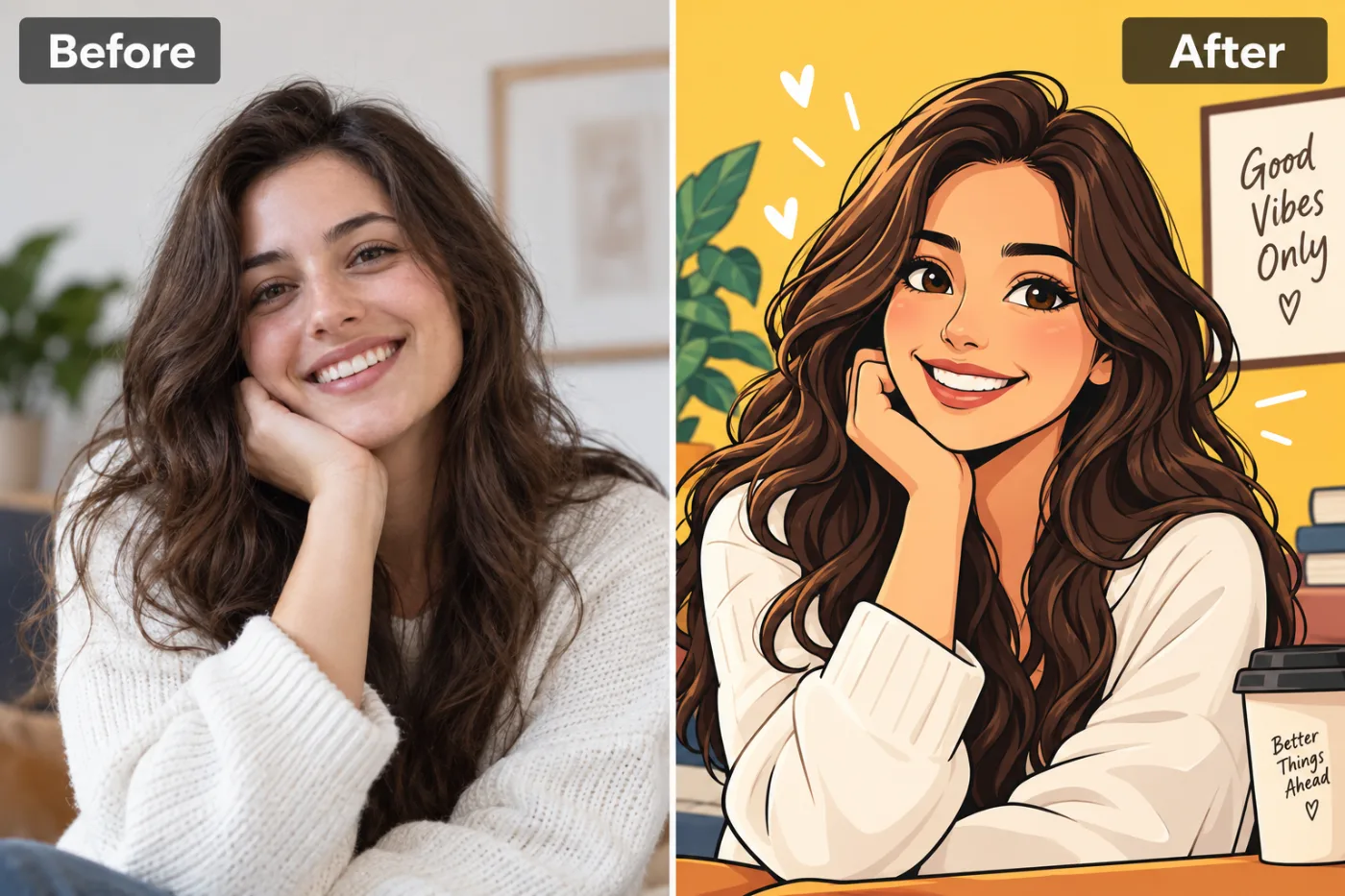
What kind of cartoon does it make?
A friendly, modern cartoon: the style you see in sticker packs, children's books and brand illustrations. It has bold, clean outlines, bright flat colours with soft shading, and simplified features with a big, warm smile.
Your pose, clothes and hairstyle carry over, so it still reads as you. The background is replaced with a cheerful scene, usually a sunny yellow wall with a plant, a picture frame and a coffee cup, and a few hand-drawn hearts and sparkles around you.
If you're after a different kind of drawing, there are other apps for it: the anime style for soft, painterly anime, the Ghibli style for hand-painted scenes, the Pixar-style avatar for a 3D animated look, and the comic book cover for bold superhero art.
Which options should you pick?
Two settings, both on Auto to start.
Framing: Head & shoulders
Your face fills the frame. Best for profile pictures and avatars, which are shown small.
Framing: Half body
Waist up, so your outfit and what you're holding show. Good for stickers and posts.
Framing: Full body
The whole of you, standing in the scene. Fun for a poster or a character sheet.
Strength: Subtle
Closer to your real proportions, with a lighter cartoon touch. Choose it if Strong stops looking like you.
Strength: Strong
A fully cartoon look, with simpler shapes and bigger expressions. Best for stickers and anything playful.
Pick the shape before you generate: 1:1 for an avatar, 4:5 for an Instagram post, 9:16 for a story or a phone wallpaper.
What photo gives the best cartoon?
- Smile in the photo. The cartoon is drawn with a big smile; if you're serious in the original, the smile can look added on.
- Face the light. A clear, evenly lit face gives the cleanest outlines.
- Show your hair clearly. Hairstyle is one of the strongest clues that the cartoon is you, so avoid hats unless you always wear one.
- Keep the photo uncluttered. Busy backgrounds are replaced anyway, but objects close to you may be turned into cartoon props.
- One or two people. In a group, every face gets simpler and harder to tell apart.
What won't it do?
- Keep a serious face. It's a cheerful style, so expect a smile.
- Write the words you want. The background often includes a little sign or mug with a short phrase the AI chooses. You can't set it, so add your own text afterwards in the free photo editor if you need it.
- Make a transparent sticker. You get a picture with a background. To cut it out, run it through the background remover.
- Draw in a specific artist's or show's style. It has its own friendly style. For anime, Pixar-like or Ghibli looks, use those apps.
Ways to use your cartoon
Profile pictures and avatars
A cartoon avatar is friendly and recognisable, and works well on Slack, Discord, gaming profiles and WhatsApp.
Stickers
Make a few with different expressions in your photos, remove the background, and turn them into a WhatsApp or Telegram sticker pack.
A personal brand
Freelancers and small shops use a cartoon of themselves on business cards, email signatures and their website's About page.
Cards and invitations
A cartoon of the birthday person or the couple makes an invitation feel personal without being too formal.
A present for kids
Children love seeing themselves as a cartoon. Print it, or make one of the whole family for the fridge.
Can you cartoon yourself in ChatGPT or Gemini?
Yes, both can redraw a photo as a cartoon if you upload it and ask. It takes some trial and error to get a consistent style, and the free plans limit how many images you can make in a day.
If you want to write your own, try: "Redraw this photo as a friendly cartoon illustration with bold clean outlines, bright flat colours and soft shading. Keep the person recognisable, with the same hairstyle and clothes." That works in ChatGPT, Gemini or our AI photo editor. This app has a fuller version built in, so you only choose the framing.
How do you make a cartoon sticker pack of yourself?
Cartoon stickers of yourself are one of the most fun things to make with this app, and they take about ten minutes.
First, take four or five photos of yourself with different expressions: laughing, surprised, thumbs up, eye roll, waving. Run each one through the cartoon generator with Head & shoulders framing and Strength on Strong, so the set looks consistent.
Next, put each cartoon through the background remover to get a transparent PNG. Stickers need a clear background to look right in a chat.
Finally, add them to WhatsApp or Telegram with a sticker-maker app, which takes PNGs and turns them into a pack. WhatsApp packs need at least three stickers. Share the pack with friends, and they'll want one of their own.
What happens to your photo?
It's sent to our image-model partner, fal.ai, to draw the cartoon, and to no one else. It's never used to train AI models or sold, and you own both your photo and the cartoon.
Your cartoons are saved in My Creations, where you can download or delete them at any time. You can also ask us to delete your account and everything in it.


