AI Interior Design
Interior concepts from a real room. Set the options to suit you, and download the result at full resolution with no watermark.
Click anywhere in this box or drag a photo in. Set the options on the left, then hit Generate — your original stays untouched, you always see both.
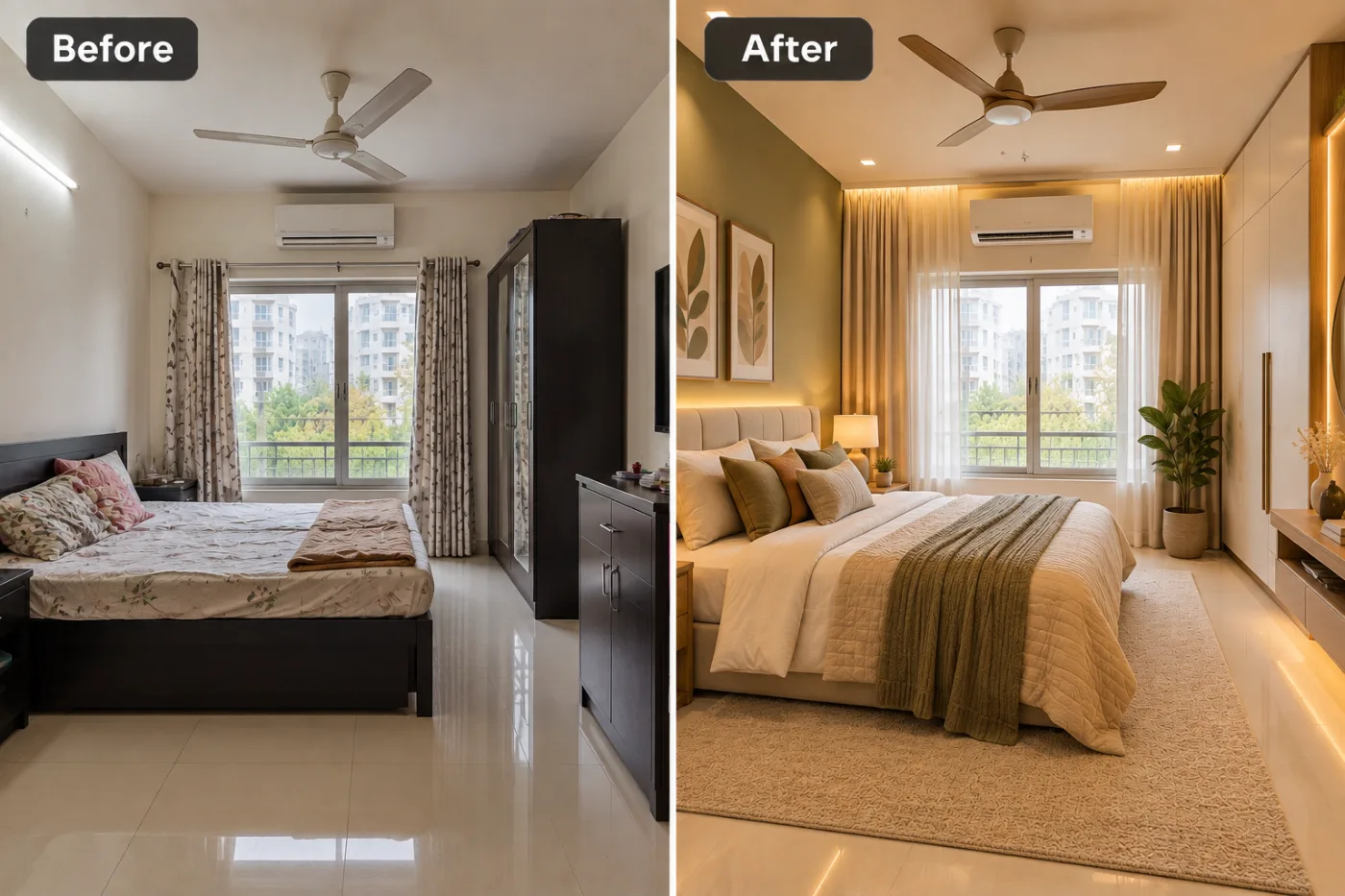
+ Choose a photoSee it in action — real before & after
How to use AI Interior Design
Upload the image
JPG, PNG or WEBP. A subject that is reasonably separated from what is behind it gives the cleanest edge — a dark jacket against a dark wall is the hardest case.
Pick a background
Transparent, plain white, studio, office, outdoor, gradient or a described scene. Transparent is the right answer whenever the image is going into another layout.
Download
PNG with real alpha for transparent results, or a flattened image for a replaced scene. Full resolution, no watermark.
Why use AI Interior Design
What AI Interior Design does
Interior concepts from a real room.
Full resolution
The download is not a downscaled preview, so it works in print as well as on a listing.
Edges that hold up
Hair, fur, fabric weave and glass are the test of a cutout. Fine detail is kept instead of being simplified into a smooth outline.
Real transparency
A genuine alpha channel, not white pixels pretending to be transparent — which is what breaks a logo placed on a coloured page.
Lighting matched to the new scene
Light direction and colour temperature on the subject are adapted to the replacement background, which is what stops a composite looking pasted.
Contact shadows
A subject with no shadow floats. A soft contact shadow is what makes a product look like it is sitting on a surface.
What AI Interior Design changes
Produce an interior design visualisation of this space. Unless a style is given below, redesign it in a warm modern style: an upholstered bed or sofa in beige, an olive-green throw, a sage-green accent wall with botanical prints, warm hidden cove lighting, light wood furniture, a textured rug and a few plants. Cohesive materials and palette, realistic lighting with believable shadows, and the room's true geometry preserved. For photographic results, use realistic camera detail: natural skin texture and pores, believable eyes and hair strands, coherent lighting and shadows, correct anatomy and perspective, and matching sharpness across face, neck and body. Avoid waxy skin, over-retouching, distorted features, face-morphing and pasted-on faces. If the app intentionally creates artwork, render the requested medium consistently across the whole image instead of forcing photorealism.
Your face, bone structure and skin tone are held fixed on every generation — only what is described above is changed.
AI Interior Design for every background problem
Removing a background and replacing one are different jobs with different failure modes. Both are here, along with the awkward cases in between.
Plain white for listings
Marketplace compliance, with even margins and a soft contact shadow so the product does not look cut out.
Studio backdrops
Seamless grey, dark gradient or a coloured sweep, with lighting to match — a studio look without the studio.
Office and professional settings
A softly defocused workplace behind a portrait, for headshots and team pages.
Outdoor and lifestyle scenes
Real environments with depth behind the subject, for product and lifestyle photography.
Key highlights of AI Interior Design
Benefits
Your original is never modified
Every result is a new image. The file you uploaded stays exactly as it was on your device.
Cheap enough to iterate
Packs start at $2. Generating the same image three ways and keeping the best is the intended workflow, not an expensive mistake.
Seconds, not a manual selection
Hand-masking hair in an editor is a slow, skilled job. This is an upload and a click.
No editor and no skill required
No pen tool, no refine edge, no channel masks.
One subject, many backgrounds
Generate the same product on white, on marble and in a lifestyle scene for the price of three credits' worth.
What people use it for
What it is mainly used for
Interior concepts from a real room. Set the options to suit you, and download the result at full resolution with no watermark.
Second-hand and resale listings
A clean background makes a used item look cared for, which is most of what a resale photo is doing.
Product photos for a marketplace
Amazon, Shopify, Etsy and Flipkart all specify a plain white main image, and rejections for background are common.
Headshots taken in the wrong room
A good portrait ruined by a kitchen behind it, fixed in one pass.
Logos and signatures
A scanned signature or a logo on white, converted into a transparent PNG that works on any page colour.
Prompt ideas
For a described background, specify the scene, the light and the perspective. The light is the part people forget, and it is the part that makes a composite convincing.
Ask for the contact shadow
"Soft contact shadow under the product" is the difference between sitting on a surface and floating above one.
Set the depth
"Background blurred, shallow depth of field" separates the subject; "everything in focus" suits catalogue work.
Specify pure white when it is required
"Pure white #FFFFFF, no gradient" for marketplace images — "white" alone often comes back very slightly grey.
Protect the edges
"Preserve fine hair detail and any transparency" helps on the genuinely hard subjects.
Keep the subject untouched
"Do not change the subject, only the background" prevents drift in the thing you were happy with.
Leave room for text
"Empty space on the right third" if the image is going into an ad or a banner with a headline on it.
More about AI Interior Design
The part that decides whether this looks real is the edge. Hair, fur, fabric, glass and anything semi-transparent are where cheap cutouts fail — a halo of the old background, or a jaw line that has been shaved flat. Matching the light is the second half: a subject lit from the left, dropped onto a background lit from the right, reads as wrong even to someone who cannot say why.
Upload, choose a background or describe one, and download. Transparent PNG is available for anything that needs to be composited later. Each generation costs 2 credits from a one-time pack.
Ask a small seller what stops them listing and a surprising number will say the background. The product is fine, the photo is sharp, and behind it is a kitchen. AI Interior Design is the two-second version of a job that otherwise needs an editor and an hour.
Getting the best result from AI Interior Design
- If one model ignores part of your instruction, switch to the other and run it again.
- Keep the original file. It is a better base for the next attempt than a generated image is.
- For a matching set, keep the same source photo and style and change only one variable.
- Nothing you upload is published, shared or added to a gallery — but do not upload anything you would not want to leave your device at all.
- The free on-device tools — compress, convert, crop, resize, rotate — cost no credits, so use them for mechanical work.
- If a result is nearly right, say what is wrong with it in the next run rather than starting over.
- Good separation in the original helps most — a subject that contrasts with what is behind it gives a cleaner edge.
- Even lighting on the subject produces a better cutout than harsh directional light.
It runs online — nothing to install. Explore the rest of our AI Creative Apps, or open the full AI photo editor for more control.
Frequently Asked Questions
How does the ai interior design work?
What photo should I upload?
Is the ai interior design free?
Do you watermark the download?
Do I get a real transparent PNG?
How well does it handle hair and fur?
Will the result meet Amazon's white-background requirement?
Can it replace the background instead of just removing it?
Find another way to use Pixel Shine
Explore tools grouped by the outcome you want, including social media, LinkedIn, ecommerce, real estate, photography, creators and weddings.


