Curly Hair Filter
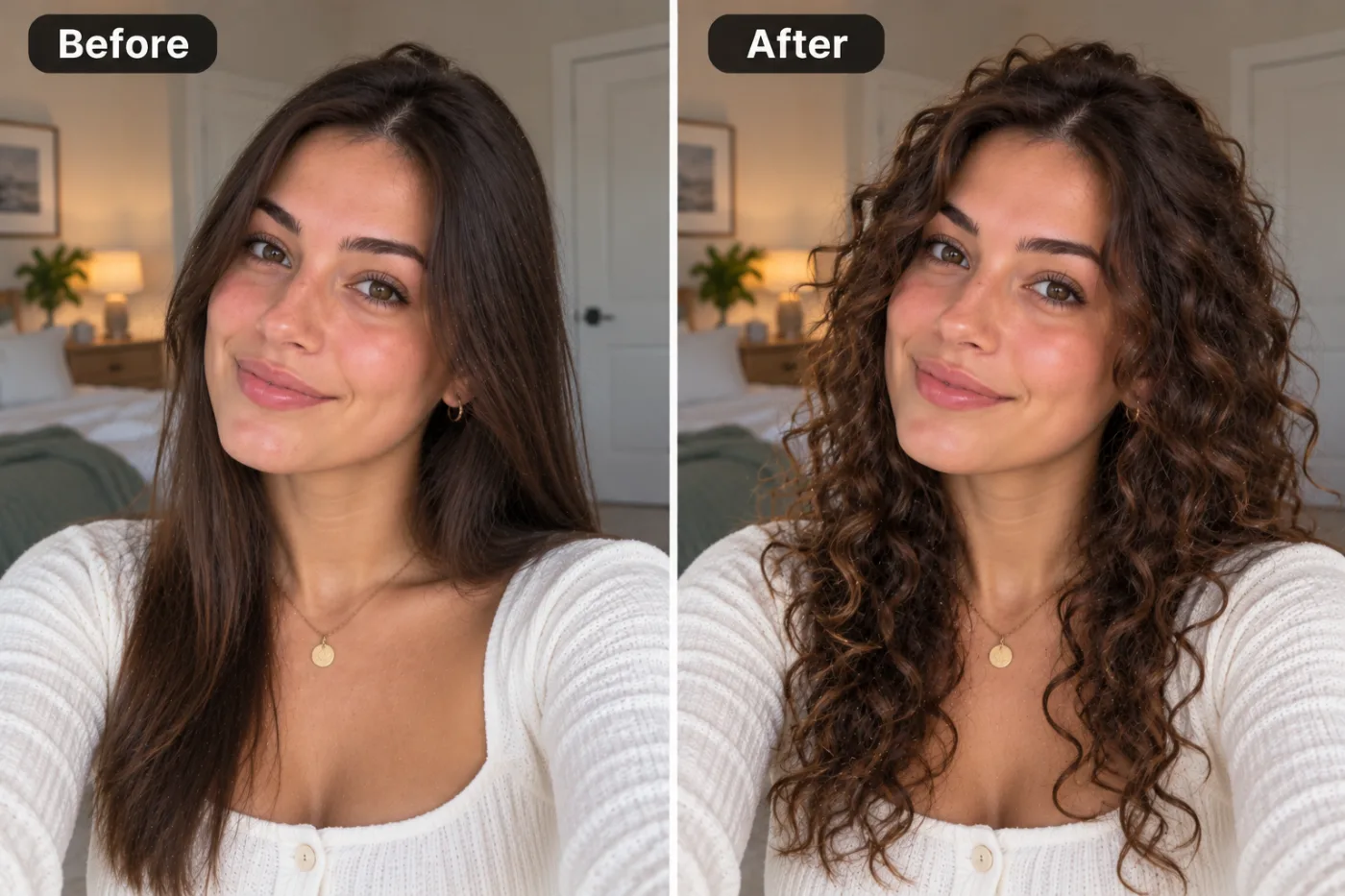
See yourself with curls. Set the options to suit you, and download the result at full resolution with no watermark.
Click anywhere in this box or drag a photo in. Set the options on the left, then hit Generate — your original stays untouched, you always see both.
+ Choose a photoSee it in action — real before & after
How to use Curly Hair Filter
Upload the photo
Any JPG, PNG or WEBP. The more resolution the original has, the more the retouch has to work with — detail cannot be invented from a heavily compressed file.
Choose the fix
Pick the correction you need, or describe it in a sentence. Being specific about what to change, and what to leave alone, is most of the skill.
Compare, then download
Check the original against the result at full size before you commit. Download is full resolution, no watermark.
Why use Curly Hair Filter
What Curly Hair Filter does
See yourself with curls.
Fixes what the camera got wrong
Colour casts, uneven exposure, flash shine, red eye, harsh shadow — the failures of the room and the lens rather than of the subject.
Restrained by default
Over-retouching is the most common mistake in the category. The defaults are deliberately conservative.
Consistent across a set
Apply the same correction to every photo from one event so the whole set matches rather than each frame looking individually processed.
No editor to learn
No frequency separation, no dodge and burn, no masks. The pass that takes an experienced retoucher ten minutes takes a sentence.
Full resolution out
The download is not a downscaled preview. It goes straight into a print, a listing or a profile.
What Curly Hair Filter changes
Change the hair to defined natural curls: consistent curl pattern and volume, believable root lift, and highlights that follow the curl spirals. Preserve the same person's recognizable identity from the uploaded reference: face shape, forehead, cheekbones, jawline, eye shape and spacing, eyebrows, nose, lips, natural asymmetry, age appearance, skin tone and distinctive features. Do not replace them with a generic AI face or beautify/idealize their features. Keep natural skin texture and pores; avoid waxy smoothing, exaggerated eyes, reshaped facial features and artificial symmetry. Change only what the app's requested transformation requires. For photographic results, use realistic camera detail: natural skin texture and pores, believable eyes and hair strands, coherent lighting and shadows, correct anatomy and perspective, and matching sharpness across face, neck and body. Avoid waxy skin, over-retouching, distorted features, face-morphing and pasted-on faces. If the app intentionally creates artwork, render the requested medium consistently across the whole image instead of forcing photorealism.
Your face, bone structure and skin tone are held fixed on every generation — only what is described above is changed.
Curly Hair Filter for the fixes that actually come up
Most retouching is a handful of recurring problems. Each one has a specific fix rather than a general "enhance" slider.
Old scans and phone photos
Grain, noise and compression artefacts reduced without smearing away the detail that was actually captured.
Before-and-after documentation
Fitness, dental, cosmetic and renovation photos, where matching the lighting between two frames is the whole job.
Portraits and profile photos
Temporary blemishes, shine, stray hair and flash red-eye — the four things that stop an otherwise good photo of a person being usable.
Colour and exposure correction
Fluorescent green, tungsten orange, a flat grey day. Getting the white balance right fixes photos people assume are unfixable.
Key highlights of Curly Hair Filter
Benefits
Cheap enough for a whole set
A pack starts at $2, so fixing every photo from an event is realistic rather than something you do to one and give up on.
Nothing to install
Works on a phone as readily as a laptop.
Predictable results
A named fix does the named thing. There is no single mystery "enhance" button doing five things at once.
Print and marketplace ready
Full resolution with no watermark, which is what a listing or a printer actually needs.
Credits never expire
Buy once, use them whenever the next batch of photos turns up.
What people use it for
What it is mainly used for
See yourself with curls. Set the options to suit you, and download the result at full resolution with no watermark.
Event albums
Hundreds of frames from one room, all needing the same correction rather than individual attention.
Dating profiles
Corrected colour and exposure, without the smoothing that reads instantly as filtered.
Documentation and comparison photos
Two photos matched for light and colour so the difference between them is the actual subject.
Older phone photos
Noise and compression from an earlier phone, cleaned up enough to print.
Prompt ideas
Name the specific problem and, just as importantly, say what to leave alone. Retouching prompts fail by being too broad — "make it better" invites the model to change things you were happy with.
Keep it short
Three or four specific clauses beat a paragraph. Long prompts dilute every instruction in them, including the one you cared about.
Name the framing
Close-up, head and shoulders, full body, centred, offset. Framing decides what the image is actually of.
Avoid asking for text in the image
Generated lettering is still unreliable. Ask for empty space where the text should go and add real type afterwards.
Pick the ratio first
Generating square and cropping to vertical throws away part of the frame. Choose the shape before you generate.
Try another model
If a prompt is being ignored, switching between Nano Banana Pro, GPT Image and Seedream 4.5 often resolves it faster than rewording.
Describe the light
Direction, softness and colour temperature. Light does more to how a photograph feels than any other single thing you can specify.
More about Curly Hair Filter
Retouching is the part of photography nobody outside it can see and everybody notices. A distracting blemish, a shine across the forehead, a colour cast from a fluorescent tube — individually small, collectively the difference between a photo you post and a photo you delete. Curly Hair Filter handles that pass without opening an editor.
The line a good retouch walks is restraint. Removing a temporary spot is invisible; smoothing skin until it has no pores is obvious to everyone and flattering to nobody. This tool is tuned to keep skin texture, real pores and the asymmetry that makes a face look like a face, and to fix only what was genuinely wrong in the frame.
Upload the photo, pick what needs fixing, and download. Each pass costs 2 credits from a one-time pack, which means fixing a set of photos one at a time is affordable rather than a project.
Getting the best result from Curly Hair Filter
- Keep the original file. It is a better base for the next attempt than a generated image is.
- For a matching set, keep the same source photo and style and change only one variable.
- Nothing you upload is published, shared or added to a gallery — but do not upload anything you would not want to leave your device at all.
- The free on-device tools — compress, convert, crop, resize, rotate — cost no credits, so use them for mechanical work.
- If a result is nearly right, say what is wrong with it in the next run rather than starting over.
- Start from the largest, least compressed version of the photo you have — a screenshot of a photo has already lost what the retouch needs.
- Fix one thing per run and check it at full size before moving on.
- Always add "keep skin texture" for anything involving a face.
It runs online — nothing to install. Explore the rest of our AI Creative Apps, or open the full AI photo editor for more control.
Frequently Asked Questions
How does the curly hair filter work?
What photo should I upload?
Is the curly hair filter free?
Will it still look like me?
Do you watermark the download?
Will my skin end up looking artificial?
Does it change my face shape or body?
Can it rescue a blurred or very dark photo?
Can I use it on a whole set of photos?
Find another way to use Pixel Shine
Explore tools grouped by the outcome you want, including social media, LinkedIn, ecommerce, real estate, photography, creators and weddings.


