Pixel Art Generator
Deliberate low-resolution sprite art. Set the options to suit you, and download the result at full resolution with no watermark.
Click anywhere in this box or drag a photo in. Set the options on the left, then hit Generate — your original stays untouched, you always see both.
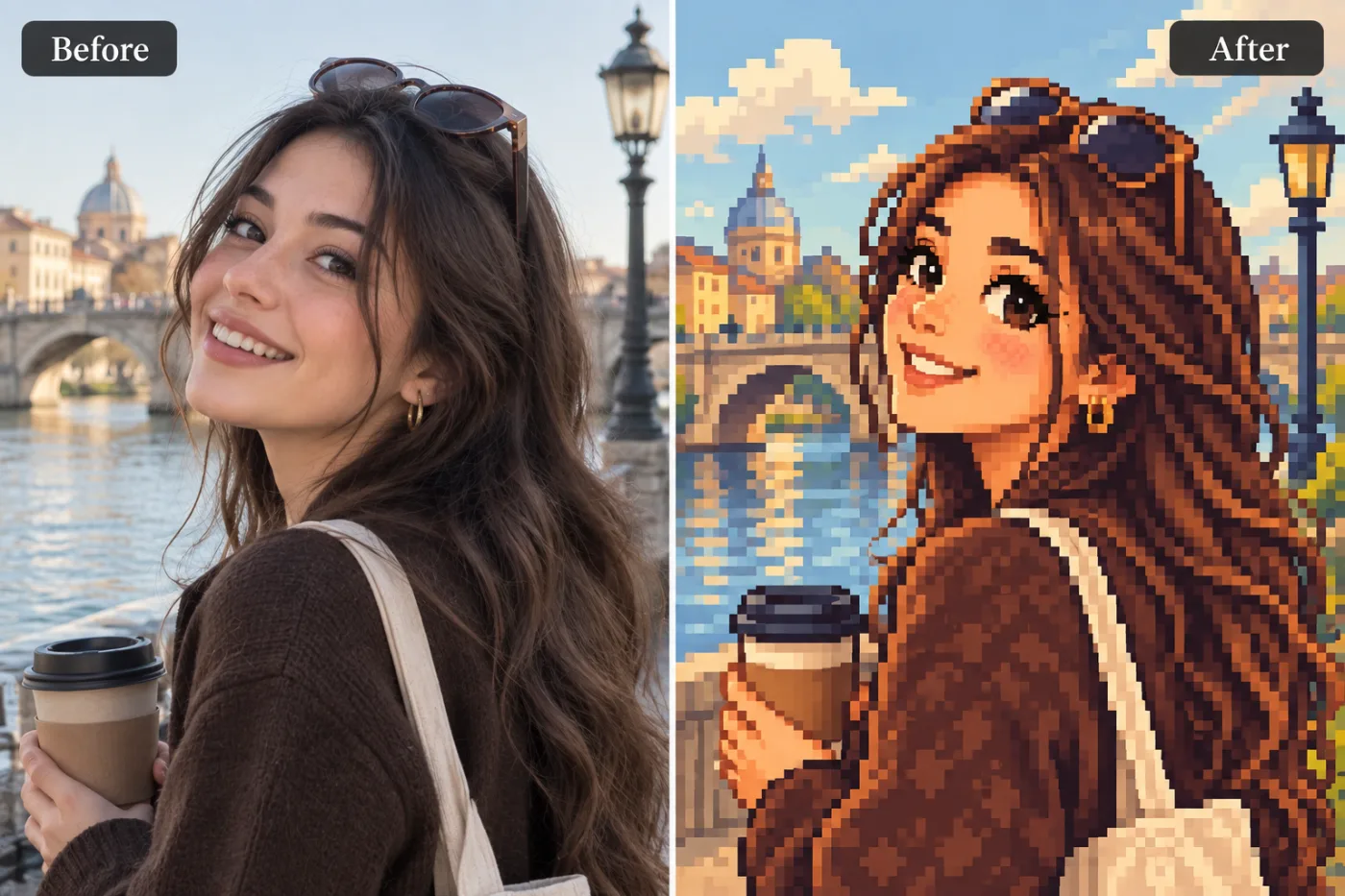
+ Choose a photoSee it in action — real before & after
How to use Pixel Art Generator
Upload the photo
A clear JPG, PNG or WEBP. Portraits work best when the face fills a reasonable part of the frame — a distant full-body shot gives the model very little face to work from.
Pick the style or write your own
Choose a preset, or describe the medium you want: line weight, palette, texture, era. Naming the medium precisely is what separates a good result from a vague one.
Generate and download
Full resolution, no watermark. Good enough to print, use as an avatar, or send to someone as a gift.
Why use Pixel Art Generator
What Pixel Art Generator does
Deliberate low-resolution sprite art.
Backgrounds restyled to match
A stylised subject on a photographic background looks pasted in. The whole frame is converted together.
Print-quality output
Resolution holds up as a framed print or a card, which is what most people end up doing with a portrait they like.
No drawing skill needed
No tablet, no brushes, no layers. The skill required is choosing a good source photo.
Any ratio you need
Square for an avatar, portrait for a print, wide for a banner or a cover. Set before generating.
Cheaper than a commission by orders of magnitude
An illustrated portrait typically runs from $40 to several hundred. A pack of credits starts at $2.
What Pixel Art Generator changes
Redraw this as pixel art: a limited palette, visible square pixels on a consistent grid, hard-edged dithering for gradients and shapes that read clearly. For photographic results, use realistic camera detail: natural skin texture and pores, believable eyes and hair strands, coherent lighting and shadows, correct anatomy and perspective, and matching sharpness across face, neck and body. Avoid waxy skin, over-retouching, distorted features, face-morphing and pasted-on faces. If the app intentionally creates artwork, render the requested medium consistently across the whole image instead of forcing photorealism.
Your face, bone structure and skin tone are held fixed on every generation — only what is described above is changed.
Pixel Art Generator for prints, avatars and gifts
The same conversion serves very different ends — a profile picture, a framed print, a card, a set of matching avatars for a group.
Creative reference
A quick look at a concept in a given medium before committing to commissioning it properly.
Profile pictures and avatars
A stylised portrait stands out in a feed of photographs, and it stays readable when a platform shrinks it to 40 pixels.
Prints and framed gifts
A converted portrait of a person, a couple or a pet is the kind of gift people keep, and it costs the price of the frame.
Cards and invitations
An illustrated portrait sits on a card in a way a photograph usually does not, without needing a designer.
Key highlights of Pixel Art Generator
Benefits
Cheap enough to iterate
Packs start at $2. Generating the same image three ways and keeping the best is the intended workflow, not an expensive mistake.
Done in under a minute
No brief, no back and forth, no revision round. Upload and generate.
Try several styles for the price of one commission
Compare mediums on the same photo instead of committing to the first description that sounded good.
Nothing to learn
No illustration software, no tablet, no understanding of layers or masks.
Keeps the likeness
The point of a portrait is that it is of someone. Identity preservation is applied to every person-editing prompt.
What people use it for
What it is mainly used for
Deliberate low-resolution sprite art. Set the options to suit you, and download the result at full resolution with no watermark.
Pet portraits
The single most requested illustrated portrait, and the one people are most reliably delighted by.
Merch and sticker art
Flat, high-contrast styles are what actually survive being printed small on a sticker or a shirt.
Book, album and playlist covers
A stylised portrait as cover art, with room for a title to sit over it.
Party and event invitations
The host, illustrated, on the invitation. Faster than finding clip art that is not terrible.
Prompt ideas
Presets cover the common styles. If you write your own, describe the medium as a maker would: line, colour, texture, era. Vague adjectives like "beautiful" or "high quality" do nothing; "thick ink outlines, flat colour, halftone shading" does a great deal.
Say what must not change
A short exclusion — "do not change the face", "keep the label text" — is often more effective than any amount of positive description.
Keep it short
Three or four specific clauses beat a paragraph. Long prompts dilute every instruction in them, including the one you cared about.
Name the framing
Close-up, head and shoulders, full body, centred, offset. Framing decides what the image is actually of.
Avoid asking for text in the image
Generated lettering is still unreliable. Ask for empty space where the text should go and add real type afterwards.
Pick the ratio first
Generating square and cropping to vertical throws away part of the frame. Choose the shape before you generate.
Try another model
If a prompt is being ignored, switching between Nano Banana Pro, GPT Image and Seedream 4.5 often resolves it faster than rewording.
More about Pixel Art Generator
The difficult part is not applying a filter — it is keeping the person recognisable while genuinely changing the medium. A good stylised portrait still reads as you: the proportions of the face, the set of the eyes, the hairline. A bad one is a generic character with your colour palette. This tool is tuned for the first outcome, which is why a clear source photo matters more than the style you pick.
Each generation costs 2 credits from a one-time pack. That is cheap enough to try the same photo in three styles and keep whichever one your friends actually recognise you in.
Every few months a visual style goes around, and the people who get the most out of it are the ones who post while it is still moving. A commission takes a week. Pixel Art Generator takes a minute, which is the difference between joining a trend and documenting it afterwards.
Getting the best result from Pixel Art Generator
- Use a source photo where the face is large in the frame — stylisation loses detail, so start with more of it.
- Even, soft lighting converts best. Harsh shadow becomes a solid black shape in most stylised mediums.
- One subject converts more reliably than a crowd. For groups, keep everyone facing forward and close together.
- Avoid photos that are already filtered — stacking a style on a style gives muddy results.
- Simple backgrounds convert better. A cluttered room becomes visual noise in the styled version.
- For avatars, generate square and ask for a plain background, or the crop will cut into the head.
- Regenerate a few times: stylised output varies more between runs than photographic output does.
- Check hands, glasses and any lettering — these are where stylised results most often break down.
It runs online — nothing to install. Explore the rest of our AI Creative Apps, or open the full AI photo editor for more control.
Frequently Asked Questions
How does the pixel art generator work?
What photo should I upload?
Is the pixel art generator free?
Will it still look like me?
Do you watermark the download?
Will the portrait still look like the person?
Can I use the result commercially or print it?
Does it work on pets and objects, or only people?
Why does the same photo give different results each time?
Find another way to use Pixel Shine
Explore tools grouped by the outcome you want, including social media, LinkedIn, ecommerce, real estate, photography, creators and weddings.


