Unpixelate Image
Rebuild detail in a blocky image. Set the options to suit you, and download the result at full resolution with no watermark.
Click anywhere in this box or drag a photo in. Set the options on the left, then hit Generate — your original stays untouched, you always see both.
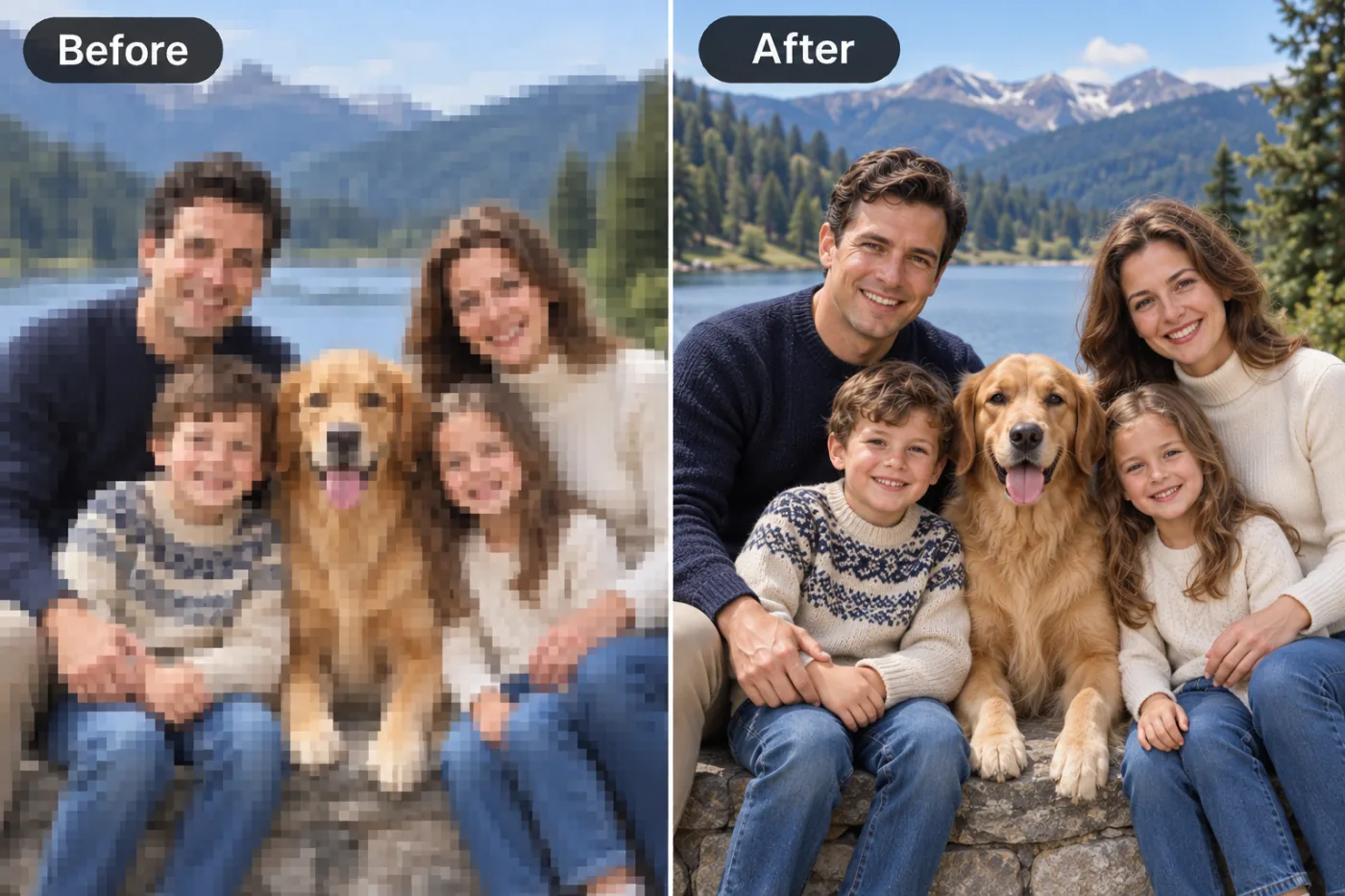
+ Choose a photoSee it in action — real before & after
How to use Unpixelate Image
Scan or photograph the print
A flatbed scan at 600 dpi is ideal. A phone photo works: lay the print flat, use indirect daylight, avoid your own shadow and any glare from the surface.
Choose the repair
Repair damage, correct faded colour, colourise a black-and-white original, or describe what the photo needs in a sentence.
Compare and download
Check the result against the scan at full size, then download at full resolution. Keep both — the scan is the document, the restoration is the reading of it.
Why use Unpixelate Image
What Unpixelate Image does
Rebuild detail in a blocky image.
Detail brought back out
Contrast that has flattened over decades is restored, and detail buried in dense shadow or a washed highlight is recovered.
Faces treated with care
The face is the reason the photo is being restored. Features are reconstructed conservatively rather than replaced with a generic plausible face.
Grain and noise handled properly
Film grain is reduced without smearing away the fine detail that sits at the same scale — the usual failure of automatic denoising.
Colourisation available
Black-and-white originals can be colourised with period-plausible tones, and the monochrome version is still there afterwards.
Print-ready resolution
Enough resolution to reprint and frame, which is what most people restoring a photo intend to do with it.
What Unpixelate Image changes
Reconstruct this pixelated image at higher fidelity: rebuild smooth edges and plausible fine detail from the visible block structure, without inventing features that contradict the original. Preserve the same person's recognizable identity from the uploaded reference: face shape, forehead, cheekbones, jawline, eye shape and spacing, eyebrows, nose, lips, natural asymmetry, age appearance, skin tone and distinctive features. Do not replace them with a generic AI face or beautify/idealize their features. Keep natural skin texture and pores; avoid waxy smoothing, exaggerated eyes, reshaped facial features and artificial symmetry. Change only what the app's requested transformation requires. For photographic results, use realistic camera detail: natural skin texture and pores, believable eyes and hair strands, coherent lighting and shadows, correct anatomy and perspective, and matching sharpness across face, neck and body. Avoid waxy skin, over-retouching, distorted features, face-morphing and pasted-on faces. If the app intentionally creates artwork, render the requested medium consistently across the whole image instead of forcing photorealism.
Your face, bone structure and skin tone are held fixed on every generation — only what is described above is changed.
Unpixelate Image for the damage prints actually have
Different decades fail differently. A 1940s silver print, a 1975 colour snapshot and a 1998 disposable-camera photo each need a different repair.
Torn and creased prints
Fold lines, corner losses and surface scratches from decades in an envelope or an album.
Faded colour from the 60s to the 80s
Dye layers fade at different rates, which is why these photos go magenta. Reversing the shift is the single biggest improvement available.
Black-and-white originals
Contrast restored, dust and scratches removed, and colourisation offered as an option rather than forced on you.
Water and mould damage
Staining and bloom from damp storage, which is what loft and basement boxes almost always produce.
Key highlights of Unpixelate Image
Benefits
No specialist to find or pay
Professional photo restoration runs from $20 to well over $100 per image and takes days. This is a minute and a couple of credits.
Work through a whole box
Because the per-photo cost is small, restoring forty prints is a realistic weekend rather than a commission.
Nothing is risked
The print is never handled beyond being scanned, and the digital original is not modified.
Reprintable output
Resolution sufficient to reprint at a useful size and frame it.
Shareable with family immediately
The usual reason for restoring a photo is to send it to relatives who have never seen it clearly.
What people use it for
What it is mainly used for
Rebuild detail in a blocky image. Set the options to suit you, and download the result at full resolution with no watermark.
Genealogy and family archives
Restored images attached to a family tree, alongside the unaltered scans.
Local history and archive projects
Faded documentary photographs made legible for display or publication.
Damaged wedding albums
Albums from the 70s and 80s where the adhesive pages have discoloured the prints themselves.
Reprinting for a frame
A restored file at print resolution, sent to any printing service.
Prompt ideas
Describe the damage you can see and say what must not change. Restoration prompts fail when they are ambitious — asking for a photo to be "improved" invites the model to make a new one.
Describe the colour shift
"Remove the magenta cast from faded colour film and restore neutral skin tones" names the actual chemistry of the problem.
Protect the faces
"Reconstruct conservatively and keep the faces exactly as they are" is the most important line in any family restoration.
Say whether to colourise
"Keep it black and white" or "colourise with natural period-appropriate tones" — leaving it unsaid means the model decides.
Ask for era-plausible colour
"1950s colour palette, muted, no modern saturation" avoids a restoration that looks like a photo taken last year.
Address grain deliberately
"Reduce grain but keep detail in the fabric and hair" gets a better result than asking for it to be removed.
Mention the background separately
"Repair the water stain in the upper right of the background" isolates a fix that would otherwise affect the whole frame.
More about Unpixelate Image
Photographic prints fail in predictable ways. The emulsion cracks along a fold, silver-based blacks fade to brown, colour dyes from the 1970s shift magenta, and anything stored in a loft gains water stains and a curl that cannot be flattened. Unpixelate Image addresses that damage from a phone photo or a flatbed scan of the print.
Restoration is not enhancement. The goal is to return the photograph to what it looked like when it was made — repairing physical damage, correcting the shift in the dyes, recovering detail the fading has buried — without inventing a new photograph. Where damage has destroyed information completely, plausible reconstruction is the honest description of what happens, and it is worth knowing which parts of a result are recovery and which are inference.
Each restoration costs 2 credits from a one-time pack. Working through a box of family prints one at a time is affordable, and the originals stay exactly as they are — nothing is overwritten.
Getting the best result from Unpixelate Image
- Crop to the photograph itself, not the album page or the mount around it.
- Do one repair at a time and check each result at full size.
- Always say "keep the faces as they are" for family photos. Faces are where invention is least welcome.
- For faded colour, correct the cast before attempting anything else.
- Keep the unaltered scan permanently. It is the actual document; the restoration is an interpretation.
- Expect plausible reconstruction where damage destroyed detail, and look closely before treating those areas as recovered fact.
- For badly damaged photos, two conservative passes beat one aggressive one.
- If a face comes back wrong, re-run rather than accept it — variation between runs is significant on damaged sources.
It runs online — nothing to install. Explore the rest of our AI Creative Apps, or open the full AI photo editor for more control.
Frequently Asked Questions
How does the unpixelate image work?
What photo should I upload?
Is the unpixelate image free?
Will it still look like me?
Do you watermark the download?
Can it repair a photo that is torn or has a missing corner?
Will it change the faces?
Should I colourise, or keep it black and white?
How should I scan the print?
Find another way to use Pixel Shine
Explore tools grouped by the outcome you want, including social media, LinkedIn, ecommerce, real estate, photography, creators and weddings.


