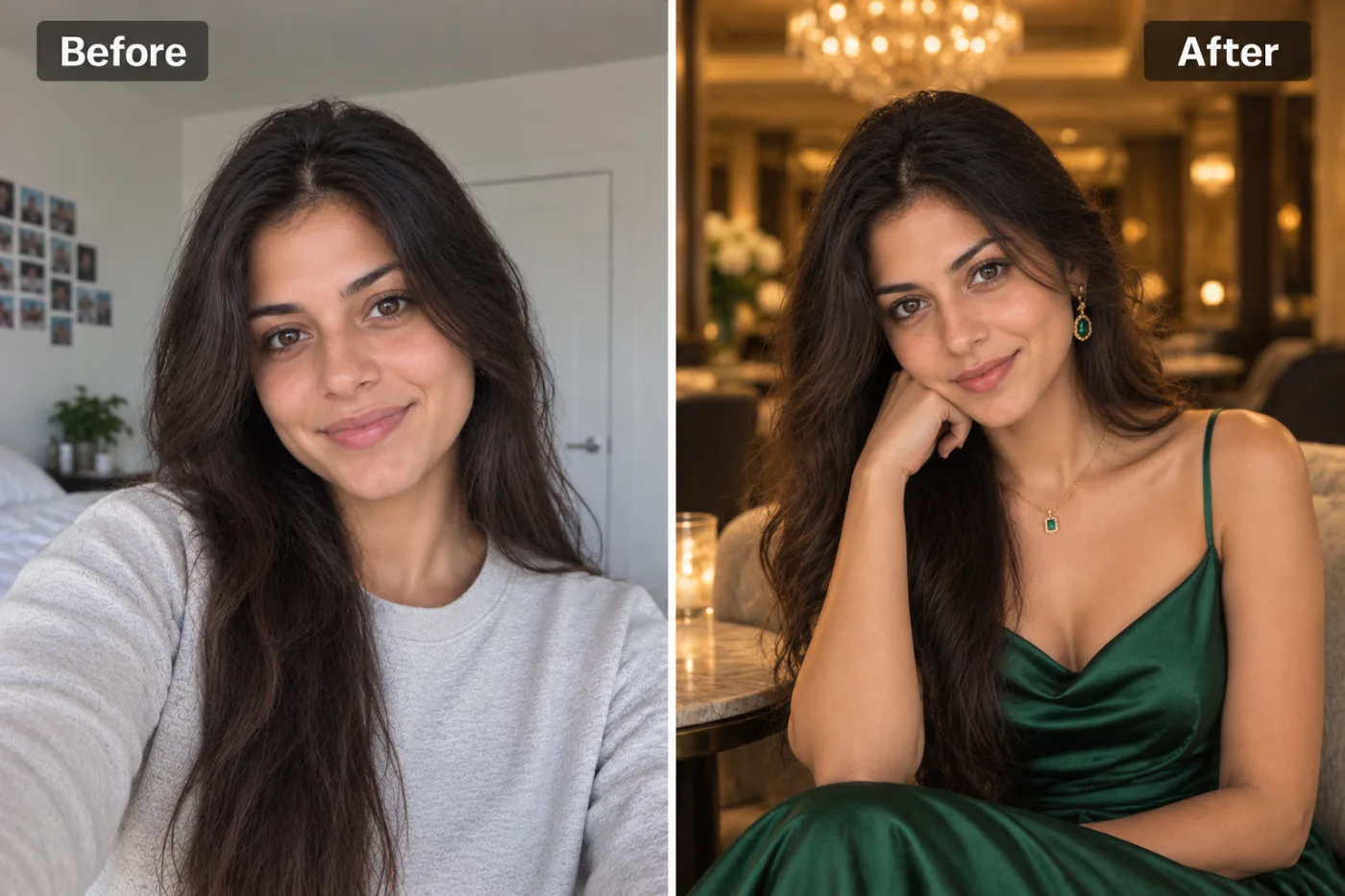
What does the AI outfit changer do?
It takes a photo of you and replaces what you're wearing with the outfit you describe, then places you in a setting that suits those clothes. Your face, hair and skin tone stay the same; the clothes, jewellery, light and background change.
If you don't describe anything, you see the app's own look: an emerald-green satin slip dress with gold jewellery, or a dark green velvet blazer over a black shirt, in a candle-lit evening lounge. It's a good first test of how the app handles your photo before you start describing your own ideas.
It's a way to see an idea on yourself, not a fitting room. The AI doesn't know your measurements and can't copy a specific product from a shop's photo, but it's very good at showing whether a colour, a cut or a whole style suits you.
How do you describe an outfit so it comes out right?
The description box is the whole point of this app. A good description names three things: the item, the colour and the fabric. Add the fit if it matters. Here are descriptions that work well, to copy or change.
Smart for work
"A navy linen suit with a white T-shirt and no tie" or "a camel wool coat over a black turtleneck". Good for testing a new work wardrobe.
Wedding guest
"A sage-green silk midi dress with thin straps" or "an ivory embroidered kurta with a light gold dupatta". For a full saree look, the saree photoshoot is made for it.
Casual weekend
"A black leather jacket over a white T-shirt" or "an oversized cream knit sweater". Simple pieces come out the most convincing.
Holiday
"A pastel floral sundress with a straw hat" or "a short-sleeved linen shirt in sky blue". Pair it with the Beach or Garden setting.
Party night
"A sequinned black blazer" or "a red satin dress with a cowl neck". Leave the setting on Auto for the evening lounge.
Keep it to one outfit per run. "A red dress or a blue suit" makes the AI guess. If a detail matters, such as "long sleeves" or "high neck", say it plainly.
How can it help you find colours that suit you?
Most of us buy the same few colours because we're not sure what else works. The outfit changer is a quick way to find out, because you can try any colour on your real face and skin in a minute, without ordering anything.
Pick one simple item, such as "a plain crew-neck sweater", and run it several times with only the colour changed: "in camel", "in navy", "in olive green", "in dusty pink", "in charcoal". Keep the setting on Studio so nothing else changes. Then put the results side by side and look at your face, not the sweater.
The colours that suit you make your skin look even and your eyes look brighter; the ones that don't make you look tired or a little grey. Many people are surprised by the result, and it's far cheaper than returning clothes.
Which setting should you choose?
Setting decides where the new photo is taken. Auto picks the evening lounge, which flatters dressy clothes. Studio gives a clean backdrop, best when you're comparing outfits and want nothing else to change. Outdoors and Garden add daylight and greenery for casual and summer clothes. City street suits jackets, coats and street style. Indoors keeps a homely room. Beach is for holiday looks.
When you're deciding between outfits, use the same photo and the same setting for each. Then the only thing that changes between pictures is the clothes, which makes the choice much easier.
What photo works best?
- Waist up, facing the camera. The app frames the new photo from the waist up, so it needs to see your shoulders and body.
- Fitted clothes in the original help. A very baggy hoodie hides your shape, and the app has to guess it.
- Plain, even light. A dark photo or strong coloured light changes how the new fabric looks.
- Only you in the frame. With two people, the app may dress the wrong one or both.
- Arms relaxed by your sides or resting near your face. Crossed arms or a bag across your body make the outfit harder to draw.
What can't it do?
- Show your shoes. The photo is framed from the waist up, so trousers and shoes are only partly visible, if at all.
- Try on a product from a photo. You can't upload a picture of a shop item; describe it in words instead. It shows the idea, not that exact garment.
- Tell you if it fits. It doesn't know your size. Use it to judge colour and style, then check the size chart.
- Keep the original background. The outfit comes with a new setting. If you need your own background, try the AI photo editor and ask it to change only the clothes.
- Draw logos and prints exactly. Brand logos and detailed prints come out approximate.
What do people use it for?
Deciding what to buy
Before ordering something online, see the colour on yourself. A coat in camel and in navy can look surprisingly different on the same person.
Planning an event outfit
Wedding, graduation, interview or date: try three ideas in a minute and see which one you'd actually wear.
Packing for a trip
Check that the clothes you're bringing go together, in a beach or city setting.
Fresh photos for social media
A new look for a profile picture without a new photo shoot. Use 4:5 for Instagram.
Styling ideas for clients
Stylists and small clothing shops use it to show a look on a real person quickly. For a full product shoot, see the AI photo editor.
What happens to the photo you upload?
It's sent to our image-model partner, fal.ai, to make the new picture, and to no one else. It isn't used to train AI models and it's never sold, and you own both the photo and the result.
Everything you make is saved in My Creations, so you can compare outfits later. Delete any picture there whenever you like, or ask us to delete your account and all of it. Only upload photos of yourself, or of people who've said yes.


