🪄
✂️
✦
✦
✓
☁️ Pixel Shine

White Background for Passport Photos

Taken a passport or ID photo at home against a messy wall? Remove the background and give it the plain white or light backdrop most applications ask for, then crop it to size.

📤
Drop your image here
or click to browse from your device
or drop image anywhere
Supports JPG · JPEG · PNG · WEBP · up to 16 MB
By uploading you agree to our Terms of Use and Privacy Policy
White Background for Passport Photos — example result (Clean Cutout)
On this page
  1. How do you make a passport photo background white?
  2. Will an edited photo be accepted?
  3. What are the usual photo rules?
  4. Who uses a white-background photo tool?
  5. Tips for a photo that passes
  6. What does it cost?

How do you make a passport photo background white?
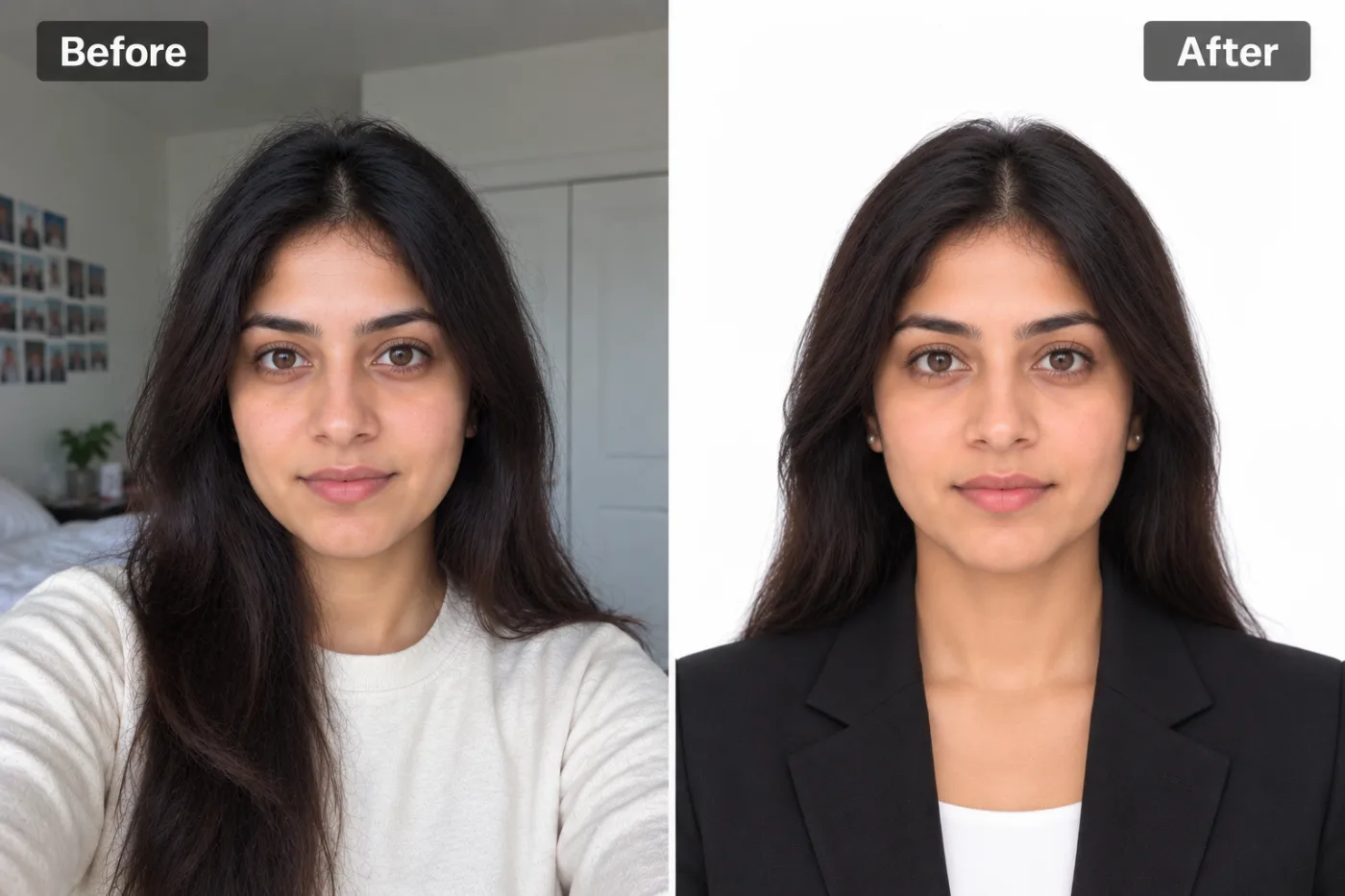
A selfie at home next to the same woman as a passport-style photo on a plain white background
A selfie at home turned into a passport-style photo on white. Made with the Passport Photo app.

1. Take the photo the way the rules ask

Face the camera straight on, neutral expression, eyes open, no glasses glare, hair off your face, even light with no shadows. Ask someone else to take it, about 1.5 metres away, rather than a selfie at arm's length.

2. Remove the background and make it white

Drop the photo here and press Remove background (2 credits). Then open Convert and choose JPG: the transparent area becomes plain white. That step is free.

3. Crop to the required size

Most countries specify both the photo size and how big your head should be in it. Crop and resize to match, then check the result against your country's guide.

Want it done in one step, including a smart outfit if you need one? The passport photo maker app produces a full passport-style portrait on white.

Will an edited photo be accepted?

Check this first, because the answer differs by country and by application. Many passport offices ask for a plain white or light background, but some also say the photo must not be digitally altered, and they can reject photos that look edited. Others are relaxed about background changes for online applications.

Read your government's official photo guidance before you submit. If it says no editing, have the photo taken against a plain light wall instead, or use a photo booth or shop. Use a background change where it's allowed, or for unofficial uses like a staff ID, a college form or an online profile.

What are the usual photo rules?

RuleWhat it usually means
BackgroundPlain white, off-white or light grey; the exact colour depends on the country
FaceStraight on, neutral expression, mouth closed, eyes open and visible
LightingEven, with no shadows on the face or behind the head
Glasses and headwearOften no glasses; head coverings only for religious or medical reasons
RecentTaken within the last few months, looking like you do now
SizeA fixed photo size and a head height range, set by each country

These are general patterns, not any one country's rules. Your official guidance always wins.

Who uses a white-background photo tool?

People renewing passports and visas online

Where the rules allow it, a clean white background fixes the most common rejection reason for home photos: a cluttered or coloured wall.

Students and job applicants

College forms, exam registrations and job portals often want a photo on a white or light background, with a separate file-size limit. Compress it to the KB they ask for afterwards.

Staff ID and access cards

Companies and schools need matching photos on the same plain background for every card.

Online profiles

A clean, neutral background also looks more professional on LinkedIn and work tools.

Tips for a photo that passes

  • Stand away from the wall. About half a metre between you and the wall prevents a shadow behind your head.
  • Light from the front. Face a window; avoid overhead lights that shadow your eyes.
  • Keep your hair edges clean. Loose flyaways against a busy wall are the hardest part of any cutout.
  • Don't retouch your face. Smoothing filters can get a photo rejected; keep your real appearance.
  • Wear contrasting clothes. A white top on a white background can blend in; a darker top looks better.

What does it cost?

2 credits to remove the background, charged only when it works; converting to white, cropping, resizing and compressing are free in the same editor. Packs start at $2 and never expire. No watermark is added.

More use cases
Free Product Photo Background RemoverFree Signature Background RemoverFree Logo Background Remover

Guides

All background removal guides →
How to Get a White Background Passport Photo for Free
11 min read
Free remove.bg Alternatives: Background Removers Compared Honestly
12 min read
How to Make a Passport Photo White Background with AI
11 min read
Free vs Paid Background Removers: Which Is Actually Better?
11 min read
Pricing

Monthly plans or one-time credits.

White Background for Passport Photos and every other browser tool are free and unlimited. Credits are only for the AI features — 2 credits per generation. Go monthly for the lowest price per credit and cancel any time, or buy an add-on whose credits never expire.

Starter
₹415/mo≈ $5
24 credits every month12 AI generations · ₹17.3 per credit

Try the AI tools every month.

Creator
₹996/mo≈ $12
64 credits every month32 AI generations · ₹15.6 per credit

Regular edits for your feed.

StudioBest value
₹2,075/mo≈ $25
150 credits every month75 AI generations · ₹13.8 per credit

The lowest price per credit.

Renews monthly · cancel anytime in Settings, no further charges · monthly credits refresh each renewal and don't carry over. 2 credits per AI generation; the free tools stay free.

See full pricing and questions

FAQ

Frequently Asked Questions

How do I change my photo background to white?
Remove the background on this page, then open Convert and choose JPG. The transparent area becomes plain white.
Will the passport office accept an edited photo?
It depends on the country. Some don't allow digitally altered photos at all. Read your government's photo rules before you submit, and use a plain light wall instead if editing isn't allowed.
What background colour do passport photos need?
Usually plain white, off-white or light grey, depending on the country. Check your official guidance for the exact colour.
Can it make my photo the right size?
Crop and resize it in the same editor to your country's photo size, then check the head size against the official guide.
Does it change my face?
No. Background removal keeps your original pixels; only the background changes. Don't use beauty filters on an ID photo.
How much does it cost?
2 credits for the background removal, only when it works. Making it white and resizing are free.
Can I compress it for an online form?
Yes. After resizing, use the image compressor with Target size to get it under the KB limit the form gives.
Is there a one-step passport photo tool?
Yes. The passport photo maker app produces a passport-style portrait on a white background from a selfie.