AI Christmas Photo Maker
Upload a selfie and AI creates a cozy festive Christmas portrait — right here, in seconds. Free.
Click anywhere in this box or drag a photo in. Set the options on the left, then hit Generate — your original stays untouched, you always see both.
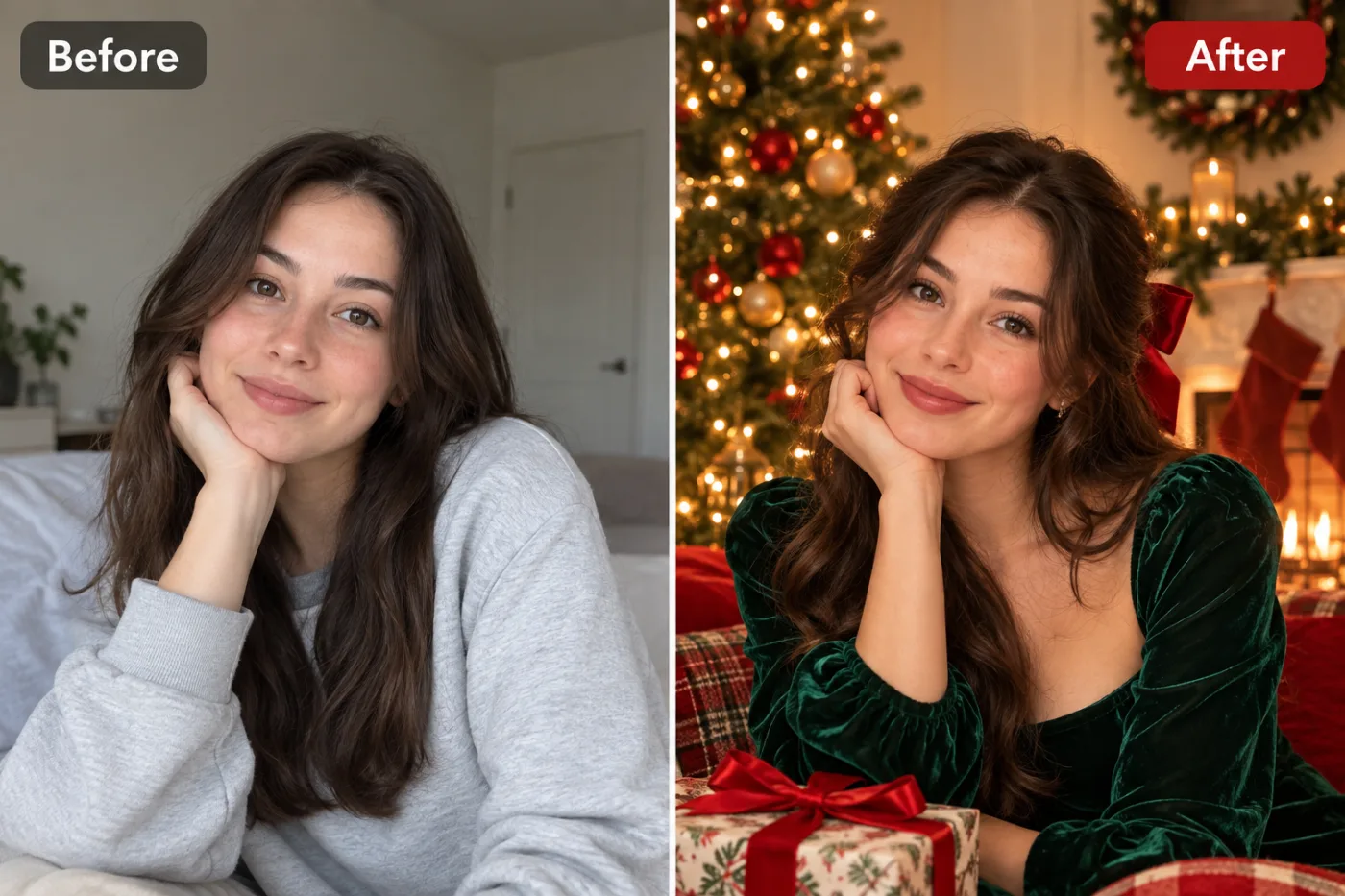
+ Choose a photoSee it in action — real before & after
How to use AI Christmas Photo Maker
Upload your photo
A clear selfie or portrait in JPG, PNG or WEBP. Face visible, reasonable light. Group photos work too — say how many people are in the frame.
Choose a look or describe one
Pick a ready-made style, or write a short brief naming the outfit, the setting and the mood you want. Both routes go to the same engine.
Generate, then download
Look at the before and after side by side, regenerate if the styling is not right, then download at full resolution with no watermark.
Why use AI Christmas Photo Maker
What AI Christmas Photo Maker does
Turn a selfie into a cozy Christmas portrait.
Real backgrounds with depth
The existing background is replaced with a setting that has genuine distance in it, so the subject is separated rather than cut out and stuck down.
Lighting matched to the mood
Warm low sun, soft window light, hard studio key or moody low-key — the light is what makes a photo feel expensive, far more than the clothes.
Group photos supported
Couples, families and friends are handled together, with each face preserved individually instead of averaged into one generic look.
Any aspect ratio
Square for a grid, 4:5 for a feed, 9:16 for a story, wide for a banner. Chosen before generating so nothing important gets cropped away.
Shareable straight away
Full resolution, no watermark, no logo. It goes straight to a feed, a print or an invitation.
What AI Christmas Photo Maker changes
Transform this photo into a warm festive Christmas portrait: soft string lights, a decorated tree in the background, a cozy red or green sweater, gentle golden bokeh and a joyful holiday mood. Keep the face and identity exactly the same. This must look like a real photograph — natural skin texture, realistic lighting and shadows, sharp photographic detail — not a painting, illustration, or cartoon.
Your face, bone structure and skin tone are held fixed on every generation — only what is described above is changed.
AI Christmas Photo Maker built for every kind of occasion
Change the clothes, the setting, the colours and the mood. The same photo can become a festival portrait, a studio sitting or a candid outdoor shot.
Themed and seasonal sets
Christmas, graduation, prom, Diwali, Thanksgiving. Generated the week they are relevant rather than planned a month out.
Pets in the frame
Animals are handled as subjects in their own right rather than treated as part of the background.
Festivals and celebrations
Traditional dress, warm light, decorated settings — the photos people actually want on the day and rarely have time to take.
Couples and family portraits
Two or more people styled together, with everyone's face kept, which is the part most tools quietly get wrong.
Key highlights of AI Christmas Photo Maker
Benefits
Nothing to install
It works on a phone or a laptop. No desktop app, no plugin, no account needed to look around.
No subscription needed
Buy a one-time pack whose credits never expire, or go monthly for the lowest price per credit and cancel any time.
Three models to choose from
Nano Banana Pro, GPT Image and Seedream 4.5 handle the same job differently. If one result is not right, another model often is.
Every aspect ratio
Square, 4:5, 9:16, 16:9 and more, chosen before generating so nothing important gets cropped away afterwards.
Full resolution, no watermark
The download is the full generated image with nothing overlaid — usable in print, in a listing or commercially.
What people use it for
What it is mainly used for
Upload a selfie and AI creates a cozy festive Christmas portrait — right here, in seconds. Free.
Gifts for family
A parent or grandparent styled into a portrait they would never sit for, printed and framed.
Long-distance group photos
People who were never in the same room can end up in one frame, styled consistently.
Trying a look before committing
See the outfit, the colour or the setting in a photo of yourself before buying or booking anything.
Creative and dating profiles
Several genuinely different portraits rather than four crops of the same picture, which is what most profiles are.
Prompt ideas
The presets handle most of it. When you do write a prompt, name four things — the outfit, the setting, the light and the mood — and stop there. Longer prompts usually get you further from what you wanted, not closer.
Re-run before rewriting
Generation is not deterministic. The same prompt twice gives two different results, and the second is sometimes simply better.
Name the outfit and its fabric
"Deep red silk saree with gold border" gives the model something specific to render, where "nice traditional clothes" leaves it guessing.
Place the scene
"Old courtyard at dusk", "marble staircase", "quiet beach at low tide". The setting sets the light as well as the background.
Describe the light
"Warm low sun from behind, rimming the hair" or "soft overcast daylight". This single line changes the feel of the photo more than anything else.
Give a mood word
Calm, celebratory, cinematic, nostalgic. One word is enough; a list of five just cancels itself out.
Say how many people are in the frame
"Two people, both facing camera" is worth stating for any group photo — it stops the model adding or dropping someone.
More about AI Christmas Photo Maker
Getting an actual festive photoshoot done before the holidays rarely happens — everyone's busy, and the good light is gone by 5pm. This gives you the cozy Christmas portrait without the scheduling.
Upload a selfie and the AI adds the string lights, the tree, the warm sweater and that golden bokeh glow people associate with holiday cards. It's a fast way to get a genuinely warm-looking photo for cards or socials.
Every December, searches for 'ai christmas photo maker' and 'holiday photo editor ai free' spike as people scramble for a card-worthy picture without a studio session. Generate one for each family member and you've got a coordinated set of holiday cards without anyone leaving the house.
Tips for the coziest Christmas photo
- A front-facing photo with good lighting on the face works best.
- Indoor photos blend most naturally with the warm festive backdrop.
- Try it on a few different photos — the lighting and decor vary each generation.
- Generate one per family member for a matching set of holiday card photos.
- For a matching set, keep the same source photo and style and change only one variable.
- Nothing you upload is published, shared or added to a gallery — but do not upload anything you would not want to leave your device at all.
- The free on-device tools — compress, convert, crop, resize, rotate — cost no credits, so use them for mechanical work.
- If a result is nearly right, say what is wrong with it in the next run rather than starting over.
- Use a clear, front-facing photo with soft light — window light on an overcast day is close to ideal.
- Make sure the whole face is visible. Sunglasses, a low cap or a hand at the chin remove the features the result depends on.
- For a group photo, everyone should be facing roughly the same way and not overlapping much.
It runs online — nothing to install. Explore the rest of our AI Creative Apps, or open the full AI photo editor for more control.
Frequently Asked Questions
How do I make a Christmas photo with AI?
Is it free?
Can I use it for greeting cards?
Will my face still look like me?
Does it work with group photos?
Can I print the result?
How many credits does one photo cost?
Find another way to use Pixel Shine
Explore tools grouped by the outcome you want, including social media, LinkedIn, ecommerce, real estate, photography, creators and weddings.


