AI Festival Photoshoot Maker
Upload a selfie and AI creates a festive Diwali, Navratri or Eid portrait — right here, in seconds. Free.
Click anywhere in this box or drag a photo in. Set the options on the left, then hit Generate — your original stays untouched, you always see both.
+ Choose a photoSee it in action — real before & after
How to use AI Festival Photoshoot Maker
Upload your photo
A clear selfie or portrait in JPG, PNG or WEBP. Face visible, reasonable light. Group photos work too — say how many people are in the frame.
Choose a look or describe one
Pick a ready-made style, or write a short brief naming the outfit, the setting and the mood you want. Both routes go to the same engine.
Generate, then download
Look at the before and after side by side, regenerate if the styling is not right, then download at full resolution with no watermark.
Why use AI Festival Photoshoot Maker
What AI Festival Photoshoot Maker does
Festive Diwali, Navratri & Eid portraits from a selfie.
Cheaper than the outfit alone
A pack starts at $2. The saree, the suit or the dress in the result would cost considerably more than the photo of you wearing it.
Your face is preserved
Features, bone structure and skin tone are held; the outfit, backdrop and light are what the model generates. A portrait of you, not of someone who looks a bit like you.
Complete wardrobe changes
Fabric that drapes, jewellery that catches light, clothing that fits the body in the photo rather than being pasted on top of it.
Real backgrounds with depth
The existing background is replaced with a setting that has genuine distance in it, so the subject is separated rather than cut out and stuck down.
Lighting matched to the mood
Warm low sun, soft window light, hard studio key or moody low-key — the light is what makes a photo feel expensive, far more than the clothes.
What AI Festival Photoshoot Maker changes
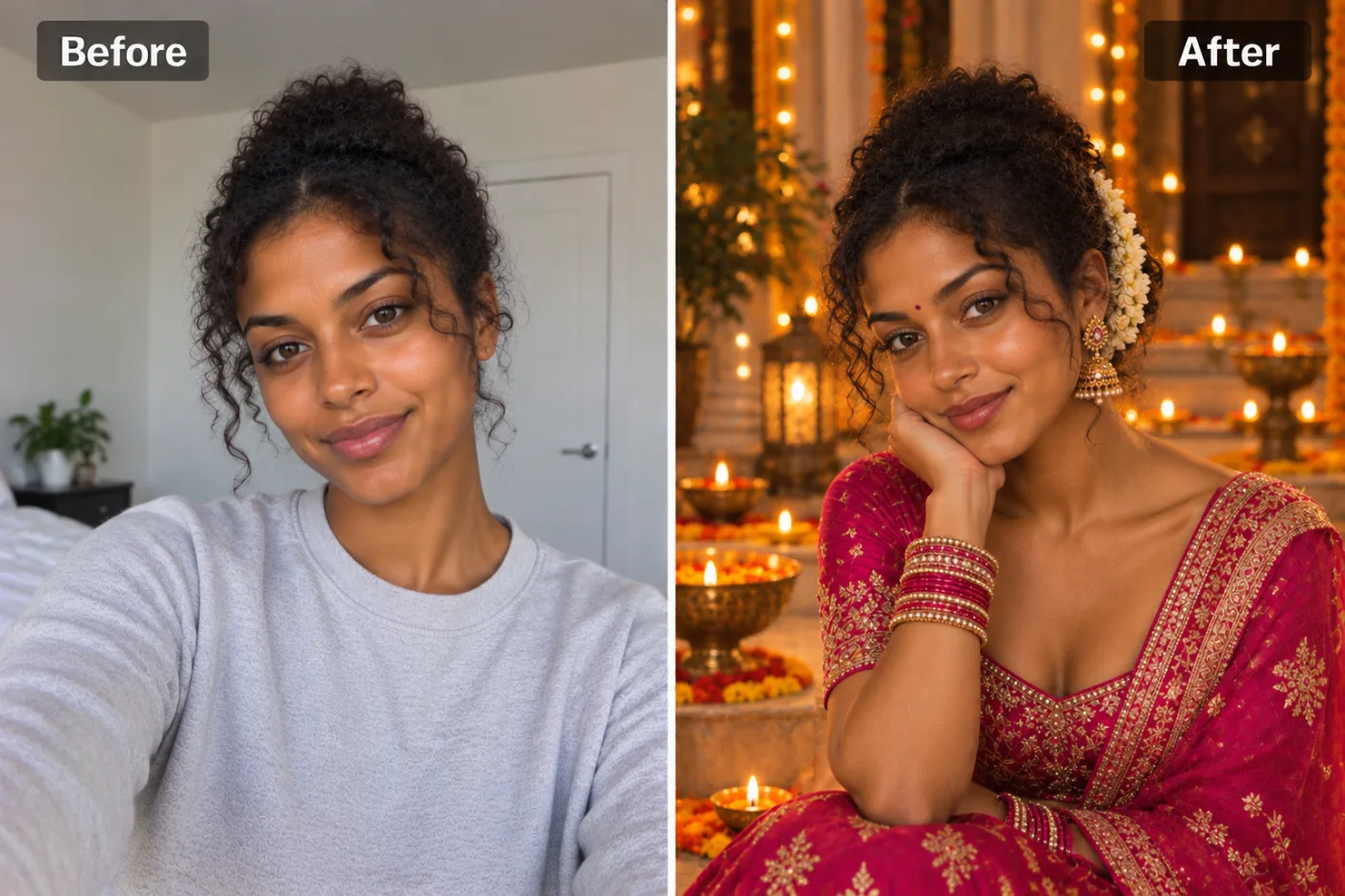
Transform this person into a festive Diwali portrait: elegant traditional Indian attire, warm glow of diyas and fairy lights, rich festive backdrop and a celebratory mood. Keep the face and identity exactly the same. This must look like a real photograph — natural skin texture, realistic lighting and shadows, sharp photographic detail — not a painting, illustration, or cartoon.
Your face, bone structure and skin tone are held fixed on every generation — only what is described above is changed.
AI Festival Photoshoot Maker built for every kind of occasion
Change the clothes, the setting, the colours and the mood. The same photo can become a festival portrait, a studio sitting or a candid outdoor shot.
Pets in the frame
Animals are handled as subjects in their own right rather than treated as part of the background.
Festivals and celebrations
Traditional dress, warm light, decorated settings — the photos people actually want on the day and rarely have time to take.
Couples and family portraits
Two or more people styled together, with everyone's face kept, which is the part most tools quietly get wrong.
Studio-style sittings
Controlled light, a clean backdrop and deliberate posing, without hiring the studio or the photographer.
Key highlights of AI Festival Photoshoot Maker
Benefits
Every aspect ratio
Square, 4:5, 9:16, 16:9 and more, chosen before generating so nothing important gets cropped away afterwards.
Full resolution, no watermark
The download is the full generated image with nothing overlaid — usable in print, in a listing or commercially.
The free tools stay free
Compress, convert, crop, resize, rotate and the rest are unlimited, with no account and no credit cost.
Your original is never modified
Every result is a new image. The file you uploaded stays exactly as it was on your device.
Cheap enough to iterate
Packs start at $2. Generating the same image three ways and keeping the best is the intended workflow, not an expensive mistake.
What people use it for
What it is mainly used for
Upload a selfie and AI creates a festive Diwali, Navratri or Eid portrait — right here, in seconds. Free.
Creative and dating profiles
Several genuinely different portraits rather than four crops of the same picture, which is what most profiles are.
A profile photo that is not three years old
The quickest way to refresh a profile without organising anything or asking anyone to take a photo of you.
Festival and wedding season posts
The traditional portrait everyone wants and almost nobody finds time to shoot properly during the actual event.
Save-the-dates and invitations
A styled couple portrait that suits the card, generated before the real shoot happens — or instead of it.
Prompt ideas
The presets handle most of it. When you do write a prompt, name four things — the outfit, the setting, the light and the mood — and stop there. Longer prompts usually get you further from what you wanted, not closer.
Rule out what you do not want
"No sunglasses, no hat, no text in the image" is more effective than hoping the model omits them.
Change one thing at a time
If a result is close, alter a single detail and regenerate. Rewriting the whole prompt gives you an unrelated image and no information.
Be concrete, not complimentary
"Soft light from the left, plain grey background" gives the model something to act on. "Beautiful, high quality, 8k" gives it nothing at all.
Say what must not change
A short exclusion — "do not change the face", "keep the label text" — is often more effective than any amount of positive description.
Keep it short
Three or four specific clauses beat a paragraph. Long prompts dilute every instruction in them, including the one you cared about.
Name the framing
Close-up, head and shoulders, full body, centred, offset. Framing decides what the image is actually of.
More about AI Festival Photoshoot Maker
Festivals are when everyone wants a great photo — and when everyone's too busy celebrating to set one up. This lets you create a festive portrait after the fact, or even when you didn't dress up at all.
Upload a selfie and the AI adds the traditional outfit, the warm glow of diyas and lights, and a festive backdrop — Diwali, Navratri, or any occasion. Your face stays the same; the celebration gets added around you. Perfect for greetings, status updates and posts.
Searches for 'ai diwali photo maker' and 'navratri photoshoot ai free' surge every festival season, as people want a fresh festive picture without the rush of last-minute shopping and styling. This free ai festival photoshoot tool covers Diwali, Navratri, Eid and other celebrations from the same selfie.
Tips for festive portraits
- A clear, well-lit selfie gives the most realistic styling.
- Front-facing shots work better than profile angles.
- Try a couple of runs to get the lighting and outfit you like most.
- Use the same selfie across a few festivals to build a set of greeting-card images.
- Nothing you upload is published, shared or added to a gallery — but do not upload anything you would not want to leave your device at all.
- The free on-device tools — compress, convert, crop, resize, rotate — cost no credits, so use them for mechanical work.
- If a result is nearly right, say what is wrong with it in the next run rather than starting over.
- Use a clear, front-facing photo with soft light — window light on an overcast day is close to ideal.
- Make sure the whole face is visible. Sunglasses, a low cap or a hand at the chin remove the features the result depends on.
- For a group photo, everyone should be facing roughly the same way and not overlapping much.
- Skip photos that already have a heavy filter on them. Smoothed skin gives the model less to hold on to.
It runs online — nothing to install. Explore the rest of our AI Creative Apps, or open the full AI photo editor for more control.
Frequently Asked Questions
How do I make a festival photoshoot with AI?
Is it free?
Can I try different festivals?
Will my face still look like me?
Does it work with group photos?
Can I print the result?
How many credits does one photo cost?
Find another way to use Pixel Shine
Explore tools grouped by the outcome you want, including social media, LinkedIn, ecommerce, real estate, photography, creators and weddings.


