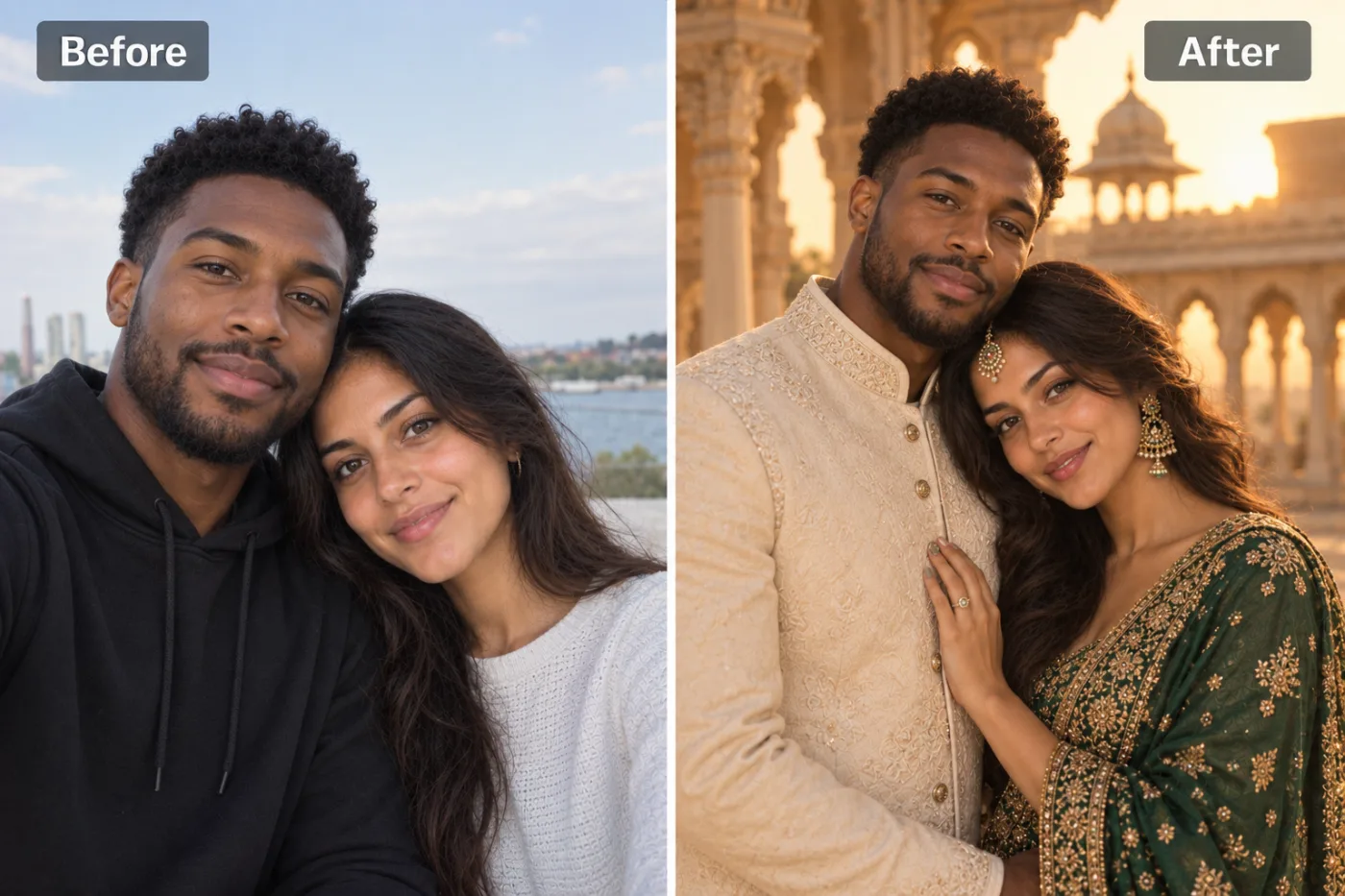
What does the AI couple photoshoot make?
A portrait that looks like it came from a pre-wedding shoot. By default, one of you wears an ivory embroidered sherwani and the other a dark-green embroidered lehenga with gold jhumkas, or matching festive outfits that suit you both. You stand close and affectionate in the arched courtyard of a sandstone heritage palace, in warm golden-hour light with a soft, blurred background.
That's the classic Indian pre-wedding look, the kind couples travel to Udaipur or Jaipur palaces to shoot. Here it comes from a selfie you took on your phone.
Both faces are kept exactly as they are. That's the hardest part of any couple edit, since the AI has to handle two people at once, and it's what this app is built around.
Which settings and light can you choose?
Two settings. Auto gives the palace at golden hour from our example.
Setting: Garden
Flowers and greenery, like a destination wedding in the hills. Pairs well with Soft daylight.
Setting: Beach
Sand and sea at sunset, the Goa pre-wedding classic. Choose Golden hour for the warm glow.
Setting: City street
A modern, editorial take: the two of you on a city street at dusk. Moody lighting makes it cinematic.
Setting: Studio
A clean studio backdrop: elegant, and easy to use on an invitation or a save-the-date.
Setting: Outdoors or Indoors
Outdoors gives open landscape; Indoors gives a grand room such as a heritage hotel hall.
Lighting does the rest. Golden hour is the pre-wedding favourite. Soft daylight is natural and fresh, Studio is crisp, Moody is dark and romantic, and Bright & airy is light and modern.
What kind of couple photo works best?
- Both faces clear and close together. Heads touching or leaning in, like a selfie, gives the most natural pose.
- Similar distance from the camera. If one face is much bigger than the other, the smaller one gets less detail.
- Even light on both faces. If one of you is in shadow, the likeness of that person suffers.
- No sunglasses or caps. The app needs to see both faces well to keep them.
- Hands visible but not covering faces. Holding hands or an arm around each other turns into the portrait's pose.
- Any clothes and background: both are replaced.
What can't it do?
- Choose specific outfits. It picks the wedding outfits. To describe your own, say "a red lehenga and a gold sherwani", use the AI photo editor.
- Take two separate photos. Both people need to be in one photo. If you only have separate pictures, take a quick selfie together for the best result.
- Groups or families. It's built for two. For one person's festive portrait, try the saree photoshoot or the festival photoshoot.
- Replace a real wedding photographer. It's great for ideas, invitations and social posts. Your wedding day itself deserves real photos.
Pre-wedding and couple photo ideas
Save-the-dates and invitations
A Studio or Garden portrait makes a clean background for names and dates. Add text in the free photo editor, or see the wedding invite photo app.
Plan your real shoot
Try the palace, the beach and the city before booking a photographer and a location. Show them the version you both like.
Engagement announcements
A cinematic portrait gets more love than a blurry selfie, and nobody has to dress up.
Anniversaries
Married years ago without a pre-wedding shoot? Make one now from a recent photo.
A gift for parents
Make a portrait of your parents from a photo of them together and print it for their anniversary.
Can you make couple photos in ChatGPT or Gemini?
Yes. Upload a photo of you both and ask for "a cinematic pre-wedding portrait of this couple in an ivory sherwani and a green lehenga, in a palace courtyard at golden hour, keeping both faces exactly the same". Keeping two faces accurate is where general chatbots most often slip, so expect a few tries, and free plans limit how many images you can make in a day.
This app has the prompt built in with extra instructions to protect both faces, so you only choose a setting and light.
Pre-wedding outfit and location ideas to try
If you're planning a real pre-wedding shoot, the app is a cheap way to try ideas before you book anything. Here are combinations couples commonly test:
- Palace at golden hour (Auto): the classic Rajasthan look, for traditional outfits and a grand feel.
- Garden with Soft daylight: fresh and romantic, ideal for pastel lehengas and light sherwanis.
- Beach with Golden hour: relaxed and warm, the Goa favourite. Lighter outfits look most natural here.
- City street with Moody light: modern and cinematic, for couples who want something that doesn't look like everyone else's shoot.
- Studio with Bright & airy: clean and minimal, the easiest background for a save-the-date with text on it.
Make the same photo in three or four of these, show them to each other and to your photographer, and you'll have a much clearer brief before the real shoot.
What happens to your photo?
It's sent to our image-model partner, fal.ai, to make the portrait, and to no one else. It isn't used to train AI models and is never sold, and you own both the photo and the portrait.
Your portraits are saved in My Creations, so you can download them again. Delete any of them at any time, or ask us to delete your account and everything in it. Please make sure your partner is happy for their photo to be used.


